What is an AI service key?
An AI service gives you a key when you sign up: a long string of letters and numbers that proves a request comes from your account. Every request sent with that key is counted against your account, and most services charge per request or per amount of text.
That makes a key work like a bank card number with no PIN. Anyone who has it can send requests as you, and you pay. People who find keys use them for their own projects, sell them on, or run up large bills in a few hours. Services cancel leaked keys when they spot them, and the bill often arrives first.
The examples here use EXAMPLE_KEY_123, an obvious placeholder. Never paste a real key into a lesson, a chat or a page.
Why can't the key live in the page?
Everything the browser loads is visible to the person using it. View source shows the HTML and scripts. The developer tools show every request the page sends, with every header. A key in a JavaScript variable, in a hidden input or in a separate script file is readable by any visitor in a few seconds.
Hiding tricks do not help. Splitting the key into pieces, encoding it, or putting it in a file with a dull name only slows a curious person down by a minute. The request itself still carries the whole key, and the browser shows it.
AI answers suggest this pattern often, with a note like "move it somewhere safer later". Later rarely comes. Treat any reply that asks you to paste a key into page code as a reply to refuse.
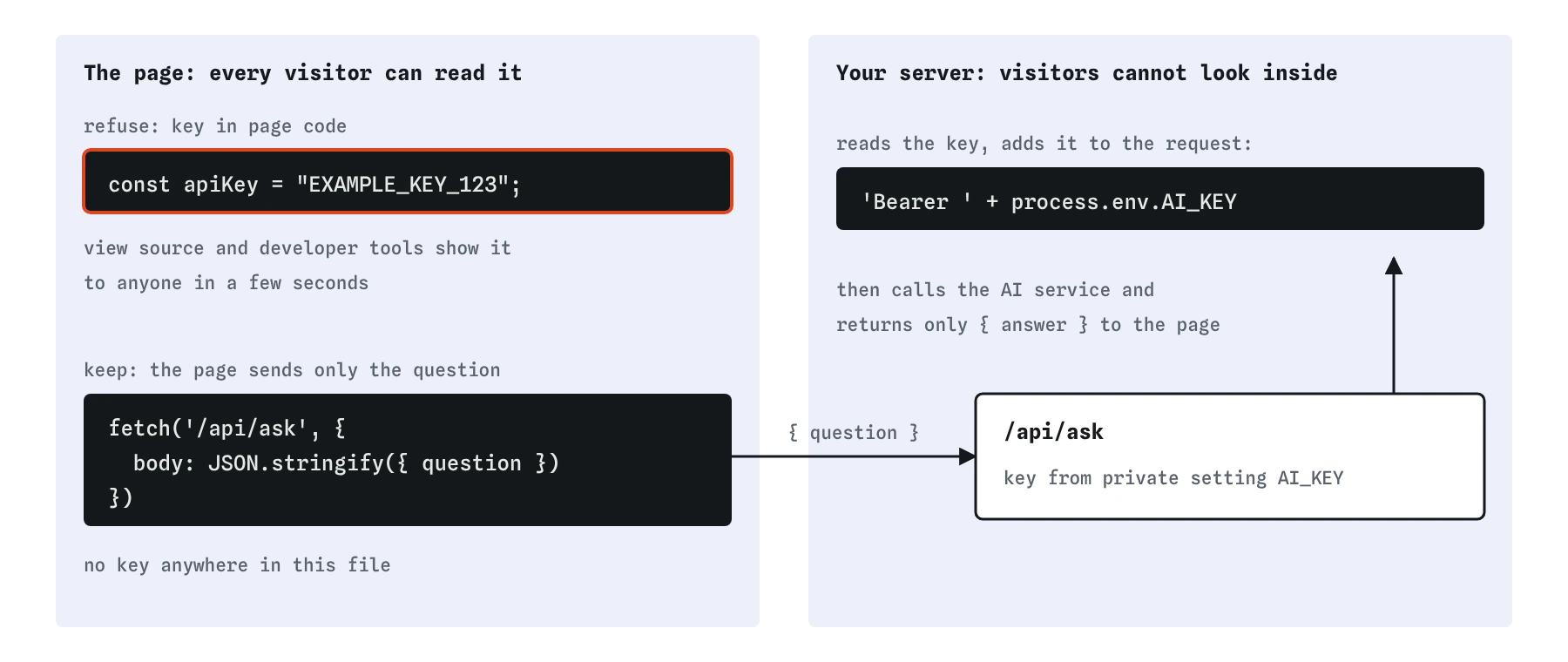
EXAMPLE_KEY_123, is readable by every visitor. Keep it in a private setting on your server and let the page send only { question } to /api/ask.How does the server keep the key private?
Your server is code that runs on a computer visitors cannot look inside. It reads the key from a private setting, usually called an environment variable, which lives in your hosting account's settings and never in your code files. When a question arrives at /api/ask, the server builds the request to the AI service, adds the key, sends it, and returns only the answer to the page.
The block below is an illustration of that idea in plain JavaScript for a server. It is not runnable here, the names are made up, and real hosting services each have their own way to set it up. Read it for the shape: receive, check, add the key, call, return.
// ILLUSTRATION ONLY: server code, not runnable in this lesson.
// The key comes from a private setting, never from the page.
async function handleAsk(request) {
  const { question } = await request.json();
  if (!question || question.length > 300) {
    return reply(400, { answer: 'Please ask a shorter question.' });
  }
  const res = await fetch('https://ai-service.example.com/v1/answer', {
    method: 'POST',
    headers: { 'Authorization': 'Bearer ' + process.env.AI_KEY },
    body: JSON.stringify({ input: question })
  });
  const data = await res.json();
  return reply(200, { answer: data.text });
}
How do you ask for code that keeps the key safe?
Put two things in your request on top of the usual goal and context: the address of your own server, and a plain statement that the key stays on the server. The practice area has a row in **Prompt check** for each. Leave either out and you get the shortcut reply with EXAMPLE_KEY_123 in the page.
The second line feels obvious, and it still changes the answer. Without it, many AI assistants reach for the shortest working example, and the shortest example puts the key in the browser.
Please add a question box to my bike shop page so customers can ask which bike suits them. Here is my page: <h1>Spoke & Chain Bikes</h1> and an intro paragraph. The page must send the question to my own server at /api/ask, and the AI key stays on the server. Do not put any key in the page.What are rate limits and why do they matter?
A rate limit is a cap on how many requests you can send in a period, such as sixty a minute. AI services set them to share their computers fairly and to stop runaway programs. When you go over, the service refuses requests for a while, usually with a status code of 429, and your page has to cope.
You will want limits of your own too. Your server can allow each visitor a few questions a minute and refuse the rest with a friendly message. Without that, one person, or one program pretending to be many people, can use up your whole allowance and leave nothing for real customers.
The page plays its part. Turning the button off while a question is being answered stops double clicks. Skipping empty questions avoids pointless requests. Showing a clear message when the server says no stops people from clicking again and again.
How do costs add up?
Most AI services charge by the amount of text going in and coming out, measured in small chunks. A short question and a short answer cost a tiny amount. A pasted essay with a long answer costs many times more, and a busy page multiplies whatever each answer costs.
Three simple controls keep that in check. A maxlength on the input limits what the page will send, and your server should check the length again, because a visitor can change the page in their own browser. Ask the service for short answers, which most services let you set on the server side. Set a monthly spending cap in your AI service account, so a mistake costs a known amount at most.
None of this needs fancy code. It needs you to ask the question "what does each click cost?" whenever an AI answer adds a button that calls a paid service.
What should you do if a key leaks?
Treat it as exposed straight away, even if you deleted it a minute later. Go to the AI service's settings, cancel the key and create a new one. Put the new key in your server's private settings only. Then check your usage page for requests you did not make.
If the key went into a Git commit, deleting it in a new commit is not enough, because the old commit still contains it. The keep-secrets lesson and the Git course cover what to do. Replacing the key is always the first step, because it makes the leaked copy useless.
What does the Preview pretend to do?
The Preview has no real server and no real AI service. A small stand-in answers requests to /api/ask with a pretend answer and blocks every other address, with a message in the console strip. That is why the shortcut code in Break It fails here even with a key in it: it tries to reach an outside address.
On a real site, that shortcut would work, which is what makes it dangerous. Working code that leaks a key looks exactly like working code that does not. Reading for key, token, Authorization and outside addresses is the check that tells them apart.
Field notes
- A key proves requests come from your account, and each one counts against it.
- Anything the browser loads, including scripts and headers, is visible to visitors.
- Your server reads the key from a private setting called an environment variable.
- Limits like a
maxlengthand a disabled button while waiting help keep costs down.
Easy to get wrong
The page is public as soon as it is online. Automated programs scan public code for keys all day, and a leaked key can be used within minutes.
The browser has to rebuild the full key to send it, and the developer tools show every request with its headers. Hiding only slows down the curious.
Each request costs money and counts against your rate limit. Small checks on the page and server keep both under control.
Questions people ask
Is a key safe in a file that is not linked from my page?
No. Any file in your public site folder can be fetched by anyone who guesses or finds its address. Keys belong in the server's private settings, outside the public folder.
What is an environment variable?
A named setting that your hosting service gives to your server code when it runs, kept outside your code files. Your code reads it by name, so the key never appears in what you write or commit.
Does maxlength on the input stop long questions?
It stops normal visitors. Anyone can remove it in their own browser, so your server must check the length as well.
Why does the Break It code fail in the Preview?
The Preview blocks every address except the pretend /api/ask. On a real site the same code would work, and anyone could copy the key out of it.