Why is “it doesn't work” so hard to fix?
When you write “my button is broken”, the assistant has to guess which button, what it should do, what it does instead, and what the code looks like. It can't run your page or see your screen. So it answers with the general list every help forum has: clear the cache, check for typos, try another browser. None of that is wrong, and none of it fixes your bug.
Try it in the practice area. Send a short complaint and read the reply. Then look at the **Prompt check** view: this lesson looks for three things, your code, the exact error, and what you expected compared with what happened. A useful bug report has all three, whether you send it to an AI tool, a colleague or a forum.
Where do you find the error message?
In a real browser, JavaScript errors appear in the console. Open DevTools (F12, or right-click the page and choose Inspect), then pick the **Console** tab. Errors are in red, usually with the file name and line number on the right. Many errors only appear when you do the thing that breaks, so press the button first, then look.
The bike shop page in the practice area has an error box under the button. It stands in for the console, because the Preview runs inside a lesson page. Press **Show opening hours** and the box shows the same text a console would: Uncaught ReferenceError: showHour is not defined.
Copy the whole message, not your summary of it. The words in it are precise: ReferenceError says a name wasn't found, and showHour says which one. A summary like “some error about hours” throws that away.
Uncaught ReferenceError: showHour is not definedWhat does “expected versus actual” add?
An error message says what went wrong inside the code. It doesn't say what you wanted to happen. Sometimes there is no error at all: the page loads, nothing goes red, and the result is still wrong. Then the only thing that describes the bug is the gap between what you expected and what you got.
Expected versus actual also catches fixes that miss the point. If you only report the error, a fix that silences it looks like success. If you said the hours should appear, you and the assistant both have a test: press the button, see the hours. Anything less is not fixed yet.
Write it as two short sentences. “I expected the opening hours to appear when I click the button. Nothing happens.” That tells the assistant what success looks like, so it can check its fix against your goal instead of only making the error go away.
How much code should you paste?
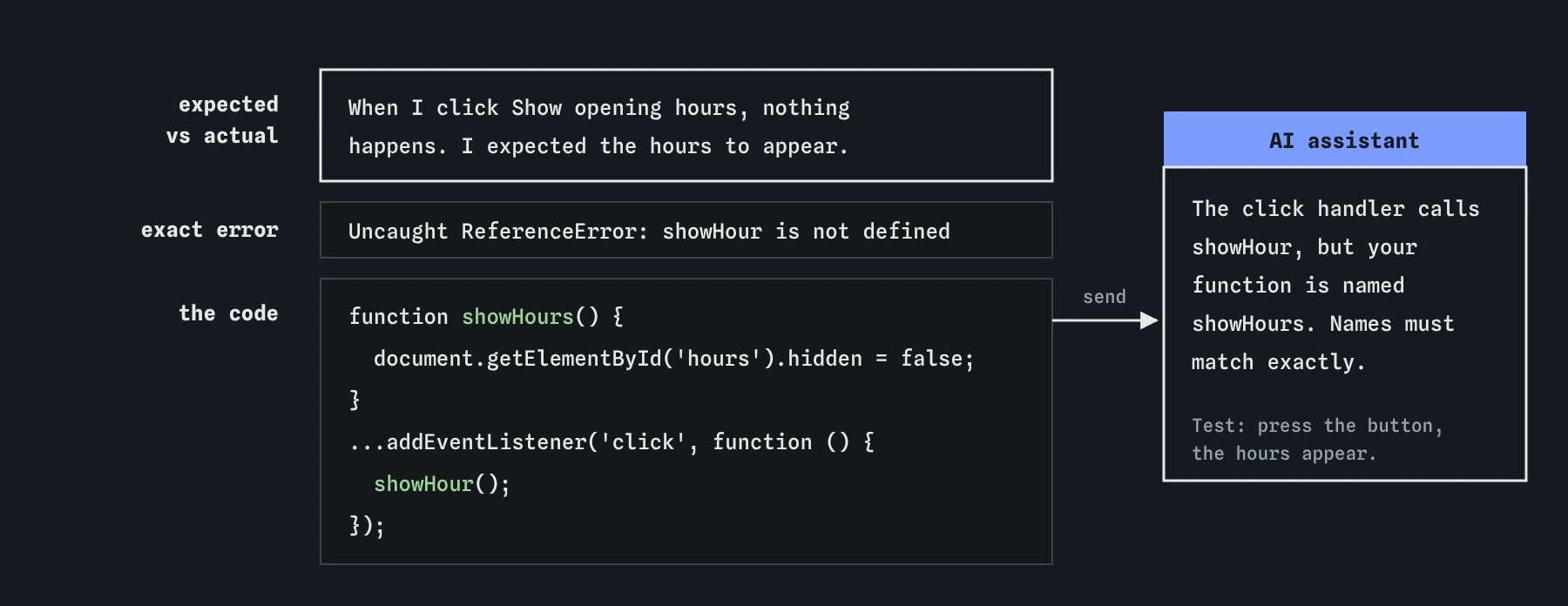
Paste the code around the error: the element involved and the script that works with it. For the bike shop, that is the button and the <script> block, about ten lines. The assistant can then see that the function is called showHours and the click handler calls showHour.
For a big file, don't paste everything. Find the line the error points to, then include the function it sits in and any element it uses. If you aren't sure, a little too much is better than too little. Mention anything the snippet can't show, such as “the script is at the end of the body” or “this runs after the page loads”, because where code runs often makes as much difference as what it says. Check what you paste for anything private first; keys and passwords never belong in a chat, and a later lesson covers that.
What does a complete error request look like?
Put the three parts in a natural order: what you did and what happened, the exact error, then the code. Send this in the practice area and the Prompt check view ticks all three. The reply names the exact typo and explains why it broke the click.
When I click the Show opening hours button, nothing happens. I expected the list of opening hours to appear. The error box says:
Uncaught ReferenceError: showHour is not defined
Here is my code:
<button type="button" id="hours-btn">Show opening hours</button>
<script>
  function showHours() {
    document.getElementById('hours').hidden = false;
  }
  document.getElementById('hours-btn').addEventListener('click', function () {
    showHour();
  });
</script>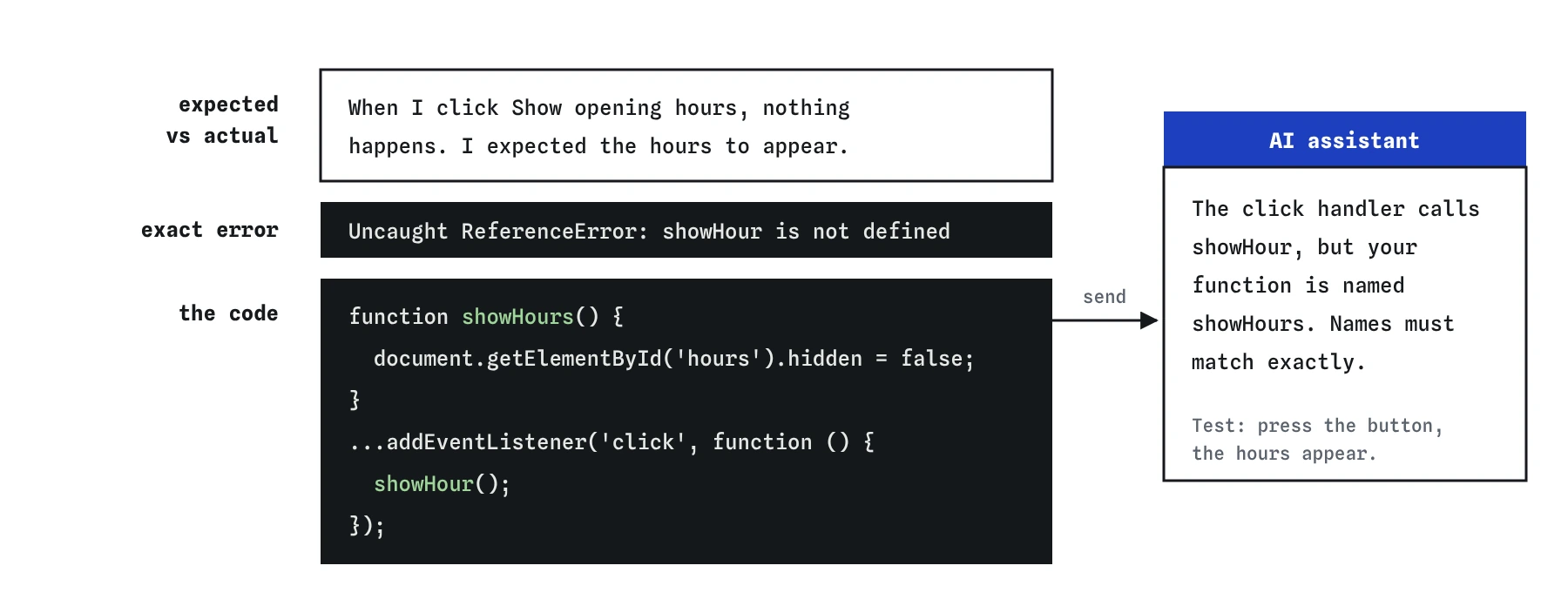
s. Expected versus actual gives you both a test for the fix.What goes wrong when you share only the error?
Send the error line on its own and see what the assistant does. It knows the kind of mistake but has no code to look at, so it reaches for a generic cure: wrap the call in try...catch. The red message disappears. The button still does nothing.
Real AI tools suggest this kind of fix often, because it stops the symptom you described. Treat any fix that catches an error and ignores it with suspicion. An empty catch block is like taking the battery out of a smoke alarm. The problem is still there, and now nothing tells you about it.
How do you check the fix?
Press **Use this code**, then test in the Preview: press the button and check the hours appear and the error box stays empty. Then read the code. The **Review** view shows the assistant's version against yours, but you also need to compare against the code you started with, because that is where unasked-for changes hide.
This reply did fix the typo, and it said it “tidied the hours list while it was there”. Look at Sunday: the shop's hours became Closed. Assistants often make extra changes while fixing something, and they don't always mention them. A wrong opening time on a shop site costs real customers. Put the Sunday hours back, then test again.
Does the pretend assistant behave like a real one?
Partly. The assistant here picks from replies written for this lesson, so the same kind of request always gets the same answer. A real tool reads your actual code and writes a new answer each time. It might spot the typo even from a vague request, or it might confidently blame something unrelated.
The habit pays off with both. An exact error, a clear expected-versus-actual pair and the relevant code give any helper, human or machine, the best chance of finding the real cause the first time.
Field notes
- A vague request like "it doesn't work" gets generic advice back.
- Copy the exact error text, since the assistant can't see your screen.
- Say what you expected and what happened, because the error alone doesn't say what you wanted.
- After using a fix, compare it with your starting code to catch changes nobody mentioned.
Easy to get wrong
Without the error, the expected result and the code, the assistant can only list common causes. With them, it can point at the line.
Error messages are exact. One wrong letter in a name, or a missing word like null, sends the search in the wrong direction.
Hiding an error with try...catch or changing unrelated content can make the red text disappear while the page stays wrong.
Questions people ask
What if there is no error in the console?
Then expected versus actual is your main evidence. Describe exactly what you did, what you expected and what you saw, and paste the code involved. Mention that the console shows nothing; that is useful information too.
Should I include the line number?
Yes, when the console gives one, and say which line of your pasted code it is. Line numbers in your file won't match the lines in a short snippet.
What if the error mentions a file I didn't write?
Include it, then look further down the error's list of lines for the first one in your own file. That is usually where your code called the other file in a way it didn't expect.