What counts as a secret?
Anything that would let someone act as you, or that belongs to someone else. API keys and access tokens are the most common in web code: long random strings that let a program use a paid service on your account. Passwords, of course. Connection strings for databases, which often contain a password. And private details about people: lists of customer email addresses, home addresses, phone numbers, order histories.
Placeholders in this course always look like EXAMPLE_KEY_123, so they are never mistaken for real keys. A real key looks random and long. If you are not sure whether a string is private, treat it as private.
Why shouldn't secrets go into an AI chat?
Text you paste into an AI chat tool leaves your computer. Depending on the tool and your settings, it may be stored in your chat history, kept on the provider's servers, seen by reviewers, or used to improve future models. You often can't take it back. Read the privacy settings of any tool you use, and assume anything you paste could be read by someone else later.
There is also a quieter risk. Chats get shared. People copy a conversation into a bug report, a screenshot goes into a team channel, a shared link gets forwarded. A key in the middle of pasted code travels with it.
What happens when you paste the key here?
Try it once in the practice area if you like. Send the script with its first line, const API_KEY = "EXAMPLE_KEY_123";, and the assistant refuses to use it and tells you to treat the key as exposed. The **Prompt check** view turns No secrets red. Real AI tools don't always notice; many will happily read the key and even repeat it back in their answer.
If you trip the refusal, press **Start over** before doing the task properly. The check for this lesson looks at every request you sent, because in real life a key that has been pasted once is already out. The answer to a leaked key is always the same: go to the service where it was created, revoke or rotate it so the old one stops working, and update your server with the new one.
How do you ask for help without the key?
Remove it before you copy anything. In the practice area that means deleting the API_KEY line and the Authorization header that uses it. Then copy the script and write the request as usual: what happens, what you expected, and the code. Say in words that you removed the key, so the assistant doesn't “helpfully” add a new one.
When the code needs something in that spot to make sense, use an obvious placeholder: YOUR_KEY_HERE, EXAMPLE_KEY_123 or a comment like // key removed. Be aware that a checker can't tell a placeholder from a real key when it is written as apiKey = "...", which is why the safest move is to leave the line out entirely.
My ask form shows "undefined" instead of the answer. I expected the bird guide's answer to appear under the form. I removed the key line before pasting; my server adds the key. Here is my script:
document.getElementById('ask-form').addEventListener('submit', async function (e) {
  e.preventDefault();
  const question = document.getElementById('question').value;
  const res = await fetch('/api/ask', {
    method: 'POST',
    body: JSON.stringify({ question: question })
  });
  const data = await res.json();
  document.getElementById('answer').textContent = data.reply;
});
Why was the key in the page in the first place?
It shouldn't have been. Every visitor's browser downloads your HTML and JavaScript, and anyone can open View Source or DevTools and read it. A key in front-end code is a key published to the whole internet. Automated scanners look for exactly this, in pages and in public code repositories, and misuse found keys within minutes.
The right shape is the one this page already half uses. The browser sends the question to your own server route, /api/ask. The server adds the key, calls the AI service, and sends back only the answer. The key never leaves the server. Later lessons in this course build that route properly.
browser  --question-->  /api/ask (your server, holds the key)  -->  AI service
browser  <--answer----  /api/ask  <--  AI service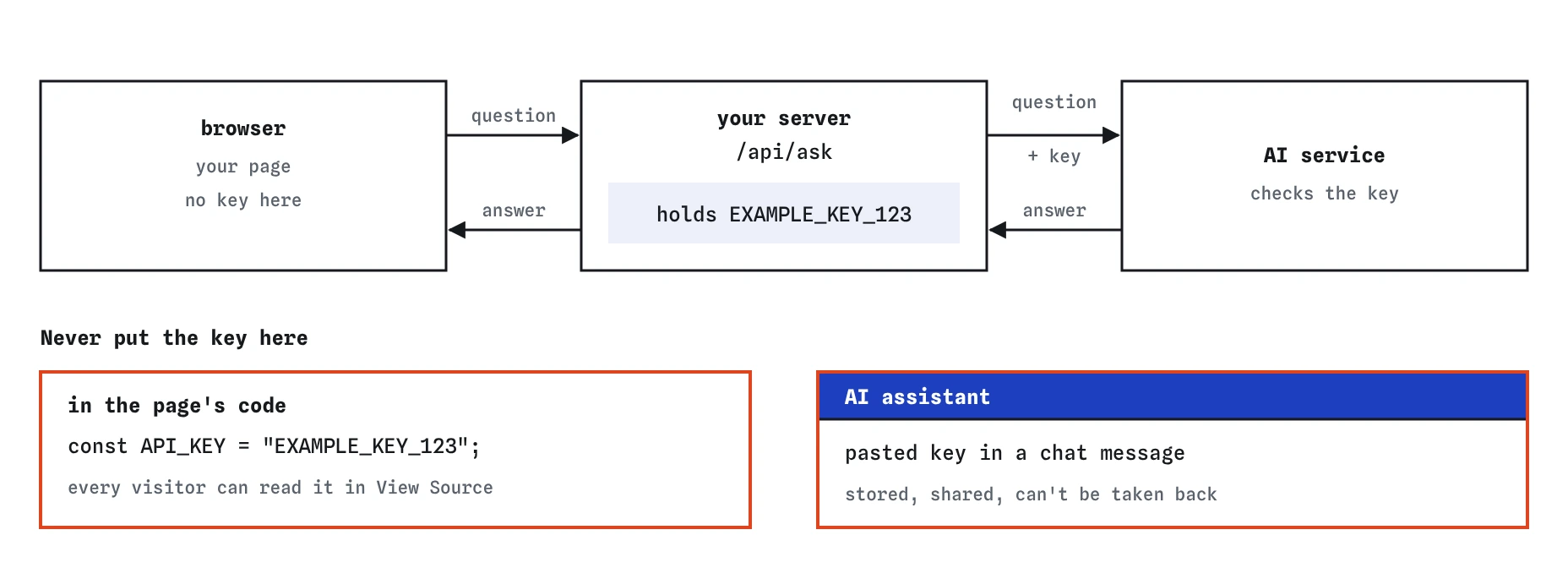
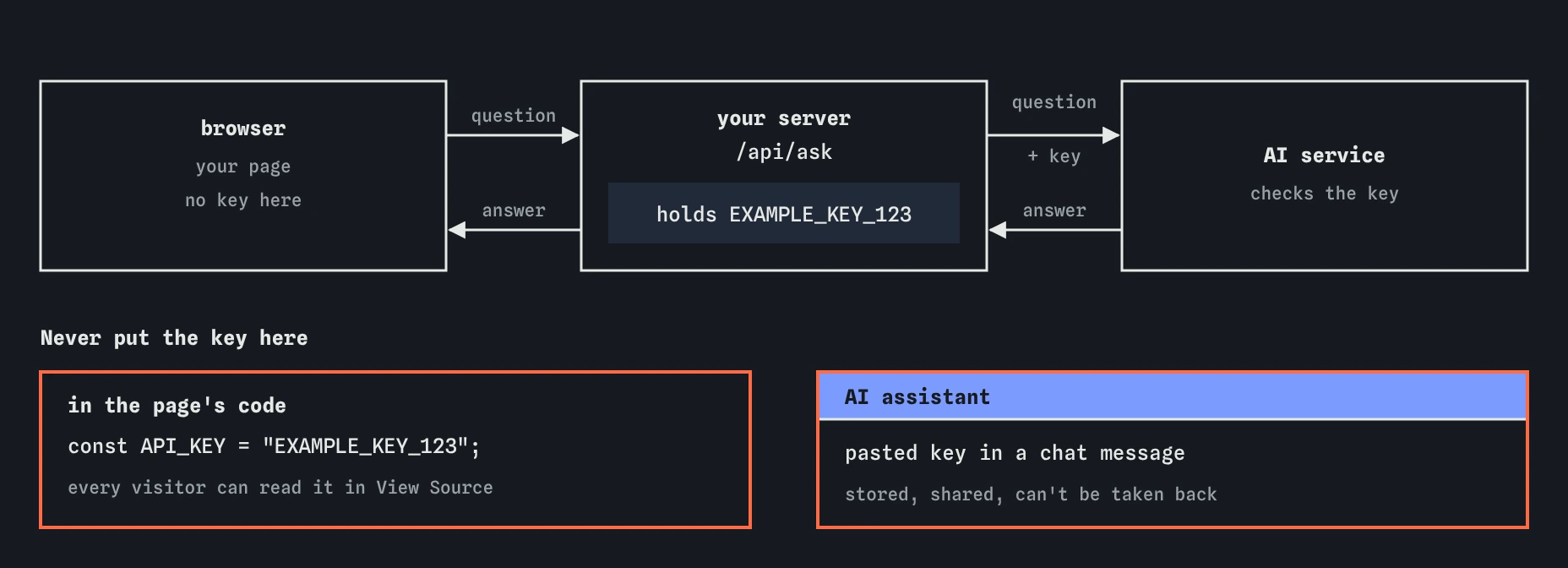
/api/ask. Page code and chat messages both travel to other people, so a key in either place has to be treated as leaked.What is the real bug, and what is wrong with the fix?
Once the key is out of the way, the request is an ordinary bug report. The server answers with JSON shaped like {"answer": "…"}. The script reads data.reply, a field that doesn't exist, so the page shows undefined. The assistant's fix reads data.answer, which is right.
It also switched the output from textContent to innerHTML. That is a step backwards. The answer comes from a server and, through it, from an AI service; it could contain HTML, by accident or on purpose. With innerHTML, that HTML runs in your page. With textContent, it shows as plain text. Change it back, then ask a question in the Preview to see the answer appear.
Where else do secrets hide in code?
Keys are the obvious case. The Break It practice shows three less obvious ones, all in an AI-written version of the same form.
Before you paste code into a chat, and before you publish it, search the file for words like key, token, secret, password and @. It takes ten seconds and catches most mistakes. Your editor's search across files does this for a whole project at once.
- HTML comments: they don't show on the page, but every visitor downloads them.
- Hidden inputs:
type="hidden"hides the field from view, not from View Source. - Configuration files:
.envfiles and settings files often hold keys. Paste the setting's name, never its value. - Error messages and logs: some include connection strings or user details. Read them before you paste them.
What about other people's data?
The same care applies to data about other people. If you need help with a script that processes your club's member list, don't paste the real list. Make up three fake rows with obviously fake names and addresses like [email protected], which uses a domain reserved for examples. The assistant needs the shape of the data, never the real people in it.
The pretend assistant on this page never sends anything anywhere; it runs entirely in your browser. The habit is for every real tool you use, at work and at home.
Field notes
- Secrets include API keys, tokens, passwords and other people's data.
- Text pasted into an AI chat leaves your computer and often can't be taken back.
- Delete the key before copying, and say in words that you removed it.
- A key in page code can be read by every visitor, so it doesn't belong there.
Easy to get wrong
Files collect secrets over time: a key someone added for testing, a comment with email addresses. Once pasted, they are out of your control.
Deleting a chat doesn't guarantee the text was never stored or seen. Only a new key makes the old one useless.
Everything in a page, including comments and hidden fields, is downloaded by every visitor and visible in View Source.
Questions people ask
Is it safe to paste a key into a chat if I delete it from the key's service straight after?
It is much safer than leaving it active, and it is the right thing to do if you pasted one by accident. It is still better to never paste it, because someone could use the key in the minutes it was live.
Can the assistant help me if it can't see my key?
Yes. Bugs almost never depend on the key's value. The assistant needs to know a key is used and where, which a placeholder or a short note covers.
What about keys meant to be public?
Some services issue keys that are designed for browsers and limited to your domain. Their documentation says so clearly. If it doesn't, treat the key as secret.
Why does the No secrets check flag my placeholder?
It looks for anything shaped like apiKey = "..." with a value, because it can't know whether the value is real. Leave the line out, or describe it in words.