Why does an example help so much?
Describing a format in words is hard. “A heading, then a small grey line with the year and tools, then a sentence” is clear to you and still leaves many choices open: which heading level, which element for the grey line, what class names, how the year and tools are separated. An example answers all of those at once.
An AI assistant is very good at continuing a pattern. Show it one finished item and it will produce more items with the same structure, the same class names and the same tone. That is close to how it works underneath: it predicts what comes next, and a clear example makes the next thing very predictable.
What happens without an example?
Send “Can you add a projects section to my portfolio please?” in the practice area. The reply is a dark grid of tiles with images you do not have, star ratings that nobody gave you, links to case studies that do not exist and placeholder names like Project One. It suits an agency site. It does not suit a calm profile page with three small projects.
The assistant is not wrong to guess. You gave it a goal and no shape, so it used the most common shape it knows. Every part of that guess is something you would have to undo.
Look at the code too. The tiles use <div> and <b> where your page uses headings, and the images have no alt text. Matching your own structure by hand afterwards would take longer than writing the list yourself.
What makes a good example?
Use one real item in the exact final format. For the profile page, that means one finished <article> for the bird club site, with real text, not placeholders. Real text shows the length and tone you want. Placeholders like “Project name” invite placeholders back.
Keep it short and correct. If the example has a mistake, such as a missing alt or a wrong heading level, the assistant will copy the mistake into every item. One example is usually enough for a list like this. Two help when items vary, such as one project with a link and one without.
Then give the real data for the rest in plain words. The assistant fits your facts into your format, and you stay in charge of the facts. That split is especially useful on a profile page, where every claim is about you.
What does a request with an example look like?
Say what you want, paste the example and label it as one, then list the remaining items. The words “like this example” or “for example” make it obvious which part is the pattern. Add a limit if you want plain HTML and CSS.
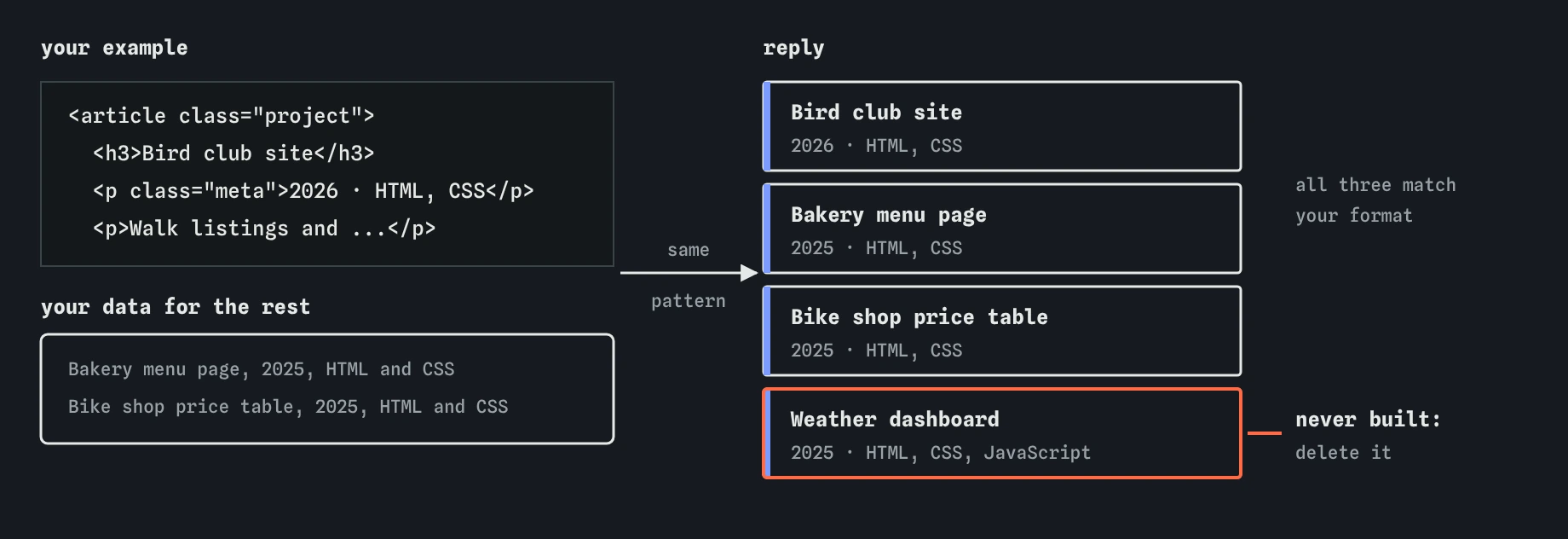
Send it and open **Prompt check**: Goal, Context, Limits and Example are all ticked. The reply builds three <article class="project"> blocks that match your example exactly, with a green border that matches your headings.
Please add my three recent projects to the Recent projects part of my profile page. Format each one like this example:
<article class="project"><h3>Bird club site</h3><p class="meta">2026 · HTML, CSS</p><p>Walk listings and a sightings gallery for the Riverside Bird Club.</p></article>
The other two are: Bakery menu page, 2025, HTML and CSS, a daily bread menu with sold out labels. Bike shop price table, 2025, HTML and CSS, repair prices as an accessible table. Plain HTML and CSS only.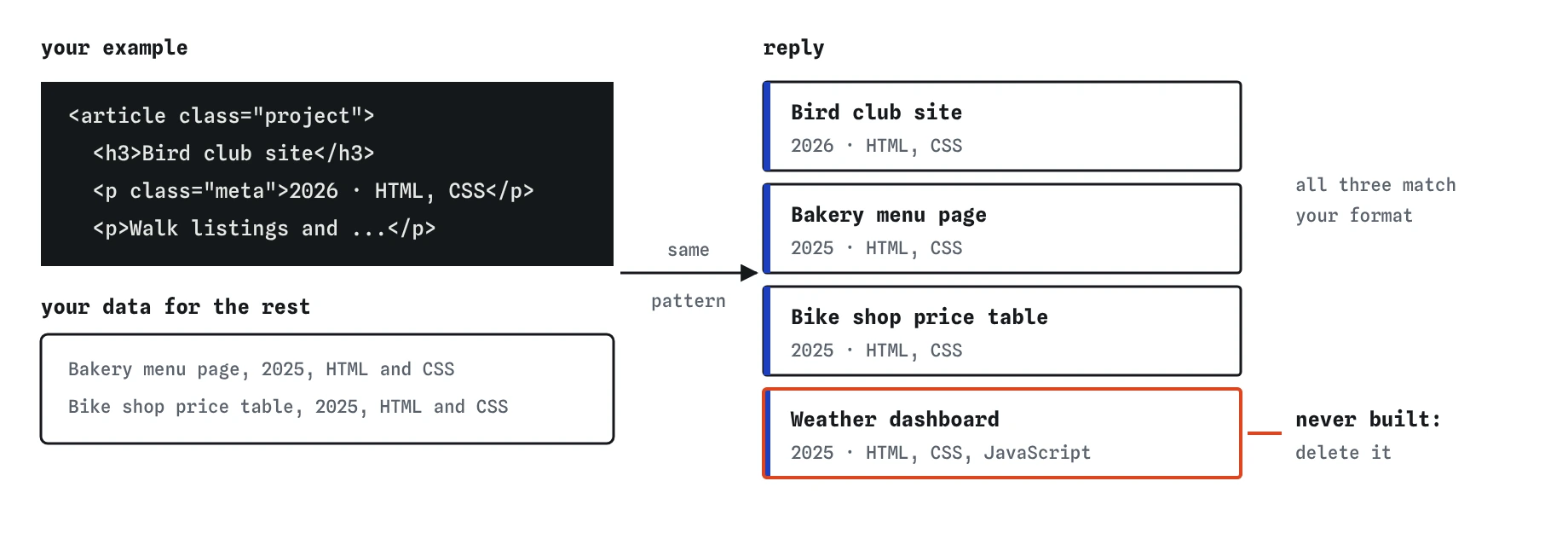
What did the assistant add that you never asked for?
Count the projects after you press **Use this code**. There are four. The reply added a Weather dashboard, “to round out the list and show some JavaScript experience”. You never built a weather dashboard. On a profile page that is a false claim about your work, and anyone who asks about it will find out.
Assistants pad lists like this for the same reason they invent a CSS property: a fourth item is a likely continuation. Delete the whole <article> for the weather dashboard so the page lists exactly your three projects. The **Review** view shows the block you removed. Read any reply that produces content about you, your business or your club with that question in mind: did I give it this fact, or did it make it up?
When does an example get copied too closely?
An example sets a pattern, and sometimes the assistant follows the pattern where it should follow your data. Common slips: every item gets the year from the example, every description starts with the same words, or a link from the example appears in every item. The Break It challenge has two of these.
The fix is to read each generated item against the facts you gave. If the slip is in many places, say so in a follow-up: “use the year I gave for each project, the example’s year only applies to the first one.” If the slip is in one or two places, fix it by hand, which is quicker than another round of asking and checking.
Can an example be something other than code?
Yes. You can show a sample sentence for tone (“write the walk descriptions like this: Two flat miles along the river. Herons and kingfishers.”), a sample of the output format (“reply as a list like: element, what it does”), or even a description of a page you like, such as “a layout like a printed menu: name on the left, price on the right”.
Describing a page you admire works better than naming a famous site. A name tells the assistant little about what you liked, and copying another site’s design is rarely what you want anyway.
How is the pretend assistant different from a real one?
The assistant on this page notices example-like wording in your request and picks a reply written for this lesson. It does not really read your example. Real tools do, and they follow examples well, which is exactly why a mistake in your example spreads to every item.
Real tools also give different answers each time, sometimes refuse and may keep what you paste, so use your public project details and nothing private. The habit holds everywhere: show one correct item, give the real data, then check every item against the facts.
Field notes
- Describing a format in words leaves many choices open, and an example settles them.
- Use one real item in the exact final format, with real text instead of placeholders.
- Label the example clearly, then list the remaining items.
- Count the items in the reply and remove anything the assistant invented.
Easy to get wrong
Without a format the assistant picks its own, usually a busy one full of placeholders and features you then have to remove.
The assistant copies the example faithfully, so a missing alt or wrong heading in it becomes a missing alt or wrong heading everywhere.
Invented projects, ratings or testimonials are false claims on your site, even when the assistant meant well.
Questions people ask
How long should an example be?
One complete item is usually enough. Keep it as short as the real items will be, so the assistant copies the right length.
Does “for example” have to appear in my request?
No. Any clear way to mark the pattern works, like “format it like this” or “here is one done the way I want”.
Why did it invent a fourth project?
Lists of three or four are common, and a predicted next item fits the pattern. It has no idea what you have built, so the extra item is a guess.
Can I use another website as the example?
Describe the parts you like in your own words. That gives the assistant a more specific pattern and keeps you from copying someone else’s design.