Why would an AI assistant invent a feature?
An AI assistant writes text that looks like the text it learned from. Most of the time that produces real code, because real code is what it saw. Sometimes it produces something that looks exactly like real code and isn’t: a CSS property with a sensible name, an HTML attribute that sounds official, a JavaScript method that ought to exist.
The assistant doesn’t know it made something up. It describes the invented feature with the same confidence as a real one, and often explains what it does in detail. That is what makes these mistakes easy to miss. Nothing in the tone of the reply warns you.
What does a made-up feature look like?
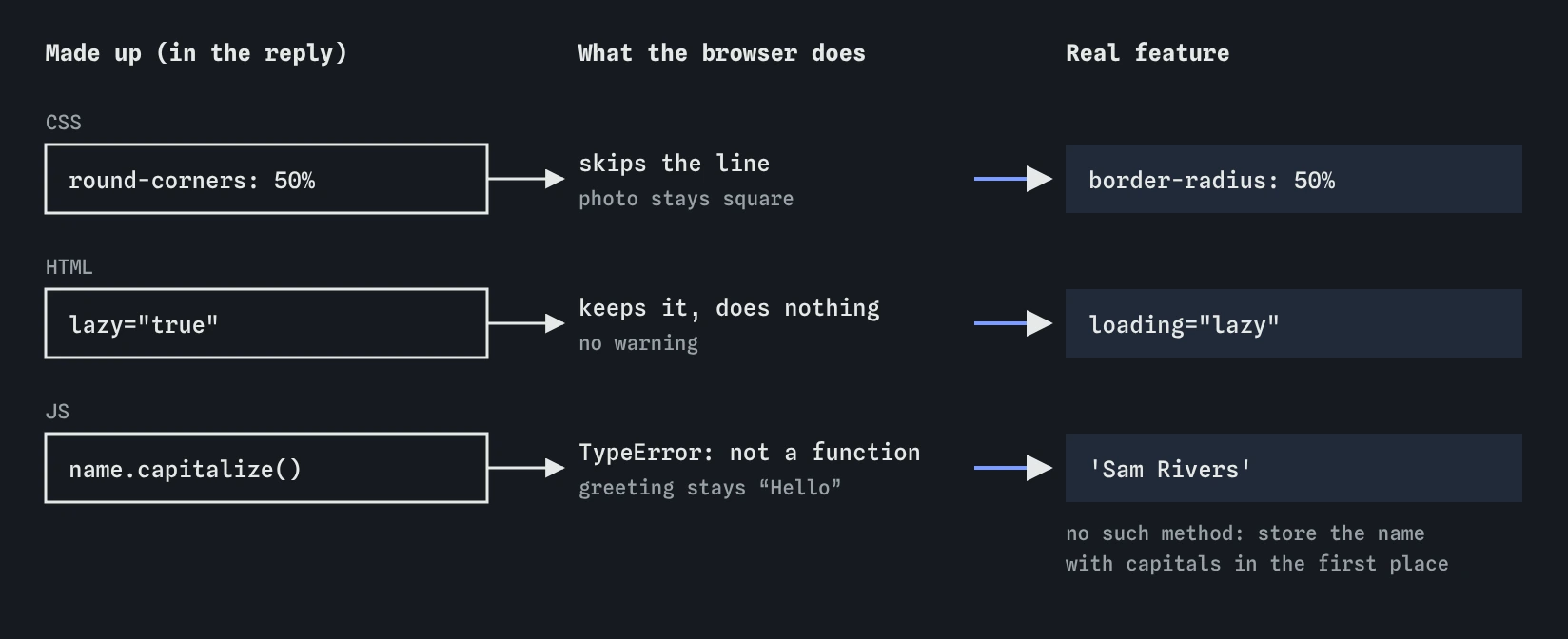
The good reply for the profile card has three. In the CSS, round-corners: 50% sounds like it rounds the photo; the real property is border-radius. In the HTML, lazy="true" sounds like lazy loading; the real attribute is loading="lazy". In the script, name.capitalize() sounds like it adds capital letters; JavaScript strings have no such method.
Notice the pattern. Each invented name is close to a real one, or to a method that exists in another language. That closeness is why they slip past a quick read.
.photo { round-corners: 50%; }      /* made up */
.photo { border-radius: 50%; }      /* real */

<img src="sam.jpg" lazy="true">     <!-- made up -->
<img src="sam.jpg" loading="lazy"> <!-- real -->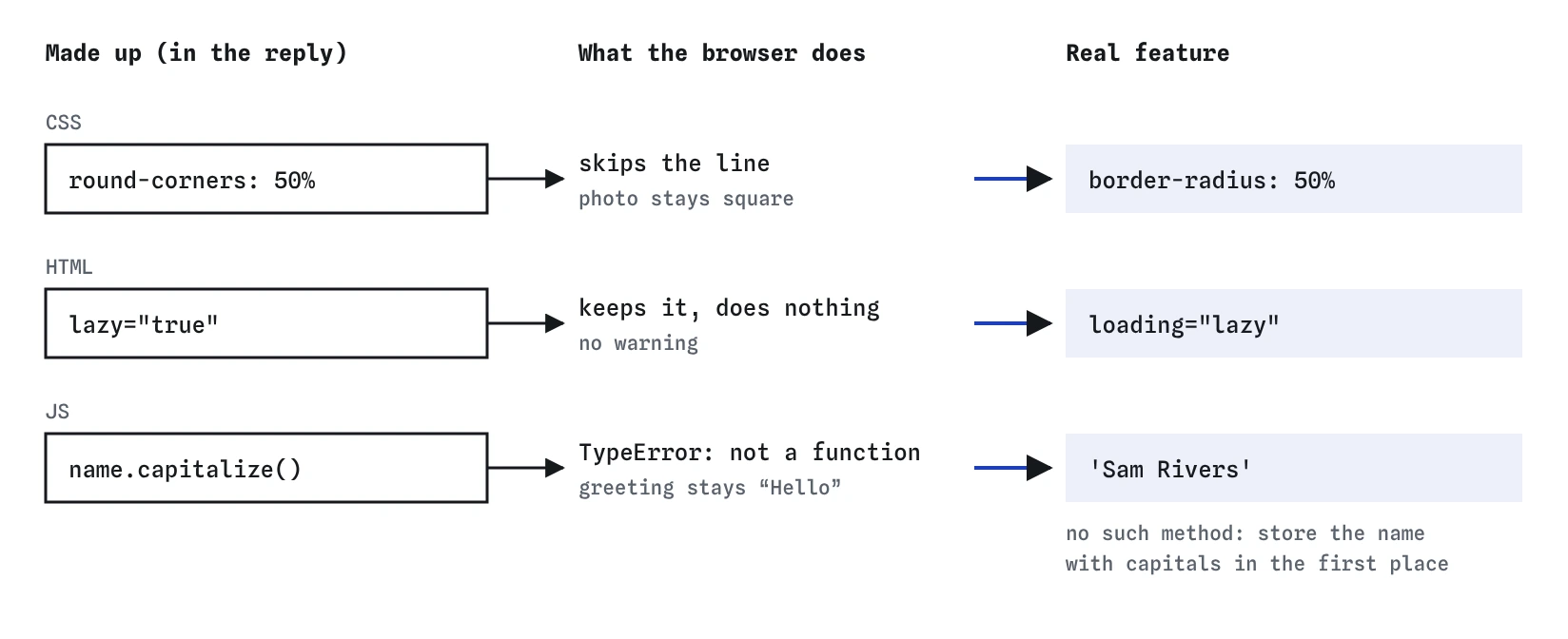
Why don’t browsers warn you?
HTML and CSS were designed to keep going when they meet something unknown. A browser that sees round-corners skips that one line and applies the rest of the rule. An unknown HTML attribute stays on the element and does nothing. The page still renders, and there is no error anywhere.
JavaScript is stricter. Calling a method that doesn’t exist throws a TypeError such as “name.capitalize is not a function”, and the script stops at that line. If nothing visible depends on it, you may not notice until you open the console. In the practice area the greeting just stays as “Hello”.
How do you spot one?
Look for the symptom first. Something the reply says should happen doesn’t: the photo stays square, the custom message never shows, the list is empty. Then read the code for any name you haven’t seen before. Developer tools help here. In the Styles panel, browsers usually strike through or flag a property they don’t recognise, and the console shows the exact line of a JavaScript TypeError.
Any unfamiliar name gets one question: is this real? Check it in a trusted reference site for HTML, CSS and JavaScript, not in the same chat that produced it. If the reference has no page for it, treat it as invented until proven otherwise.
- The reply promises a visible effect that doesn’t happen.
- A property, attribute or method name is new to you.
- The name looks like a friendlier version of one you know.
- The console shows “is not a function” or “is not defined”.
Can you ask the assistant whether a feature is real?
Yes, and it often helps. Name the exact feature and ask directly. Asking an open question like “is this code correct?” tends to get a confident yes. A specific question gives the assistant a chance to correct itself.
Try it in the practice area after you use the good reply. The assistant admits all three mistakes and names the real features. A real tool might do the same, or it might insist the invented feature exists and even describe its history. Either way, the reference has the last word.
Are round-corners, lazy and capitalize() real? Please check that each one is a real CSS property, HTML attribute or JavaScript method.How do you replace a made-up feature?
Find the real feature that does what the invented one promised, and swap it in. For the profile card, border-radius: 50% makes the square photo a circle, and loading="lazy" delays loading an image that is off screen. For the greeting there is no built-in capitalise method, so the plain fix is to store the name with capitals in the first place.
Test each fix in the Preview and keep the console open. The photo should be round, the greeting should read “Hello, I’m Sam Rivers”, and the console should be clear. Then open the **Review** view to see your three changes beside the assistant’s version.
Which made-up features are most common?
In CSS, watch for friendly names that describe an effect: text-colour, round-corners, image-shape, card-shadow. Watch for wrong values on real properties too, such as display: flexbox (the real value is flex) or font-weight: extra-bold. A real property with an invented value is also ignored without any error.
In HTML, watch for attributes that sound like settings: validate-email, auto-resize, lazy, required-message. In JavaScript, watch for methods borrowed from other languages, like capitalize() on a string or sortAlphabetically() on a list. Each of these is a guess at what would be convenient, and each one fails in the same way every time.
Does this happen outside HTML, CSS and JavaScript?
Everywhere. AI tools invent command-line options for Git, like a --undo flag on git commit that doesn’t exist, and suggest database functions such as a CAPITALIZE() in SQL that your database has never heard of. Made-up Git flags usually fail with an “unknown option” message. Made-up SQL functions fail with an error naming the function.
Those errors are a gift, because they tell you immediately. The quiet cases, like an invented CSS property, are worse. Whatever the language, the habit is the same: any name you don’t recognise gets checked in that tool’s own documentation before you rely on it.
How is this pretend assistant different from a real one?
The pretend assistant always invents the same three features, and always admits them when asked. A real AI tool is less predictable. It may get everything right one day and invent a property the next, and newer or rarer features are where it guesses most.
Real tools are right far more often than they are wrong, which is part of the risk: you get used to trusting them. Keep the check light and constant. A five-second look-up for each unfamiliar name costs much less than a broken page you believed was finished.
Field notes
- Assistants sometimes write features that look real but do not exist.
- Browsers skip unknown CSS and HTML, so the page still shows without warning.
- Start from the symptom, then look for any name you have not seen before.
- Replace each invented feature with a real one that does the same job.
Easy to get wrong
AI tools describe invented features as confidently as real ones. A detailed explanation is not evidence that the feature exists.
A broad question invites a broad yes. Naming the exact feature gives the assistant, and you, something specific to check.
Browsers silently ignore unknown CSS properties and HTML attributes, so a made-up one fails without any message.
Questions people ask
Why does the AI make things up instead of saying it doesn’t know?
It predicts likely text. A plausible property name is likely text, whether or not it exists. It has no built-in sense of which names are real.
Where should I check whether a feature is real?
Use a trusted reference for web standards, or the official documentation for the tool, such as Git’s or your database’s manual. Don’t use the same chat that suggested the feature.
What if the feature is real but very new?
Then check which browsers support it. A real feature that most browsers don’t support yet behaves like a made-up one for most of your visitors.
Can I add my own attributes to HTML?
Yes, as long as they start with data-, like data-bird="wren". They hold information for your scripts and do nothing on their own.