Why does a vague request get a vague answer?
An AI assistant only knows what you type. It can’t see your screen, your files or the picture in your head. When you write “make a form”, it has to guess everything else: what the form is for, what fields it needs, what your page looks like and what tools you use. It fills those gaps with the most common answer it has seen, which is rarely the answer you need.
Try it in the practice area. Send “make a form” and read the reply. You get a friendly list of website tips, or a form for some other business, with fields you never asked for. The assistant did nothing wrong. It answered the question you asked, and the question was nearly empty.
The fix is to put the missing details into the request yourself. This lesson covers the first three: the goal, the context and the limits. The **Prompt check** view ticks each one as you include it, so you can see your request getting better before you read the reply.
What counts as a goal?
The goal is the thing you want made, plus what it is for. “Add a contact form” names the thing. “So customers can send the bakery a question” says what it is for. Together they tell the assistant which fields matter, how formal the wording should be and where the form belongs.
Say it in your own words. There are no magic phrases, and the assistant here accepts any normal way of asking, such as “I need”, “can you add” or “please make”. Test it this way: a stranger should be able to read your first sentence and know what you are trying to build.
Please add a contact form to my bakery page so customers can send us a message with their name, email and question.Why does the assistant need your code?
Without context, the assistant writes a whole new page. It picks its own title, its own colours and often an outside stylesheet or library, because that is common in the examples it learned from. You then have to untangle its page from yours.
Context can be your actual code pasted into the request, or a plain description such as “my page is one HTML file with a style block”. For small pages, pasting the code works best. For bigger projects, paste the part you are working on and describe the rest. Never paste anything private while you do it; that has its own lesson later in the course.
What are limits, and why do they help?
Limits tell the assistant what to leave out. “Plain HTML and CSS only, no frameworks” rules out the outside UI kit. “Match my brown colours” rules out a blue design. “Keep it to three fields” rules out phone numbers and department menus you don’t need.
Beginners often skip limits because they feel fussy. They are the quickest way to get code you can read. Every library, framework or clever trick you didn’t ask for is something you would have to learn, check and maintain. A short list of limits keeps the answer at your level and inside your project.
Use plain HTML and CSS only, no frameworks, and match my brown colours.What does the Prompt check view measure?
Prompt check lists the ingredients this lesson cares about and marks each one for your last request. A filled square means the ingredient is there. An empty square comes with one plain line on what to add. The last row, No secrets, turns red if your request contains something that looks like a key, a password or a list of email addresses.
Treat it as a checklist, not a score to chase. A request can tick every box and still be unclear, and a short request can be perfect for a small job. Over time you will stop needing the view, because asking this way becomes a habit.
How do the three parts fit together?
Put the goal first, then the context, then the limits. That order reads naturally and keeps the most important part at the top. A complete request for the bakery form is only four or five lines long, and most of that is the pasted heading.
Send it in the practice area and watch two things change. The Prompt check view shows three filled squares, and the reply is your own page with a form added in your colours. It is a much better answer, and it took about thirty seconds more to write.
Please add a contact form to my bakery page so customers can send us a message with their name, email and question. Here is my page:
<h1>Crumb & Co. Bakery</h1>
<p>Fresh bread every morning on Mill Street.</p>
<h2>Contact us</h2>
Use plain HTML and CSS only, no frameworks, and match my brown colours.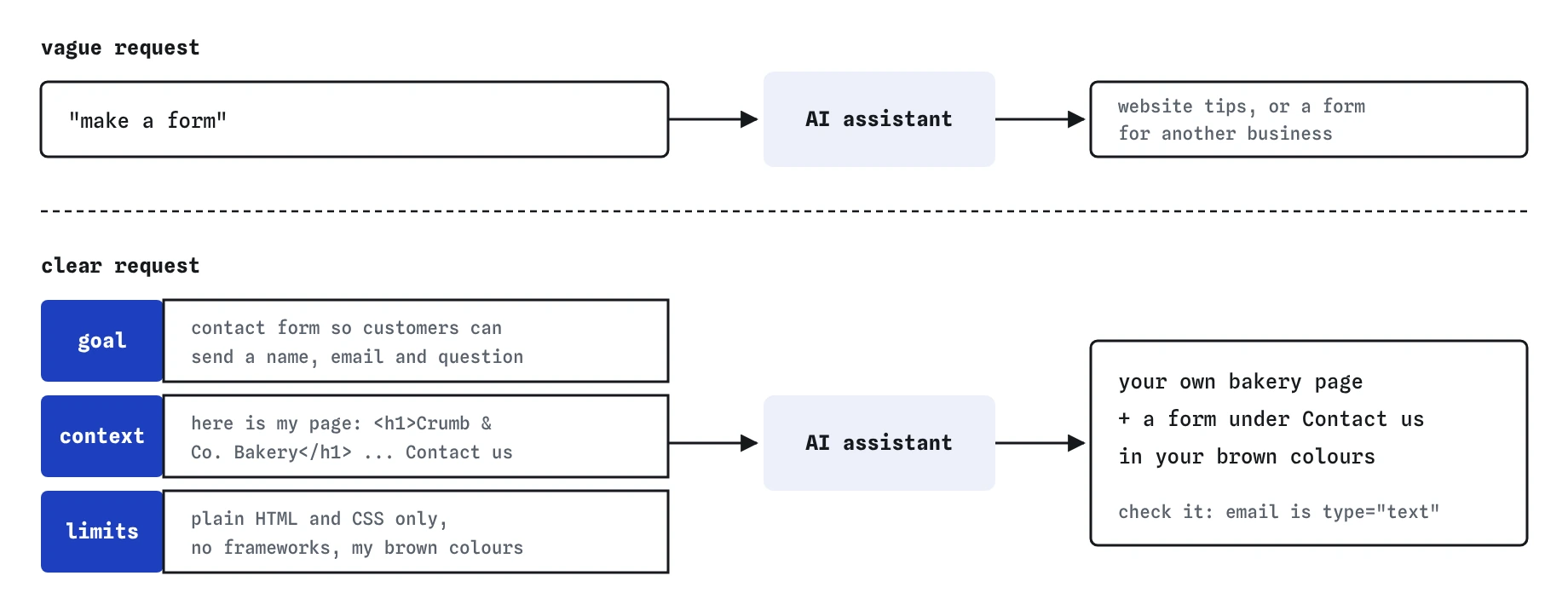
Is a good answer a correct answer?
No. A clear request makes a good answer more likely, and you still have to check it. The bakery reply looks finished, and it has two quiet problems. The email field uses type="text", so the browser won’t check the address and phones show the wrong keyboard. The message box has a word above it, but that word is a <span>, not a <label>, so screen readers don’t connect it to the box.
Press **Use this code** to move the reply into the Code tab, then read every line before you change anything. The **Review** view compares the assistant’s code with yours and highlights each line you changed, which helps you keep track of your fixes. This habit, ask clearly and then check carefully, runs through the whole course.
How is the pretend assistant different from a real one?
The assistant on this page is pretend. It runs in your browser, never goes online, and picks from replies written for this lesson. The same kind of request always gets the same reply, which is what makes Check my work possible.
Real AI tools are different in a few ways. They give a slightly different answer each time, even to the same request. They often write longer answers, and they can make things up with complete confidence. The ingredients you practise here still work with them, because they are about giving a reader enough information, and any reader, human or machine, does better with that.
Field notes
- A vague request forces the assistant to guess everything you did not say.
- A goal names the thing you want and what it is for.
- Sharing your code and setting limits keep the reply fitting your own page.
- A good-looking answer can still have quiet problems, so check it before you keep it.
Easy to get wrong
A request with no goal or limits makes the assistant guess, and its guesses come from other people’s projects. One extra sentence about what it is for and what to avoid saves a long round of corrections.
Code that looks right can still use the wrong input type, skip labels or depend on a library you never chose. You are responsible for every line that goes on your site, wherever it came from.
Without your code the assistant invents its own design and structure, and you spend more time merging the two pages than you saved.
Questions people ask
Do I have to use the words goal, context and limits?
No. Those are names for kinds of information, not keywords. Write the way you would explain the job to a helpful friend who has never seen your site.
How long should a request be?
Long enough to answer the obvious questions a stranger would ask. For a small change that is often three to six lines, including any pasted code. Longer is fine when the job is bigger.
What if I don’t know what limits to set?
Start with the tools you already know: “plain HTML and CSS only” is a good default in this course. Add more limits when a reply includes something you didn’t want.
Why does the assistant here always give the same reply?
It is pretend, so Check my work can be fair and predictable. Real AI tools vary their answers, which is one more reason to read and test everything they give you.