Why ask for one piece at a time?
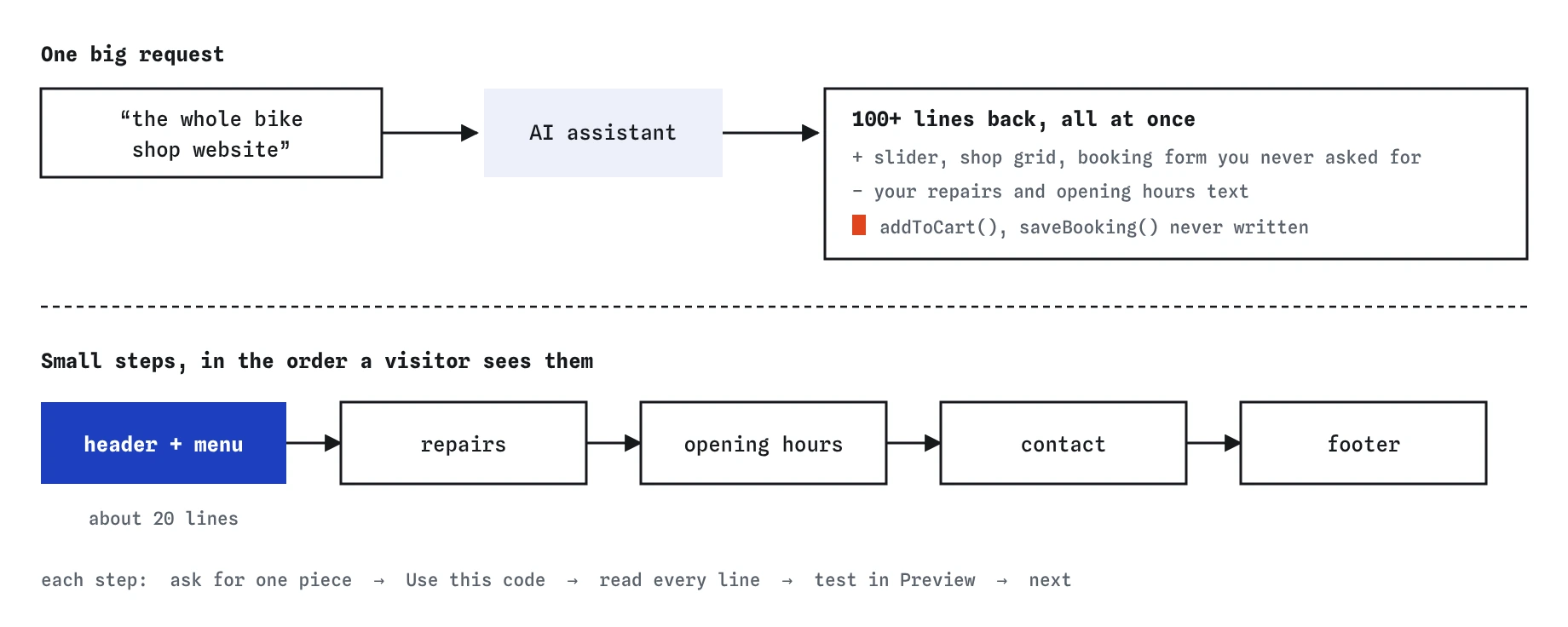
When you ask an AI assistant for a whole website in one message, you get a whole website back: a hundred or more lines, a design you didn’t choose and several features you didn’t plan. Some of it will work. Some of it won’t. Finding which is which is slow, because every part depends on every other part.
When you ask for one piece, such as the header, you get twenty lines. You can read all of them, test them in the Preview and fix what is wrong before anything else is built on top. Each step is small enough to understand, and the page grows in a way you control.
Try both in the practice area. Ask for the whole bike shop website first and read the reply. Then ask for just the header and compare the two. The second reply is shorter, and it fits the page you already have.
What goes wrong with a giant answer?
Look closely at the big reply in the practice area. It throws away your content about repairs and opening hours. It adds a photo slider, a shop grid and a booking form. It calls two functions, addToCart() and saveBooking(), that are never written anywhere, so the buttons fail the moment someone clicks them. The reply sounds finished and confident about all of it.
None of those problems is hard to fix on its own. The trouble is that they are mixed together in one long file, and you didn’t write any of it. You can’t tell which lines matter, which are decoration and which are broken. Beginners often paste the whole thing in, find that something is off, and then ask the assistant to fix code that neither of you understands.
Big answers also make you agree to decisions you never made. A slider, a cart and a dark top bar are design choices. If you only asked for a header, the assistant had no reason to make them for you.
How do you split a page into steps?
Before you open the chat, write a short list of the parts the page needs, in the order a visitor sees them. For the bike shop that might be the header and menu, the repairs section, the opening hours table, the contact details and the footer. Each item becomes one request.
Start with the part everything else hangs off. The header sets the shop name and the menu, and the menu links tell you which sections you still need. After that, work down the page. If a step turns out to be bigger than you expected, split it again: the opening hours table first, then the styling for it.
- The header with the shop name and menu
- The repairs section
- The opening hours table
- The contact details
- The footer
What does a small-step request look like?
It says what this one piece should do, shows the code it attaches to, and says plainly that you want only this piece for now. The phrase doesn’t matter. “Just the header”, “one step at a time” and “only the menu for now” all work, here and with real tools.
Send this request in the practice area and look at the **Prompt check** view. The Small step row ticks, and the reply adds a header to your own page instead of replacing it.
Let's do this one step at a time. For now, just the header: please add a header to my page with the shop name and a menu that links to Repairs, Opening hours and Contact. Here is the start of my page:
<h2 id="repairs">Repairs while you wait</h2>
How do you check each step before the next?
Press **Use this code**, then open the **Preview** and use the new piece the way a visitor would. Click every link in the menu. Resize the window to phone width. Read every line of the new code in the Code tab, and open the **Review** view to see exactly which lines you changed afterwards.
The header reply here has two problems, and both are easy to miss in a long answer. The links sit in a plain <div>, so screen readers don’t announce them as the page’s navigation. The Contact link has href="", which reloads the page instead of jumping to the Contact section. In a twenty-line reply you can spot both in a minute. In a two-hundred-line reply they would hide.
Fix them now, before you ask for the next piece. If you move on first, the next reply may copy the same mistakes, and you end up fixing them in several places.
How do you carry on to the next step?
Once a piece works, start the next request with the current code, or the relevant part of it. Say what you just finished and what you want next: “The header is done. Next, the opening hours table under the Opening hours heading. Keep everything else the same.” That last sentence stops the assistant from rewriting the parts you have already checked.
Real AI tools remember earlier messages in the same chat, up to a limit. Long chats drift, and an assistant may forget a fix you made three steps ago. Pasting the current code at the start of each step is a cheap way to keep it working from your version, not its own memory of what it wrote earlier.
When is a big request fine?
Sometimes you want to see a whole rough draft to get ideas: what sections a bike shop page might have, or how a layout could look. Asking for a full sketch is fine for that, as long as you treat it as a sketch. Read it for ideas, then build the real page step by step.
A big request also works when the job is truly small, like a single page with three paragraphs. The rule of thumb is about what you can check. If you can’t read and test the whole reply in a few minutes, the step was too big.
How is this pretend assistant different from a real one?
The assistant here picks from replies written for this lesson, so a request for one piece always gets the same header back. A real AI tool would vary its answer, and might still add a little more than you asked for, such as a logo slot or extra links. Ask it to remove what you didn’t want, or remove it yourself.
Real tools can also refuse a vague request or ask you a question back. Both are fine. Answer the question, keep the step small, and keep checking each piece before you build on it.
Field notes
- A whole page in one reply is long and hard to check line by line.
- Before asking, list the parts of the page in the order a visitor sees them.
- Ask for one piece only, and include the code it attaches to.
- Test each piece in the Preview and read its code before asking for the next.
Easy to get wrong
A whole-site answer mixes design choices, missing functions and replaced content into one long file. A one-piece answer is short enough to read and test before you build on it.
Problems pile up. The next reply builds on the broken piece and may repeat its mistakes, so one quick fix turns into several.
A full rewrite can undo fixes you already made. Asking for one change keeps your checked work in place.
Questions people ask
Doesn’t asking in small steps take longer?
It takes more messages and less time overall. Each step is quick to check, and you spend far less time untangling a long answer that half works.
How small is small?
Small enough that you can read every line of the reply and test it in a few minutes. For a beginner that is usually one section of a page or one feature.
Should I start a new chat for each step?
You can keep one chat for one page. If the chat gets long or the answers start ignoring your earlier fixes, start a fresh chat and paste your current code at the top.
What if the assistant adds things I didn’t ask for anyway?
Remove them, or ask it to send only the piece you wanted. Extra features you didn’t plan are code you would have to check and maintain.