How do you decide whether to ask at all?
Asking an AI assistant has a cost you do not see at first. You write the request, wait for the reply, read every line of it, test it and fix what is wrong. For a big, fiddly job that cost is small next to the typing it saves. For a tiny job the cost can be bigger than the job itself.
A quick test helps: if you already know exactly what to type and where, type it. If you know what you want but writing it would take a while, or you are not sure how to start, asking is often worth it. The bike shop page has one of each. welcmoe needs two letters swapped. The price list needs to become a table with a caption, five rows and some CSS. Only the second is worth a request.
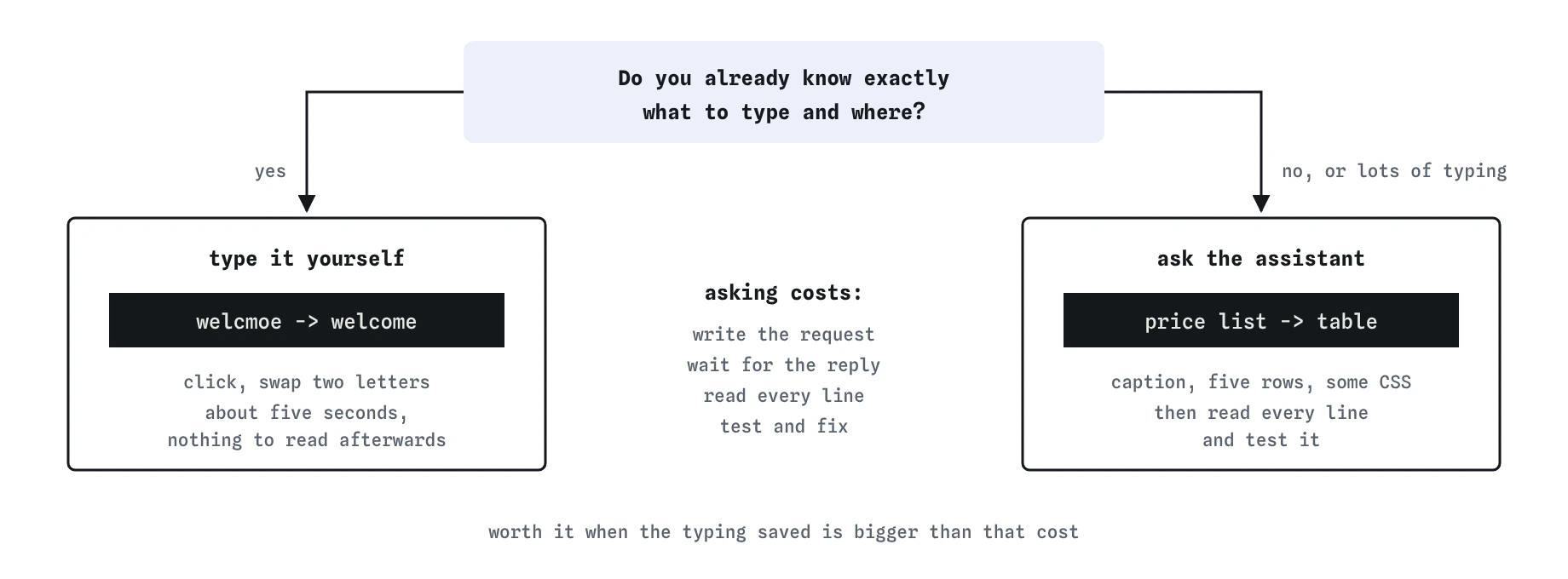
welcmoe typo is cheaper by hand, while the price table has enough typing in it to be worth a request.Why is a one-word fix faster by hand?
Fixing welcmoe takes about five seconds: click, swap two letters, done. You know exactly what changed because you changed it. There is nothing to read afterwards.
Asking for the same fix means describing the problem, pasting enough of the page that the assistant can find the word, and then reading the whole reply to make sure only that word changed. Send “can you fix the typo in my opening hours” in the practice area and look at what comes back. The typo is fixed, and the page also has a dark theme, a hero section, a new font loaded from another server, a phone line without a number and different opening hours.
That reply is realistic. Assistants like to be helpful, and a vague small request gives them room to do far more than you asked.
Which jobs are worth asking for?
Jobs with lots of predictable typing, where you can easily check the result. Turning a comma-separated list into a table, writing the first draft of a form, converting a block of CSS colours into custom properties, or adding the same class to twenty list items are all good examples. You know what the right answer looks like, so checking is quick.
Explaining is another strong use. Pasting a CSS rule you do not understand and asking what each line does is usually faster than searching, and the answer is easy to test by changing a value and watching the Preview.
First drafts of wording also work well, as long as you edit them. The assistant writes a fair paragraph about a bike repair service in seconds. It cannot know what your shop actually offers.
Which jobs should stay with you?
Facts about your own business or club: opening hours, prices, phone numbers, names, dates, addresses. The assistant has never met your bike shop. When it needs a fact it does not have, it writes a likely one, and the likely one is wrong. The partial reply in the practice area fills the price table with “typical industry prices” like $49.99 because you did not give it yours.
Decisions also stay with you. Whether the shop page should be dark, which font fits the brand and whether to add a library are choices with consequences you will live with. An assistant can lay out options. It should not make those choices inside a typo fix without telling you.
Anything private stays out of the chat entirely, including keys, passwords and customer details. A later lesson covers that properly.
What does the table request look like?
Give it the goal, the part of your page it needs and a limit that protects the rest. Pasting the actual price line means the table uses your prices. Saying “keep the rest of my page as it is” means the hours, phone and colours survive.
Send it, then open the **Prompt check** view. The Worth asking row is ticked because the request is about a table and prices, a job with real typing in it. Goal, context and limits are ticked too.
Can you turn my repair price list into an HTML table so customers can compare prices quickly. Here is the part of my page: <h2>Repair prices</h2> <p>Puncture repair 8, brake tune 15, gear tune 20, full service 55</p>. Use plain HTML and CSS only and keep the rest of my page as it is.What should you check in the table it gives you?
Press **Use this code** and read the whole file, including the lines you did not ask about. Two things are worth noticing. The hours line still says welcmoe. The assistant copied your page faithfully, typo and all, and said nothing about it. Fix it yourself now: it is the five-second job from earlier.
The second problem is in the table. The header row uses <td><b>Repair</b></td>, which looks bold on screen and means nothing to a screen reader. Real header cells are <th> elements, and screen readers use them to announce which column a price belongs to. Change both cells to <th>. The **Review** view shows your two edits next to the assistant’s version, so you can see exactly what you changed and what you kept.
What about jobs in between?
Plenty of work is medium sized: changing a colour across a few rules, moving a section higher up the page, renaming a class. A good habit is to try it yourself first for a minute or two. If you get stuck, ask with the code you have, say what you tried and ask for the smallest change.
Over time the line moves. Things that felt big in your first month, like writing a form, become quick by hand, and you will ask less often for them. That is a good sign. You can still ask for a check or an explanation, which keeps the learning going without handing over the typing.
How is the pretend assistant different from a real one?
The assistant here answers from replies written for this lesson, so the same kind of request always gets the same reply. Real tools vary every time. A real tool might fix the typo neatly once and rewrite the page the next, which is why small fixes are safer done by hand, where the result is the same every time.
Real tools also make longer answers, can refuse a request and may keep what you paste. None of that changes the decision you practised: ask when the typing is big and the result is easy to check, and do it yourself when you already know the answer.
Field notes
- Asking has hidden costs: writing the request, waiting, reading the reply, testing and fixing it.
- A one-word typo is faster to fix yourself than to describe to an assistant.
- Jobs with lots of predictable typing that are easy to check are good ones to ask for.
- Facts about your own business, like prices and hours, should come from you.
Easy to get wrong
Reading the reply to confirm nothing else changed takes longer than the fix, and small vague requests invite the assistant to rewrite things you liked.
It cannot know your business, so it writes plausible numbers. Plausible numbers on a shop page are worse than none.
Every unrequested change is something you did not choose and have not checked, such as a font loaded from another server.
Questions people ask
Is it lazy to use an AI assistant for tables and forms?
No. Using a tool for repetitive typing is sensible. Before it goes live, read, test and understand the result.
Why did the assistant keep my typo?
You asked for a table, so it focused on the table and copied the rest. Assistants often miss things outside the request, which is one reason to read the whole file.
What if I don’t know how to do the small fix myself?
Then ask the assistant to explain how, and do the edit yourself. You learn the fix and keep control of the page.