What does each of the three commands move?
Think of two copies of the Spokes Bike Shop repository: yours, and the one on GitHub that Sam also uses. Three commands move commits between them, and each moves in one direction only.
git push sends your commits up to the remote and moves the remote's branch forward. git fetch downloads new commits from the remote and moves your origin/main label, without touching your own branches or files. git pull is a fetch followed by a merge of origin/main into the branch you are on, so it changes your files.
None of them sends uncommitted edits. If prices.html is modified but not committed, a push says Everything up-to-date and your change stays on your laptop. Commit first, every time.
- Push: your commits go up, the remote branch moves.
- Fetch: their commits come down into
origin/main; your branch and files stay put. - Pull: fetch, then merge into your current branch.
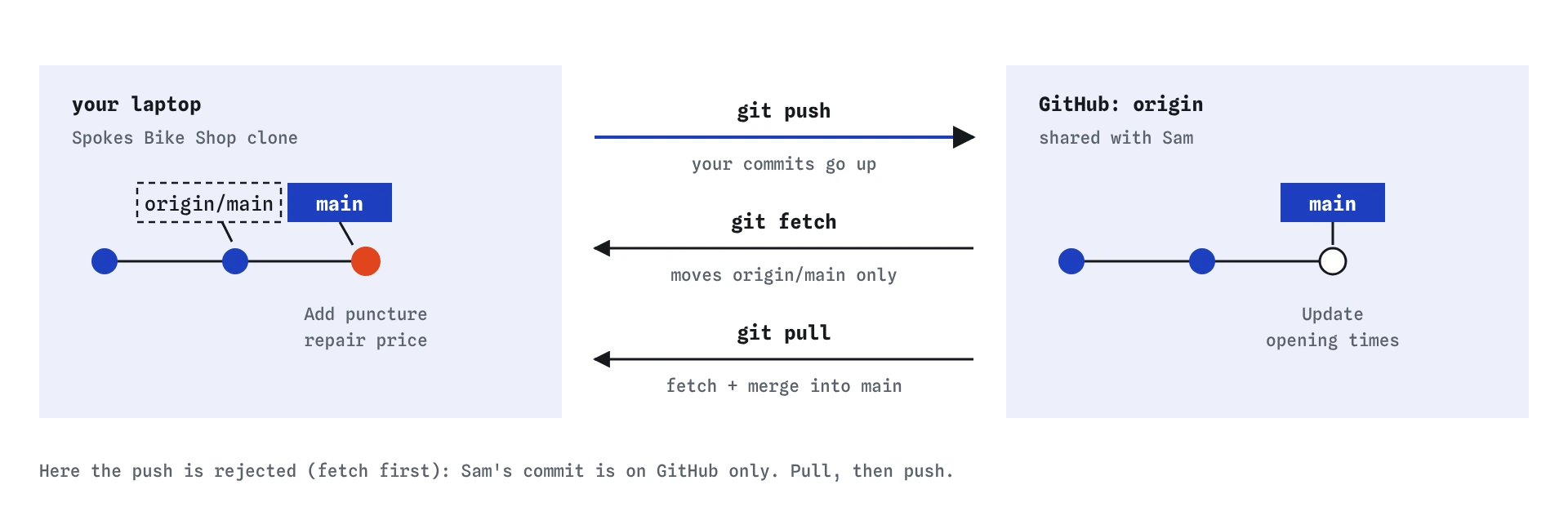
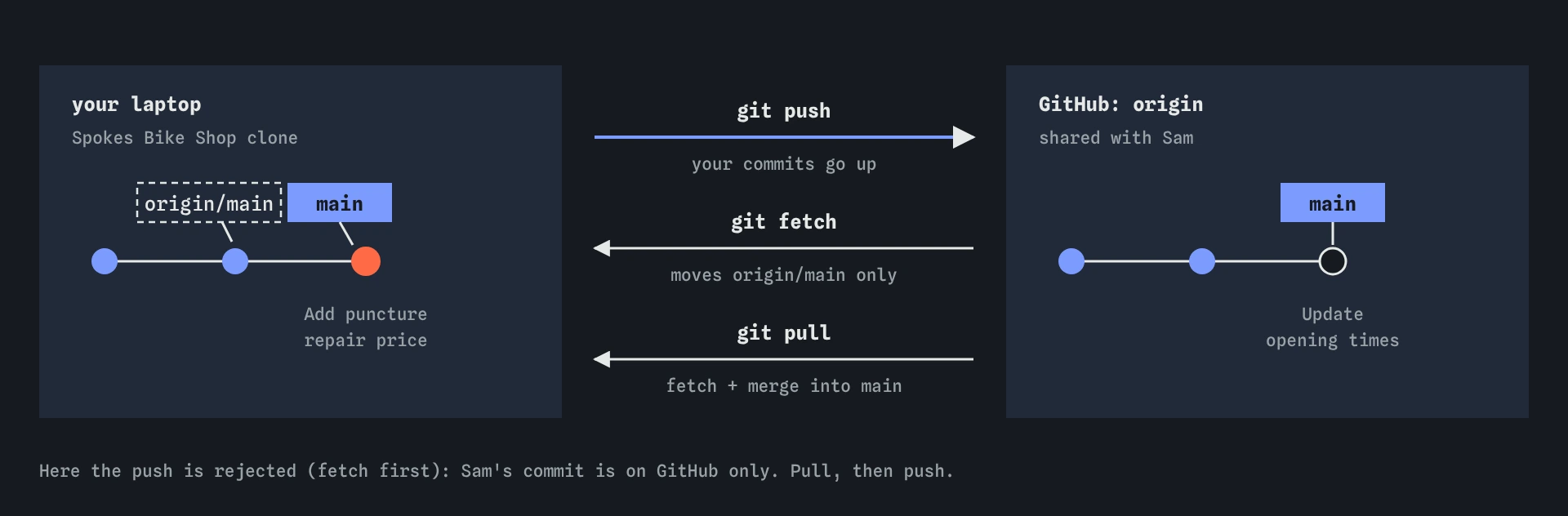
origin/main, and pull also merges into your branch, so it is the one that changes your files.Why was the push rejected?
In the practice repository you committed a new price, and Sam pushed new opening times after you cloned. When you push, GitHub sees that its main has a commit yours does not contain. Accepting your push would mean moving main to a history without Sam's commit, so it refuses with [rejected] main -> main (fetch first).
This rejection protects Sam. It is the normal result of two people working at once and says nothing bad about your commit. The fix is to bring Sam's work into your branch, then push the combined history.
git push origin main  # fails on purpose
git status
How do you pull and then push?
Run git pull. Git fetches Sam's commit and merges origin/main into your main. Because you each changed a different file, the merge goes through on its own and creates a merge commit. In the Graph, your line and Sam's join. Your folder now shows the new opening times as well as your price.
Then run git push. The remote's main is now an ancestor of yours, so GitHub accepts it. The dashed origin/main label jumps to the same dot as main, and git status says your branch is up to date.
If you had both edited the same line, the pull would stop with a merge conflict. You resolve it exactly as in the conflicts lesson, commit, and then push.
Read what the pull printed before you push. It lists the files that changed and says whether it fast-forwarded or made a merge. If the merge touched files you did not expect, run git log --oneline -4 and git show on the new commits to see what Sam changed. Opening the shop page in a browser after a pull is a quick way to make sure the combined version still looks right, and it costs less than discovering a broken page after the push has gone out to everyone.
A push that fails again straight after a pull usually means someone pushed in the few seconds between the two commands. Repeat the pull and push. On a busy repository that can happen more than once, and it is still not a reason to force anything.
git pull
git push
git status
git log --oneline -4
When should you fetch instead of pull?
git fetch is the cautious version. It updates origin/main and leaves your branch alone. Then you can look before mixing anything in: git log --oneline --all shows the new commits, and git diff main origin/main shows exactly what changed. When you are happy, git merge origin/main does the second half of a pull.
Fetch first when you are in the middle of something, when you are unsure what a teammate pushed, or when an earlier pull surprised you. Fetching never changes your files and never creates conflicts, so you can run it at any time.
git fetch
git log --oneline --all
git diff main origin/main
git merge origin/main
What do ahead and behind mean?
git status compares your branch with origin/main and reports the difference as counts. Ahead 1 means you have one commit the remote does not; push it. Behind 1 means the remote has one commit you do not; pull it. Both at once, which Git words as have diverged, means pull first, then push.
These counts are only as fresh as your last fetch. After a fetch in the practice repository, status reports one commit on each side. Before the fetch, it said you were only ahead, because your repository had not yet heard about Sam's push.
git status
git fetch
git status
Why is git push --force dangerous on a shared branch?
git push --force tells the remote to accept your branch as it is, even if that means dropping commits that are only on the remote. On the bike shop repository, forcing your push would delete Sam's opening times from GitHub. Sam's next pull would not bring them back for you, and anyone who had already pulled would now have a history that no longer matches.
AI assistants often suggest --force when a push is rejected, because it makes the error go away. Read the rejection instead. fetch first means someone else pushed: pull, then push. Force pushing has legitimate uses on your own personal branch after rewriting it, and even then --force-with-lease is the safer form, because it refuses if the remote moved since your last fetch.
What routine keeps you out of trouble?
Pull before you start work, so you begin from the latest version. Commit in small steps. Before you push, run git status; if you are behind, pull and check the result. Then push. Push at the end of each session so your work never lives on a single laptop.
Real Git can be configured to pull by rebasing instead of merging, which keeps a straight line of history. The practice terminal has no rebase, and merging is the safer default while you are learning. Either way, recent Git versions ask you to choose with git config pull.rebase false (merge) or true (rebase) the first time branches diverge.
Field notes
git pushsends your commits,git fetchdownloads theirs, andgit pulldownloads and merges.- A push is rejected when the remote has commits you have not brought in yet.
- Pull first, check the result, then push again.
- Ahead means you have commits to push; behind means there are commits to pull.
Easy to get wrong
Forcing replaces the remote branch with yours and deletes your teammate's commits from it.
Push sends commits only. Uncommitted edits never leave your computer, and Git will happily report that everything is up to date.
That message compares you with the remote as it was at your last fetch, which may be hours old.
Questions people ask
Is git pull the same as git fetch plus git merge?
Yes, with the default settings. It fetches and then merges the upstream branch into your current branch. With pull.rebase set to true it rebases instead of merging.
Can I pull with uncommitted changes?
Often, if the incoming commits touch different files. If they touch a file you edited, Git refuses so it does not overwrite your work. Commit or stash first.
Why did pull create a merge commit?
Because both you and the remote had new commits. If only the remote had new commits, pull fast-forwards and no merge commit appears.
How often should I push?
At least at the end of every working session, and whenever you finish a piece someone else is waiting for. Small, frequent pushes make conflicts smaller.