What does git reset actually move?
A branch is a label that points at one commit. main in the bike shop repository points at "Make it more neon", and each commit points back at its parent. git reset <commit> picks up the label and puts it on a different commit. Commits after that point are no longer on the branch.
That is the whole core of reset. The three modes, --soft, --mixed and --hard, only decide what happens to the staging area and your files after the label moves. Keep that split in mind and reset stops being mysterious.
Open the Graph view and run a reset. The main label jumps down the line, and the commits it left behind turn faded. They still exist for now. Git keeps unreachable commits for weeks before cleaning them up, and git reflog can find them.
git log --oneline
git reset HEAD~1
git log --oneline
How do --soft, --mixed and --hard differ?
In all three, the commits themselves are treated the same: they leave the branch. The difference is how much of their content you keep around to work with.
Try each on the neon commits and watch the Areas view. After git reset --soft HEAD~2, style.css shows as staged. After a mixed reset it shows as changed but unstaged. After --hard, Areas is empty and cat style.css prints the cream background again.
--soft: moves the branch only. The changes from the removed commits sit in the staging area, ready to commit again.--mixed(the default when you give no mode): moves the branch and resets the staging area. The changes stay in your files, unstaged.--hard: moves the branch, resets the staging area and overwrites your files to match the target commit. Uncommitted edits to tracked files are destroyed.
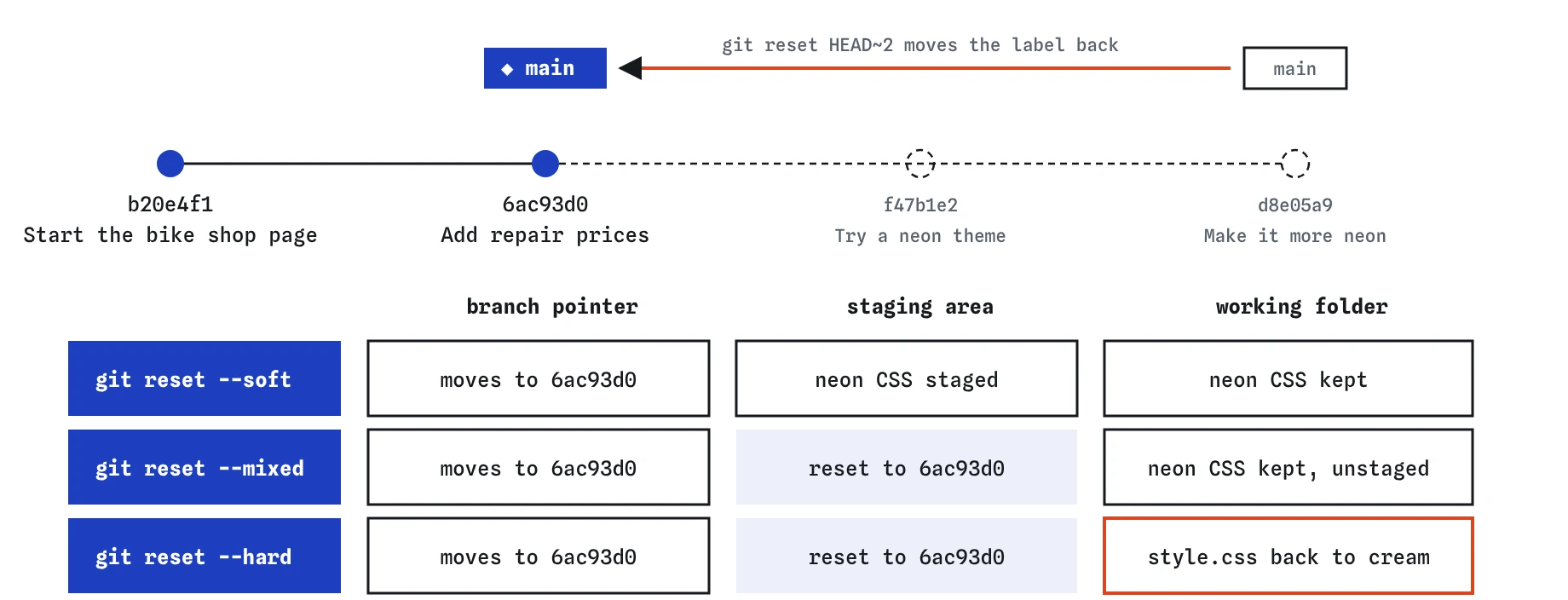
main back to the same commit. They differ only in how far the reset reaches: the staging area for --mixed, and your files too for --hard.When is a soft reset useful?
Soft reset is the tool for squashing a few messy commits into one tidy commit. Say you made "Try a neon theme" and "Make it more neon" as two experiments, and you decide to keep the result after all. A soft reset back two commits leaves all the neon CSS staged. One git commit -m "Switch to a dark theme" then records it as a single step.
It is also handy when you committed on top of the wrong idea: reset softly, adjust what is staged with git restore --staged, and commit again in smaller pieces.
Nothing in your files changes during a soft reset, so it is very hard to lose work with it.
git reset --soft HEAD~2
git status
git commit -m "Switch to a dark theme"
git log --oneline
Why does --hard need extra care?
A hard reset rewrites your working folder. Any change you had not committed to a tracked file is replaced with the version from the target commit, and Git keeps no copy of it. Committed work can be found again with the reflog. Uncommitted work cannot.
Before a hard reset, run git status. If anything is listed under changes not staged or changes to be committed, decide what to do with it first: commit it, stash it with git stash, or confirm you truly want it gone.
Files Git has never tracked, such as a new todo.txt you never added, are left alone by --hard. That surprises people both ways: the junk you expected to vanish is still there, and the edit you expected to keep is gone. git clean -n previews what deleting untracked files would remove.
git status
git reset --hard HEAD~2
cat style.css
How do you unstage a file with reset?
Give reset a file name instead of a commit and it does a smaller job: it copies that file from the last commit into the staging area. In practice that means "unstage this file". Your edits to the file stay in the folder.
git reset index.html and git restore --staged index.html do the same thing here. Git's own hints now suggest restore --staged, which reads more like what it does. You will still see git reset <file> in older tutorials and in suggestions from AI tools, so it helps to recognise it.
A file name never moves the branch, so this form is safe to run at any time.
echo "<p>Open late on Thursdays.</p>" >> index.html
git add index.html
git reset index.html
git status
How do you get back commits you reset away?
git reflog lists every place HEAD has pointed recently, newest first, with the command that moved it. After a reset, the line just below the top shows the commit you were on before. Copy its short id and reset back to it: git reset --hard <id>.
Real Git also accepts HEAD@{1} for "where HEAD was one move ago". The practice terminal understands that form too, and copying the short id from the reflog works just as well.
The reflog lives only on your machine and entries expire after about 90 days by default. It will not save uncommitted edits, and it cannot see anything from a teammate's computer.
git reset --hard HEAD~2
git reflog
When should you use revert instead of reset?
Use reset for commits that exist only on your machine. Moving a local branch back hurts nobody, because nobody else has those commits.
Use revert for commits you have already pushed. Resetting a pushed branch makes your history disagree with GitHub's, so the next push needs --force, which throws away the remote's version. Anyone who pulled the old commits is left with history that no longer exists upstream. A revert adds a commit instead, so a normal push works and nobody's copy breaks.
A practical test: run git status and look for "Your branch is up to date with origin/main" or "ahead of". Commits that are only ahead are local and safe to reset. Anything at or below origin/main is shared.
What should you check before running a reset an AI suggested?
Check the mode. git reset --hard HEAD~1 is a common suggestion for "undo my last commit", and it also deletes uncommitted edits. If you only want the commit gone and the changes kept, git reset HEAD~1 or git reset --soft HEAD~1 is what you asked for.
Check the target. HEAD~3 goes back three commits; make sure that is the number you meant by reading git log --oneline first. origin/main as a target means "make my branch match GitHub", discarding every local commit not yet pushed.
Check whether the commits are pushed. If they are, prefer git revert.
Field notes
git resetmoves the branch label back to an earlier commit.--softkeeps changes staged,--mixedkeeps them unstaged,--harddiscards them.- A hard reset also wipes uncommitted edits to tracked files, so check first.
- Reset is for commits only on your machine; use revert for shared ones.
Easy to get wrong
--hard overwrites your files. Mixed or soft resets move the branch and keep the changes for you.
Resetting shared history and forcing the push removes commits other people already have. Revert undoes the change with a new commit.
Reset only deals with files Git tracks. Untracked files stay until you clean them.
Questions people ask
What does HEAD~2 mean?
Two commits before the one you are on, following the first parent each time. HEAD~1 and HEAD^ both mean the parent.
Is git reset with no arguments dangerous?
No. It is a mixed reset to HEAD, which unstages everything and leaves your files and commits alone.
Where did my commits go after a reset?
They still exist, just no branch points at them. git reflog shows their ids, and the Graph view shows them faded until they drop out.
Can reset undo a merge?
Yes, if the merge is not pushed: git reset --hard HEAD~1 right after a merge moves the branch back to before it. Use git merge --abort instead while a merge is still in progress.