Why does Git refuse things?
When Git says no, it is usually protecting something: commits on the remote you have not seen, a branch whose work exists nowhere else, edits that would be overwritten by a switch. The refusal is a safety catch. Most of the time the right fix is to deal with the thing Git is protecting, and the wrong fix is to find the flag that turns the catch off.
Git's messages look dense, and they are more helpful than they first appear. They usually say what failed, why, and often a hint: line with the command to try next. Reading them slowly is the single best debugging skill you can build with Git.
The practice terminal prints Git's real message and then a plain-English line underneath. Read both. On your own computer you will only get the first, so practise reading it here while the translation is still next to it.
What is the calm routine?
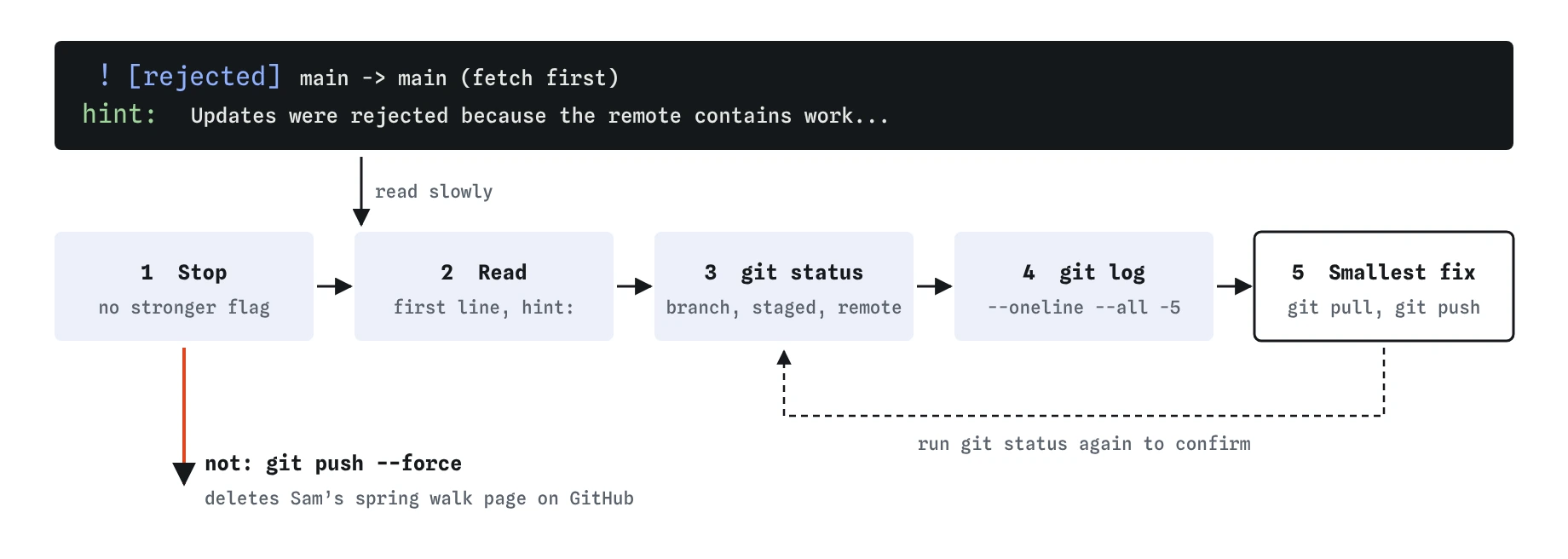
Use the same five steps for every error. They work for messages you have never seen before, which is the point.
git status
git log --oneline --all -5- Stop. Do not retry the same command with a stronger flag. Errors from Git rarely go away by insisting.
- Read the first line of the message, then any
hint:lines. Note the key words: rejected, upstream, not fully merged, pathspec, conflict, would be overwritten. - Run
git status. It tells you the branch, whether you are mid-merge, what is staged, and how you compare to the remote. Half of all puzzles end here. - Run
git log --oneline --all -5or look at the Graph view to see where your branch and the remote actually are. - Choose the smallest fix that deals with the cause, run it, and run
git statusagain to confirm.
git pull then git push, and a final git status confirms both the heron and Sam's walk page made it.What does a rejected push mean?
The message reads [rejected] main -> main (fetch first) followed by Updates were rejected because the remote contains work that you do not have locally. Someone, maybe a teammate or you on another laptop, pushed commits to GitHub after your last pull. Your push would make GitHub's main jump to your commit, skipping theirs, so Git refuses.
The fix is to bring their work in and then push: git pull, then git push. The pull fetches the new commits and merges them with yours. If both of you edited the same lines, you get a merge conflict to resolve first, which you already practised. In the demo, Sam added a spring walk page while you added a heron; the pull joins both and the push succeeds.
A force push makes the error vanish by deleting Sam's commit from GitHub. That is why AI tools that reach for --force here cause so much trouble. In real Git, you may also see non-fast-forward, which means the same thing seen from a slightly different angle.
git push  # fails on purpose
git pull
git push
What does "no upstream branch" mean?
The message fatal: The current branch main has no upstream branch means your branch does not know which remote branch it pairs with yet. Plain git push has no target. Git even prints the fix: git push --set-upstream origin main, which you can shorten to git push -u origin main.
You only need -u once per branch. After that, git push and git pull on that branch know where to go, and git status starts reporting "ahead" and "behind" counts. If you see this error on a brand new branch such as photos, run git push -u origin photos.
A related message, fatal: 'origin' does not appear to be a git repository, means there is no remote called origin at all. Check with git remote -v, and add one with git remote add origin <url>.
git remote -v
git branch -a
What does "not fully merged" mean?
When git branch -d photos replies error: the branch 'photos' is not fully merged, Git is telling you that the branch has commits no other branch contains. Delete it and those commits become hard to find. The capital -D deletes anyway, which is what you want only if the work really is rubbish.
Usually the calm fix is to merge first: git switch main, git merge photos, then git branch -d photos. Now the commits live on main and Git deletes the branch label without fuss. If you are not sure whether you need the work, keep the branch. Branches are cheap, and an extra label hurts nobody.
Similar protection appears when you try to switch branches with uncommitted edits that would be overwritten: Your local changes to the following files would be overwritten by checkout. Commit or git stash the edits, then switch.
What do pathspec and nothing-to-commit errors mean?
error: pathspec 'Index.html' did not match any file(s) known to git means the name you typed does not exist as written. Check the spelling and capitals with ls. File names on web servers and in Git are case-sensitive, even when your laptop's file browser is not. The same error appears for branch names: git switch phtos fails because there is no such branch.
nothing to commit, working tree clean is a refusal too, and a reassuring one: every change is already saved. If you expected changes, maybe you saved the file in a different folder, or you already committed. If Git says no changes added to commit, you edited files but did not stage them; run git add first.
Aborting commit due to empty commit message happens here when you run git commit without -m. On your own computer, Git would open a text editor instead; the practice terminal has no editor, so always pass -m "message".
ls
git switch phtos  # fails on purpose
git commit  # fails on purpose
How do you get help without making it worse?
When the routine does not solve it, ask for help with the full picture. Copy the exact command you ran, the full error message, and the output of git status and git log --oneline --all -5. Those three things let a teammate, a forum or an AI tool see your actual situation instead of guessing.
Before trying any fix you do not understand, make a safety branch: git branch before-fix. If the fix goes badly, git switch before-fix returns you to where you were. Avoid anything with --force, --hard or -D until someone has explained why it is needed for your case.
Errors are also good news in disguise. A refusal means Git noticed a problem before it did damage. The commands that deserve real caution are the ones that run silently and destroy things, which is why the previous lesson focused on them.
git branch before-fix
git branch
Field notes
- A refusal from Git usually means it is protecting work.
- Read the first line of the error, then run
git status. - A rejected push means the remote has commits you need to pull first.
- "No upstream branch" is fixed by pushing once with
-u.
Easy to get wrong
The refusal protects commits someone else pushed. Pulling merges them in; forcing deletes them from GitHub.
The capital D deletes unmerged work. Merging first keeps the commits and lets the safe delete succeed.
Git gives the same answer to the same situation. Status tells you what situation you are in, which is what needs to change.
Questions people ask
What if `git pull` gives me a merge conflict?
Open the conflicted files, choose the lines to keep, remove the markers, then git add and git commit. If you want to back out, git merge --abort returns you to before the pull.
Why does Git say I am "ahead by 2 commits"?
You have two commits that the remote branch does not have yet. That is normal after committing. git push sends them and the count drops to zero.
What does "detached HEAD" mean in an error?
You are looking at a commit directly instead of a branch. New commits there belong to no branch. Run git switch main to go back, or git switch -c new-name to keep the work on a new branch.
Is it safe to copy the hint line Git prints?
Usually yes. Git's own hints point to the standard fix, such as git pull or git push --set-upstream. Still read it first, because the hint cannot know whether you meant to be on that branch.