What are you merging in this milestone?
The Finch Street Bakery site has three files: index.html, menu.html and style.css. Two pieces of work happened on separate branches. On new-prices, the owner raised the sourdough loaf from 4.00 to 4.50. On spring-menu, the baker renamed it to a seeded sourdough, added a lemon tart, and gave the menu items more line spacing in style.css.
Both branches started from the same commit on main, and both changed the sourdough line. The goal is a menu that respects both decisions: the new name, the new price and the new tart. Start by looking at what you have. The Graph view shows main with two branches growing out of it.
git branch
git log --oneline --all
git diff main new-prices
git diff main spring-menu
Why merge new-prices first, and what is a fast-forward?
Order matters a little. new-prices is a single small commit and main has nothing new since the branches split, so merging it is a fast-forward: Git moves the main label ahead to the price commit and creates no merge commit. Git prints Fast-forward, and the Graph shows main sitting on the same dot as new-prices.
Merging the small, certain change first means the second merge has one clear question to answer. If you merged spring-menu first, you would meet the same conflict from the other direction. Either order works; the steps below assume prices first.
git merge new-prices
git log --oneline -3
What happens when spring-menu meets the new price?
Run git merge spring-menu. Git applies the style.css change without trouble, because nobody else touched that file. In menu.html, both sides changed the sourdough line, so Git stops with a conflict and the summary line shows a merge in progress.
Open menu.html. The top half of the marker block, under <<<<<<< HEAD, holds main's lines: the 4.50 sourdough and the cinnamon bun. The bottom half, above >>>>>>> spring-menu, holds the seeded 4.00 sourdough, the cinnamon bun and the lemon tart. The practice terminal groups everything between the first and last difference into one block, so the bun appears on both sides. Real Git often splits this into smaller blocks; the decision is the same.
git merge new-prices
git merge spring-menu  # fails on purpose
git status
cat menu.html
How do you combine both sides into one answer?
Neither half is right by itself. The top half has the right price and the old name. The bottom half has the right name, the lemon tart and the old price. Write the list you want: Seeded sourdough loaf 4.50, Cinnamon bun 2.50, Lemon tart 3.20, each in its own <li>, and delete every marker line.
This is the most common real resolution: take a piece from each side. It is also where people slip, because it is tempting to delete one half and move on. Before saving, read each line of the bottom half and ask whether it still appears in your result. Then do the same for the top half.
Save the file, run git add menu.html, and check git status. It should say all conflicts are fixed and you are still merging. Run git diff --staged to read exactly what the merge commit will bring into main.
- Name from spring-menu: seeded sourdough.
- Price from new-prices: 4.50.
- New item from spring-menu: lemon tart.
- Unchanged line from both: cinnamon bun.
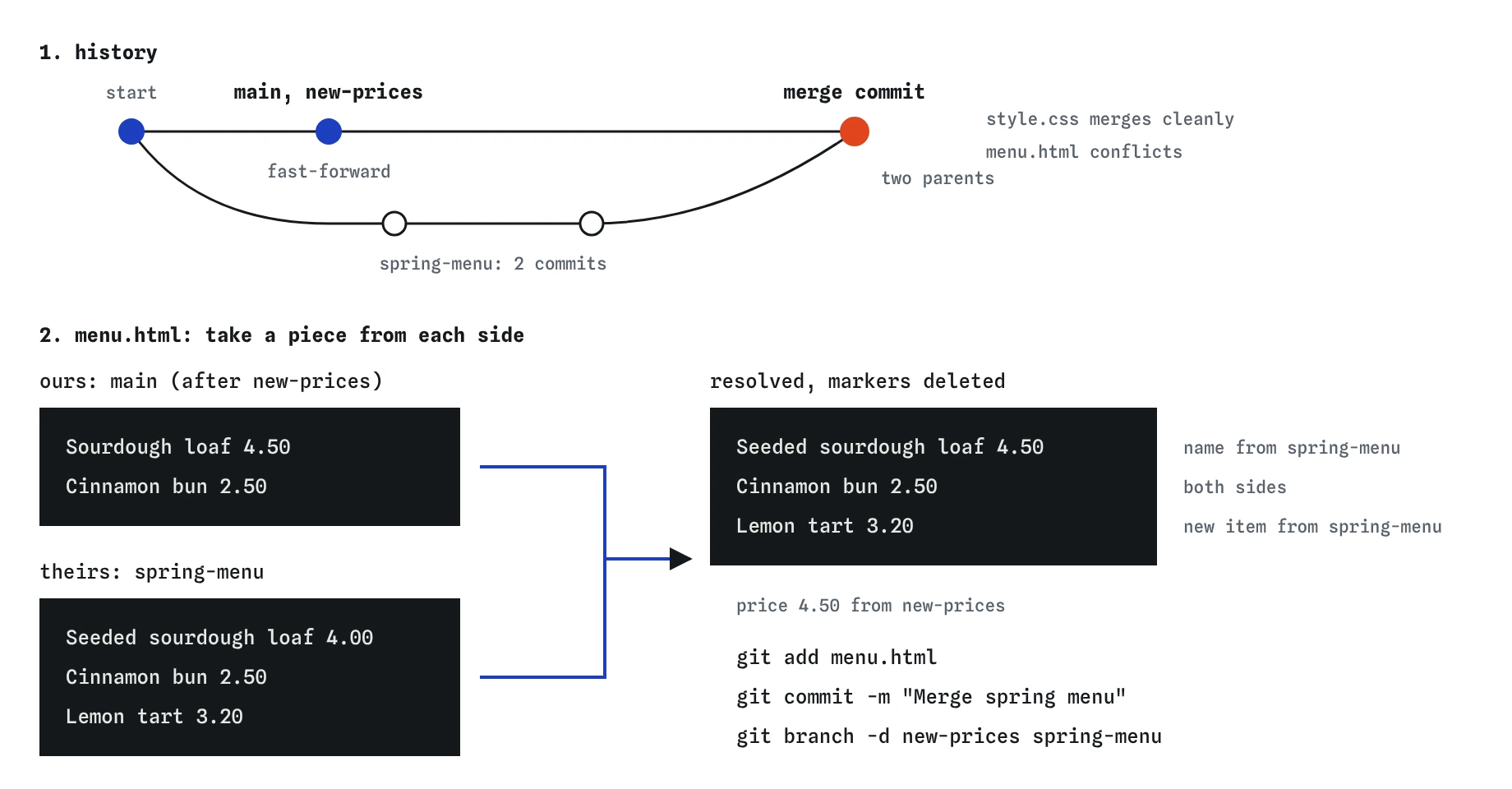
new-prices change first, then spring-menu. Neither half of the conflict is right alone: the result keeps the 4.50 price, the seeded name, the cinnamon bun and the lemon tart.How do you finish and check the result?
Run git commit -m "Merge spring menu". The Graph now shows spring-menu's two commits joining main at a merge dot with two parents. git log --oneline lists the merge, both spring commits, the price commit and the first commit.
Then check the finished files as well as the history. Run cat menu.html and confirm the three items and the 4.50 price. Run cat style.css and confirm the line-height rule arrived. On a real site you would also open the page in a browser, because a stray ======= line shows up as text on the page and nobody notices it in a terminal.
Two quick history checks are useful too. git log --oneline --all should show no branch tips sitting off to the side, because both branches are now inside main. git show HEAD on the merge commit lists the files the merge changed compared with its first parent, which here means the menu and the stylesheet. If index.html appeared in that list, something unexpected came along with the merge, and you would want to find out what before publishing the site.
git merge new-prices
git log --oneline --all
cat style.css
Why delete the branches afterwards?
After a merge, the branch labels new-prices and spring-menu point at commits that are already part of main. They are finished. Deleting them with git branch -d removes only the label; every commit stays in main's history. A short branch list makes it obvious which work is still open.
The lowercase -d is the safe version. Git refuses to delete a branch whose commits are not yet merged into the branch you are on, and prints a hint telling you so. The capital -D deletes regardless, which is how unmerged work gets lost. Use -d, and if Git refuses, find out why before reaching for -D.
git merge new-prices
git branch -d new-prices
git branch
What would you do differently on a real team?
On a team the same conflict usually appears inside a pull request: GitHub reports that the branch cannot be merged automatically. You resolve it the same way, either on GitHub's conflict editor for small cases or locally by merging main into your branch, fixing the markers, committing and pushing again.
Talk to the person on the other side. Here the owner and the baker each made a reasonable change, and the combined line was only obvious once you read both. When the right answer is unclear, ask before committing. A two-line message to a colleague is faster than a second fix later.
Finally, keep this checklist close: clean folder before merging, small branch merged first, read both halves, write the combined result, search for markers, git add, commit, check the page, delete merged branches.
Field notes
- Merging a branch with no competing changes is a fast-forward that only moves the label.
- A good resolution can mix both sides, keeping the right parts of each.
- Check the finished file and the log before you move on.
git branch -dremoves branch labels whose work is already part ofmain.
Easy to get wrong
Choosing one half drops a real decision someone made, and nothing in Git warns you about it.
The capital -D skips the safety check, so a branch with unmerged commits is deleted without a warning.
A single leftover marker or a missing line is easy to spot in ten seconds and annoying to find on the live site.
Questions people ask
Why did the first merge not create a merge commit?
main had no commits of its own since new-prices branched off, so Git moved the label forward. That is a fast-forward, and there is nothing to join.
Could I have avoided the conflict?
Only by not changing the same line on two branches at once. Merging main into spring-menu after the price change would have shown the conflict earlier, to the person who knew the menu best.
What if I realise later that the price was wrong?
Edit the file and commit a normal fix. You do not need to redo the merge.
Is the practice terminal's conflict block the same as real Git's?
Close. Real Git can split one big block into several smaller ones and can show the original lines too if you turn on the diff3 style. The markers and the steps to resolve are the same.