What does git init actually do?
Running git init inside a folder creates a hidden subfolder called .git. That folder is the repository: it will hold every commit, every branch name and Git's settings for this project. Your own files stay exactly where they were and are not changed or copied.
Right after git init the repository is empty. There are no commits and nothing is tracked. git status reports No commits yet and lists your existing files as untracked, which means Git can see them but has never saved them.
Run git init once per project, in the project's top folder. Running it again in the same folder is harmless: Git says it reinitialised the existing repository and leaves your history alone.
git init
git status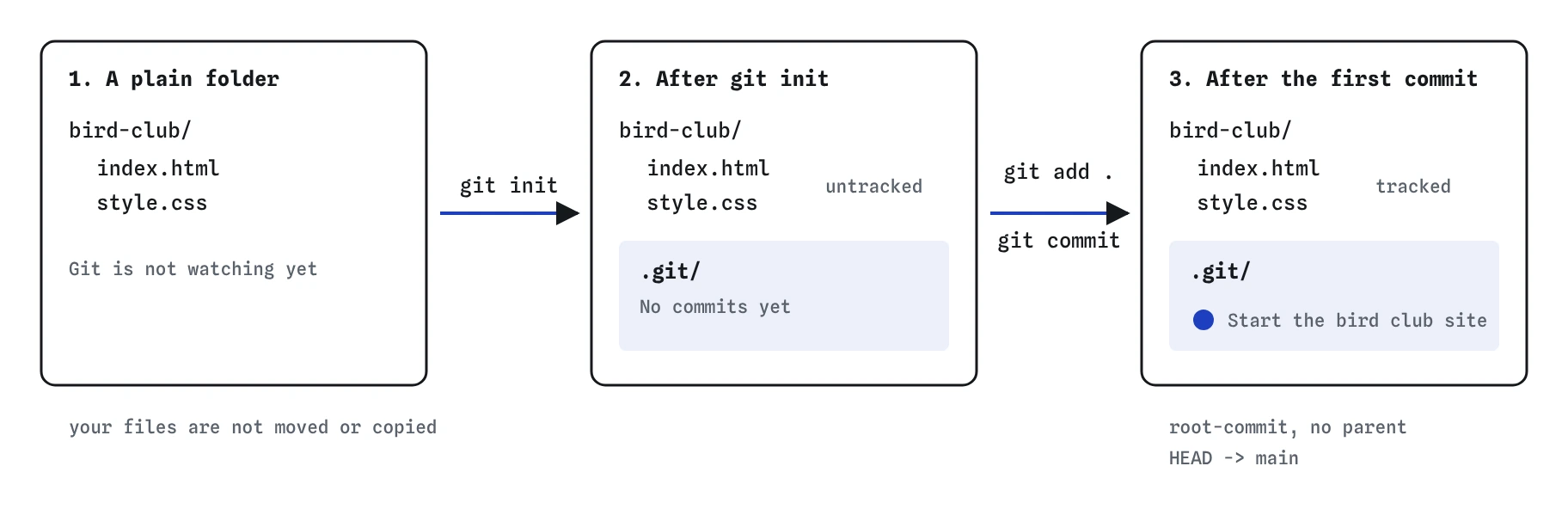
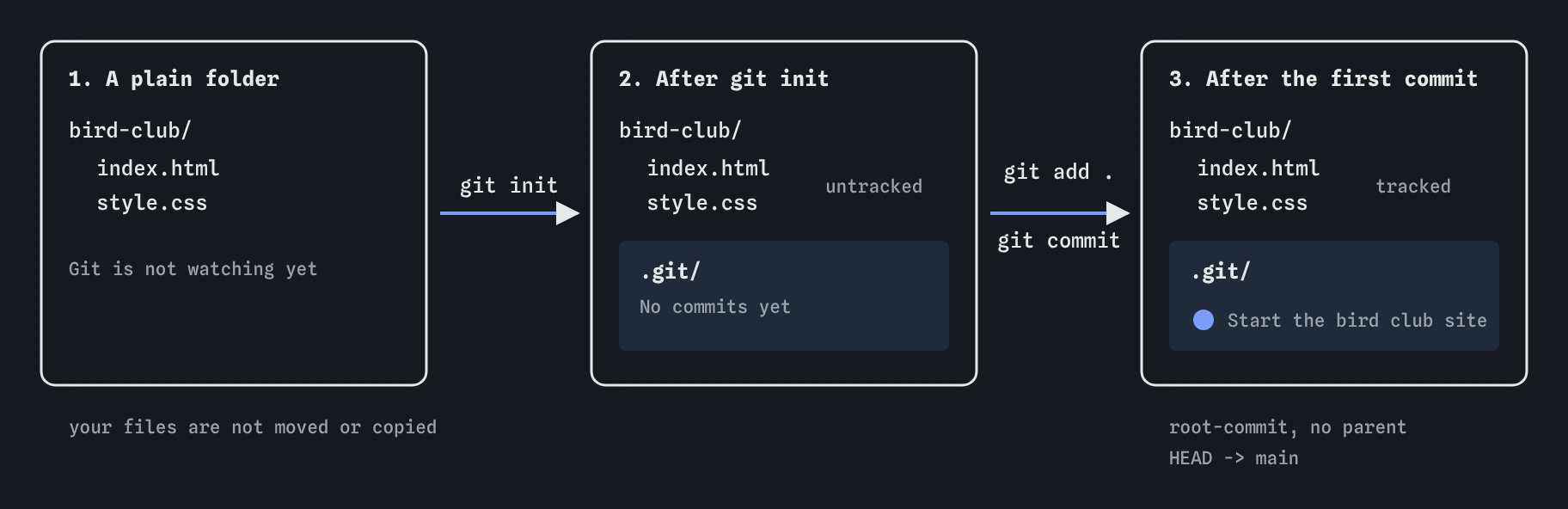
git init only adds a hidden .git folder beside your files. The history starts empty until git add . and git commit make the root commit that main points to.Which folder should I run it in?
Run it in the folder that holds the whole site, the one with index.html in it. Everything inside that folder, including subfolders such as images/ and css/, belongs to the repository.
Two mistakes are common. The first is running git init in your home folder, which makes Git consider every document, download and photo on the computer part of one giant project. If git status suddenly lists Desktop/ and Documents/, that is what happened. Deleting the stray .git folder in the home folder undoes it and removes nothing else.
The second is creating a repository inside another repository by accident, for example running git init in bird-club/images/. Keep one repository per project. A quick test before you start: run git status first. If it already works, you are inside a repository and do not need git init.
Why does Git need my name and email?
Every commit records an author. Git takes the name and email from two settings, user.name and user.email. On a fresh install, real Git refuses to commit until they are set and prints a message asking who you are.
Use git config --global user.name "Robin Ellis" once on your own computer and every repository picks it up. Leave out --global to set it for one project only, which is handy when the bird club repository should use a different email from your work projects. The practice terminal keeps settings per repository, so the plain form is what it understands.
Git accepts any email. If you later push to GitHub, it uses that email to link commits to your account. GitHub can give you a private no-reply address if you would rather not publish your own.
git init
git config user.name "Robin"
git config user.email "[email protected]"
git config user.name
How do I make the first commit?
The first commit works like any other. Stage the files, then commit with a message. git add . stages everything in the current folder that is not ignored, which on a brand new site is usually what you want.
Before you commit, run git status once more and read the list under Changes to be committed. This is your last easy chance to spot a file that should never be in history: a notes file with passwords, a members list, an .env file with API keys. The lesson on ignoring files shows how to keep such files out permanently.
Git labels the first commit root-commit because it has no parent. The Graph view shows it as a single dot with main on it. Every later commit points back to it.
git init
git add .
git status
git commit -m "Start the bird club site"
git log --oneline
What is inside the .git folder?
You can look, but you should not edit anything in it by hand. It contains the stored snapshots, a file called HEAD that records which branch you are on, a config file with this repository's settings, and folders for branches and tags.
Most file managers hide it because its name starts with a dot. On macOS press Cmd+Shift+. in Finder to show hidden files; on Windows turn on Hidden items in File Explorer's View menu; in a terminal use ls -a.
Deleting .git deletes the whole history, and nothing in your working files changes. Sometimes that is exactly what you want, such as after running git init in the wrong place. Never do it to a project whose history you need unless a copy exists elsewhere, for example on GitHub.
When should I use git clone instead?
Use git init when the project starts on your computer. Use git clone <url> when it already exists somewhere else, such as a GitHub repository a friend set up for the bird club. Cloning downloads the whole history, creates the folder, and sets up a remote called origin that points back at the source.
Do not run git init and then try to pull someone else's repository into it. That creates two unrelated histories that Git refuses to combine without extra flags. If a project is already on GitHub, clone it.
Remotes and cloning get their own lessons. For now the rule is short: new project, git init; existing project, git clone.
What are the differences between this terminal and real Git?
The practice terminal starts every project in /home/you/project and names the first branch main. On your own machine, older Git versions name it master unless you set git config --global init.defaultBranch main, which is worth doing once so your repositories match GitHub's default.
Real Git will refuse your first commit if user.name and user.email are missing. The simulator fills in a placeholder so you can keep practising. Real Git would show the name and email you configured.
What should I check when an AI tool sets up a repository?
Setup instructions from AI tools are usually right in outline and wrong in small, sticky details. Check these before running them.
- It runs
git initin the project folder, not in your home folder or a parent folder. - It does not run
git initin a folder that came fromgit clone. That folder is already a repository. - It checks
git statusbeforegit add ., so secret or huge files do not slip into the first commit. - The name and email it suggests are yours, not a placeholder such as
Your Name. Fix them withgit configbefore committing.
Field notes
git initcreates a hidden.gitfolder that holds the whole history.- Run it in the top folder of the site, the one containing
index.html. - Git records an author on every commit, taken from
user.nameanduser.email. - The first commit is made like any other: stage the files, then commit with a message.
Easy to get wrong
Git treats everything below the folder as one project, so status fills with unrelated files and git add . could stage your whole computer.
Once a secret file is committed it stays in history, even after you delete it in a later commit.
Clone copies the existing history and sets up origin. Init plus pull produces two unrelated histories that Git refuses to merge.
Questions people ask
Can I undo git init?
Yes. Delete the hidden .git folder. Your files are untouched, and the folder goes back to being an ordinary folder with no history.
Does git init upload anything?
No. Everything stays on your computer. Nothing reaches GitHub until you add a remote and push.
Should every project have its own repository?
Yes, for websites that is the normal setup. One repository per site keeps its history, settings and publishing separate.
What does untracked mean?
Git can see the file in the folder but has never saved it in a commit. It will ignore the file's changes until you add it.