What are you building here?
This milestone puts your own profile page under version control, from an empty folder with no history to a small repository with a clean record of how the page grew. The folder has four files: index.html, style.css, a private-notes.txt with the rates you quoted to clients, and a .DS_Store that macOS left behind.
By the end you will have run every command from the earlier lessons in a real order: git init, a .gitignore, staging, committing, git diff, git log. The Graph view should show at least three dots, and none of them should contain your private notes.
Keep the Areas view open as you go. Watching files move from working folder to staging area to commit is the habit you are building.
How do you start the repository?
Run git status first. Git answers that this is not a repository, which is a useful thing to recognise: it means you are in the wrong folder or have not run git init yet.
Then run git init. Git creates a hidden .git folder and puts you on a branch called main with no commits. git status now lists all four files as untracked, including the two you never want in history.
git status # fails on purpose
git init
git status
Why write .gitignore before the first commit?
The first commit is where private files most often sneak in, because git add . is the obvious first command and it stages everything. If .gitignore exists before that, the private files are skipped and the problem never happens.
Write two lines in .gitignore: .DS_Store and private-notes.txt. Run git status again and both names vanish from the list. Commit .gitignore on its own with a message such as "Ignore private files". A small first commit like this is common in real projects.
If you ever do commit a private file before ignoring it, git rm --cached <file> stops tracking it. The copy inside the older commit stays there, which is why getting the order right from the start is worth the extra minute.
git init
echo ".DS_Store" > .gitignore
echo "private-notes.txt" >> .gitignore
git status
git add .gitignore
git commit -m "Ignore private files"
How should you group the next commits?
Commit the page and the stylesheet together, since they are one working version of the site: git add index.html style.css, then git commit -m "Add my profile page". Naming the files makes you look at what you stage, which git add . hides.
Then make a real change. Add a Projects heading and a list item to index.html, for example the bakery site you worked on. Before committing, run git diff: it shows the new lines with a plus sign. Reading your own diff before each commit catches stray edits and leftover test text.
Because index.html is already tracked, git commit -am "Add a projects section" stages and commits it in one step. The -a flag only picks up tracked files, so a new file would still need git add.
git init
git add index.html style.css
git commit -m "Add my profile page"
echo "<h2>Projects</h2>" >> index.html
git diff
git commit -am "Add a projects section"
git log --oneline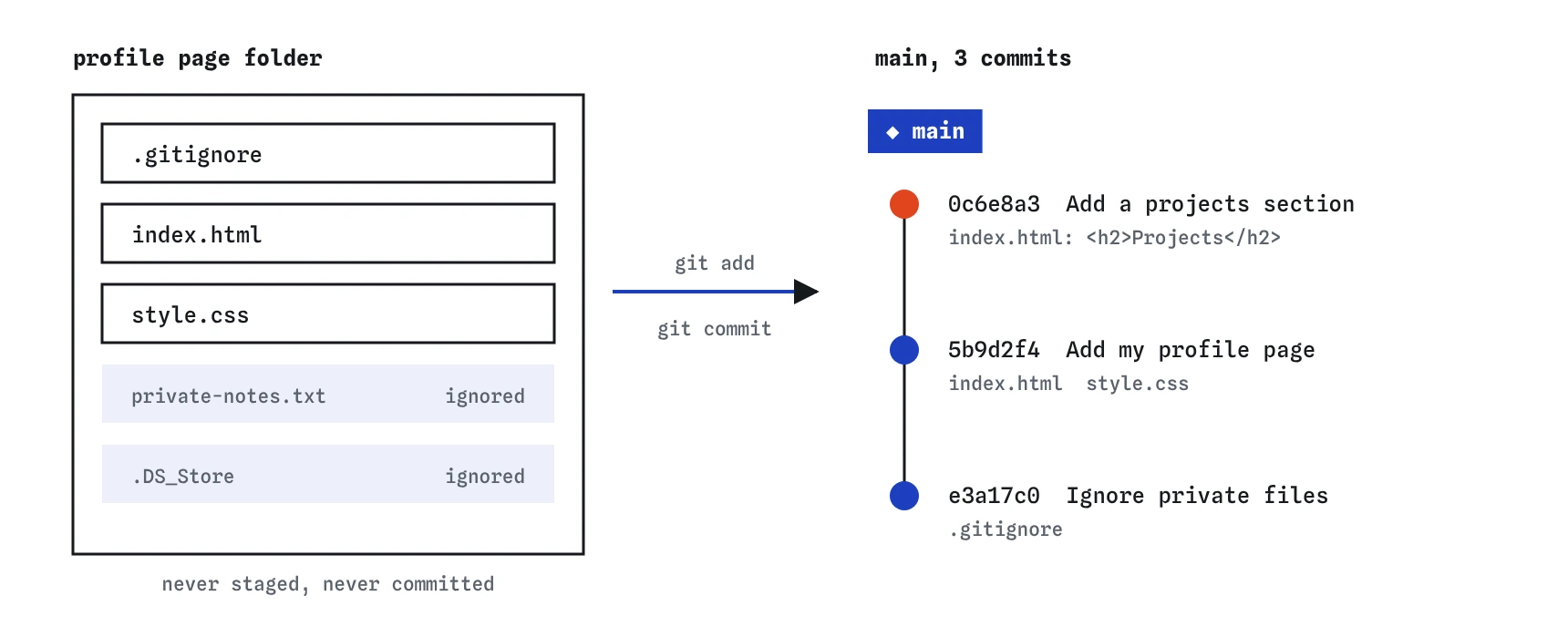
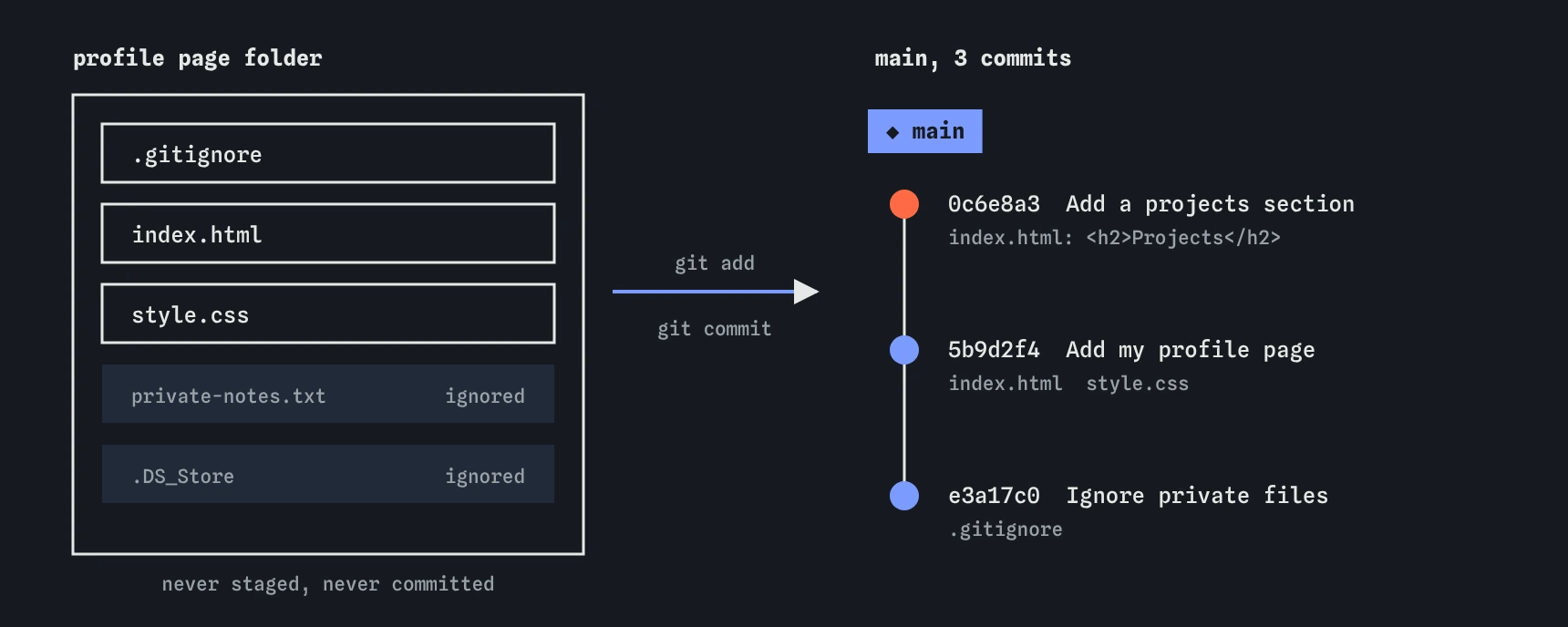
.gitignore was written first. Each of the three commits holds one clear step of the page.What makes this history useful later?
Run git log --oneline and read the messages from the bottom up. "Ignore private files", "Add my profile page", "Add a projects section": anyone can follow what happened and roughly when. That is the point of small commits with plain messages.
Each dot in the Graph is a version you can return to. If a later redesign goes badly, git restore --source=HEAD~1 index.html gets back an earlier page, and git revert can undo one step cleanly. Those tools only work well when each commit does one thing.
A rhythm that suits a small personal site: commit whenever the page works and you finished one idea, such as a new section, a colour change or a fixed link. Several commits a session is normal.
How do you fix a slip along the way?
Mistakes during a milestone are part of the exercise. If you typo a message, git commit --amend -m "Better message" replaces it while the commit is still only on your machine. If you forgot a file, stage it and run git commit --amend --no-edit.
If you staged something you did not mean to, git restore --staged <file> takes it back out. If you committed one step too many, git reset --soft HEAD~1 undoes the commit and keeps the changes staged.
None of these touch a remote, because there is none yet. That makes now the cheapest time to tidy. Once you push in a later lesson, amend and reset get riskier.
git init
git add .
git restore --staged private-notes.txt
git status
How do you know you're done?
When all four hold, the profile page has real history. The next lessons build on this same habit: branches let you try a redesign without touching main, and merging brings the good parts back.
git statussays the working tree is clean.git log --onelineshows at least three commits with messages that describe the change.- The Files view lists
.DS_Storeandprivate-notes.txtwithout any mark: ignored, never committed. git show HEADprints the Projects lines you added.
How do you check each step in the Areas view?
After git init, every file sits in the working folder column marked new. After writing .gitignore, two of them drop off the view entirely, because Git no longer looks at them. That disappearance is your proof that the patterns work.
After git add .gitignore, one file moves into the staging area. After the commit, it moves into the last commit column and the staging area empties again. Repeat the pattern for the page and stylesheet, and you can predict each move before you press Enter.
When you edit index.html for the Projects section, it reappears in the working folder marked changed. If the view ever shows something you did not expect, stop and run git status before committing. Reading the state first is cheaper than undoing a commit later.
What would an AI assistant often skip here?
A typical generated setup is git init, git add ., git commit -m "Initial commit", git push. That sequence commits whatever is in the folder, private notes and all, under a message that says nothing. Insert a .gitignore and a git status check before the first add, and split the first commit if it mixes unrelated things.
Assistants also tend to write .gitignore templates for frameworks you are not using. For a static profile page, two or three lines is enough.
Field notes
- Write
.gitignorebefore the first commit so private files never enter history. - Group files that make one working version of the page into one commit.
- Clear messages let anyone follow the story in
git log --oneline. - You are done when
git statusreports nothing left to commit.
Easy to get wrong
git add . stages every untracked file. Without the ignore rules, your private notes go into the first commit.
A message is a note to your future self. It should say what changed.
-a only stages files Git already tracks. A new file stays untracked and is left out.
Questions people ask
Should the first commit hold everything?
It can, but small steps make history easier to read. Many people commit .gitignore first, then the starting files.
Can I rename main?
Yes: git branch -m main home renames it. Keeping main matches GitHub's default and avoids confusion later.
What if I already committed my notes?
Run git rm --cached private-notes.txt, add it to .gitignore, and commit. If you have not pushed, a reset can remove the commit entirely, which the reset lesson shows.
Do I need a GitHub account yet?
No. Everything here happens on your machine. Pushing to GitHub comes in a later group of lessons.