Who reads commit messages?
Mostly you, months from now. A customer says the website showed the wrong price in March, and you scroll through git log --oneline looking for the change. Each line is a short id and a message. With messages such as update, fix and more changes, the log tells you nothing and you end up opening commits one by one.
With messages such as Raise puncture repair to 12 pounds and Add bank holiday closing notice, the answer is on the screen in seconds. The message is the only part of a commit written for humans, so give it the ten seconds it takes.
Other readers come later: a friend helping with the shop site, a hosting tool that shows the latest commit message on each deploy, and AI assistants that read your history to understand the project.
git log --oneline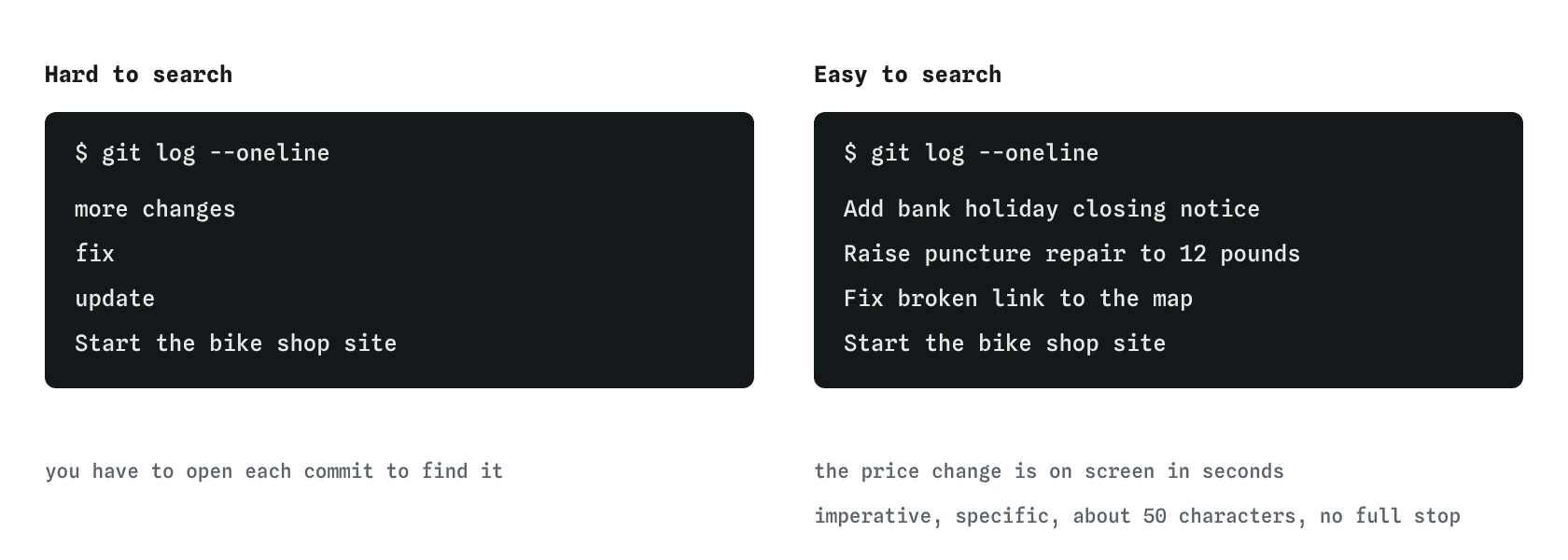
Raise puncture repair to 12 pounds, the log answers your question without opening a single commit.What makes a good summary line?
The first line of the message is the summary. Write it as an instruction that completes the sentence "If applied, this commit will...": Add Saturday opening hours, Fix broken link to the map, Remove old winter prices. This imperative style matches the messages Git writes itself, such as Merge branch 'menu' and Revert "Add banner".
Keep it short. Around 50 characters is a common target and 72 is a firm ceiling, because git log --oneline, GitHub's commit lists and most editors cut the line off past that. Start with a capital letter and leave off the full stop, the way you would write a heading.
Name the specific thing. Fix typo is better than fix; Fix typo in service prices is better still. If you cannot describe the commit in one short line, it probably contains two changes.
- Vague:
update,changes,stuff,wip,final,final2. - Better:
Update prices. - Good:
Raise puncture repair to 12 pounds.
When does a commit need a body?
The summary says what changed. A body explains why, when the reason is not obvious from the change itself. A price change probably needs no body. A change that removes the online booking form deserves one sentence: "Bookings now go through the phone line because the form attracted spam."
With -m, each extra -m adds a new paragraph. The first becomes the summary, the second becomes the body. Real Git leaves a blank line between them, which is how tools tell the two apart. The simulator stores the message too, though its log shows only the summary.
Bodies are also the right place for detail that would make the summary too long: which pages are affected, a link to the issue, or a note such as "Prices take effect from 1 May".
git add prices.html
git commit -m "Raise puncture repair to 12 pounds" -m "Inner tube costs went up in April."
git log -n 1
How does a message relate to the size of a commit?
A clean message is easy to write when the commit holds one change. If you find yourself writing Add holiday notice and raise prices and fix footer, the word "and" is telling you to split it. Stage one file or one change, commit it, then stage the next.
The staging area from the previous lesson is what makes this possible. The bike shop's index.html and prices.html can change on the same afternoon and still end up as two commits with two clear messages.
Small, well-named commits pay off when you need to undo. Reverting Raise puncture repair to 12 pounds affects exactly one price. Reverting a commit called lots of stuff affects whatever happened to be in it.
Can I fix a message after committing?
Yes, for the most recent commit, as long as you have not pushed it. git commit --amend -m "Better message" replaces the last commit with a new one that has the same changes and the new message. The Graph view shows the old dot fading and a new one taking its place.
Amending rewrites history, which is harmless on your own machine and causes trouble once others have the old commit. The rule of thumb: amend freely before git push, never after. A later lesson covers amend and its safer cousin, revert, in full.
Older commits can also be reworded with interactive rebase on real Git. The practice terminal does not support rebase, and for a beginner the better habit is writing a decent message the first time.
git add prices.html
git commit -m "update"
git commit --amend -m "Raise puncture repair to 12 pounds"
git log --oneline
Are there message formats teams use?
Some teams add a prefix that labels the kind of change, a style called Conventional Commits: feat: add booking page, fix: correct Saturday hours, docs: explain deploy steps. Tools can read these prefixes to build changelogs automatically.
Other projects put an issue number in the message, such as Fix map link (#14), so GitHub links the commit to the discussion. Both are fine. On your own site, pick one format and use it every time.
If you join a project, read its last twenty messages with git log --oneline -n 20 and copy their style. Match the house style before any rule on this page, because a log that mixes three styles is harder to scan than one that consistently uses a style you would not have picked.
For a personal site such as the bike shop, plain imperative summaries with no prefix are plenty. Add a prefix scheme only if a tool you use reads it.
What do AI-written commit messages get wrong?
Editors and AI assistants can now draft commit messages from the diff. They are often decent and sometimes misleading, so read them before accepting.
- They describe the code instead of the purpose:
Change 10 to 12 in li elementinstead ofRaise puncture repair to 12 pounds. - They run long, with a summary line well past 72 characters and a body that restates the diff.
- They list everything in a mixed commit, which hides the real problem: the commit should have been two.
- They guess the reason. A body that says "to improve user experience" is filler unless that was actually why.
Field notes
- Your future self is the main reader of your commit messages.
- Write the summary as an instruction, such as
Add Saturday opening hours. - Add a body when the reason for a change is not obvious from the change itself.
- If a message needs the word "and", the commit probably holds two changes.
Easy to get wrong
One vague word cannot be searched. Name the thing that changed and how.
A list in the summary means the commit mixes changes. Split them so each one can be found and undone alone.
Amend creates a different commit. Anyone who already has the old one ends up with histories that disagree.
Questions people ask
Should I write in past tense, like Added menu?
Git's own messages and most projects use the imperative, Add menu. Past tense works, but pick one style and keep to it so the log reads consistently.
Can I use emoji in commit messages?
Git stores them fine. Some teams like them; many terminals and tools display them poorly. Words are easier to search.
What message should the very first commit have?
Something plain such as Start the bike shop site or Initial commit. It only needs to mark where history begins.
How do I search old messages?
On real Git, git log --grep="puncture" lists commits whose message contains the word. In the practice terminal, scan git log --oneline.