What counts as a secret?
A secret is any value that lets someone act as you or as your site: API keys for maps or payments, database passwords, tokens for email services, private SSH keys, and the session secret your web framework uses to sign cookies. If a stranger could copy it and run up a bill, read customer data or post as you, it is a secret.
The bike shop's map widget needs a key from a map provider. Anyone holding that key can make requests that the shop pays for. Keys in public repositories are found quickly: automated scanners watch GitHub for new pushes, and leaked keys are often abused within minutes.
The examples in this course use obviously fake values such as EXAMPLE_KEY_123. Do the same in screenshots, tutorials and questions you post online.
Where should the key live instead?
Keep secrets out of files that Git tracks. The usual arrangement is a .env file in the project folder with lines such as MAPS_API_KEY=EXAMPLE_KEY_123, read by your build tool or server at run time. On a hosting service you enter the same values in its settings page for environment variables, so the live site gets them without the file.
The .env file stays on your computer only. Git must never see it. Look at map.js in the practice folder: it reads the key from a setting rather than writing the value into the code. Code can be shared; the value cannot.
One limit applies to every website: anything sent to the browser can be read by visitors. A key used in browser code is public by nature, so map providers let you restrict a browser key to your own domain. Truly private keys, such as payment secret keys, belong only on a server.
How does .gitignore protect a .env file?
Run git status in the practice folder. .env appears under Untracked files. It is uncommitted, yet one careless git add . would put it in the next commit. Create a .gitignore file containing the line .env, and run git status again: the file disappears from the list. Git now skips it for git add . and git add -A.
Commit .gitignore itself so everyone who clones the project gets the same rule. Add the rule before the first git add . in a new project, ideally in the very first commit. Many project templates already include .env in their .gitignore; open it and check instead of assuming.
git status
echo ".env" > .gitignore
git status
git add .
git status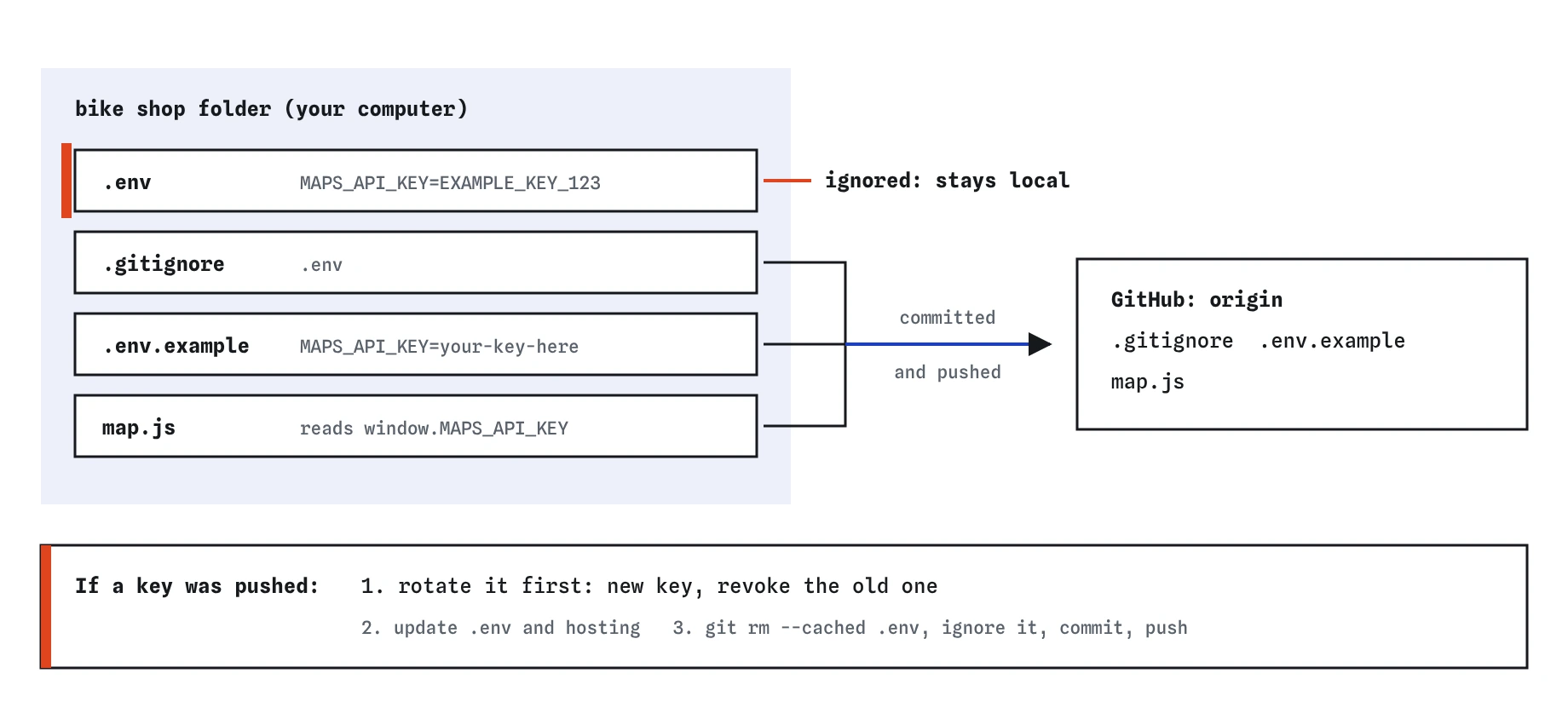
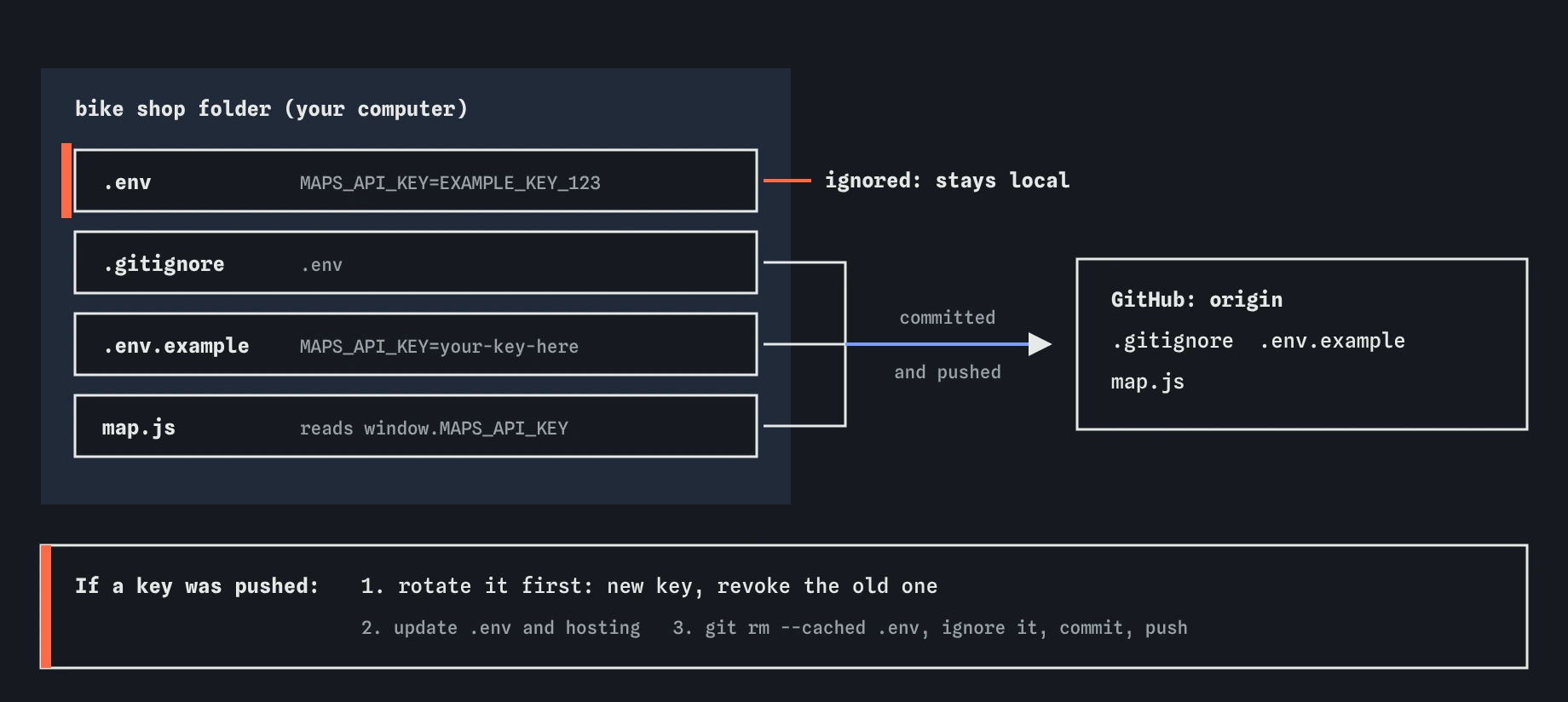
.env.example travels to GitHub; the real value in .env stays on your computer. If a key ever reaches GitHub, rotate it at the provider before cleaning up Git.What is .env.example for?
Someone who clones the bike shop site needs to know which settings to create, without seeing the real values. A .env.example file lists every name with a placeholder, such as MAPS_API_KEY=your-key-here, and is committed like any other file. New contributors copy it to .env and fill in their own values.
Keep the example up to date whenever you add a setting, and never paste a real value into it to save time. A real key in .env.example is exactly as public as one in .env.
echo "MAPS_API_KEY=your-key-here" > .env.example
git add .env.example
git status
Why does .gitignore not help once a file is tracked?
Ignore rules only apply to untracked files. If .env was already committed, adding it to .gitignore changes nothing: Git keeps tracking it and keeps committing changes to it. You have to stop tracking it with git rm --cached .env, which removes it from the next commit but leaves your copy on disk.
Even then, the old commits still contain the key. Anyone who can read the history can find it with git log and git show. Removing a file from the latest commit never removes it from the commits before.
echo ".env" > .gitignore
git add .env  # fails on purpose
git status
What if you committed a key but have not pushed?
Check first with git status: if it says your branch is ahead of origin/main, the commit is only on your computer. Undo it with git reset HEAD~1. That moves the branch back one commit and keeps all your files, now as uncommitted changes. Add .env to .gitignore, then git add . and commit again; the new commit has your work and no key.
If the key went in several commits ago and nothing is pushed, the same idea applies with a larger reset, but slow down and use git log --oneline to count. When in doubt, treat the key as leaked and rotate it. It costs a few minutes at the provider and removes the risk entirely.
What do you do if a key was pushed?
Rotate the key first. Go to the provider's dashboard, create a new key, update your .env and your hosting settings with it, and revoke or delete the old one. Until the old key is revoked, assume someone has it. Do this step before anything in Git, because the key may already be copied.
Then clean up. Stop tracking the file with git rm --cached .env, add it to .gitignore, commit and push, so the current version no longer contains it. Removing it from older commits needs a history-rewriting tool such as git filter-repo, followed by a force push and every collaborator re-cloning. On GitHub, cached views and forks can keep old commits around, and GitHub support can help with those. Because history cleaning is never a guarantee, rotation is the step that actually protects you.
Finally, check the provider's usage page for activity you do not recognise, and let your team know what happened.
- Rotate: create a new key and revoke the old one at the provider.
- Update
.envand your hosting settings with the new key. - Stop tracking
.env, ignore it, commit and push. - Optionally rewrite history, knowing copies may already exist.
- Check the provider's usage logs.
How can you catch secrets before they leave your computer?
Read git status before every commit and git diff --staged before committing anything unusual. A file named .env, credentials.json or id_rsa in the staged list should stop you. Prefer git add with file names over git add . when you are unsure what the folder contains.
GitHub's secret scanning and push protection recognise many key formats and can block a push that contains one, or alert you after the fact. Turn them on for your repositories. They are a safety net, not a replacement for keeping keys out in the first place.
AI assistants sometimes paste a key straight into a code sample, or suggest committing a config file that contains one so the project works on another machine. Move the value into .env, read it from the environment, and commit only the placeholder.
Field notes
- A secret is any value that lets someone act as you, such as an API key.
- Keep real values in a
.envfile and list.envin.gitignore. - A
.env.exampleshows the setting names with placeholder values. - If a key was pushed, replace it with a new one first and clean up after.
Easy to get wrong
Ignore rules do not apply to tracked files, and old commits still contain the key.
Scanners and clones may already have copied it. Only a revoked key is harmless.
The example file is committed and pushed, so anything in it is public.
Questions people ask
Is a private repository safe for keys?
Safer, not safe. Private repositories get shared, made public later, cloned onto laptops and given to new collaborators. Keep keys out of all repositories.
Does git rm --cached delete my .env file?
No. It removes the file from the staging area so the next commit no longer tracks it. Your copy on disk stays.
Why can I still see the key in an old commit after removing it?
Every commit is a snapshot. Removing a file creates a new snapshot without it; earlier snapshots are unchanged. Rotating the key makes the old value useless.
Can I ignore every file that starts with .env?
A pattern such as .env* does that, but it also ignores .env.example. Add a second line made of an exclamation mark followed by .env.example to keep the example tracked, because a leading exclamation mark turns a rule into an exception.