Which way of adding CSS should I use?
There are three. An external stylesheet, linked with <link rel="stylesheet"> in the head, is the normal choice. One file styles every page, and the browser caches it, so the second page loads faster. A <style> element holds CSS for one page. It suits a single-page demo or a small block of critical styles you want painted without waiting for a file. The style attribute applies declarations to one element.
The style attribute is hard to maintain and beats almost any selector in specificity, so a class rule cannot override it without !important. Keep it for values that code sets, such as a progress percentage passed in as a custom property.
Stylesheets in the head are render-blocking. The browser waits for them before it paints, which prevents a flash of unstyled content. That makes a slow stylesheet delay the whole page, so keep the file small and serve it from your own domain where you can.
<link rel="stylesheet" href="/css/site.css">
<style>
  .notice { border-left: 4px solid teal; }
</style>
<div class="bar" style="--progress: 40%">…</div>
What does the order of stylesheets change?
When two rules have the same specificity, the later one wins. That includes the order of <link> and <style> elements in the document. Put a third-party stylesheet first and your own after it, so your rules override theirs without a specificity fight.
The media attribute on <link> makes a stylesheet apply only when its query matches, such as media="print". The browser still downloads it but does not block rendering for it. CSS cascade layers (@layer) give finer control over which rules win, independent of order, and are supported in every current browser.
<link rel="stylesheet" href="/vendor/calendar.css">
<link rel="stylesheet" href="/css/site.css">
<link rel="stylesheet" href="/css/print.css" media="print">
How do I add JavaScript?
Use <script src="/js/app.js"></script> for an external file, or put code between the tags for an inline script. The script element always needs its closing tag, even with src, because it is a normal element. If you write <script src="app.js" />, the parser treats it as an open tag and swallows the rest of the page as script text.
An external script ignores any code written inside its tags. If you set src and also put code inside, only the file runs. Keep the two separate.
When should I use defer or async?
A plain <script src> in the head stops the HTML parser while the file downloads and runs. Nothing below it is parsed or shown until it finishes. Two boolean attributes change that for external scripts. They have no effect on inline scripts.
<head>
  <script defer src="/js/menu.js"></script>
  <script defer src="/js/gallery.js"></script>  <!-- runs after menu.js -->
  <script async src="https://stats.example/count.js"></script>
</head>defer: downloads in parallel and runs after the document is parsed, just before theDOMContentLoadedevent. Deferred scripts run in the order they appear. Use it for nearly all page scripts.async: downloads in parallel and runs the moment it arrives, possibly before parsing finishes and in any order. Use it for independent scripts like analytics that touch nothing else.- Neither: blocks parsing. The old advice to put scripts at the end of
<body>worked around this. Withdeferin the head, the download starts sooner.
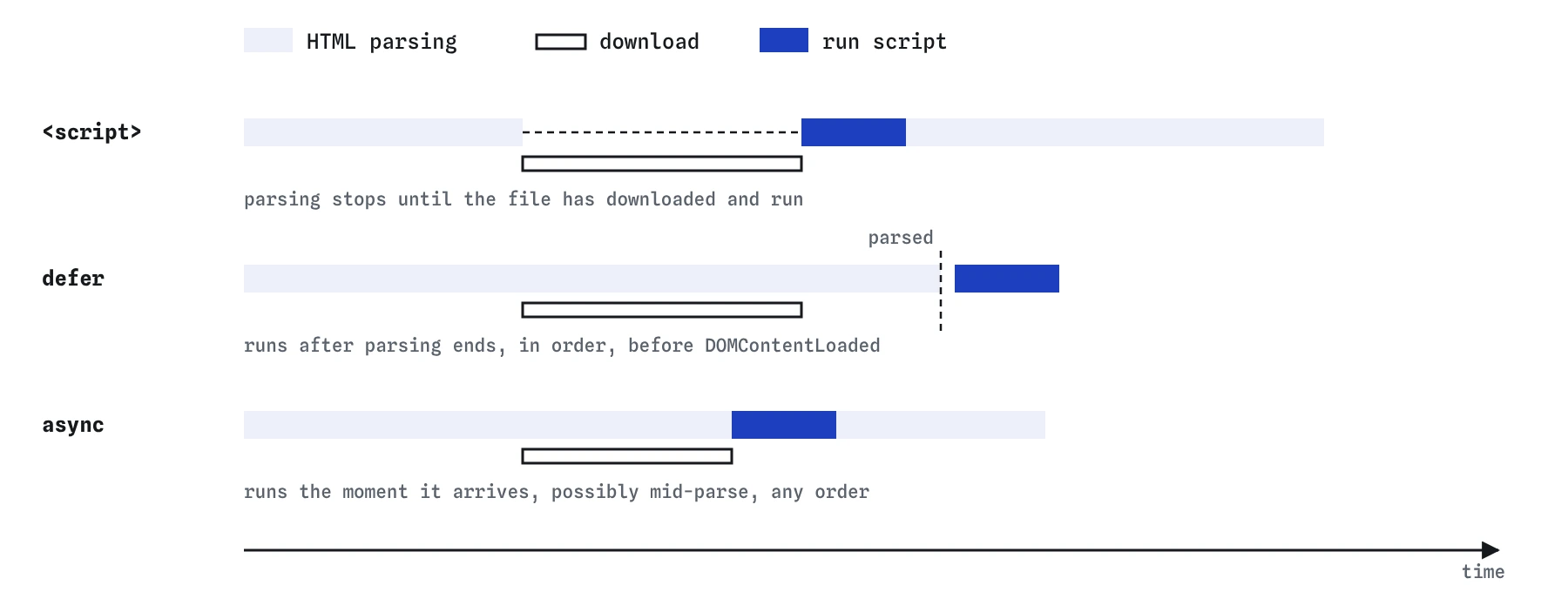
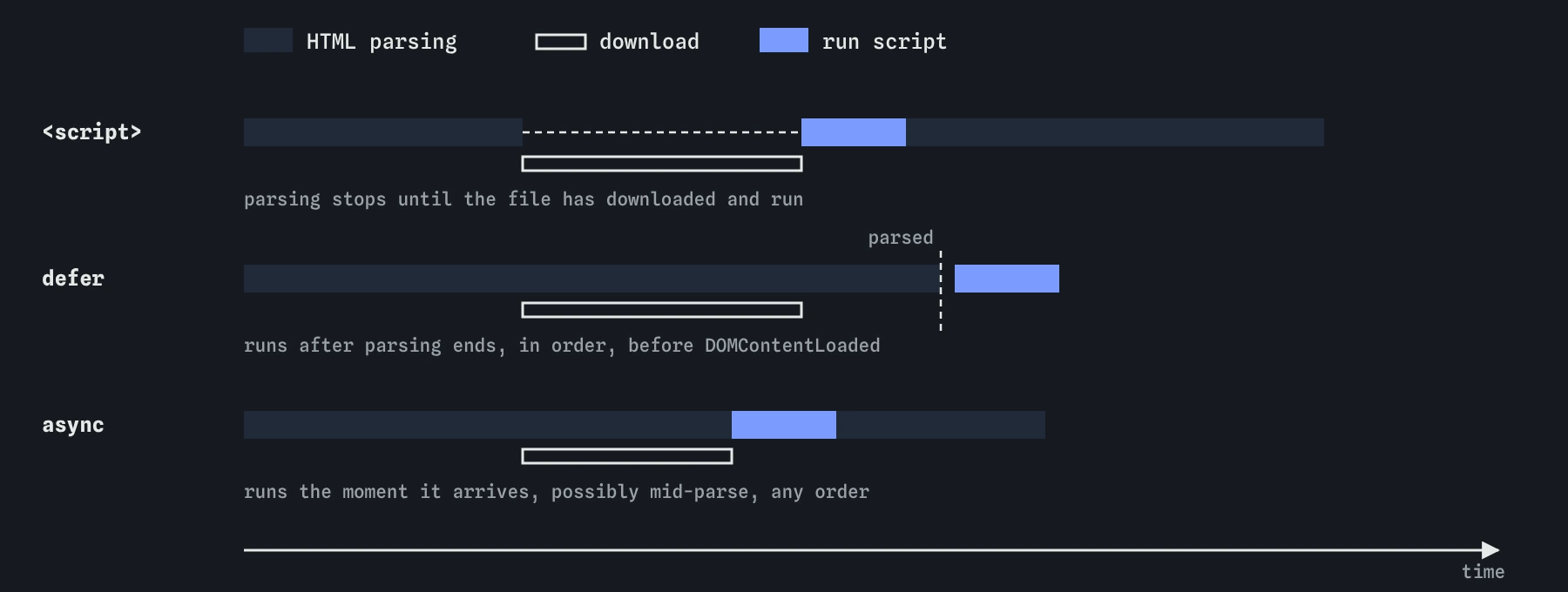
<script> in the head leaves a gap in parsing, while defer and async download alongside it, and only defer waits for the whole document.What changes with type="module"?
A module script can use import and export. It runs in strict mode and has its own scope, so top-level variables do not leak onto window. Modules are deferred by default, and each module runs once even if imported from several places. Add async to run a module as soon as it and its imports are ready.
Modules are fetched with CORS, so a module loaded from another origin needs the right headers. They also do not run from file:// URLs in most browsers. If your module works on a server and fails when you double-click the HTML file, that is why. Run a local server such as npx serve or the Live Server extension.
An import map, written as <script type="importmap">, lets you use bare names like import confetti from "confetti" and maps them to URLs. It must come before any module that uses it.
<script type="importmap">
{ "imports": { "dayjs": "https://cdn.jsdelivr.net/npm/dayjs@1/+esm" } }
</script>
<script type="module" src="/js/main.js"></script>
How do HTML, CSS and JS find each other?
They meet through attributes. Classes are the usual hook for styling, and many elements can share one. An id must be unique, so it suits a single element a script needs, a fragment link target, or a label's for. Avoid styling with ids, since their high specificity makes later overrides painful.
Custom data-* attributes carry small pieces of data for scripts. A data-price="4.50" attribute is read in JavaScript as element.dataset.price, and hyphenated names turn into camelCase, so data-walk-id becomes dataset.walkId. CSS can select them with [data-state="open"].
Many teams keep separate hooks for each job: classes for CSS, data-* attributes or a js- class prefix for scripts. A designer can then rename a class without breaking the script.
<button class="btn" data-action="add" data-item-id="loaf-12">Add loaf</button>
<script type="module">
  document.addEventListener('click', e => {
    const b = e.target.closest('[data-action="add"]');
    if (b) addToBasket(b.dataset.itemId);
  });
</script>
When does noscript help?
Content inside <noscript> shows only when scripting is disabled or unavailable. Use it for a short line explaining that a feature needs JavaScript, or a plain link to a fallback such as a static map image. It does nothing when the script fails to load or throws an error, because scripting is still enabled.
The better fallback is a page that works without scripts and gets better with them. A form that posts to the server works everywhere, and a script can enhance it later.
How do I tell if CSS or JS failed to load?
Open the Network panel and reload. A red 404 next to a CSS or JS file means the path is wrong. Remember that href="css/site.css" is relative to the current page, while href="/css/site.css" is relative to the site root. A path that works on the home page and breaks on /blog/post is usually a missing leading slash.
A stylesheet served with the wrong Content-Type is refused, and the Console says so. A script with a syntax error stops at that line, and the Console shows the file and line number.
What do AI tools get wrong when wiring up CSS and JS?
Generated starter pages often look right in a demo and carry problems that surface later. Check for these.
- Scripts in the head with no
defer, wrapped inDOMContentLoadedlisteners to make up for it. asyncon scripts that depend on each other, such as a library and its plugin.<script src="…" />copied from JSX habits.- Inline
onclick="…"handlers scattered through the markup, which a strict Content Security Policy will block. - Huge
styleattributes repeated on every card where one class would do. - Old CDN links pinned to versions with known security issues, or missing the
integrityattribute for third-party files.
Field notes
- A linked external stylesheet in the head is the usual way to add CSS.
- A plain script in the head pauses the page while it downloads and runs.
- With
defer, a script downloads alongside the page and runs in order after parsing.
Easy to get wrong
script is not a void element. Without a closing tag, the rest of the page is treated as script content.
Without rel="stylesheet" the browser does not know the file is CSS and will not apply it.
async scripts can run in any order, so a plugin may run before the library it depends on. defer keeps order.
Questions people ask
Should I put script tags in the head or the body?
Put them in the head with defer. They download early without blocking parsing and run once the document is ready.
What is the difference between async and defer?
Both download in parallel. defer runs after parsing in document order; async runs as soon as the file arrives, in any order.
Are module scripts deferred?
Yes. Scripts with type="module" behave as deferred by default.
How do I read a data attribute in JavaScript?
Use element.dataset. A data-city attribute is available as element.dataset.city.