What does async do to a function?
Putting async before a function changes two things. Inside it you may use await. And the function always returns a promise, whatever its body returns. async function getTotal() { return 12; } gives you a promise that fulfils with 12, so callers use await getTotal() or getTotal().then(...).
If the body throws an error, the returned promise rejects with that error instead of the error bubbling up the normal way. This is why an uncaught error inside an async function shows in the Console as an error in a promise.
Every function form can be async: async function name() {}, const load = async () => {}, and methods in objects and classes. Event listeners can be async too, which is a common place to use them: button.addEventListener("click", async () => { ... }).
async function getTotal() {
  return 12;
}

console.log(getTotal()); // a Promise
getTotal().then((total) => console.log(total)); // 12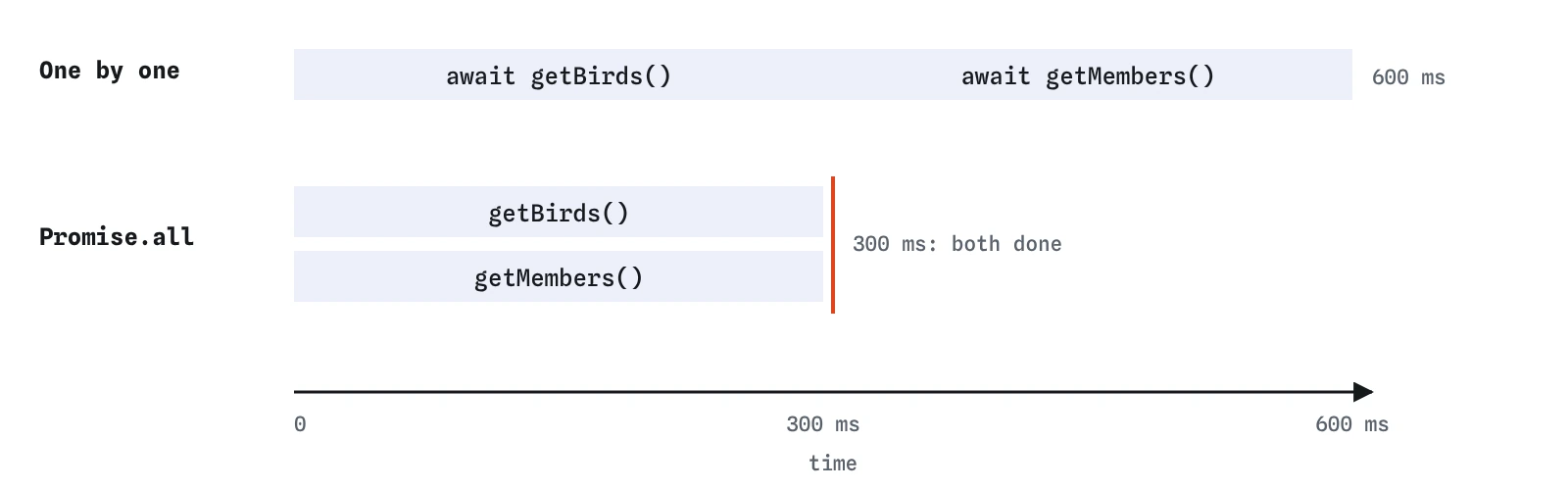
Promise.all takes as long as the slowest one.What does await actually pause?
await promise pauses the async function it is in until that promise settles. If it fulfils, await gives you the value. If it rejects, await throws the error right there, as if that line contained a throw.
Only that one function pauses. The rest of the page keeps going: clicks are handled, timers fire, other code runs. The function that called the async function also carries on immediately, holding a pending promise. When the awaited promise settles, the paused function resumes from the same line as a new queued job.
That is why await makes code read top to bottom without freezing anything. Use the Step lens on the demo: the function runs up to the await, the rest of the script finishes, and later the function picks up where it left off. You can also await a value that is not a promise; it is passed straight through, after a tiny pause.
async function bake() {
  console.log("Into the oven");
  await new Promise((resolve) => setTimeout(resolve, 300));
  console.log("Out of the oven");
}

bake();
console.log("Meanwhile, washing up");
How do you handle errors with try and catch?
Because a failed await throws, the ordinary try/catch from the errors lesson works. Put the awaits that can fail inside try. In catch (error), show the visitor what went wrong and log error.message for yourself. Code after the failed line inside try is skipped.
Keep the try block focused on the work that can fail. A huge try around a whole function hides typos in unrelated code behind a friendly message that says the network failed. A finally block runs whether the work succeeded or failed, and it is the natural place to turn off a loading state or re-enable a button.
If you do not catch inside the function, the caller can: loadMenu().catch(showProblem) or a try around await loadMenu(). Pick one place to handle each error. Catching it, logging it, and throwing it again in three layers makes one problem look like three.
async function loadOrder() {
  try {
    const order = await Promise.reject(new Error("Order not found"));
    console.log(order);
  } catch (error) {
    console.log(`Problem: ${error.message}`);
  } finally {
    console.log("Spinner hidden");
  }
}

loadOrder();
How do you run things in parallel?
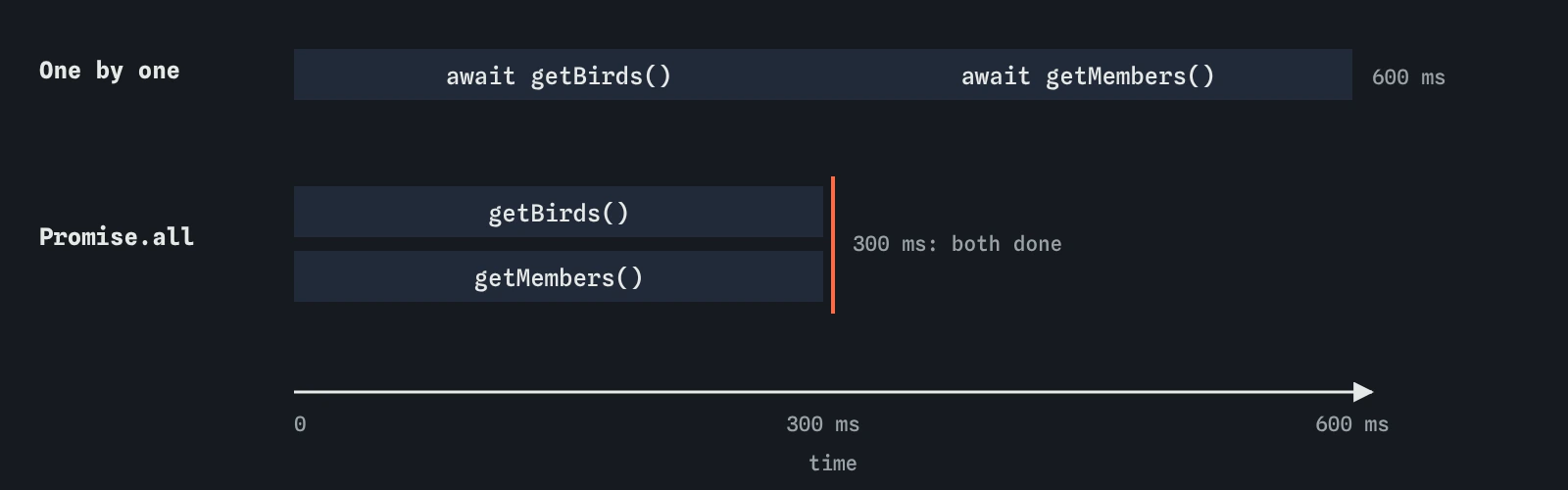
Each await waits before moving to the next line. Two awaits in a row run one after the other, so two 300 millisecond requests take 600 milliseconds. When the second request does not need the first one's answer, that wait is wasted.
Start both first, then wait for both together: const [birds, members] = await Promise.all([getBirds(), getMembers()]);. Calling the functions starts the work immediately; Promise.all waits for all of them and keeps the results in the order you listed them. The total time is roughly the slowest request.
Keep requests sequential when one depends on another, such as loading an order and then the customer whose id is in the order. When some failures are acceptable, use Promise.allSettled instead, so one broken feed does not hide the others.
const wait = (ms, value) => new Promise((resolve) => setTimeout(() => resolve(value), ms));

async function loadClub() {
  const [birds, members] = await Promise.all([
    wait(300, ["Wren", "Heron"]),
    wait(300, 24),
  ]);
  console.log(`${birds.length} birds, ${members} members`);
}

loadClub();
Is await inside a loop a problem?
A for...of loop with await inside processes items one at a time: each iteration waits for the previous one. That is correct when each step must wait for the one before or when a server limits how many requests you may send at once, such as saving to-do items in sequence.
It is slow when the items are independent. Fetching ten bird profiles one by one takes ten times as long as fetching them together. Build an array of promises with map and await Promise.all on it.
Avoid await inside forEach. forEach ignores the promise its callback returns, so the loop finishes immediately, nothing waits, and errors escape uncaught. Use for...of for one at a time, or map plus Promise.all for all together.
const ids = [1, 2, 3];
const lookup = (id) => new Promise((resolve) => setTimeout(() => resolve(`bird ${id}`), 200));

async function loadAll() {
  const names = await Promise.all(ids.map((id) => lookup(id)));
  console.log(names);
}

loadAll();
How do you show a loading state?
Code before the first await runs immediately, so set the loading state there: a message such as Loading…, a disabled button, or aria-busy="true" on the area being filled. Then await the work, and in finally undo all of it.
Disabling the button also stops double submissions, the async version of intervals piling up. Write the message in a region that screen readers announce, such as an element with role="status", so people who cannot see the spinner still know something is happening.
Think about three outcomes every time: data arrived, data arrived but was empty, and it failed. Each needs something on the page. A page that only handles success leaves visitors staring at Loading forever when the network drops.
const save = document.createElement("button");
save.textContent = "Save";

save.addEventListener("click", async () => {
  save.disabled = true;
  save.textContent = "Saving…";
  try {
    await new Promise((resolve) => setTimeout(resolve, 300));
  } finally {
    save.disabled = false;
    save.textContent = "Save";
  }
});
Can you use await outside a function?
Yes, in JavaScript modules. A script loaded with type="module" can use await at the top level, outside any function, and has been able to in every current browser since 2021. The module pauses there, and anything importing it waits too.
In an ordinary script, such as the one in this editor, top-level await is a syntax error. Wrap the code in an async function and call it, as the demo does. The modules lesson covers when to switch to modules.
What should you check in AI-written async code?
Look for a missing await: a variable that holds a promise but is used like data, which shows up as [object Promise], undefined properties or a not iterable error. Look for an async function called without anything handling its errors. Look for awaits in a row that could run together, and for await inside forEach.
Also check that loading states are cleared in finally, which runs on success and on failure. When the request fails, a page that only clears the spinner in the success path keeps spinning.
Field notes
- An
asyncfunction always returns a promise and may useawaitinside. awaitpauses only its own function until the promise settles.- Put awaits that might fail inside
try, and show a friendly message incatch. - Set a loading message before the first
awaitso people see something right away.
Easy to get wrong
Without await you hold the promise, which has no length. This must be inside an async function.
The two requests are independent, so waiting for one before starting the other doubles the time.
forEach does not wait for async callbacks, so nothing is awaited and errors escape uncaught.
If the request fails, the line after await never runs and the spinner stays. finally always runs.
Questions people ask
Is async and await different from promises?
It is a different way to write the same thing. An async function returns a promise, and await waits for one. You can mix .then and await freely.
Does await block the whole page?
No. It pauses only the async function it is in. Clicks, timers and other code keep running.
What happens if I forget try/catch?
The async function's promise rejects. If nothing catches it, the Console shows an uncaught error in a promise and the page is left half updated.
Can an arrow function be async?
Yes: const load = async () => { ... };. Event listeners are often written this way.
Why is my code slower after switching to await?
Probably several awaits in a row for independent work. Start them together and await Promise.all.