Why split code into separate files?
A page script starts small. A few months later it holds price formatting, the menu data, the basket, the form handling and a date helper, all in one 600-line file. Finding anything takes scrolling, two functions end up with the same name, and a change to the basket breaks the form because both used a variable called items.
Modules let you put each job in its own file. bakery.js holds the menu and price helpers, basket.js holds the basket logic, and script.js wires them to the page. Each file says what it offers with export and what it needs with import. Reading script.js you can see at the top exactly which files it depends on.
The second benefit is reuse. The order page and the menu page can both import formatPrice from the same file, so a fix to rounding happens once. The third is privacy: anything a module does not export stays inside it, and no other file can change it by accident.
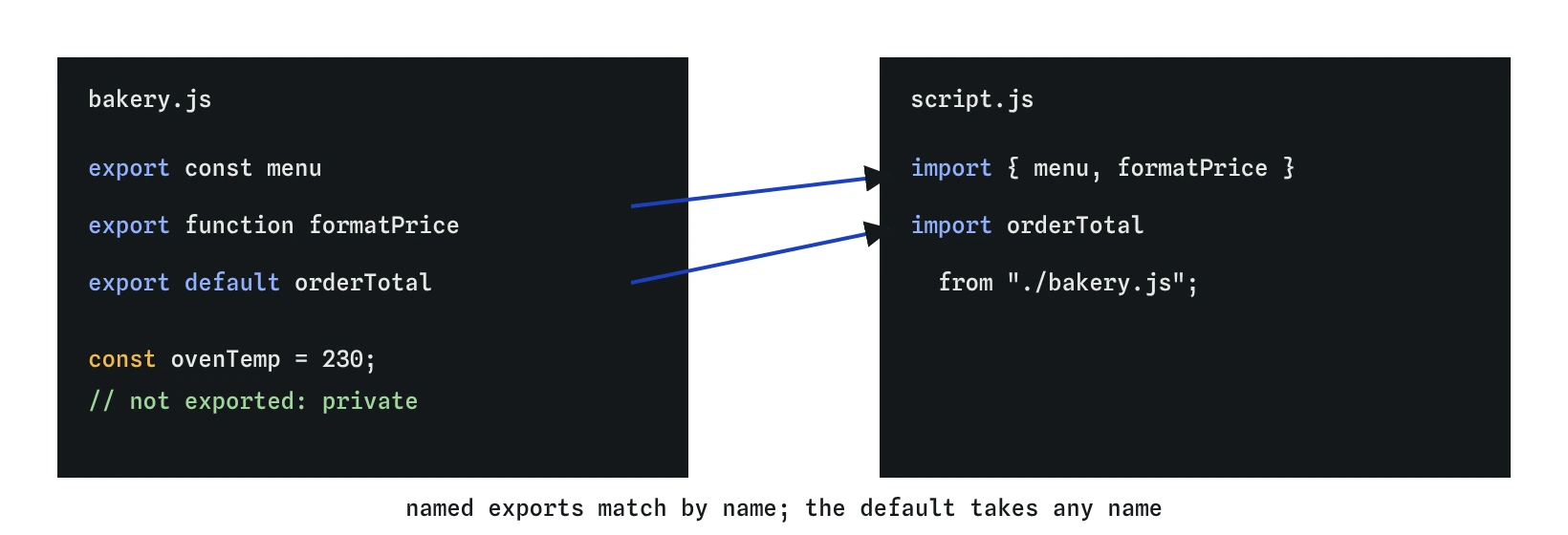
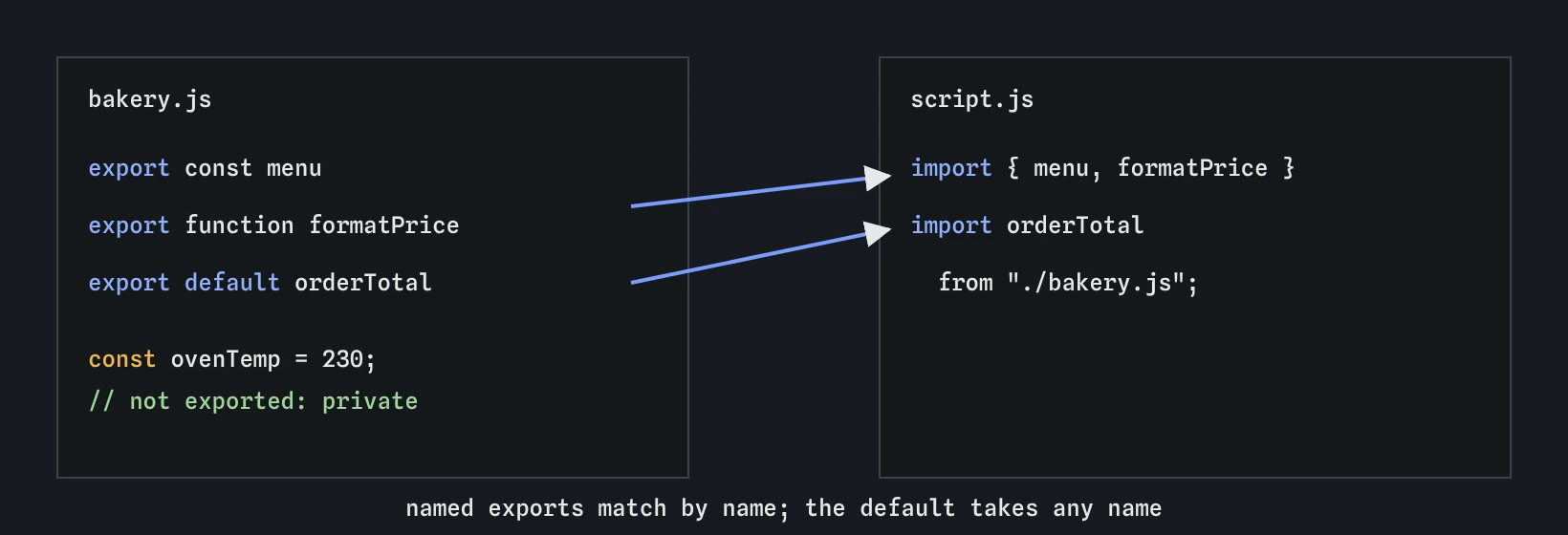
export marks what other files may use, and import pulls those names in. Named imports must match the export name; the default export can be given any local name.How do export and import work?
Put export in front of a declaration to share it. You can export functions, const and let variables and classes. A file can have as many named exports as it likes. In the demo, bakery.js exports menu and formatPrice.
Another file asks for those names with import { menu, formatPrice } from "./bakery.js";. The names inside the braces must match the export names exactly, including capital letters. If you want a different local name, rename on the way in with as: import { formatPrice as price } from "./bakery.js";.
Imports are live, read-only views of the exported bindings. You can call an imported function and read an imported array, and you can push to that array because the object itself is shared. You cannot reassign the imported name: menu = [] in script.js throws a TypeError. If another module needs to change shared data, export a function that does it.
// bakery.js
export const menu = [{ name: "Rye loaf", cents: 450 }];

export function formatPrice(cents) {
  return `$${(cents / 100).toFixed(2)}`;
}

// script.js
import { menu, formatPrice } from "./bakery.js";
console.log(formatPrice(menu[0].cents)); // "$4.50"
What is a default export?
A file can also have one default export, marked export default. It is meant for the main thing a file provides, such as a single function or class. The importing file writes the name without braces and may call it anything: import orderTotal from "./bakery.js"; and import total from "./bakery.js"; both receive the same function.
You can combine both forms in one line, with the default first: import orderTotal, { menu, formatPrice } from "./bakery.js";.
Many teams prefer named exports everywhere. Named imports must match, so editors can rename them safely across files, autocomplete can suggest them, and a typo fails loudly. A default import with a misspelt name still works, which can hide confusion when two files call the same thing by different names. Use a default when a file truly exports one thing, and stay consistent within a project.
// bakery.js
export default function orderTotal(items) {
  return items.reduce((sum, item) => sum + item.cents, 0);
}

// script.js
import orderTotal, { menu } from "./bakery.js";
console.log(orderTotal(menu));
How does the page load a module?
The HTML must mark the entry script as a module with type="module". Without it, the browser reads import as a syntax error and nothing runs. Only the entry file needs the attribute; files it imports are loaded as modules automatically.
Module scripts are deferred by default. The browser downloads them while it parses the HTML and runs them after the whole document is parsed, in order. That means document.querySelector("#menu") finds the element even when the <script> tag is in the <head>, and you do not need defer or a DOMContentLoaded listener.
Modules also run in strict mode automatically. Strict mode turns several silent mistakes into errors. The most common one for beginners: assigning to a variable you never declared throws a ReferenceError, where a classic script would create a global without any warning. At the top level of a module, this is undefined instead of window.
Opening an HTML file by double-clicking it uses a file:// address, and browsers block module loading from there. Serve the folder with a local server, such as the Live Server extension in VS Code or npx serve, and open the http://localhost address. The PlainFinch editor already does this for you.
<!-- index.html -->
<script type="module" src="script.js"></script>
Why don't module variables become globals?
In a classic script, a top-level function or var becomes a property of window, and every script on the page shares one namespace. Two scripts that both define render silently overwrite each other, and whichever loads last wins.
Each module has its own scope. A top-level const ovenTemp = 230; in bakery.js is visible everywhere in that file and nowhere else. Another module that declares its own ovenTemp gets a separate variable. Nothing reaches window unless you put it there on purpose with window.something = …, which you should rarely need.
This also changes how you debug. Typing a module's variable name into the browser Console usually gives a ReferenceError, because the Console runs in the global scope. Log the value from inside the module, use the Step lens, or set a breakpoint in the Sources panel of DevTools. The PlainFinch checks for module code read the page and the Console for the same reason.
What must an import path look like?
In the browser, an import path is a URL. Relative paths start with ./ (same folder) or ../ (one folder up), and the browser resolves them against the importing file's own address. ./bakery.js from /js/script.js loads /js/bakery.js.
Write the file extension. The browser fetches exactly the address you give, so ./bakery asks the server for a file called bakery and gets a 404. Node tools and bundlers sometimes guess the extension, which is why code copied from a React or Node project often omits it and then fails in a plain page.
A path without ./, such as import { format } from "date-fns";, is a bare specifier. Browsers refuse it unless the page has an import map that says which URL that name means. When AI-generated code imports bare package names, it was written for a project with a bundler; in a plain HTML page, either add an import map or use a full CDN URL.
./bakery.js: a file in the same folder. Correct.../lib/bakery.js: up one folder, then intolib. Correct../bakery: missing extension. Fails in the browser.bakery.js: no./, so it is treated as a package name. Fails without an import map.
When would you use dynamic import()?
Normal import statements sit at the top of the file and load before any code runs. Sometimes you want code only when it is needed, such as a large chart library that loads after someone clicks Show chart. The function-like import("./chart.js") loads a module on demand and returns a promise for an object holding its exports.
Use it with await inside an async function, or with .then. Dynamic import works in classic scripts too, which makes it handy for adding one module to an older page. Keep it for code that is large or rarely used; for everyday helpers, the static form at the top of the file is clearer and lets tools see your dependencies.
const button = document.querySelector("#show-chart");

button.addEventListener("click", async () => {
  const { drawChart } = await import("./chart.js");
  drawChart(document.querySelector("#chart"));
});
What does a bundler add?
Browsers load modules natively, so a small site can ship its files as written. Larger apps often use a bundler such as Vite, esbuild, Rollup or webpack. It follows your imports from the entry file, combines the modules into a few optimized files, removes exports nobody uses, resolves bare package names from node_modules, and often lets you omit extensions. The code you write uses the same import and export syntax; the bundler changes how it is delivered, so treat its extra conveniences as features of that tool and expect them to fail in a plain page.
How do you read and debug module code an AI wrote?
Start at the HTML. If the entry <script> lacks type="module", the first import line throws Cannot use import statement outside a module. Then read each import path: does it start with ./ or ../, does it end in .js, and does that file exist with that exact spelling and capitalisation? Servers on Linux treat Bakery.js and bakery.js as different files.
Next, match names. For each name in braces, find an export with that exact name in the target file. For each name without braces, the target must have an export default. A mismatch gives does not provide an export named … and stops the whole file, so the page shows nothing at all, which can look like a much bigger problem than it is.
Finally, look for require(...) and module.exports. Those come from CommonJS, the older Node.js format, and do not work in browser modules. Rewrite them as import and export.
Field notes
- Put
exportin front of a function or variable to share it with other files. - Named imports go in braces, like
import { formatPrice } from "./bakery.js". - The entry script needs
type="module"or the browser rejectsimport. - Relative import paths start with
./or../and include the file extension.
Easy to get wrong
Without type="module" the browser treats the file as a classic script, and the first import statement is a syntax error that stops everything.
Browsers fetch the exact URL you write and never add an extension, so the request for ./bakery fails.
orderTotal is the default export. Braces ask for a named export, and the file has none called orderTotal.
require belongs to CommonJS in Node.js. Browsers do not define it, so the line throws require is not defined.
Questions people ask
Do I need a build tool to use modules?
No. Every current browser supports type="module", import and export. You need a local server instead of opening the file directly, and that is all. Build tools become useful when you install packages from npm or ship many files.
Can a module import another module?
Yes. basket.js can import from bakery.js, and script.js can import from both. The browser loads each file once, however many modules import it, and runs it once.
Why can't I see my variable in the browser Console?
The Console runs in global scope and module variables are private to their file. Log the value from inside the module or pause on a breakpoint.
Should I use named or default exports?
Named exports are easier to search and rename, and typos fail loudly. Use a default only when a file exports one main thing, and follow whatever the project already does.
What is the .mjs extension?
It marks a file as a module for Node.js. Browsers ignore the extension and look at type="module" and the server's content type, so .js is the normal choice for browser code.