What are div and span for?
The div and span elements are generic containers. They carry no meaning, so the browser exposes them to assistive technology as nothing more than a group. You reach for them when you need a hook for CSS or JavaScript and no meaningful element fits.
The difference between them is how they sit in the flow. A div is block-level by default, so it starts on its own line and stretches to the full width of its parent. A span is inline, so it sits inside a line of text and takes only the width of its content.
Think of them as the last option on the shelf. Before you type <div>, ask whether the content is a paragraph, a list, a heading, a navigation block, an article, a figure or a button. If one of those fits, use it. If none does, a generic container is the correct choice and there is nothing wrong with it.
<div class="product-card">
  <h3>Sourdough loaf</h3>
  <p>Baked this morning. <span class="price">£4.20</span></p>
</div>
How do block and inline flow affect what I can nest?
The div element accepts what the spec calls flow content: paragraphs, lists, headings, other divs. The span element accepts only phrasing content: text and inline elements like a, em, strong and other spans.
The rule that bites people most is p. A paragraph may only contain phrasing content, so a div inside a p is invalid. The parser does more than complain: it closes the paragraph the moment it sees <div>, then treats your closing </p> as a stray tag and creates an empty paragraph. Your CSS selectors and JavaScript then point at a structure that differs from your source.
Display and content model are separate things. Setting span { display: block; } changes how it renders, but a span still may not contain a div in valid HTML. Choose the element by what it contains, then use CSS for the layout you want.
<!-- You wrote -->
<p>Total: <div class="price">£14</div></p>

<!-- The browser built -->
<p>Total: </p>
<div class="price">£14</div>
<p></p>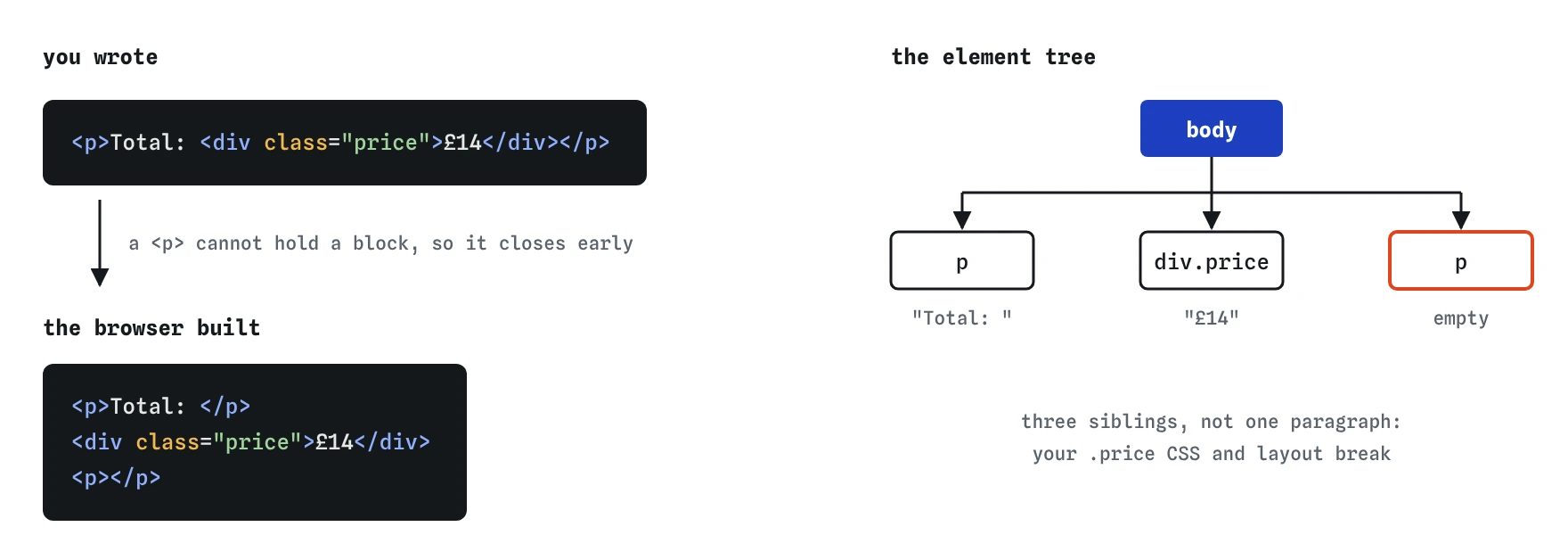
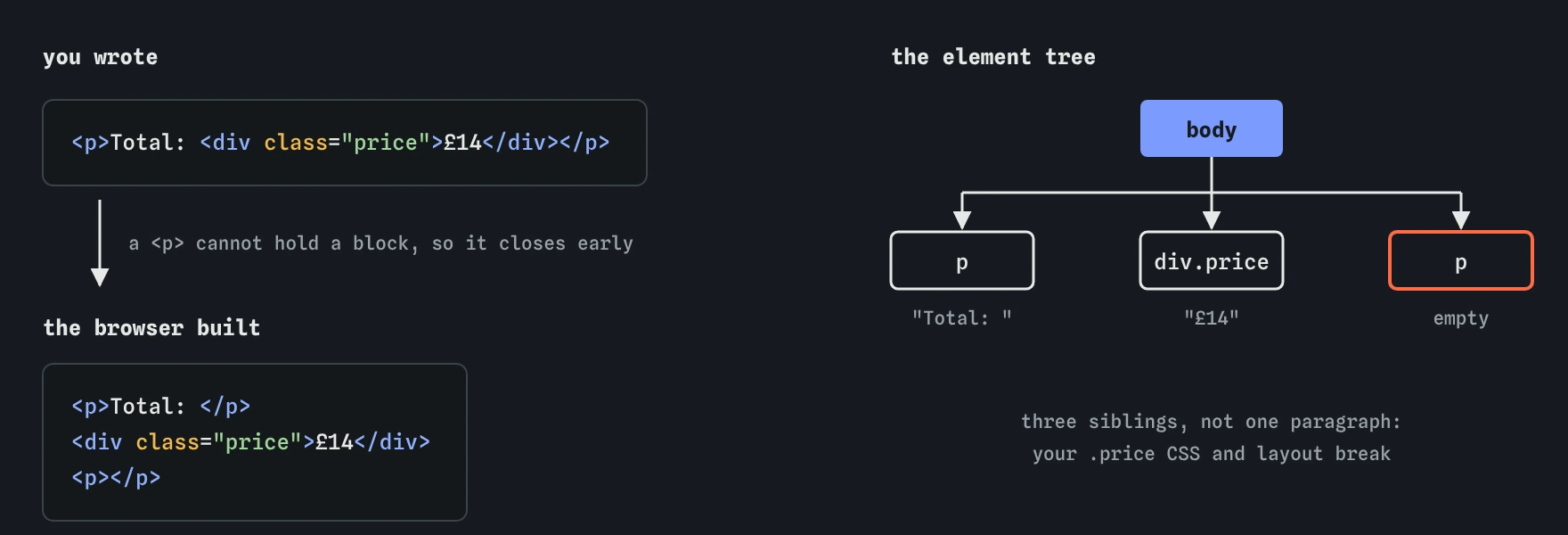
<p> can only hold inline content. When a <div> turns up inside, the browser ends the paragraph before it, and the closing </p> creates a new empty one. Use a <span> inside text instead.How should I name classes?
The class attribute takes a space-separated list of names. An element can have as many as you like, and many elements can share the same class. Classes are the main way you connect HTML to CSS, and the most common way scripts find groups of elements with querySelectorAll.
Name classes after what something is or does, not how it looks. class="price" and class="sold-out" still make sense after a redesign; class="red-bold" becomes a lie the day the colour changes. State classes like is-open or is-active are a common convention for things scripts toggle.
Class names are case-sensitive, may not contain spaces, and can use letters, digits, hyphens and underscores. Starting a name with a digit is valid HTML but awkward in CSS, where you would need to escape it as .\31 col. Keep to lowercase words joined by hyphens and you avoid all of these problems.
If you use a utility CSS framework, you will see long lists like class="flex gap-4 p-2 text-sm". That is valid and works fine. The same rule about semantics applies underneath: the framework styles the element, it does not make a div into a button.
<li class="product sold-out">
  <span class="product-name">Rye loaf</span>
  <span class="badge">Sold out</span>
</li>
What makes id different from class?
An id must be unique in the whole document. That uniqueness is what makes it useful: a URL fragment like /menu#desserts scrolls to the element with id="desserts", a label uses for to point at one input's id, and attributes such as aria-labelledby, aria-describedby, popovertarget and list all reference elements by id.
Duplicate ids do not throw an error. The browser keeps going, and getElementById returns the first match. The bug shows up later: a label that focuses the wrong field, a skip link that jumps to the wrong place, an aria-describedby that reads the wrong hint. Validators flag duplicates, and so does the Issues tab in Chrome DevTools.
Every element with an id also becomes a global variable in browser JavaScript, so id="name" creates window.name lookups that clash with built-ins. Do not rely on this; use document.getElementById.
For styling, prefer classes. An id selector has much higher specificity than a class selector, so #signup overrides .form .field and is hard to override later. Use ids for linking and referencing, classes for styling.
<h2 id="desserts">Desserts</h2>
…
<a href="#desserts">Jump to desserts</a>

<label for="postcode">Postcode</label>
<input id="postcode" name="postcode" autocomplete="postal-code">
When is a generic container the right choice?
Use a div when you need a box for layout and nothing more: a grid or flex wrapper, a max-width container, a card that groups a heading and paragraph for styling. Use a span when you need to style or script part of a line of text: a price, a highlighted word that has no special meaning, a counter that JavaScript updates.
Prefer a meaningful element whenever the content has meaning. A few swaps cover most cases:
- A clickable thing that does something on the page is a
button. - A clickable thing that goes to another URL is an
awithhref. - A group of similar items is a
ulorol. - Text that should be stressed is
emorstrong, not a styled span. - A self-contained card with its own heading may be an
article. - A picture with a caption is a
figurewithfigcaption. - A date or time is
timewith adatetimeattribute.
What goes wrong when a div pretends to be a button?
A div with a click handler works for mouse users and fails almost everyone else. It cannot receive keyboard focus, so Tab skips it. It does not respond to Enter or Space. Screen readers announce it as plain text, so nobody knows it is clickable. Voice control users who say "click Buy now" may not reach it.
You can patch this with role="button", tabindex="0" and a keydown handler for Enter and Space, but then you are rebuilding what button gives you for free, including disabled state, form submission and the correct focus styles. Use <button type="button"> and reset its look with CSS if the default style is the problem.
The same applies to links: a span with onclick="location.href=..." loses middle-click to open in a new tab, the link preview on hover, and the right-click menu.
<!-- Avoid -->
<div class="btn" onclick="addToBasket()">Add to basket</div>

<!-- Use -->
<button type="button" class="btn" onclick="addToBasket()">Add to basket</button>
Do too many nested divs cause problems?
Deep nesting does not hurt accessibility, because generic containers are mostly ignored by assistive technology. It does make CSS harder to reason about, and a very large DOM slows down style recalculation and layout on low-end phones. Lighthouse warns when a page has more than about 1,400 elements.
Before adding another wrapper, check whether CSS can do the job on the existing element. Grid and flexbox with gap remove most spacer and row divs. The display: contents value lets a wrapper's children take part in the parent's grid, but use it with care on meaningful elements, because some browsers once dropped the element's role from the accessibility tree when it was applied.
What should I look for in AI-generated markup?
AI tools often produce "div soup", where every block is a div with a descriptive class. Open the file in DevTools and scan the Elements panel for these signs, then check the accessibility tree for anything announced as plain text that should be interactive.
divorspanelements withonclickhandlers. Replace withbuttonora.- Classes like
class="heading"orclass="list-item"standing in for realh2orlielements. - A
divinside ap, which the parser silently splits. - The same
idrepeated in a loop of cards or list items. - Ids used purely for styling, such as
#header-blue. - Wrapper divs with no class and no purpose, often three or four deep.
Field notes
- A
divand aspanare plain containers with no meaning of their own. - A
spansits inside a line of text, while adivholds larger blocks. - Many elements can share a class, but each id must appear only once per page.
Easy to get wrong
A div cannot receive keyboard focus or announce itself as a button. The real element gives you both.
A div inside a p is invalid, so the browser ends the paragraph before it. Use the inline span.
An id must be unique. Use a class when several elements share a name.
A styled span looks like a heading but does not appear in the screen reader headings list, so users cannot jump to it.
Questions people ask
What is the difference between div and span?
A div is a block-level container that starts on its own line. A span is an inline container that sits inside text. Neither adds meaning.
Can an element have both a class and an id?
Yes. Many elements have both: the id for a unique link or label target, and classes for styling.
How many classes can one element have?
As many as you need, separated by spaces in a single class attribute.
Is using lots of divs bad?
Only when a meaningful element would fit better. Divs used purely for layout are normal and valid.
Can a span contain a div?
No. A span accepts only phrasing content. Setting it to display: block in CSS does not change the rule. Use a div as the outer element instead.
Should ids use hyphens or camelCase?
Either is valid. Pick one style for the whole project. Hyphens match common CSS class conventions; camelCase is easier to type in JavaScript.