How does a font stack work?
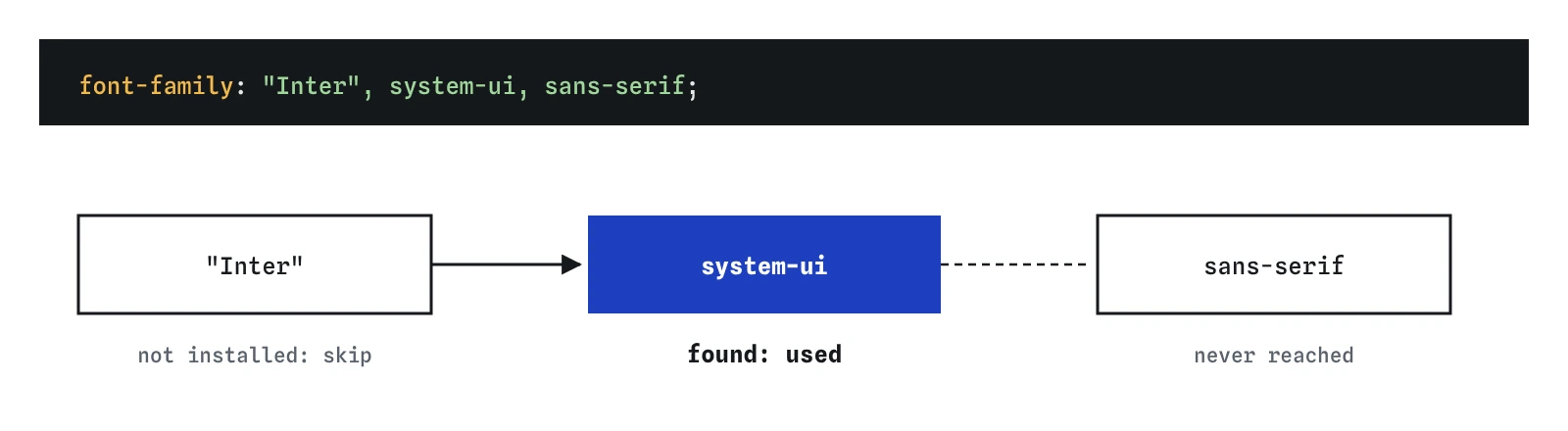
The font-family property takes a comma-separated list of font names, called a font stack. The browser walks the list from left to right and uses the first family that is available on the device or loaded as a web font. Names with spaces go in quotes, such as "Iowan Old Style". Quotes are optional for single-word names.
The list is checked for each character too. If the first font lacks a glyph, for example an emoji or a Greek letter, the browser looks further down the stack for that one character. That is why mixed-language text sometimes shows two different typefaces in one line.
Always end the stack with a generic family name, unquoted: serif, sans-serif, monospace, cursive, system-ui or one of a few newer ones like ui-monospace. A generic name always resolves to something, so the text never falls back to the browser's plain default, which is usually Times. Quoting a generic name, as in "sans-serif", turns it into a search for a font literally called sans-serif and loses the guarantee.
body {
  font-family: "Iowan Old Style", Georgia, serif;
}

code {
  font-family: ui-monospace, Menlo, Consolas, monospace;
}

What is system-ui and when should you use it?
The system-ui generic family maps to the font the operating system uses for its own interface: San Francisco on Apple devices, Segoe UI on Windows, Roboto on most Android phones, and usually Cantarell or Ubuntu on Linux desktops. It costs nothing to load, it is tuned for screens, and it makes a web app feel at home on each device.
The trade-off is that your page looks slightly different on every system, and you cannot control the letter widths, so a heading that fits on one line on a Mac may wrap on Windows. For tools, dashboards and forms that is usually fine. For a brand with a distinct voice, a web font gives more control at the cost of a download.
A sensible sans-serif default is system-ui, sans-serif. Some older stacks list -apple-system, BlinkMacSystemFont, "Segoe UI", Roboto one by one; that was needed before system-ui worked everywhere, and now system-ui alone covers them. It has been supported in all current browsers since 2020.
body {
  font-family: system-ui, sans-serif;
}
How should you set font-size?
The browser default for body text is 16px, and readers can change it in their settings. Use rem for font sizes so that a reader who has picked a larger default gets larger text everywhere. A heading at 1.75rem is 28px at the default and grows in proportion when the setting goes up. Fixed px sizes on html or body override the reader's choice, which is why accessibility audits flag them.
Keep body text at 1rem or a little above, such as 1.0625rem or 1.125rem for long reading on a site with generous space. Below 16px, text gets hard to read on phones held at arm's length. Small print, captions and labels can go to 0.875rem, but rarely smaller.
Headings need fewer sizes than you think. Three or four steps, say 1.25, 1.5, 2 and 2.5 rem, cover most pages and keep the hierarchy clear. The units and fluid sizing lessons show how to scale these with the screen.
h1 {
  font-size: 2.5rem;
}

h2 {
  font-size: 1.75rem;
}

.caption {
  font-size: 0.875rem;
}
How do font-weight and font-style work?
The font-weight property takes numbers from 1 to 1000, usually in steps of 100: 400 is regular, 700 is bold, 300 is light, 600 semibold and 900 black. The keywords normal and bold equal 400 and 700. bolder and lighter step relative to the parent's weight. Headings are bold by default, font-weight: 700, in every browser.
A weight only looks different if the font has it. Most system fonts include regular and bold, and many include more. If you ask for 600 and the font only has 400 and 700, the browser picks 700. If it has no bold at all, it fakes one by thickening the strokes, which looks smeared. Variable fonts contain every weight in one file and render any number exactly.
The font-style property sets normal, italic or oblique. Italic uses the font's true italic design, with its own letter shapes; if there is none, the browser slants the regular letters. Use italic for short emphasis, book titles and captions. Long italic passages read more slowly.
.lead {
  font-weight: 300;
}

.price {
  font-weight: 700;
}

cite {
  font-style: italic;
}
What is the trap in the font shorthand?
The font shorthand sets style, variant, weight, size, line height and family in one go: font: italic 600 1.125rem/1.5 Georgia, serif. The order is strict. Style, variant and weight come first in any order and are optional; then the size, which is required; then an optional slash and line height; then the family, which is also required and must be last.
Two things go wrong. First, font: 18px with no family is invalid and the whole line is ignored. Second, like every shorthand, font resets everything you leave out to its initial value. Writing font: 1.25rem Georgia, serif on a heading sets its weight back to normal and its line height back to normal, wiping out a line-height you set earlier on that element.
Use the shorthand once, near the top, when you mean to set everything. In later rules, change one longhand at a time. A useful form is font: inherit on form controls: buttons, inputs and selects do not inherit the page font by default, and this one line makes them match.
body {
  font: 1.0625rem/1.6 system-ui, sans-serif;
}

button,
input,
select,
textarea {
  font: inherit;
}
Why should line-height have no unit?
The line-height property sets the height of each line box, and the text sits in the middle of it. A value of 1.5 means one and a half times the element's own font size. A value like 24px or 1.5em is turned into a fixed length on the element where you write it, and that length is what children inherit.
That difference shows as soon as sizes vary. Set line-height: 1.5em on body at 16px and every descendant inherits 24px. A 40px heading inside it gets 24px line boxes, so its lines overlap when it wraps. With the unitless 1.5, children inherit the number, and the heading gets 60px lines and the caption gets 21px.
For body text, 1.4 to 1.7 reads well, and longer lines need more spacing. Headings look better tighter, around 1.1 to 1.25, because large type already has plenty of space around it. The default normal is about 1.2 in most fonts, which is cramped for paragraphs.
body {
  line-height: 1.6;
}

h1,
h2,
h3 {
  line-height: 1.2;
}
What makes body text comfortable to read?
Four settings do most of the work. A size of 1rem or a little more. A line height around 1.5. A line length of about 45 to 75 characters, which you can set with max-width: 65ch on the text column. And strong contrast between text and background, near black on near white rather than mid grey.
Avoid justified text on narrow screens, because it opens uneven gaps between words. Avoid all-caps for anything longer than a label. Keep paragraphs left-aligned in left-to-right languages so each line starts at the same place.
When you read AI-generated CSS, look for font-size in px on the root, a line-height with px or em on body, generic family names in quotes, and stacks with no generic fallback. Each one is a small fix with a visible payoff.
article {
  max-width: 65ch;
  font-size: 1.0625rem;
  line-height: 1.6;
  color: #1f1f1f;
}
When do you need tabular numbers?
In most fonts, digits have proportional widths: a 1 is narrower than an 8. In running text that looks natural. In a price list, a table of times or a countdown, the columns do not line up, and a ticking timer jitters as the digits change width.
The font-variant-numeric: tabular-nums setting switches to the font's equal-width digits, so every digit takes the same space and columns align by place value. It only works if the font includes tabular figures. Most system fonts and many web fonts do. Combine it with text-align: end in a table column so the decimal points line up.
The same property also offers lining-nums and oldstyle-nums, which change whether digits sit on the baseline at capital height or rise and fall like lowercase letters, and slashed-zero to tell 0 from O in codes.
.price,
td.amount {
  font-variant-numeric: tabular-nums;
  text-align: end;
}
Field notes
- A font stack lists fonts in order, and the browser uses the first one available.
- Use
remfor font sizes so readers' own settings are respected. font-weighttakes numbers, where 400 is regular and 700 is bold.- A unitless line height around 1.5 suits most body text.
Easy to get wrong
Quoted, the generic name becomes a search for a font literally called sans-serif, so there is no real fallback.
An em line height is fixed at the body's size and inherited as a length, so large headings get overlapping lines.
The font shorthand resets line height to normal. Put the shorthand first and the longhand after it.
A pixel size on the root ignores the reader's browser setting. Leave the root alone and size text in rem.
Questions people ask
Why don't my form buttons use my page font?
Browsers give form controls their own font settings that do not inherit. Add font: inherit to button, input, select and textarea.
How do I use a font that readers don't have installed?
Load it as a web font with @font-face or a hosted service, then list it first in your stack. The web fonts lesson covers loading and performance.
What is the difference between italic and oblique?
Italic uses separately designed letter shapes. Oblique slants the regular ones. If a font has no italic, the browser uses an oblique for both.
Is font-weight: bold the same as 700?
Yes. bold is a keyword for 700 and normal is 400. bolder is relative to the parent and can give a different number.
Should I use px or rem for font-size?
Use rem for nearly everything so text follows the reader's chosen default size. px is fine for borders and other details that should not scale with text.