What does @font-face actually do?
An @font-face rule teaches the browser a new family name and tells it where the file for that name lives. It does not download anything by itself. The browser fetches the file only when an element on the page uses that family name in font-family and has text to draw. A rule for a font you never use costs nothing.
Each rule describes one file. The font-family descriptor is the name you invent; it can be anything, though matching the real typeface name keeps things readable. The src descriptor lists one or more files with a format() hint, and the browser takes the first format it understands. In 2026 you need only woff2. Every current browser supports it and it is the smallest of the formats, so the old lists of eot, ttf and svg files are dead weight.
The font-weight and font-style descriptors say which weight and style this file covers. If you load a regular file and a bold file under the same family name, the browser picks the right one when a heading asks for bold. Without them, the browser assumes the file is weight 400 and normal style, and fakes bold by smearing the regular glyphs.
@font-face {
  font-family: "Fraunces";
  src: url("/fonts/fraunces-var.woff2") format("woff2");
  font-weight: 100 900;
  font-style: normal;
  font-display: swap;
}

h1 {
  font-family: "Fraunces", Georgia, serif;
}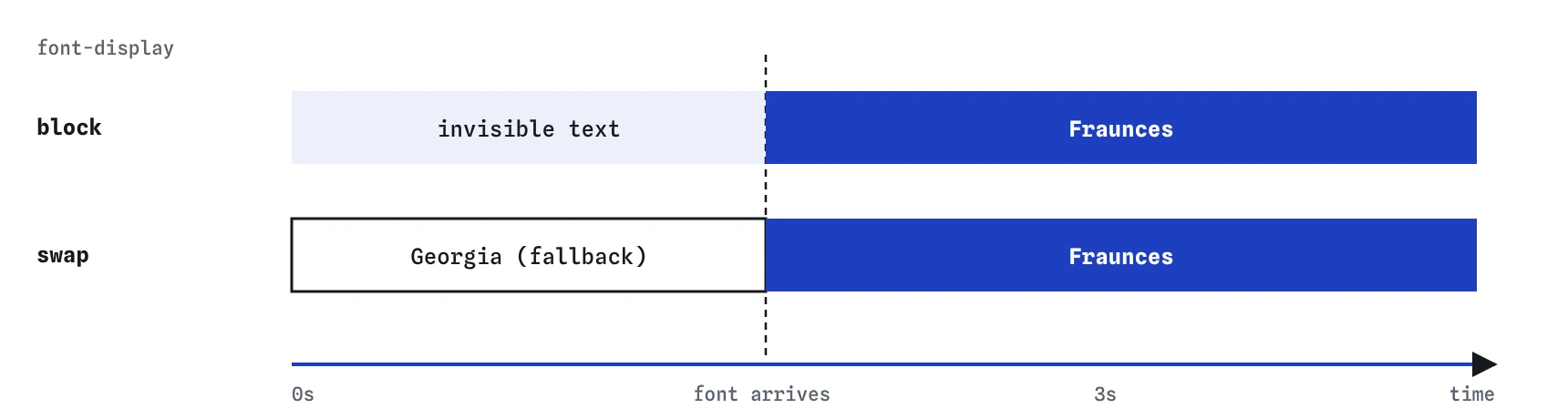
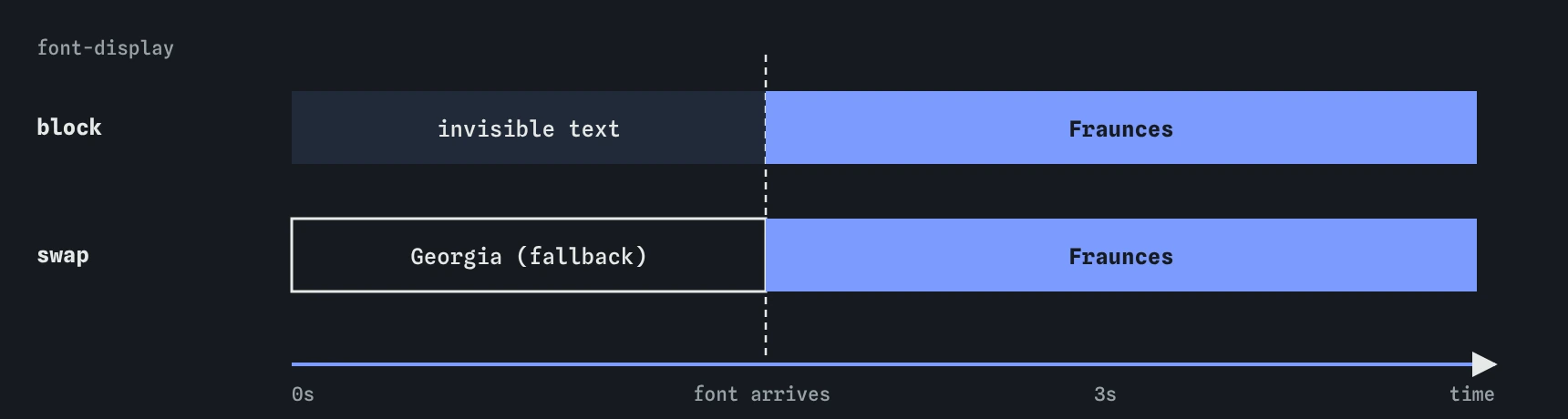
block, text is hidden until the file arrives. With swap, readers see the fallback straight away and the web font replaces it when ready.Why does text sometimes vanish while the page loads?
While a web font downloads, the browser has to decide what to show. The default behaviour in most browsers is to hide the text for up to three seconds and then fall back if the font is still missing. That blank gap is the flash of invisible text, often shortened to FOIT. On a slow phone connection it means a reader sees a page of empty boxes.
The font-display descriptor changes the decision. With swap, the browser paints the fallback font immediately and replaces it when the web font arrives. The visible change is the flash of unstyled text, or FOUT. A short FOUT is almost always better than invisible words, so swap is the right choice for body text and most headings.
Two other values are useful. The optional value gives the font a very short window, about 100 milliseconds; if it misses that window, the page keeps the fallback for this visit and uses the cached font next time. It is good for decorative fonts where layout stability is more important than the exact face. The fallback value sits between the two. Avoid block for anything people need to read.
Should you use a link tag or @import for Google Fonts?
Google Fonts gives you a stylesheet URL that contains the @font-face rules for you. You can load it with a <link> in the HTML head or with @import at the top of your CSS. Use the <link>. The browser sees it while reading the HTML and starts the request at once. An @import is only discovered after your own stylesheet has downloaded and been parsed, which adds a full round trip before the font request even begins.
Add display=swap to the URL so the generated rules use font-display: swap. Ask only for the weights you use. A URL that requests every weight from 100 to 900 with italics can pull in many files for one family.
The two preconnect hints in the snippet below let the browser open connections to Google's servers early. They help a little; the bigger win is choosing fewer files.
<link rel="preconnect" href="https://fonts.googleapis.com">
<link rel="preconnect" href="https://fonts.gstatic.com" crossorigin>
<link rel="stylesheet" href="https://fonts.googleapis.com/css2?family=Fraunces:[email protected]&display=swap">
Is self-hosting better than a font CDN?
Self-hosting means putting the woff2 files on your own server and writing the @font-face rules yourself. It used to be slower than a shared CDN, because a visitor might already have the CDN's copy cached from another site. Browsers now partition their caches by site, so that shared-cache benefit is gone. A self-hosted font is usually as fast or faster, because it comes over the connection your page already opened.
Privacy is the other reason. Every request to a third-party font service sends the visitor's IP address to that company. A German court ruled in 2022 that embedding Google Fonts this way breached the GDPR, and many European sites switched to self-hosting afterwards. If your audience includes people in the EU, self-hosting removes the question entirely.
Check the licence before you copy files. Fonts from Google Fonts are under open licences that allow self-hosting. Commercial fonts often come with a web licence that limits page views or requires their own hosting.
What is a variable font?
A variable font packs a whole range of weights, and sometimes widths or other axes, into one file. Instead of loading regular, semibold and bold as three files, you load one file and declare font-weight: 100 900 in the @font-face rule. Any weight in that range then works, including in-between values such as font-weight: 650.
One variable file is often larger than one static file, but smaller than three or four. If you use only a single weight, a static file is lighter. If you use two or more, the variable version usually wins, and it lets you animate or fine-tune weight without extra downloads. Variable fonts are supported in every current browser.
Extra axes such as optical size or slant are set with font-variation-settings or, for registered axes, with normal properties like font-stretch and font-optical-sizing. Prefer the normal properties when one exists, because font-variation-settings overrides everything at once and does not inherit per axis.
When should you preload a font?
The browser does not know a page needs a font until it has built the CSS and found an element that uses it. That is late. A preload hint in the HTML head tells the browser to fetch the file right away. Use it for the one font that renders above the fold, usually the body face or the main heading face.
The crossorigin attribute is required even for fonts on your own domain, because fonts are always fetched in CORS mode. Leave it out and the browser downloads the file twice. Preload more than one or two files and you start competing with your own CSS and images for bandwidth, which makes the page slower rather than faster.
<link rel="preload" href="/fonts/fraunces-var.woff2" as="font" type="font/woff2" crossorigin>How do you stop the layout jumping when the font swaps?
When swap replaces Georgia with Fraunces, the letters change width, so lines rewrap and the content below moves. That shift counts against your Cumulative Layout Shift score and is annoying for readers. The fix is to make the fallback the same size as the web font.
You can declare a second @font-face that points at a local system font and adjusts it with size-adjust, ascent-override and descent-override. Then you put that adjusted fallback in the stack just after the web font. Tools such as Fontaine and the Next.js font loader calculate these numbers for you. Supported in all current browsers; Safari added the override descriptors last, in 2023.
@font-face {
  font-family: "Fraunces Fallback";
  src: local("Georgia");
  size-adjust: 104%;
}

h1 {
  font-family: "Fraunces", "Fraunces Fallback", serif;
}
How many web fonts is too many?
A useful limit is two families and four files in total, counting each weight and style as a file. A bakery site might use a variable display face for headings and the system font stack for body text, which is one download. Each extra file adds a request and more bytes before the page looks finished.
Check the real cost in DevTools. Open the Network panel, filter by Font, and reload with throttling set to Slow 4G. You will see each file, its size and when it started. Most woff2 files are 20 to 60 KB; if one is over 100 KB, look for a subset that drops languages you do not need.
When an AI tool writes font code for you, look for these habits: @import of Google Fonts at the top of the CSS, URLs asking for every weight, no display=swap, long src lists with ttf and eot formats, and a font-family with no generic fallback at the end. Each one is a small, easy fix.
- Two families at most, ideally one plus the system stack.
- woff2 only.
font-display: swapon everything readers need to read.- Preload one file, not five.
Field notes
@font-facegives a font name and says where its file lives.font-display: swapshows a fallback font until the web font arrives.- A
<link>tag loads Google Fonts faster than@import. - Self-hosted woff2 files are usually as fast as a font service, or faster.
Easy to get wrong
The import is found only after your CSS downloads, so the font starts late. The link starts at once and the display=swap parameter keeps text visible.
Without fallbacks, a failed download leaves the heading in the browser default. A close fallback and a generic family keep the look predictable.
Every current browser reads woff2, the smallest format. Older formats add files you maintain and nobody downloads.
Fonts load in CORS mode. Without crossorigin the preload does not match the real request and the file downloads twice.
Questions people ask
Why does my web font not show in the editor preview?
The preview only shows fonts that are installed on your computer or loaded by an @font-face rule the page can reach. The font stack still works: the browser uses the next family in the list. That is exactly why the fallbacks matter.
Do I need to quote font family names?
Quotes are required when a name contains characters such as digits at the start or punctuation, and recommended when it has spaces. Generic families like serif and sans-serif must never be quoted, or the browser looks for a font literally called serif.
Can I use a font installed on my computer?
Only you will see it. Visitors without that font get the fallback. Use @font-face with a file on the server for anything that must look the same everywhere.
Does font-display work with Google Fonts?
Yes. Add &display=swap to the stylesheet URL and Google writes font-display: swap into every rule it generates.
Is the system font stack a good choice?
For body text, often yes. system-ui loads instantly, looks native on each platform and supports many languages. Pair it with one web font for headings if you want a distinctive voice.