What is a login cookie and why do attackers want it?
When a Crumb and Crust customer signs in, the server creates a session and hands the browser a cookie such as session=abc123. The browser stores it and sends it back with every later request to crumbandcrust.example. That is how the server knows who is asking to change a delivery address without asking for the password each time.
The cookie value is effectively a temporary password. Whoever presents it is treated as the customer until the session ends. An attacker does not need the real password if they can get the cookie, or if they can make the customer's own browser send it on their behalf.
Cookie flags are short words added to the Set-Cookie header that limit both of those. Each one closes a different route, and you met all three in the task: one stops scripts reading the cookie, one keeps it off unencrypted connections, one stops other sites using it.
Set-Cookie: session=abc123; Path=/; HttpOnly; Secure; SameSite=Lax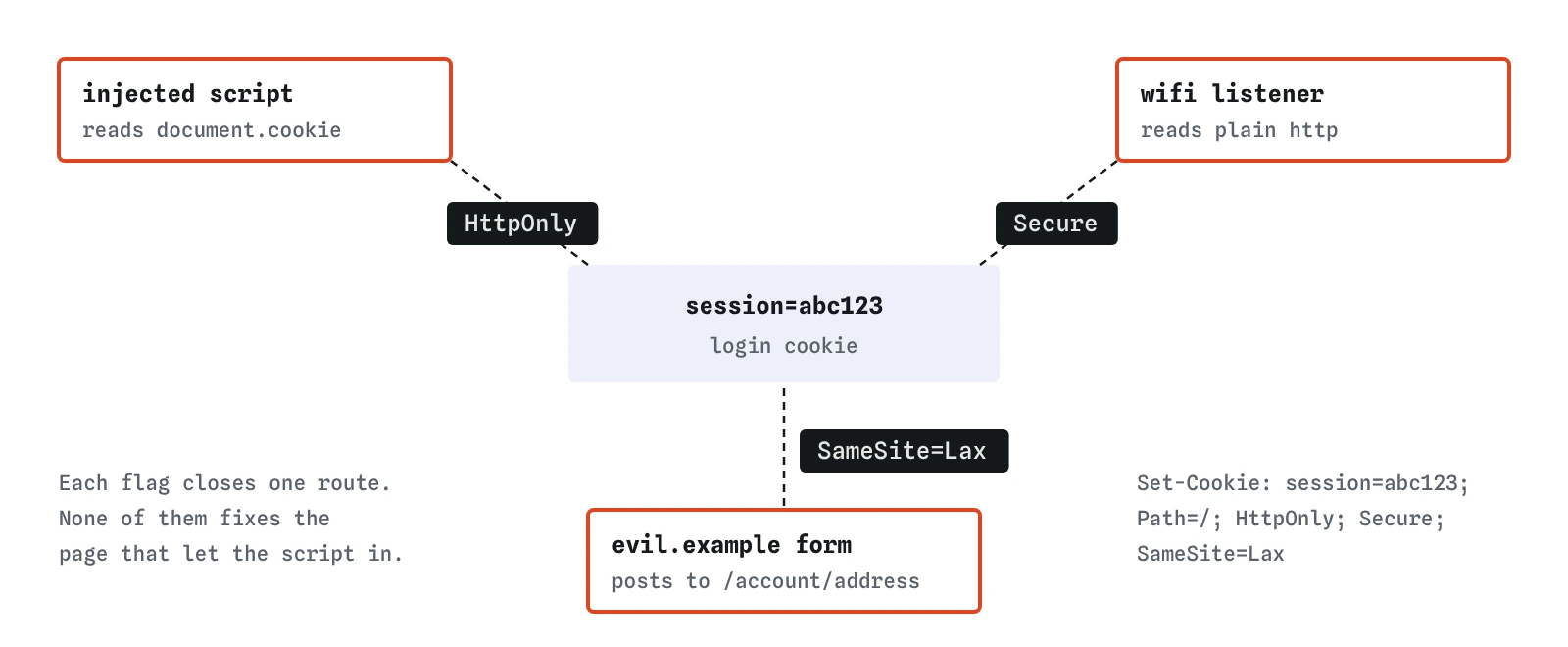

What does HttpOnly do?
HttpOnly removes the cookie from document.cookie, the JavaScript property that lists a page's cookies. The browser still stores it and still sends it with requests to your server. Only scripts lose sight of it.
That matters when a script gets into your page that you did not write, through a cross-site scripting hole like the unescaped comments on the bakery's page. Without HttpOnly, the attacker's script reads the cookie, sends it to evil.example, and the attacker can sign in from anywhere until the session expires. With it, the script finds nothing to steal.
HttpOnly has a limit. An injected script running in the customer's browser can still send requests to the bakery while the page is open, and those requests carry the cookie automatically. HttpOnly turns a stolen session into a session that can only be misused while the victim is on the page. The lab's reason after your fix says the same thing, and it still lists the comment attack as succeeding. Escaping fixes the cause.
What does Secure do?
Secure tells the browser to send the cookie only over HTTPS. If any request to the site goes out over plain HTTP, the cookie stays behind. The previous lesson showed how a single plain request can slip out even on a site with HTTPS switched on, and a cookie riding along on that request can be read by anyone on the same network.
There is one side effect to know. Browsers refuse to store a Secure cookie on a page loaded over plain HTTP, except on localhost during development. If sign-in stops working after you add the flag, check the address bar before anything else.
What does SameSite do?
SameSite controls whether the browser attaches the cookie to requests that start on a different site. A page on evil.example can contain a hidden form that posts to https://crumbandcrust.example/account/address. Without SameSite, some browsers attach the bakery cookie to that post, and the server changes the address because the request looks signed in. That is cross-site request forgery, covered fully in its own lesson.
There are three values. Strict never sends the cookie on a request that started on another site, including when someone clicks a link to you from an email or a search result, so they arrive looking signed out on that first page. Lax sends it when someone follows an ordinary link or types the address, and leaves it off forms posted from other sites, fetches, images and frames. None sends it everywhere and must be paired with Secure.
For a typical login cookie, Lax is the sensible default. Strict suits a cookie that guards something sensitive, such as an admin area, where landing signed out from an email link is acceptable.
Strict: only requests that start on your own site.Lax: your site, plus ordinary links from other sites that open one of your pages.None: every request from every site, and only withSecure.
What happens when a cookie has no SameSite at all?
Browsers disagree, which is why you should always write it. Chrome and Edge treat a missing SameSite as Lax, with a short exception: for about two minutes after the cookie is set, they still send it on a cross-site top-level POST, so some older sign-in flows keep working. Firefox and Safari still send cookies without a SameSite setting on cross-site requests, relying on other protections such as their limits on third-party cookies, which do not cover every case.
The lab takes the cautious reading and counts a cookie with no SameSite as unprotected against the forged form. Your real visitors use all four browsers, so writing SameSite=Lax explicitly gives everyone the same behaviour.
One more detail affects real sites more than the lab. SameSite compares sites, not exact addresses. shop.crumbandcrust.example and crumbandcrust.example count as the same site, so a Lax cookie flows between them. The same-origin lesson explains the difference.
Which other cookie settings are useful?
Path=/ makes the cookie apply to the whole site. Leave Domain off unless you need the cookie on subdomains: without it the cookie belongs to the exact host that set it, which is narrower and safer. Max-Age or Expires decide how long the cookie lives; leaving both off makes a session cookie that browsers may still restore after a restart, so expire sessions on the server too.
A name starting with __Host- is a promise the browser enforces. It refuses the cookie unless it has Secure, Path=/ and no Domain, which stops a subdomain or a plain HTTP page from overwriting your login cookie. The lab warns if a __Host- cookie breaks those rules.
Set-Cookie: __Host-session=abc123; Path=/; HttpOnly; Secure; SameSite=LaxHow do you check cookie flags in a real browser?
Sign in to your own site, open DevTools, and go to the Application tab in Chrome and Edge or the Storage tab in Firefox. Under Cookies, pick your domain. Each cookie has columns for HttpOnly, Secure and SameSite. A blank SameSite column means the header did not set one.
For a second check, go to the Network tab, click the sign-in request and read the Set-Cookie response header. In the Console, typing document.cookie should not show your session cookie at all. If it does, HttpOnly is missing. Safari shows the same information under Storage in its Web Inspector.
What do AI tools get wrong about cookies?
The most common one is reaching for SameSite=None whenever a cookie does not arrive where expected, often in an embedded widget or a separate front end on another port. It makes the error go away by sending the cookie to every site, which reopens forged requests. Before accepting it, ask whether the two parts really sit on different sites. Usually they are the same site and Lax works.
Assistants also write res.cookie('session', id) with no options at all, or with httpOnly: false so front-end code can read the user's ID from the cookie. Your own JavaScript should never need the session value. If the page needs to know who is signed in, add a small route that returns the name, and keep the cookie hidden. In Express with express-session, check the cookie options object for all three flags before you ship.
Field notes
HttpOnlyhides a cookie from page scripts, so an injected script cannot read it.Securemeans the cookie only travels over HTTPS.SameSite=Laxkeeps the cookie off most requests started by other sites.- The
__Host-prefix locks a cookie to one host and requires Secure andPath=/.
Easy to get wrong
A cookie with no flags can be read by scripts, travel over plain HTTP, and be sent by other sites' forms. Each flag closes one of those.
None sends the login cookie with requests from every site. Most front ends and widgets are on the same site and work with Lax.
Browsers reject a None cookie that is not Secure, so the cookie is never stored and sign-in fails.
An injected script cannot read an HttpOnly cookie, but it can still act as the visitor while the page is open.
Questions people ask
Can a visitor see or change their own cookies?
Yes, in DevTools, including HttpOnly ones. Flags protect the cookie from other sites, scripts and networks, not from the person whose browser it is. Never store anything in a cookie that the visitor should not be able to change, such as a price or a role.
Should I use Lax or Strict?
Lax for most login cookies. Strict for cookies guarding sensitive areas where it is fine for someone arriving from an email link to sign in again.
Do I still need CSRF tokens if my cookie is SameSite=Lax?
For most small sites Lax stops cross-site forms. Tokens add a second wall, and they cover requests from sibling subdomains, which count as the same site. The CSRF lesson goes through when to add them.
Why does the lab only look at one cookie?
To keep the lesson focused. It treats the cookie whose name contains session, sid, auth, login or token as the login cookie. Real sites often set several, and every one that grants access needs the same flags.