What problem does CORS solve?
The same-origin rule stops a script on one origin reading answers from another. Most of the time that is exactly right. Sometimes you want the exception: Spoke and Chain's new booking app at https://book.spokeandchain.example needs to read /api/account on https://spokeandchain.example. Those are different origins, so without help the browser refuses.
Cross-Origin Resource Sharing is how the API server says yes to specific callers. It is a handful of response headers. The browser reads them and decides whether to give the answer to the script that asked. CORS never protects your server, and it never adds a restriction. Every CORS header you send opens something that was closed.
Seen that way, CORS is less frightening. The safe default is no CORS headers at all. You add only the ones you need, for only the origins you name.
What do the main CORS headers mean?
Four headers do almost all the work. The browser adds Origin to cross-origin requests, naming the page that asked. Your server answers with Access-Control-Allow-Origin, which must be a single exact origin or *. Lists are not allowed in the header itself, which is why servers check the request's Origin against a list and echo back the one that matched.
Access-Control-Allow-Credentials: true says the browser may include cookies and may show the answer to the script even though cookies were involved. Browsers refuse to combine it with Allow-Origin: *, so a wildcard can only ever expose the logged-out version of a page. That is why the lab marks * as blocked for the account route, while still calling it wrong for anything private.
For preflighted requests, Access-Control-Allow-Methods and Access-Control-Allow-Headers list what the real request may use, and Access-Control-Max-Age lets the browser remember the answer for a while.
Origin: sent by the browser, says who is asking.Access-Control-Allow-Origin: one origin, or*for public data.Access-Control-Allow-Credentials: true: cookies allowed; never with*.Access-Control-Allow-Methodsand-Headers: answers to a preflight.Vary: Origin: tells caches the answer differs by caller.
Why is reflecting the Origin header so dangerous?
The line in the task, res.set('Access-Control-Allow-Origin', req.headers.origin), copies whatever origin the request names into the answer. A request from the booking app gets the booking app's origin back. A request from evil.example gets https://evil.example back. The browser sees its own origin named and allowed, so it hands over the response.
On a public route that would only be untidy. On /api/account, combined with Access-Control-Allow-Credentials: true and a cookie sent from every site, it means any page a signed-in customer visits can read their name, email and bookings. The attacker does not need to break anything. The server gave written permission.
This pattern appears because it is the shortest code that makes every CORS error disappear during development. It is also how a lot of real data leaks happen.
What does a safe allowlist look like?
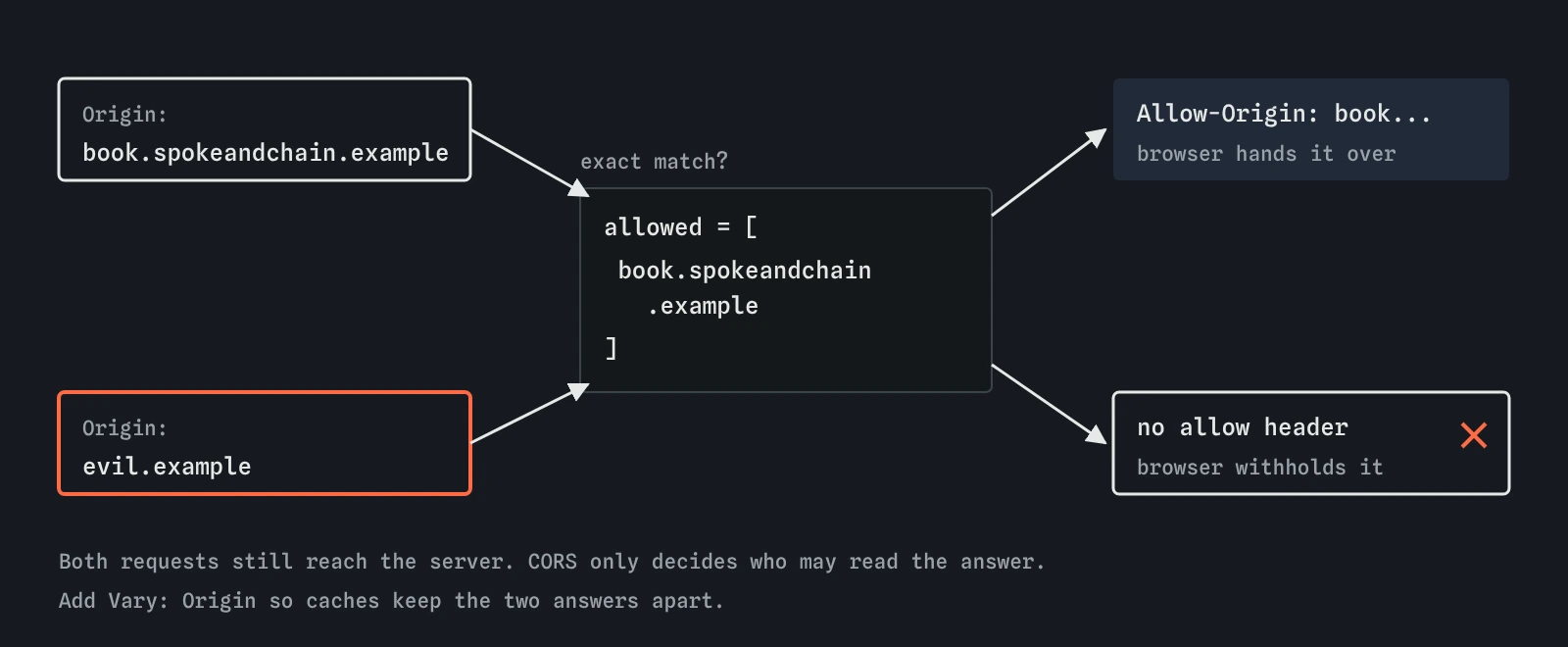
Keep a short list of the exact origins that may read, compare the incoming Origin against it with an exact string match, and only then set the header. Anything else gets no allow header, which the browser treats as a refusal. Add Vary: Origin so a shared cache never serves one origin's allowed answer to another.
Compare whole origins. Checks such as origin.endsWith('spokeandchain.example') also match evilspokeandchain.example, and origin.includes('spokeandchain') matches far more. A regular expression without anchors has the same flaw. An array and includes avoids all of it.
With the cors package in Express, the same idea is cors({ origin: ['https://book.spokeandchain.example'], credentials: true }) on the routes that need it. Calling cors() with no options allows every origin, without credentials.
const allowed = ['https://book.spokeandchain.example'];
const origin = req.headers.origin;
if (allowed.includes(origin)) {
  res.set('Access-Control-Allow-Origin', origin);
}
res.set('Vary', 'Origin');
When is Access-Control-Allow-Origin: * fine?
For data that is truly public and identical for everyone, a wildcard is fine. The shop's /api/hours route returns opening times. Any site may show them, and nothing changes based on who is signed in. Access-Control-Allow-Origin: * on that route lets partner sites fetch it without asking you to update a list.
Do not put the wildcard on the whole site to save effort. Even without cookies, some internal pages are protected only by where they are reachable from, such as an office network, and a wildcard lets any page a staff member visits read them.
Does CORS stop requests reaching your server?
No. Simple requests, meaning GET, HEAD and form-style POST, are sent first and judged afterwards. The server runs the route, and only then does the browser decide whether the calling script may see the answer. If the route changes something, the change has already happened. That is why every change needs CSRF protection whatever your CORS settings say.
Preflighted requests are the exception. Before a PUT, a DELETE, or a POST with a JSON body or a custom header, the browser sends OPTIONS and waits. If the server does not approve, the real request is never sent. That helps, but you should not depend on it: a route that accepts both JSON and a plain form post can be reached with the form version, which skips the preflight.
The lab's reason after your fix says this directly: the request still reaches your server, and CORS only decides whether evil.example's script may read the answer.
How do you debug a real CORS error?
Read the whole Console message. Browsers say exactly which header is missing or wrong: no Access-Control-Allow-Origin, a wildcard used with credentials, a preflight that did not return a success status such as 200 or 204, or a request header that was not listed in Access-Control-Allow-Headers.
Then open the Network tab, find the request, and look for a separate OPTIONS line just before it. Check the response headers on both. Common causes are a typo in the origin, a trailing slash such as https://book.spokeandchain.example/ which never matches, http versus https, or a different port in development. Fix the specific header for the specific origin. If the front end and API can share an origin, for example by serving the API under /api on the same host, CORS is not needed at all.
What do AI tools get wrong about CORS?
Ask an assistant to fix a CORS error and the most likely answers are app.use(cors()), Access-Control-Allow-Origin: *, or reflecting req.headers.origin with credentials. Each removes the error by allowing everyone. The first two are fine for public data. For private data they fail closed, because the browser will not show a script a cookie-carrying answer when the header is a wildcard, though they can still expose pages that rely on being inside an office network. The third is the dangerous one, and it often arrives together with SameSite=None on the cookie to make the cookie flow.
They also suggest allowing the origin null when testing from a local HTML file. Sandboxed frames on any site send null too, so that allows attackers. Test from a local web server instead. When you review AI code, search for Access-Control and cors( and check every place an origin is allowed against a fixed list. The lab reads the CORS lines with pattern rules; it treats a copied req.headers.origin as reflection and cannot follow more creative code, so a real review reads the logic line by line.
Field notes
- CORS headers let chosen origins read answers from your API.
- Copying the request's Origin back into
Access-Control-Allow-Originlets any site read the data. - Use an exact allowlist of full origins and send
Vary: Origin. Access-Control-Allow-Origin: *is fine for public data and can never carry cookies.
Easy to get wrong
Reflecting the Origin header allows every site, and with credentials it lets any page read signed-in customers' data.
Suffix and substring checks also match domains an attacker can register, such as evilspokeandchain.example.
Sandboxed frames on any site send the origin null, so allowing it allows attackers.
Simple cross-origin requests are sent and run before the browser applies CORS. CORS only hides the answer.
Questions people ask
Do curl and Postman get CORS errors?
No. Those tools ignore CORS, because it is a browser rule protecting visitors. If a request works in curl and fails in the browser, the server's CORS headers are the difference.
Does my site need CORS at all?
Only if a page on a different origin must read your answers with JavaScript. A site whose pages and API share one origin needs no CORS headers.
Can I list several origins in one header?
No. Access-Control-Allow-Origin takes one origin or *. Check the request's Origin against your list and send back the one that matched, with Vary: Origin.
Why did the lab block the attack when the cookie was SameSite=Lax?
A Lax cookie is not sent with a fetch from another site, so evil.example only gets the signed-out answer. The CORS lines would still be too loose, and a sibling subdomain would get the cookie, so fix both.