What is cross-site scripting?
Cross-site scripting, usually shortened to XSS, happens when text from a stranger ends up in your page as code. The browser cannot tell your markup from theirs, so it runs their script with all the rights your own scripts have: it can read the page, change it, send requests as the visitor and, unless a cookie is protected, read the login cookie.
The name is old and confusing. The script does not come from another site. It comes through your own site, in a bio, a comment, a search box or the address. What makes it dangerous is that it runs in the visitor's browser as if you wrote it.
What happened to your profile page?
Your profile prints two things: your name and a bio. The name went through escapeHtml, the bio did not. The pretend attacker set a bio of <img src=x onerror="steal()">. The browser read it as an image tag, failed to load the image, and ran steal().
The second attack built on the first. With a script running on you.example, document.cookie returned session=... because the cookie had no HttpOnly flag. The script could send that value to evil.example, and the attacker could paste it into their own browser and be signed in as you until the session ended.
Each fix covers a different step. Escaping stops the script ever running. HttpOnly stops a running script reading the cookie. A script that does get in could still click buttons and send requests from the open page, which is why escaping comes first.
What are the three kinds of XSS?
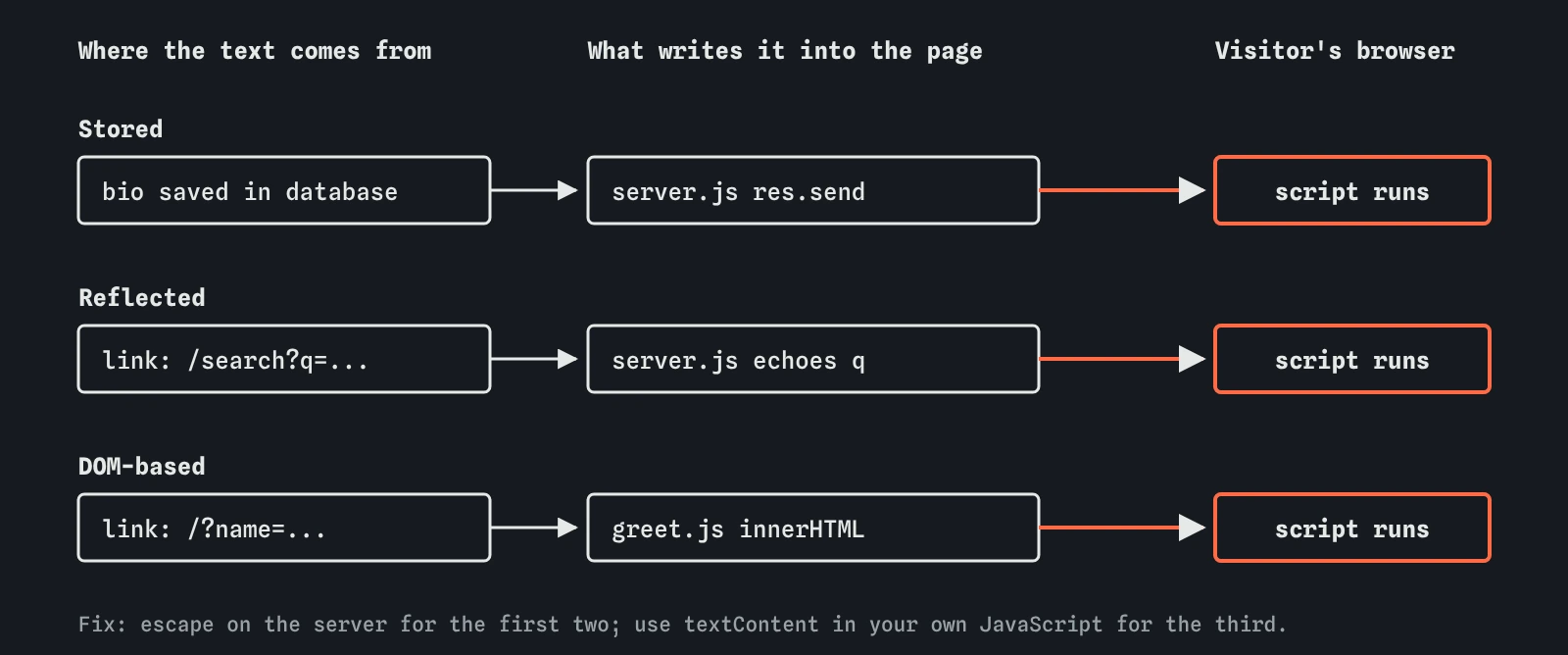
The kinds differ only in how the attacker's text reaches the page. Knowing them helps you look in the right places.
- Stored: the text is saved, then shown to everyone. Your bio and the visitor notes are examples. One saved payload hits every reader.
- Reflected: the text arrives in the request, often the address, and the server prints it straight back, as in
You searched for .... The attacker sends someone a crafted link. - DOM-based: your own front-end JavaScript takes text from the address or another source and writes it into the page with
innerHTML. The server never writes the payload into the page (and never even receives it when it sits after a#in the address), which is why server-side escaping alone misses it.

Why is innerHTML risky?
innerHTML tells the browser to parse a string as HTML. If any part of that string came from a visitor, they control the markup. textContent puts the string in as plain text, with no parsing. For greeting someone by name, showing a search term or listing bird names, textContent does the job and cannot run anything.
The same applies to outerHTML, insertAdjacentHTML and document.write. Frameworks have their own versions: React escapes by default but dangerouslySetInnerHTML does not, Vue's v-html does not. When you truly need visitor-written HTML, such as formatted posts, pass it through a sanitiser like DOMPurify, which keeps safe tags and strips scripts and handlers.
// risky: the name is parsed as HTML
hello.innerHTML = 'Hello ' + name;

// safe: the name is shown as text
hello.textContent = 'Hello ' + name;
What can a script do once it runs?
It runs as your site. It can rewrite the page into a fake sign-in form that posts passwords to the attacker. It can read anything shown on the page, such as an email address or order history. It can call your site's own endpoints with fetch, and the browser attaches the visitor's cookies, so it can change a password or post spam as them.
HttpOnly limits one of these: reading the cookie. A Content Security Policy without 'unsafe-inline' limits more, since the injected handler never runs. Neither undoes the hole. Treat any XSS finding as serious, even on a page that looks unimportant, because every page on the origin shares the same cookies and storage.
How do you find XSS in your own site?
List every place visitor text is shown. Include the obvious ones, comments and profiles, and the easy-to-forget ones: the search results heading, error messages that repeat what was typed, the page title, email confirmation pages, admin screens that show reports from users.
For each place, type a harmless test such as <b>test</b> into the field and look at the result. If the word appears in bold, the text was treated as markup. If you see the angle brackets printed, it was escaped. Do this only on sites you own or have permission to test. In DevTools, the Elements panel shows whether a <b> element was created.
The lab looks for this with pattern rules on server.js and on innerHTML lines. It does not run the code, so unusual code can fool it, and it only tries one payload. A real attacker tries many, in attributes, URLs and scripts too.
Is filtering out script tags enough?
No. Attackers do not need the word script. The payload in the lab has no <script> tag at all. There are dozens of tags and attributes that run code, and endless ways to vary spelling and encoding. Blocklists that remove bad words are always one trick behind.
The dependable approach is to escape on output for the place the text is going, which the next lesson covers in detail. Validate input as well where it makes sense, for example a bike frame size should be a number, but treat validation as tidiness. Escaping is what stops the script.
What do AI tools get wrong about XSS?
Generated code reaches for template strings and innerHTML because they are short. A request to "show the user's name in the header" frequently comes back as header.innerHTML = Hi ${user.name}`. Server code often uses res.send(<p>${req.query.q}</p>)` with no escaping.
When you ask about safety, assistants often answer "sanitise user input" with no detail, or suggest a regular expression that removes <script>. Ask instead: where is each value displayed, and is it escaped for that place? Check that cookies holding a login have httpOnly: true. Then run the attack here and look for the tick.
Field notes
- Cross-site scripting lets a stranger's script run in your visitors' browsers.
- Stored XSS is saved on the server, reflected XSS comes back from the address, DOM XSS happens in page script.
innerHTMLreads text as HTML. UsetextContentfor visitor text.- Filtering out
<script>tags misses handlers likeonerror, so escape instead.
Easy to get wrong
innerHTML parses visitor text as markup. textContent shows it as text and cannot run code.
Scripts can run without a script tag, through attributes like onerror. Removing words never catches every form.
HttpOnly hides the cookie, but an injected script can still act as the visitor while the page is open.
Questions people ask
Does HTTPS prevent cross-site scripting?
No. HTTPS protects text while it travels. XSS comes through your site's own pages, over the same encrypted connection.
Do frameworks like React stop XSS?
They escape text in normal templates, which removes most cases. Escape hatches such as dangerouslySetInnerHTML, v-html and links built from visitor text can still let it in.
Is a self-XSS, where people paste code into their own console, my problem?
Mostly no, though browsers warn about it for a reason. Focus first on any path where one person's text reaches another person's page.
What is the safest way to show visitor HTML, like formatted posts?
Use a tested sanitiser such as DOMPurify with a short list of allowed tags, and keep a Content Security Policy as a backup. Markdown converted on the server and then sanitised is a common pattern.