Why use a checklist at all?
Most attacks on small sites are automated, and automated attacks look for the same handful of gaps on every site they visit. You do not need to predict a clever attacker. You need to make sure none of the common gaps is open, every time you launch or change something.
That is a job for a list. Pilots and surgeons use checklists because experienced people still forget steps when they are busy, and the cost of a skipped step is high. The bird club's code was fine in the lab above; every problem was a missing setting, the kind of thing anyone forgets on a Friday afternoon.
Keep the list short enough that you will actually use it. The version below fits on one screen and covers every attack in this course. Copy it into your project's notes and tick it before each launch.
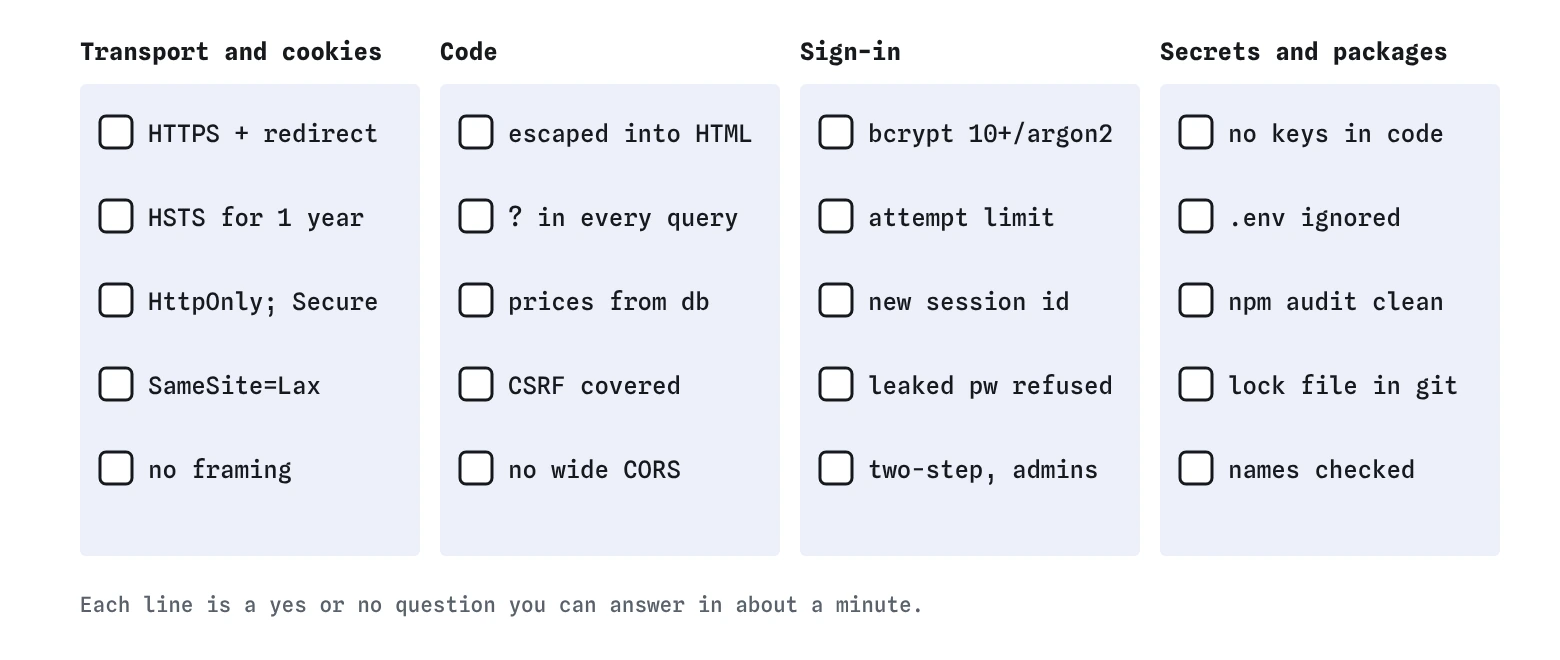

What goes on the list for transport and cookies?
HTTPS on, with a certificate from your host or Let's Encrypt. Plain HTTP redirects to HTTPS. A Strict-Transport-Security header with a long max-age, usually a year. These three together mean someone on the same wifi sees only which site is visited.
The login cookie has HttpOnly, so scripts cannot read it, Secure, so it only travels over HTTPS, and SameSite=Lax or Strict, so other sites' forms arrive without it. In DevTools, open Application, then Cookies, and check the three columns for your session cookie. A name starting with __Host- adds a guarantee that the cookie is Secure and belongs to exactly your domain.
- HTTPS on, HTTP redirects, HSTS for a year
- Login cookie: HttpOnly, Secure, SameSite=Lax
- Frames: frame-ancestors 'none' or X-Frame-Options: DENY
- X-Content-Type-Options: nosniff and a Referrer-Policy
- A Content-Security-Policy that blocks inline scripts
What goes on the list for code?
Every place visitor text enters HTML is escaped. Every database query uses placeholders. No price, total or role comes from the browser. Every route that changes data either relies on a SameSite cookie or checks a CSRF token or the Origin header. API routes that return private data send no CORS header, or name exact trusted origins.
These are the items a scanner finds least reliably, because they depend on what the code means. Read each route with the question from the AI review lesson: where does outside data go, and what protects it there? That takes a few minutes per route.
- Visitor text escaped where it enters HTML
- Placeholders in every query
- Prices and totals from the server
- SameSite or CSRF tokens on every change
- No CORS header on private routes, or exact origins only
What goes on the list for sign-in?
Passwords hashed with bcrypt at cost 10 or more, or argon2id. Sign-in attempts limited, per account and per address, with growing delays rather than permanent lockouts that let a stranger lock members out. A new session id issued at sign-in. Common and leaked passwords refused at sign-up, with a minimum length of at least eight characters and no rules forcing symbols or regular changes. Current NIST guidance asks for 15 characters when the password is the only step.
Two-step sign-in available, and required for accounts with power, such as the club's committee members who can delete sightings. Codes from an app are better than texts. Passkeys are better still, because they will not work on a fake copy of your site.
- bcrypt cost 10 or more, or argon2id
- Rate limit on sign-in
- New session at sign-in
- Leaked and common passwords refused
- Two-step required for powerful accounts
What goes on the list for secrets and packages?
No keys in code, including front-end code. .env listed in .gitignore before the first commit, with GitHub push protection or a similar scanner on. npm audit clean of high and critical issues, Dependabot alerts on, the lock file committed, and every package name checked on npmjs.com before installing.
Add one item that is not about code: know what you would do if something went wrong. Where are the keys revoked? Who has admin access to the host? Where are the backups, and have you ever restored one? Ten minutes writing this down saves hours on a bad day.
- No keys in code; .env ignored
- npm audit clean, alerts on, lock file committed
- Every new package name checked
- Backups tested, and a note on how to revoke keys
What changed on the bird club's site?
In the task you added seven things without touching server.js. HSTS and the Secure flag closed the cafe wifi attack. HttpOnly added a second wall behind the club's escaping. SameSite=Lax stopped the forged sighting form, because browsers no longer attach the cookie to a post from another site. A frame rule stopped clickjacking. The sign-in limit and required two-step sign-in stopped password guessing and leaked passwords.
The Report view also showed defences that were already on: escaping, placeholders, bcrypt at cost 12 and a new session on sign-in. A good checklist pass usually looks like this, mostly confirming what is right and catching two or three things that slipped.
How often should you run through it?
At launch, after any change to sign-in, cookies, headers or hosting, and once every few months regardless. The quarterly pass catches drift: a header removed by a new hosting setup, a package with a new advisory, a test setting left switched on. The broken version of this lesson shows exactly that kind of drift.
Free tools speed up the header part. Mozilla's HTTP Observatory and similar scanners read your live site's headers and grade them. They do not see your code or your settings, so a good grade earns one tick on the list and no more.
What do AI tools get wrong about checklists?
Ask an assistant for a security checklist and you often get a long list padded with outdated items: the X-XSS-Protection header, which modern browsers ignore; forced password changes every 90 days; complex character rules; and broad advice such as validate all input or follow security guidelines. Long lists get skipped.
Prefer items you can check in a minute with a definite answer. Is HSTS present, yes or no? Does the cookie say HttpOnly? A list made of questions like that gets used.
Where does the lab simplify?
The lab treats a sign-in limit of 1 to 10 a minute as enough, and any required second step as stopping credential stuffing. Real limits need to work per account and per address without letting a stranger lock members out, and app codes and texts can still be phished on a convincing fake page. The lab also has one cookie and one attacker site; real sites have several cookies and subdomains, each needing the same checks.
Field notes
- A checklist catches the same few gaps that most attacks on small sites use.
- Transport and cookies: HTTPS, HSTS and cookies with HttpOnly, Secure and SameSite.
- Code: placeholders in queries, escaping on output and prices looked up on the server.
- Run the list before each launch, after big changes and on a regular schedule.
Easy to get wrong
A max-age of zero tells browsers to forget the rule. A year is the usual value once HTTPS is working.
Optional two-step protects only the members who chose it. Accounts that can change or delete things need it switched on.
Long lists with vague items get skipped. Short, specific checks get done before every launch.
Questions people ask
Is a checklist enough for a site that takes payments?
It covers the common gaps. Sites handling payments or health data should also have a professional review or a penetration test, and payment providers set their own rules for how card data is handled.
Which item should I do first?
HTTPS with HSTS, then cookie flags, then escaping and placeholders. Those close the gaps automated tools try most.
Can I check headers on a live site?
Yes. Open DevTools, go to Network, reload, click the first request and read Response Headers. Online scanners such as Mozilla's HTTP Observatory do the same and explain each one.