What does escaping actually change?
A handful of characters have special meaning in HTML. < starts a tag, & starts a character reference, and " and ' end an attribute value. Escaping swaps each one for a reference the browser shows as that character but never treats as structure: <, >, &, " and '.
A customer who searches for rye & spelt <fresh> sees exactly that on the results page. The page source contains rye & spelt <fresh>. Nothing is removed and nothing is rejected, which is why escaping is kinder than filtering: people with apostrophes in their names, or who type maths in a comment, keep their text intact.
escapeHtml('rye & spelt <fresh>')
// 'rye & spelt <fresh>'Why escape on output instead of on input?
You could escape text as it arrives and store the escaped version. It goes wrong quickly. The same order note might end up in an HTML page, a plain-text email, a CSV export and a JSON API. Each needs different treatment, and text escaped for HTML shows as & in the email. Text that gets escaped twice shows &amp;.
Store what the visitor typed, unchanged, and escape at the moment you put it into a page, for that page. The place where text meets HTML is the place where you know which rules apply. Validate input separately, for example a quantity must be a whole number from 1 to 50, but do not rely on validation for safety.
How do you find every value that needs escaping?
Read each line that builds HTML and ask, for each value: where did this come from? Search terms, form fields, cookies and the address come from visitors. Database values came from visitors earlier. Even data from a supplier's API was written by someone outside your code.
In the bakery's file that gave three values in two routes. i.name is a menu item name; staff type those today, but if the menu ever takes suggestions it becomes visitor text, and escaping it costs nothing. q comes from the address. o.note was typed by a customer and is shown to staff, which is a common route for attacks on admin pages.
Values that can only be numbers are safe as they are. Number(o.qty) turns anything into a number or NaN, and .toFixed(2) produces digits. orders.length is a count. The lab recognises these and so should you.
Does escaping work the same everywhere in HTML?
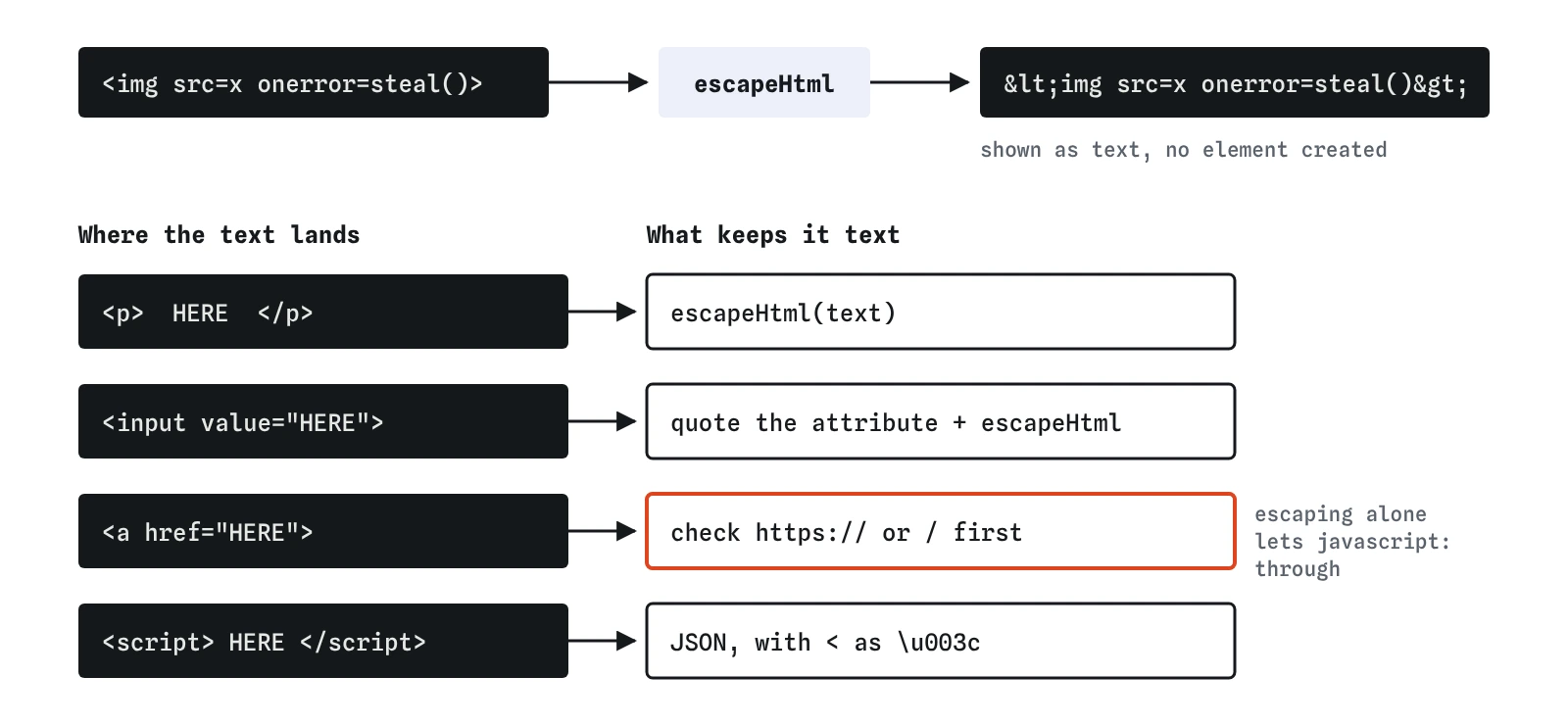
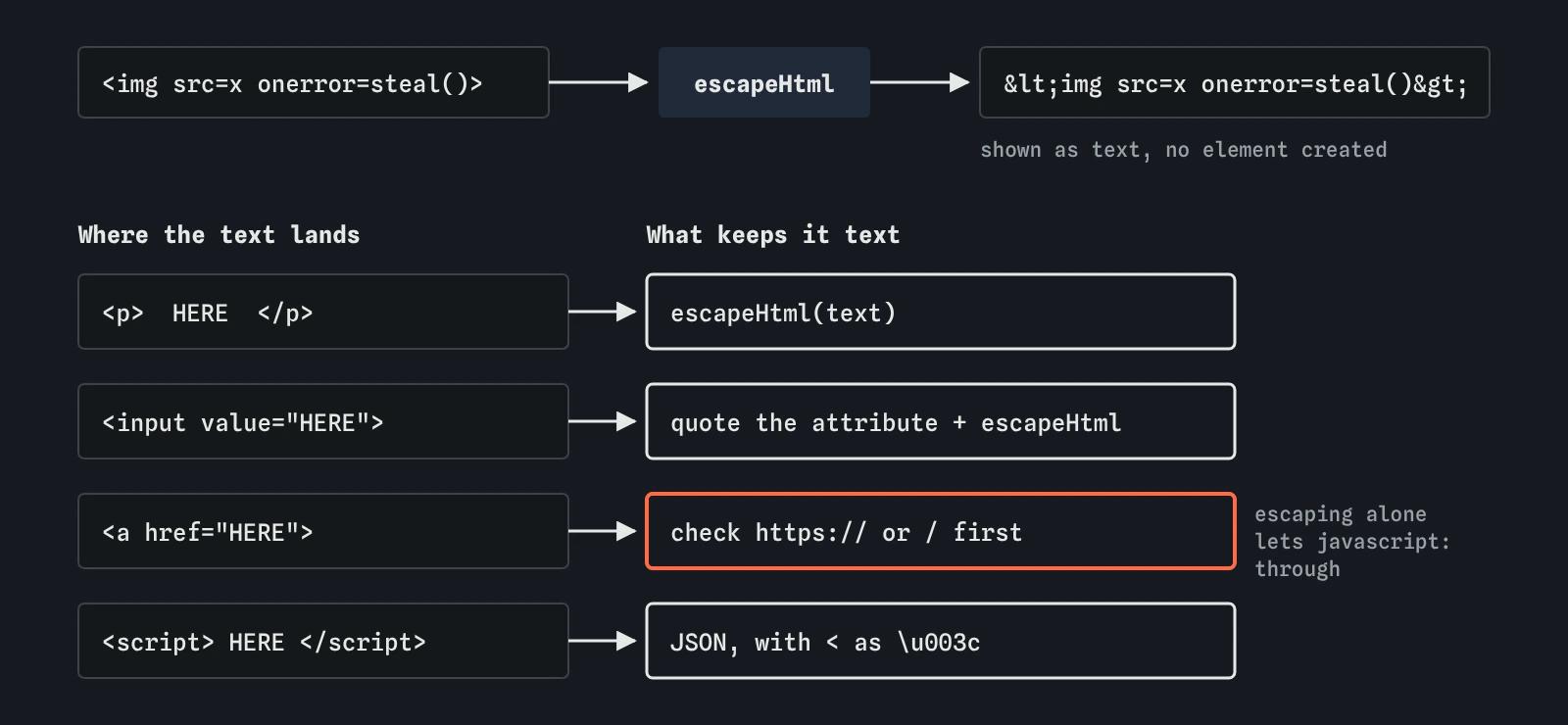
No, and this is where the lab is simpler than reality. The lab checks values placed in the body of a page, between tags. HTML has other places where text can land, and each has its own rules.
- Inside an attribute: always quote the attribute and escape quotes too.
escape-htmldoes both. An unquotedvalue=${name}can be broken with a space. - Inside a link: escaping is not enough. A link of
javascript:steal()is valid text with no special characters. Check that visitor-supplied URLs start withhttps://or/before using them inhref. - Inside a
<script>block: HTML escaping is the wrong tool. Pass data withJSON.stringify, either into adata-attribute (HTML-escaped like any attribute) or into a<script type="application/json">block with every<written as\u003c, so text such as</script>inside the data cannot end the block. Read it from your script file. - Inside CSS: avoid putting visitor text into styles at all.
Which escaping function should you use?
Use a small, well-tested one. The escape-html package, which the bakery uses, handles the five characters and nothing else, and it has been stable for years. Template engines such as EJS, Pug, Handlebars and Nunjucks escape by default when you use their normal output tag, so check which tag you are using: in EJS, <%= %> escapes and <%- %> does not.
Avoid writing your own. Home-made versions often handle < and forget & or quotes, or use replace('<', '<'), which in JavaScript replaces only the first match. If you need to keep some HTML, such as bold and links in posts, escaping is the wrong tool and a sanitiser such as DOMPurify is the right one.
<!-- EJS -->
<p><%= order.note %></p>   <!-- escaped -->
<p><%- order.note %></p>   <!-- raw: avoid for visitor text -->
What about res.write, res.end and string joining?
Every function that sends HTML to the browser is an output: res.send, res.write, res.end, a template's render call, and front-end calls such as innerHTML. Every way of building a string counts too. A value joined with + needs escaping exactly as one inside ${} does.
The break-it exercise uses both forms because hurried rewrites tend to switch styles and drop escaping along the way. When you review a change, search the file for ${ and for ' + and check each hit. The lab follows a variable like rows back to where it was built, but a human reviewer should do the same.
How do you test escaping by hand?
On your own site, put <b>x</b> into every field and into the address, such as /menu?q=<b>x</b>. Each page should show the brackets as text. Use View Source or the DevTools Elements panel: you should see <b> in the source, with no <b> element created. Test a name like O'Neill and a note with & too, to catch double escaping.
Add a test to your project so the check runs every time: request a page containing stored text with < in it, and assert the response contains <. A test like that catches the next rewrite before customers do.
What do AI tools get wrong about escaping?
Generated Express code very often builds pages with template strings and no escaping at all, because it is shorter and works for normal text. When asked to fix it, assistants sometimes write a home-made function that handles only < and >, or uses replace without the g flag, or escape on input and store HTML entities in the database.
They also escape the obvious field and miss the rest: the search heading, the error message, the staff page. Ask the assistant to list every value that goes into HTML and say how each one is escaped, then compare that list with the file yourself. Run the attack in the lab after any change, since one missed value is all it takes.
Field notes
- Escaping turns
<,>,&and quotes into character references like<. - Escape at output, where the value enters the HTML, because each place needs its own rules.
- Attribute values need quotes around them, and links need a check for
javascript:. - Template tags like
<%= %>escape for you, while<%- %>and string joining do not.
Easy to get wrong
In JavaScript, replace with a string changes only the first match, and this misses >, & and quotes as well.
Stored entities show up wrongly in emails and exports, and get escaped twice later.
A javascript: link has no special HTML characters, so escaping leaves it working.
The dash tag outputs raw HTML. The equals tag escapes.
Questions people ask
Do I need to escape numbers?
Not if they really are numbers. Values passed through Number(...) or .toFixed() can only contain digits, a sign, a decimal point or harmless words such as NaN and Infinity. A value that only looks like a number, such as a quantity read straight from the request, is still text until you convert it.
Does escaping protect against SQL injection?
No. HTML escaping is for HTML. Databases need parameterised queries, which a later lesson covers. Each destination has its own rule.
Why does the lab only check the page body?
It reads code with simple patterns, and body text is the most common case. Real sites also need quoted, escaped attributes, checked URLs and JSON for script data, as described above.
Is escaping enough on its own?
It stops the script getting in. Keep a Content Security Policy and HttpOnly cookies as backups, since one missed value is enough for an attacker.