What counts as a key or secret?
A secret is any value that lets a program act as you. The password for the bakery's mail account is one. So is the key a payment provider gives you, the token a map service hands out, the password your server uses to reach its database, and the long random string that signs login cookies. If a stranger had the value, they could send email as Crumb and Crust, take payments, run up a bill on your map account or read the order table.
Secrets look harmless in code. Line 7 of the lab's server.js reads const mailKey = 'replace-me-bakery-mail';, which looks like any other setting. The difference is that a setting such as a page title can be printed on every page without harm, and a key cannot be shown to anyone at all.
A useful test: if this line appeared in a screenshot posted online, would you need to do anything afterwards? If the answer is yes, the value is a secret and it belongs outside the code.
How do keys in code end up in the wrong hands?
Code travels. You push it to GitHub or GitLab, paste a function into an AI chat to ask about a bug, send a zip to a friend who helps with the site, or copy the folder to a new laptop. Each copy carries the key with it. A repository that starts private is sometimes made public later, and its whole history goes public with it.
Automated programs watch public repositories all day. Within minutes of a push they read every new file looking for patterns that look like keys, and then they try them. Cloud and payment providers run scanners too and often email you when they spot one of their keys, but by then you should assume someone else has seen it.
The Attacker view showed this as Scan the code for keys. The lab's bot looks for a name like key, secret, token or password followed by a long quoted value. A real scanner also recognises the exact shapes that particular providers use, so it catches keys even when the variable has a bland name like x.
How does a .env file keep the key out?
The usual Node pattern has three parts. The key goes into a plain text file called .env next to your code. Your code reads it from the environment with process.env.MAIL_KEY. Git is told to ignore .env, so the file never enters the repository.
Node 20.6 and later can load the file for you with node --env-file=.env server.js. Older projects use the small dotenv package and call require('dotenv').config() at the top of the server. Either way the result is the same: by the time your code runs, process.env.MAIL_KEY holds the value from the file.
On your hosting provider you usually do not upload .env at all. Hosts such as Render, Railway, Fly.io and Vercel, and many cPanel setups, have a screen for environment variables where you paste each value. The code does not change between your laptop and the server; only where the value comes from does.
# .env (on your machine only)
MAIL_KEY=replace-me

// server.js
const mailKey = process.env.MAIL_KEY;

# .gitignore
node_modules
.env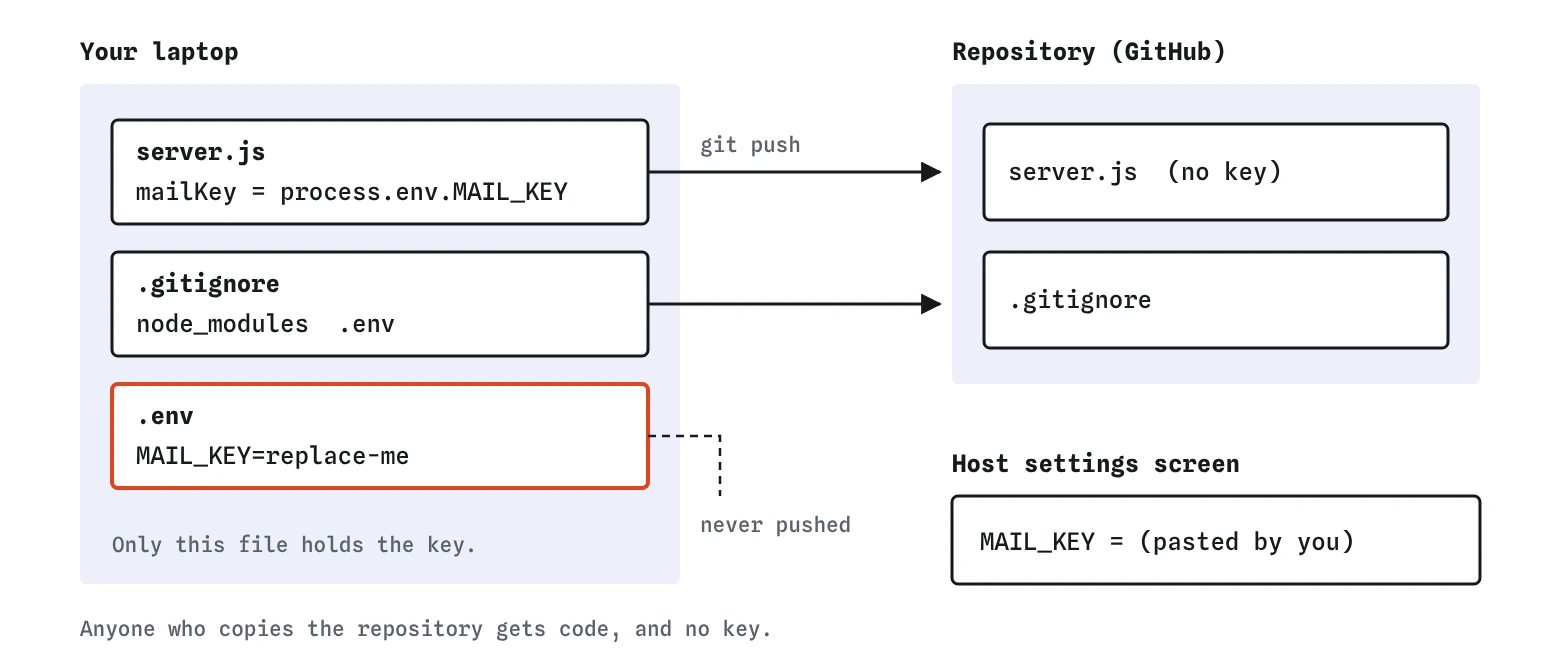

Why does .gitignore matter so much here?
Moving the key into .env only helps if .env stays on your machine. In the lab you saw this directly: after you created .env, the scan still succeeded and named the file itself, because nothing told git to leave it out. The Report view showed Keys kept out of code as off with the detail .env not ignored.
A .gitignore file is a list of names git pretends not to see. A line of .env covers a file with exactly that name. A line of .env* also covers .env.local and .env.production, which many tools create. Add the line before you create the file if you can, because .gitignore does not affect files git is already tracking.
If .env was committed before you added the line, ignoring it now does not remove it from earlier commits. You need to stop tracking it with git rm --cached .env, commit that, and then treat every key in it as exposed.
What should you do if a key was already pushed?
Treat it as stolen, even if the repository is private and even if you deleted the line a minute later. Git keeps every version of every file, so the key is still in the history, and anyone who cloned or forked in between has a copy.
Go to the provider's dashboard and revoke the key. Swapping a leaked key for a fresh one is called rotating or rolling it. Create a new key, put the new one in .env and in your host's settings, and check the provider's logs for use you do not recognise. Revoking takes a couple of minutes and makes the old value worthless, which is far more reliable than trying to scrub history.
Rewriting history with tools such as git filter-repo is possible and sometimes worth doing to keep the repository tidy, but it does not reach copies other people already have. Revoke first, tidy later.
Can a key ever go in front-end code?
Anything sent to the browser is public. A visitor can open DevTools, look in the Sources panel and read every JavaScript file, or open the Network tab and see every request with its headers. A key in map.js or in a <script> tag is handed to every visitor.
Some services are built for this. Map and analytics providers issue publishable keys that are meant to sit in the page, and they let you restrict each key to your own domain such as crumbandcrust.example and to the one service it is for. Another website then cannot use a copy on its pages. A determined person can still send requests outside a browser, so also set a daily usage cap in the provider's dashboard. Payment providers split their keys the same way: a publishable one for the page and a secret one that must stay on the server.
Anything that can send email, read your database, issue refunds or spend money is a secret key. If the page needs that power, the browser asks your server, and your server uses the key. The browser never sees it.
What do AI tools get wrong about keys?
Ask an assistant to connect to a mail or payment service and it will often write the key straight into the file, sometimes with a comment saying to move it later. It will happily put a secret key into front-end code because that is the shortest working example. It may suggest a .env file but leave out the .gitignore line, and the lab showed exactly what that does.
There is a second leak to think about. When you paste code into an AI chat to ask for help, the key goes with it. Before pasting, replace real values with placeholders such as replace-me. If you find you have already pasted a real key somewhere public or shared, revoke it.
Where does the lab simplify?
The lab's bot looks for a key-like name next to a long quoted value, skipping lines that mention process.env or obvious placeholders. It treats .env as pushed whenever .gitignore does not cover it. Real scanners such as GitHub secret scanning, gitleaks and trufflehog know hundreds of provider formats, scan the whole history, and can reject a push that contains a key, or stop a commit on your own machine when run as a pre-commit hook. Turning on GitHub's push protection for your repository is a cheap extra wall.
The lab also has no history. In a real project the order matters: ignore first, then create the file. In the lab, adding .gitignore after .env counts as fixed, which in real git is only true if you never committed in between.
Field notes
- Keys, tokens and passwords in
server.jstravel everywhere the code goes. - Put secrets in
.envand read them withprocess.env. - List
.envin.gitignorebefore your first commit. - A key that was ever pushed is leaked. Revoke it and make a new one.
Easy to get wrong
A key written into code goes everywhere the code goes. Reading it from the environment keeps the code shareable.
Without the ignore line, .env is committed like any other file, so the key is still in the repository.
Git keeps every earlier version. Only revoking makes the leaked value useless.
Questions people ask
Is a private repository safe enough for keys?
It lowers the risk but does not remove it. Collaborators, connected apps, laptops and backups all hold copies, and repositories sometimes become public later. Keep keys out regardless.
Should I commit a .env.example file?
Yes, many projects do. It lists the names the app needs, like MAIL_KEY=replace-me, with placeholder values, so a new developer knows what to fill in. Make sure your ignore pattern does not also hide it if you want it committed; .env alone leaves it visible.
Do I still need dotenv?
On Node 20.6 or later you can use node --env-file=.env instead. The dotenv package still works and is common in older projects. Both do the same job.
Does putting a key in .env make it encrypted?
No. .env is plain text on your disk and in your host's settings. It keeps the key out of the repository; it does not hide it from someone who already has access to the server.