How does a site remember that you signed in?
The web forgets you between requests. Each time your browser asks for a page, the server receives a separate message with no built-in link to the one before. If the bird club only checked your password on the sign-in form, the very next click on Sightings would arrive as a stranger.
Sessions solve this. When your password checks out, the server creates a small record, something like member 42 signed in at 9:14, and gives it a long random name called the session id. It sends that id to your browser in a cookie. Your browser then attaches the cookie to every request it sends to riversidebirds.example, and the server looks up the record each time.
That makes the session id as good as your password for as long as it lasts. Anyone who holds it is you, as far as the server can tell, and they never need to know your password at all. Everything on this page is about keeping that id secret, fresh and short-lived.
What is in the bird club's session code?
The club uses express-session, the common session package for Express. The app.use(session({...})) line at the top turns it on for every route. It reads the cookie called sid, finds the matching record and makes it available as req.session. When the sign-in route writes req.session.memberId = member.id, that value is saved on the server, never in the cookie.
The secret option signs the cookie, so the server can tell if anyone has edited it, and it comes from process.env.SESSION_SECRET so the real value stays out of the code. saveUninitialized: false means the server only saves a session, and sets its cookie, once something is stored in it, so visitors who never sign in do not get one, which keeps the store small and avoids setting cookies nobody needs.
In a real app, the cookie's flags are set in the same options object, under cookie: { httpOnly: true, secure: true, sameSite: 'lax' }. The lab shows the resulting Set-Cookie line in headers.txt so you can see and edit the flags directly. Open the Network view to see that header on the sign-in response.
What is session fixation?
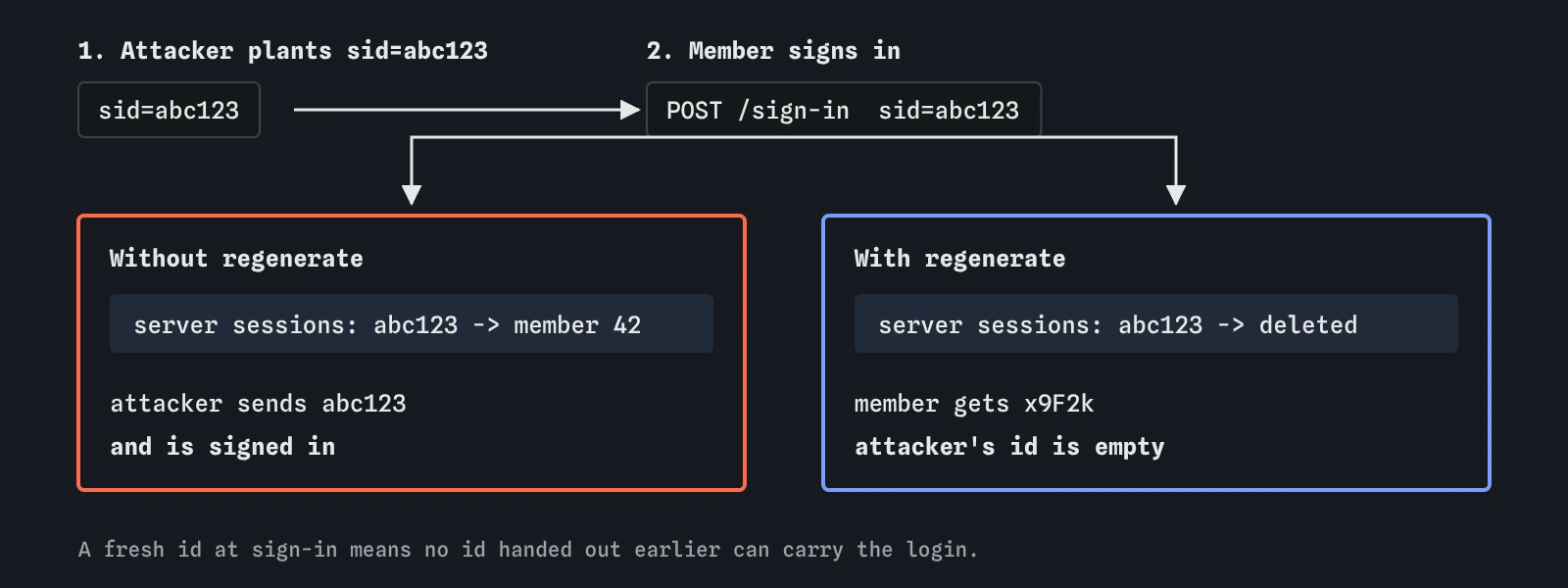
Session fixation is a trick where the attacker chooses your session id before you sign in. They get a session from the site themselves, then find a way to make your browser use the same id: a shared computer at the club hut, a link on a site that can set cookies for yours, or a weakness on a neighbouring subdomain. You then sign in normally.
If the site keeps the same session after sign-in, it has just marked the attacker's id as belonging to a signed-in member. The attacker refreshes their page and they are in. Nothing about your password leaked; the site attached your login to an id someone else already had.
That is what the lab reported for the starting files. The sign-in route set memberId on whatever session the visitor arrived with.
How does regenerate stop it?
The fix is to issue a fresh session id at the moment someone's rights change, most of all at sign-in. req.session.regenerate deletes the old session record, creates a new one with a new random id, and sets the new cookie on the response. Only then does the code store memberId and redirect.
Any id the attacker planted now points at an empty session that was thrown away. The member's new id was created on the server after the password check, so nobody else could have known it in advance.
Do the same whenever access goes up during a session: after a second sign-in step, after someone becomes an admin, or after a password change. Some frameworks do this for you; express-session does not, which is why the club's code needs the line.
req.session.regenerate(() => {
  req.session.memberId = member.id;
  res.redirect('/sightings');
});
Why should page scripts not see the session cookie?
Browser JavaScript can read cookies through document.cookie. A site's own scripts rarely need the session cookie, but a script injected through a cross-site scripting hole would love it: one line sends it to the attacker, who pastes it into their own browser and is signed in.
The HttpOnly flag tells the browser to keep that cookie out of document.cookie while still sending it with requests. In DevTools, open Application, then Cookies, then the site, and you will see a tick in the HttpOnly column. The cookie flags lesson covers Secure and SameSite in detail; for now, the session cookie should have all three.
HttpOnly is a second wall. An injected script can still send requests from the open page with the cookie attached, so the first wall remains escaping output. The lab's cookie-theft attack says the same in its reason.
When should a session end?
Sessions should not last forever. A short idle timeout, for example 30 minutes without activity for an admin area or a few hours for a club site, limits how long a stolen id stays useful. An absolute limit, such as signing everyone out after a week however active they are, catches ids that leaked a long time ago. With express-session you set cookie.maxAge, add rolling: true so the timer restarts with each request, and use a store that removes expired records.
Signing out must end the session on the server. The club's /sign-out route calls req.session.destroy and then clears the cookie. Clearing only the cookie leaves the record alive, so anyone with a copy of the id can carry on. After a password change, end the member's other sessions too, so a thief who already has an id is thrown out.
The lab does not model timeouts or the store; it only checks for a new session at sign-in. The default memory store in express-session loses everything on restart and is not meant for production; real sites keep sessions in a database or a cache such as Redis.
What do AI tools get wrong about sessions?
The most frequent gap is the one you fixed: generated sign-in code sets a value on the session and never calls regenerate. It works in every test, so nobody notices.
Assistants also like to put a login token in localStorage and send it in a header. Any script on the page can read localStorage, so one cross-site scripting hole hands over the token, and there is no HttpOnly equivalent. Long-lived tokens with no way to cancel them on sign-out are a related problem. Other slips include a hard-coded session secret such as 'keyboard cat' copied from an old example, secure: false left in after local testing, and a sign-out route that only clears the cookie. When reviewing, search for regenerate, destroy, localStorage and the word secret.
Field notes
- After sign-in, the server stores who you are and gives your browser a session id in a cookie.
- Session fixation means an attacker plants a session id and waits for you to sign in with it.
- Calling
req.session.regenerateat sign-in issues a fresh id and defeats fixation. - The
HttpOnlyflag stops page scripts from reading the session cookie.
Easy to get wrong
Keeping the old id lets anyone who planted it share the signed-in session.
Any script on the page can read localStorage. HttpOnly cookies are hidden from scripts.
The server record stays valid until it is destroyed, so a copied id keeps working.
Questions people ask
Is the session id the same as my password?
No, but it is just as powerful while it lasts. It is a long random value made after your password was checked, and the server treats whoever sends it as you.
Why does the lab put the cookie in headers.txt?
So you can see and change the flags as one plain line. In a real Express app the same flags go in the cookie options of express-session, which then sends that header for you.
Are JSON Web Tokens better than sessions?
They solve a different problem, mostly sharing sign-in between separate services. For a single site, a server-side session in an HttpOnly cookie is simpler and easier to cancel.
How long should a session last?
As short as members will tolerate. A few hours of inactivity for a club site is common, with a shorter limit for admin pages and a fresh sign-in before changing an email address or password.