What are you building in this project?
The bakery's order route is about to go live. It takes an item, a quantity, a price and the customer's name from the order form, saves the order and shows a thank-you page. It works. The Report view shows four attacks getting through, each one covered by an earlier lesson.
The goal is the state a careful developer would ship: no pretend attack succeeds, nothing on the page is broken, and the code still does what the bakery wants. You fix the four problems in any order. The hints give the lines if you get stuck, but try each one from the attack's reason first, because that is the skill this project practises.
Why is the price the most serious problem?
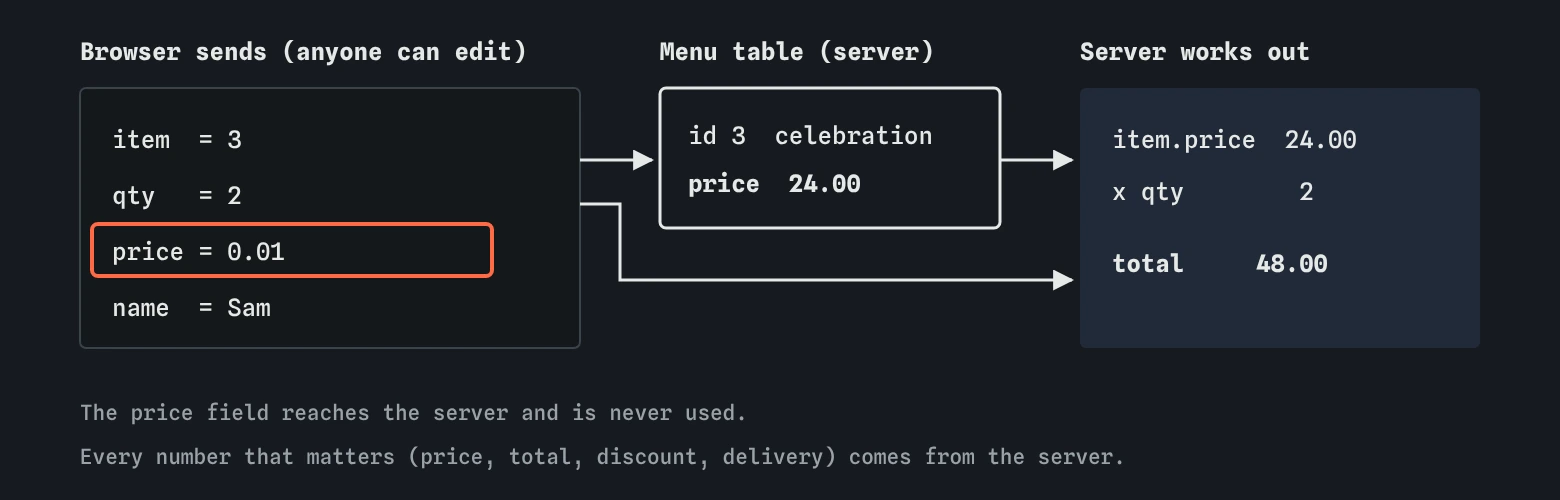
The form sends a hidden field called price along with the item. Line 11 multiplies that by the quantity to get the total. Anyone can open DevTools, find the hidden input in the Elements panel, change 24.00 to 0.01 and press Order. The browser sends whatever the page says, and the server believed it.
This one costs money directly, and no header or cookie flag can help. The browser is the customer's property, and everything it sends is a suggestion. The server must decide every number that matters: prices, totals, discounts, delivery charges and stock.
The fix is already half there. Line 10 looks the item up in the menu table, including its price. Use item.price and ignore the field from the form. You could delete the hidden field from the form as well, but the server must not rely on it being gone.
const item = db.get('SELECT id, name, price FROM menu WHERE id = ?', [req.body.item]);
const total = item.price * Number(req.body.qty);
What else should the server check on an order?
The lab checks only the price. A real order route has more numbers to doubt. Number(req.body.qty) turns the quantity into a number, but it would still accept -3, 0.5 or 100000. Check that it is a whole number between 1 and a sensible maximum, and reply with an error if not.
Check that item was found at all. If someone sends an item id that does not exist, db.get returns nothing and item.price throws an error. A clear message is kinder than a crash. Libraries like zod let you describe the shape of a valid order in one place and reject everything else, which keeps these checks tidy as the form grows.
Why does the thank-you page need escaping?
The page says Thank you, ${req.body.name}. The name is visitor text, typed into the form, and line 13 sends it straight into HTML. The item name next to it was escaped, so the code half knew the rule.
You might think this only hurts the person who typed the name, since only they see their own thank-you page. Two things make it worse. An attacker can build a form on another site that posts to /order with a harmful name, so the victim sees the attacker's script on the bakery's real address. And the name is saved, so any staff page that lists orders could show it too. Escape it on the way out, everywhere it appears.
How do the key and the package fit in?
Line 6 holds the payment provider's key. A payment key is among the most valuable secrets a small shop has, because it can issue refunds and read customer details. It goes into .env, the code reads process.env.PAY_KEY, and .gitignore keeps .env out of the repository.
@pretend/markdown is on 3.0.2, which has a published advisory. The order route does not call it. The server still loads it, and the menu page from the previous lessons runs it. Dependencies belong to the whole site, so updating it belongs on any launch checklist. In a real project you would run npm audit and fix whatever it lists.
How do you know you are finished?
The task asks for two things at once: every attack blocked or not applicable, and no warnings. The second part is there because a defence can break a site. A Content Security Policy that blocks your own scripts, or a Secure cookie on a site without HTTPS, can stop real customers ordering. A fix that breaks the site is a new problem.
Read the n/a lines in the Report as well. Cookie theft, CSRF and the sign-in attacks show n/a because this route has no sign-in yet. The moment the bakery adds customer accounts, they become real, and the lessons on cookie flags, CSRF and passwords apply. Rerun the whole Attacker view after any change of that size.
What would an AI assistant have done with this route?
Ask an assistant to build an order form and it will very often include a hidden price field and trust it on the server, because that is the simplest code that works. It will usually escape some values and miss others. It may put a test payment key in the file and tell you to replace it later.
If you use an assistant for a route like this, give it the rules up front: prices come from the database, every value in HTML is escaped, keys come from process.env. Then review the result against those same rules, line by line.
Where does the lab simplify?
The lab spots a trusted price by looking for req.body.price, total, amount or cost in an order route. A real review also looks for discounts, coupon codes, delivery fees and anything else the browser could change. The lab also has one visitor and one order; a real shop also needs to handle two customers buying the last loaf at once, payment provider callbacks that must be verified, and receipts that must not show other customers' orders.
Payments themselves usually happen on the provider's own page or in its embedded form, so card numbers never touch your server. That is the safest choice for a small shop, and it means your job is mostly the order total and the key.
Field notes
- Look up the price on the server and never use
req.body.price. - Check quantity is a whole number in a sensible range.
- Escape the customer's name on the thank-you page.
- Move the payment key into
.envand update the package with the advisory.
Easy to get wrong
The browser can send any price. The server's own menu table is the only price you can trust.
An attacker can add the field back with DevTools. Only the server decides the total.
A defence that breaks ordering costs the bakery customers. The task asks for both.
Questions people ask
Does HTTPS stop someone changing the price?
No. HTTPS stops strangers on the network changing it. The customer controls their own browser and can change anything before it is encrypted.
Should the form show a price at all?
Yes, customers need to see it. Show it as text from the server. Just never use what the form sends back.
What about client-side validation in JavaScript?
It helps honest customers spot mistakes quickly. It does nothing against someone who sends requests without your page. Always repeat the checks on the server.
Why is the order project in the secrets group?
Because it combines the classic attacks with keys and packages, the two topics of this group. The last project, the bike shop audit, goes wider still.