What is a security header?
Every response your server sends starts with a few lines of headers before the page itself. Most describe the content, such as Content-Type: text/html. A security header is one that asks the browser to switch on a protection for that page: refuse to be framed, refuse to guess file types, keep the address private when a visitor follows a link.
The browser does the protecting. Your server only asks. That makes headers cheap to add, since each is one line, and also limited: an old browser that does not know a header ignores it, and a header with a typo is ignored too, with no error anywhere. In the lab, headers.txt lists the headers sent with every page, one per line, so you can see exactly what the browser receives.
Headers are a second wall. They help when the code behind a page has a mistake, and they cover attacks such as framing that code alone cannot stop. They never replace escaping, parameterised queries or proper sign-in checks.
Which headers should a small site send?
For a typical site in 2026, a short list covers most of the value. Each line below is something current versions of Chrome, Edge, Firefox and Safari all understand.
Strict-Transport-Security: max-age=31536000
X-Frame-Options: DENY
X-Content-Type-Options: nosniff
Referrer-Policy: strict-origin-when-cross-origin
Strict-Transport-Security: max-age=31536000keeps visitors on HTTPS for a year after their first visit. The HTTPS lesson covers it.Content-Security-Policylimits where scripts may come from. It is the largest of the set and has its own lesson next.X-Frame-Options: DENY, orframe-ancestors 'none'inside the policy, stops other sites showing your page in a frame.X-Content-Type-Options: nosniffstops the browser guessing file types.Referrer-Policy: strict-origin-when-cross-originkeeps paths and query strings out of the address other sites see.Permissions-Policy: camera=(), microphone=(), geolocation=()switches off device features a bike shop never uses.

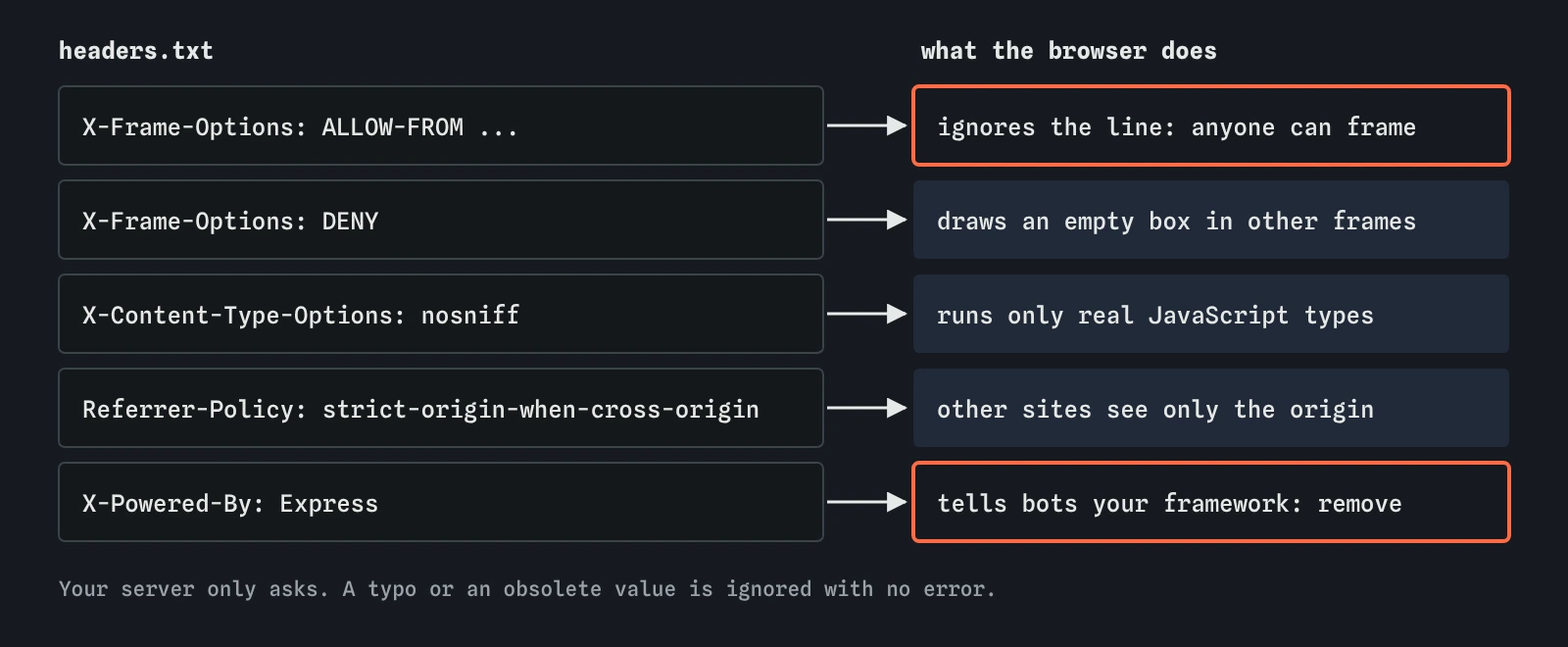
Why did ALLOW-FROM let the frame attack through?
X-Frame-Options was added to browsers around 2009 with three values: DENY, SAMEORIGIN and ALLOW-FROM followed by an address. Only some browsers ever supported ALLOW-FROM, and every current one has dropped it. When Chrome or Firefox meets ALLOW-FROM today, it treats the header as invalid and ignores the whole line, so the page can be framed by anyone.
That is what you saw in the Attacker view. The shop's file looked protected, a reviewer skimming it would nod, and the frame attack still worked. If you really need to let one partner site frame a page, use Content-Security-Policy: frame-ancestors https://partner.example instead. For most small sites, DENY is right: nothing should frame the booking form.
What does nosniff protect against?
Browsers used to be generous with file types. If a server said a file was plain text but its contents looked like JavaScript, an older browser might run it anyway. That guessing, called MIME sniffing, turned harmless uploads into scripts. Imagine a hire customer uploading a file named receipt.txt that is really a script, and a page elsewhere loading it with <script src>.
X-Content-Type-Options: nosniff turns the guessing off for scripts and stylesheets. The browser refuses to run a file as a script unless its Content-Type says it is JavaScript. The header has exactly one valid value, nosniff, with no hyphen. It costs nothing and breaks almost nothing, provided your server sends correct types, which Express does for static files.
What does a referrer leak?
When a visitor clicks a link from your site to another, the browser can tell the other site where they came from, in the Referer request header (the misspelling is historical). With the old default, that included the full address. A link from https://spokeandchain.example/account/hire?ref=8841&[email protected] would hand the path and the query string to whatever site the link pointed at.
strict-origin-when-cross-origin sends the full address within your own site, only https://spokeandchain.example/ to other sites, and nothing at all from HTTPS to plain HTTP. Current browsers already use this as their default when no header is set, so adding it mostly makes your choice explicit and protects visitors on older browsers. no-referrer is stricter still. Avoid unsafe-url, which sends everything everywhere.
Which headers are outdated?
X-XSS-Protection switched on a filter in old versions of Chrome, Edge and Safari that tried to spot scripts in the address and remove them from the page. The filter could itself be abused to break pages, Chrome removed it in 2019, and Firefox never had it. Sending it today does nothing in current browsers. If you send it at all, the safe value is 0. Most sites drop the line.
X-Powered-By: Express is sent by Express automatically. It protects nothing and tells automated scanners which framework to try. Turn it off with app.disable('x-powered-by'). Expect-CT, Public-Key-Pins and Feature-Policy are also retired; the last one was renamed Permissions-Policy.
const app = express();
app.disable('x-powered-by');
How do you set headers in Express?
You can set each header yourself in a small middleware function that runs before every route, using res.set(name, value). Many Express projects use the helmet package instead, which sets a sensible group of headers in one line, including nosniff, a frame rule, a referrer policy and a starter Content Security Policy, and removes X-Powered-By.
Helmet is a good start. Read its defaults rather than assuming them: its policy may block scripts your pages need, and you will want to tune it. Headers can also come from your web host or a service in front of your site, such as Cloudflare. If two layers both set the same header, the visitor may receive two copies, and for some headers that changes the result.
const helmet = require('helmet');
app.use(helmet());
How do you check which headers a page sends?
Open the page, press F12 to open DevTools, choose the Network tab and reload. Click the first request, the page itself, and look at Response Headers. Every header the server sent is listed there. If a line you added is missing, the server never sent it; if it is there with a typo, the browser ignored it.
Test the effect, too. For framing, open the Console on any other site and try to load your page in an iframe; the Console reports that the page refused to be framed. The lab's Network view shows the same thing for the pretend shop. Online header scanners give a quick grade, but treat the grade as a prompt to read the headers yourself.
What do AI tools get wrong about security headers?
Assistants learned from years of old blog posts, and it shows. They still suggest X-XSS-Protection: 1; mode=block, which does nothing now, and X-Frame-Options: ALLOW-FROM, which turns off frame protection by accident. They sometimes produce frame-ancestors * or a policy full of wildcards to make an error go away.
When an assistant hands you a block of headers, check each line against the short list above and ask what it does in a current browser. Remove anything you cannot explain. Then load the page with DevTools open and read the Response Headers and the Console, because that is what the browser really did with them.
Field notes
- Security headers are lines in a response that switch on browser defences.
- Browsers ignore
X-Frame-Options: ALLOW-FROM, so useframe-ancestorsin CSP. X-Content-Type-Options: nosniffstops the browser guessing a file's type.Referrer-Policy: strict-origin-when-cross-originkeeps full addresses from leaking to other sites.
Easy to get wrong
Current browsers ignore ALLOW-FROM, so the page can be framed by anyone. frame-ancestors is the supported way to name an allowed site.
The filter it controlled has been removed from browsers. Escaping and a Content Security Policy are what stop scripts now.
Browsers accept one exact value. Anything else is ignored with no warning.
Typos, duplicate layers and missing middleware all look fine in a config file. The browser only obeys what it actually receives.
Questions people ask
Do security headers slow my site down?
No measurable amount. Each one is a short line of text in the response. A strict Content Security Policy can block scripts you need, which is a different problem and one the next lesson covers.
Should I use X-Frame-Options or frame-ancestors?
frame-ancestors in a Content-Security-Policy header is the current standard and wins when both are present. Many sites send both, since X-Frame-Options: DENY costs nothing and helps very old browsers.
Can I set security headers in a meta tag?
Two can: a Content Security Policy in a <meta http-equiv> tag, where frame-ancestors is ignored, and the referrer policy as <meta name="referrer">. The others only work as real response headers.
Is a header scanner grade enough?
It is a quick check that headers exist. It cannot tell whether your policy fits your pages or whether your code escapes visitor text, so use it as a starting point.