What does HTTPS actually protect?
When a browser loads a page, it sends a request across a chain of networks: the cafe wifi, the cafe's internet provider, several backbone networks, then your host. On plain HTTP that request is readable text at every hop. The address, every form field, every cookie and the whole reply are visible to anyone who can watch one of those links, and anyone in the right spot can change the reply before it arrives.
HTTPS wraps the same request in TLS, an encryption layer agreed between the browser and your server at the start of the connection. Three things change. Nobody in the middle can read the content. Nobody can change it without the browser noticing and dropping the connection. And the browser checks a certificate proving it is talking to the real riversidebirds.example, so a fake wifi hotspot cannot pretend to be your site.
Some things stay visible. Someone on the network can still see which site a device is connecting to, roughly how much data moves, and when. They cannot see the page path, the search terms, the password or the cookie. For a sign-in form that difference is everything.
What does the padlock in the address bar tell you?
The padlock, or in recent Chrome a small settings icon in the same spot, means one narrow thing: this page arrived over a valid HTTPS connection to the name in the address bar. It says nothing about whether the site is honest, well run or free of holes. A scam site at bird-club-login.example can have a perfect certificate, because certificates prove control of a name and nothing more.
That is why browsers have gradually made the padlock less prominent and started warning loudly about the opposite case. Chrome, Edge, Firefox and Safari all mark plain HTTP pages as not secure, and they show a stronger warning when someone types into a form on one. Your members will see that warning on the club's sign-in page until HTTPS is on.
In the lab, the Page view draws the padlock when site.conf says https = on. On a real host there is more behind it: a certificate for your domain, usually issued free by Let's Encrypt through your hosting panel and renewed automatically every few months. Most hosts now do this with one switch. If yours charges extra for a basic certificate, that is a sign to look at other hosts.
Why is switching HTTPS on not enough?
Turning HTTPS on makes the encrypted address work. It does nothing for a member who types riversidebirds.example into the address bar, follows an old link printed on a poster, or taps a bookmark saved years ago. Those all start with plain http://, and if the server answers that request with the full page, the member stays on the unencrypted version for the whole visit.
The first fix is a redirect. Any request to http:// gets a short reply, 301 Moved Permanently, pointing at the same path on https://. In the lab that is redirect_http = on. Run the task and the Network view shows the plain request and the redirect as two separate lines.
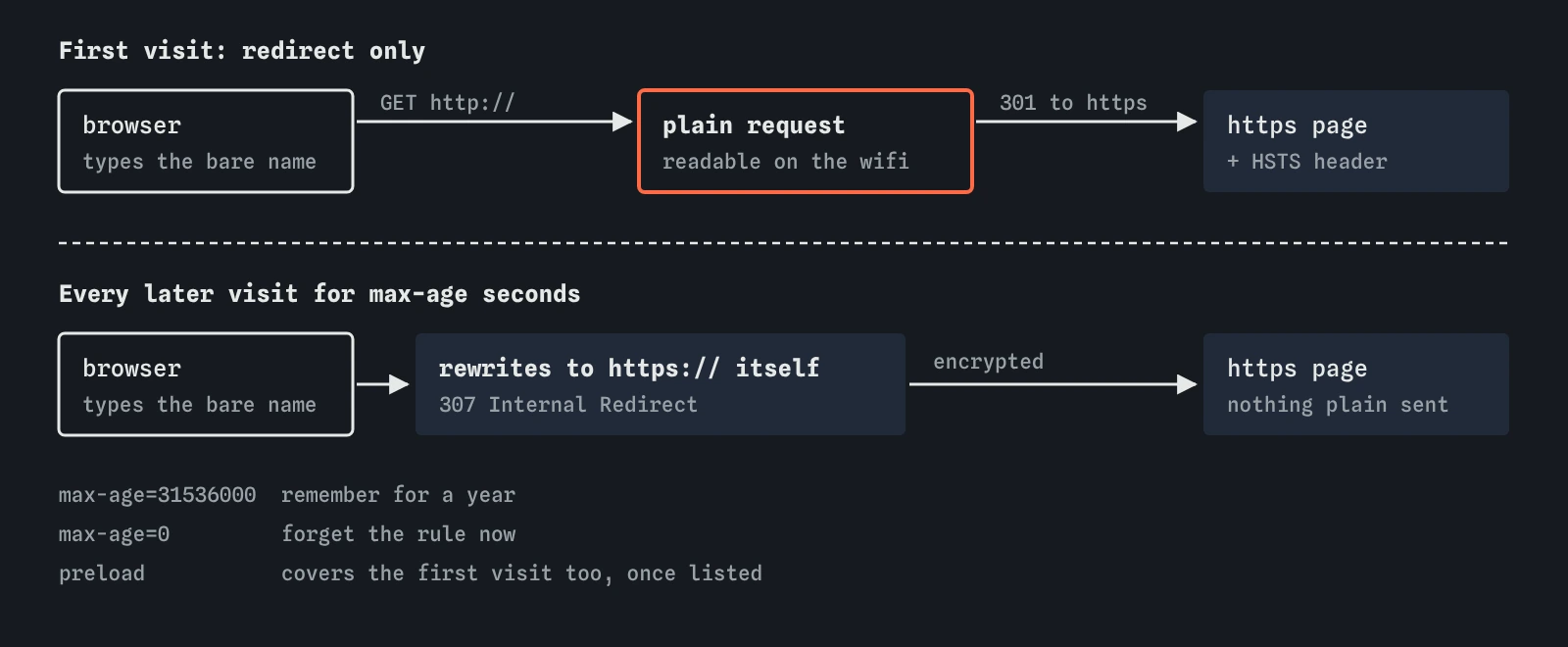
A redirect still leaves one plain request on each typed visit. A listener on the wifi can answer that request before your server does, with a page of their own that never redirects. The member sees no padlock, but few people check. The second fix, HSTS, closes that gap.
# site.conf
https = on
redirect_http = on
What does HSTS add?
HTTP Strict Transport Security is a response header. When the browser receives Strict-Transport-Security: max-age=31536000 over HTTPS, it remembers for that many seconds, here one year, that this site must only be loaded over HTTPS. From then on, if anyone types the plain address or clicks an http:// link, the browser rewrites it to https:// itself, before anything is sent.
That removes the plain first hop on every visit after the first. The very first visit on a new device is still exposed, which is the gap HSTS preload lists cover: browsers ship with a built-in list of domains that use HSTS from the start. The lab does not model preload lists. For a club site, the header alone is a large improvement.
Two options are common. includeSubDomains applies the rule to every subdomain as well, which is what you want only if every subdomain already works over HTTPS. preload signals that you want to be on the preload list, which also needs includeSubDomains, a max-age of at least a year and a request at hstspreload.org. Add both only once you are sure, because browsers will refuse plain HTTP for the whole domain for as long as max-age says, and undoing it means waiting for that time to run out.
# headers.txt
Strict-Transport-Security: max-age=31536000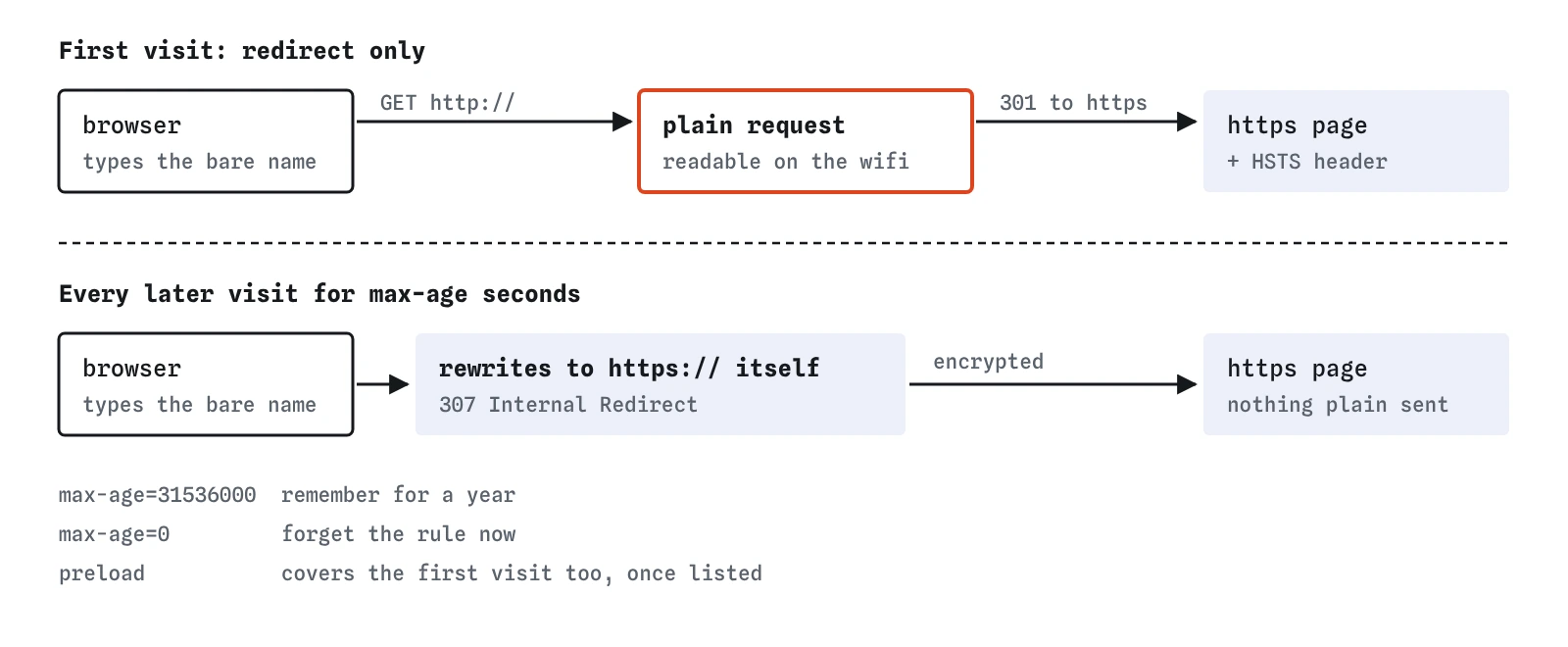
Why does the session cookie need the Secure flag?
A cookie without Secure is sent with any request to its site, encrypted or not. If one plain request slips out, perhaps from an old image link or an attacker's page pointing at http://riversidebirds.example/, the session cookie goes with it in readable form. Whoever reads it can sign in as that member.
With Secure, the browser only ever attaches the cookie to HTTPS requests. The lab's wifi attack counts a missing Secure flag as a gap even when HTTPS, the redirect and HSTS are all on, because it is the last line between a stray plain request and a stolen sign-in. The next lesson covers the cookie flags in detail.
Watch for one trap. A Secure cookie on a site that is still on plain HTTP is never stored at all, so sign-in seems broken. The lab shows that as a warning on the Page view. Switch HTTPS on first, then add the flag.
How do you check HTTPS on a real site?
You need nothing more than a browser and a few minutes.
- Type the bare domain without
https://and confirm you land on the https address. A private window avoids a cached HSTS rule hiding a missing redirect. - Open DevTools, then the Network tab, tick Preserve log, and load
http://again. The first line should be a 301 or 308 pointing at https, or a 307 marked Internal Redirect once HSTS is cached. - Click the main document request and read the response headers. Look for
strict-transport-securitywith amax-agein the millions of seconds. - Open the Application tab, then Cookies, and check the session cookie has a tick in the Secure column.
- Look at the Console for mixed content warnings: an https page loading an image or script over plain http. Browsers upgrade or block most of these now, but each one is a link to fix.
What is mixed content and why does it break pages?
Once a page is on HTTPS, everything it loads should be too. A script tag pointing at http://cdn.example/map.js would let a listener replace that script with their own, which would then run with full access to the secure page. Browsers block such scripts and stylesheets outright, so a map or widget can stop working the moment you switch HTTPS on.
Images, audio and video are handled more gently. Current browsers try to upgrade them to https automatically and drop them if that fails. The fix in every case is the same: change the link to https://, or to a path on your own site, and check the Console until it is clean.
What do AI tools get wrong about HTTPS?
Assistants often suggest code that skips certificate checks to get past an error during development, such as setting rejectUnauthorized: false in Node or the environment variable that switches TLS checking off. That makes the warning go away by accepting any certificate at all, which is exactly what an attacker in the middle needs. If you see that in code headed for a real server, take it out and fix the certificate instead.
They also tend to write an HSTS header with includeSubDomains; preload on day one, copied from a high-traffic site, without asking whether every subdomain is ready. And some still recommend paying for a certificate, or doing the redirect with a meta refresh tag in the HTML, which only runs after the plain page has already arrived. A server-side redirect and a free automatic certificate are the normal setup in 2026.
Field notes
- HTTPS scrambles traffic so people on the same network cannot read or change it.
- The padlock means the connection is private. It says nothing about whether the site is honest.
- Redirect every plain HTTP request to HTTPS with a 301.
- HSTS tells the browser to use HTTPS every time, and Secure keeps cookies off plain HTTP.
Easy to get wrong
Visitors who type the bare address or follow an old link start on plain HTTP. The redirect moves them across, and HSTS stops the browser sending that plain request at all on later visits.
A max-age of zero tells the browser to forget the rule. Start with a short value such as a day while testing, then raise it to a year.
Browsers refuse to store a Secure cookie that arrives over plain HTTP, so members could not stay signed in.
The padlock proves the connection is encrypted to that name. Scam sites get certificates as easily as real ones.
Questions people ask
Do I need HTTPS if my site has no sign-in?
Yes. Without it, anyone on the network can change your pages on the way, for example inserting adverts or a fake form, and browsers label the site not secure. Certificates are free and most hosts switch them on for you.
Does HTTPS make my site slower?
Not in any way a visitor would notice. Modern TLS adds very little time, and HTTP/2 and HTTP/3, which make pages load faster, only run over HTTPS in browsers.
What happens if my certificate expires?
Visitors get a full-page warning and most will leave. Automatic renewal through your host or a tool such as Certbot prevents this. Check your host's panel once to confirm renewal is switched on.
Is the lab's HTTPS switch how it really works?
No. In the lab it is one setting. A real site needs a certificate installed on the server, a redirect rule and the header. Most hosting panels handle the first two with a toggle each.