Why should a site never keep your real password?
Every website with accounts has to remember something about each password, so it can tell whether the next person typing it is the right one. The obvious approach is to store the password itself in the database. That works perfectly until the database is copied by someone else, and then every member's password is readable in one go.
Databases leak more often than people expect. A backup file left on a public server, a laptop stolen from a car, an old admin page nobody removed, a hole in some other part of the site. When that happens to the Riverside Bird Club, the damage should stop at the bird club. Many people reuse passwords, so a readable password list from a small club becomes a key to members' email and shopping accounts.
The goal is to store something that lets you check a password without being able to read it back. That something is a hash.
What is a hash?
A hash function takes any text and turns it into a fixed-length string of characters that looks random. Feed it kingfisher42 and you always get the same output; change one letter and the output changes completely. It works in one direction only. There is no function that turns the output back into kingfisher42.
To check a sign-in, the site hashes whatever the member just typed and compares it with the stored hash. If they match, the password was right. The site never needs the original, so it never stores it.
The catch is that an attacker with a stolen hash can do exactly what the site does: hash a guess and compare. They cannot reverse the hash, but they can try guesses as fast as their computer allows. Everything about choosing a password hash comes down to making those guesses slow and expensive.
Why is SHA-256 the wrong choice for passwords?
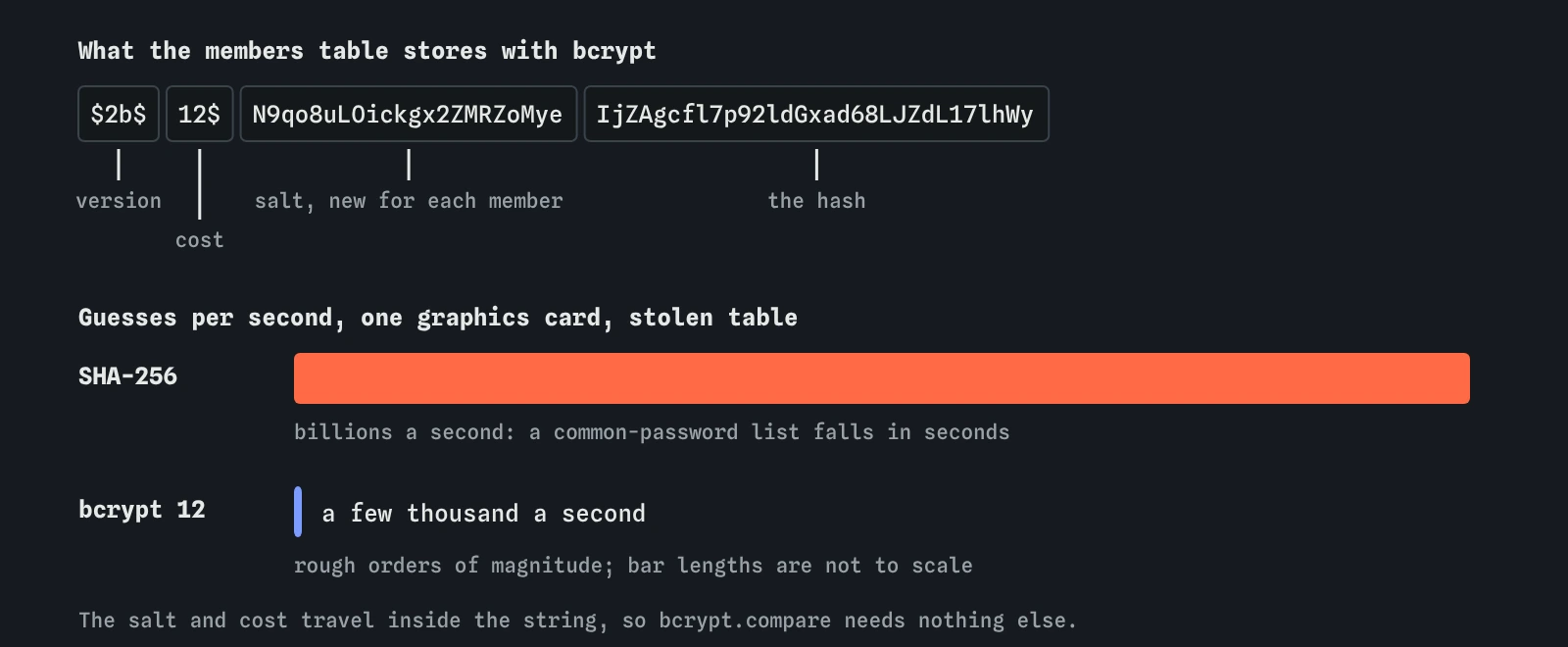
SHA-256 is a good hash for checking that a downloaded file has not changed. It was designed to be fast, because people hash huge files with it. Speed is the problem for passwords. A single modern graphics card can work out billions of SHA-256 hashes a second. Treat that figure as a rough order of magnitude, since it depends on the hardware, but it means a list of a few billion likely passwords takes seconds to try.
That is what the lab showed when you ran Crack a stolen database against the starting files. The route in server.js used crypto.createHash('sha256'), so the attacker's guessing run found most real passwords within hours. MD5 and SHA-1 are even faster and fail the same way.
Adding a salt, a random value mixed in for each member, stops one trick: the attacker can no longer crack every account at once or use a precomputed table. It does nothing about raw speed. A salted SHA-256 hash still falls to a graphics card working on one account at a time.
What makes bcrypt and argon2 different?
Password hashes are built to be slow on purpose, with a setting that controls how slow. bcrypt has a cost factor. Each step up doubles the work, so cost 12 is four times slower than cost 10. On a normal server, a bcrypt hash at cost 12 takes somewhere around a quarter of a second. A member signing in never notices. An attacker who needs billions of guesses feels every one of them, and drops to a few thousand guesses a second.
The argon2id hash goes further. As well as time, it uses a chosen amount of memory for each hash, which makes graphics cards and custom chips much less useful for guessing. It is the first choice for new projects. bcrypt is older, widely supported and still a sound choice at cost 10 or more. scrypt and PBKDF2 are acceptable when a platform requires them.
Both bcrypt and argon2 create a fresh salt for every password and store it inside the hash string, along with the settings. A bcrypt hash starts with something like $2b$12$, which records the version and the cost. That is why bcrypt.compare needs only the typed password and the stored hash.
// Storing a new password
const hash = await bcrypt.hash(req.body.password, 12);

// Checking a sign-in
const ok = member && await bcrypt.compare(req.body.password, member.password_hash);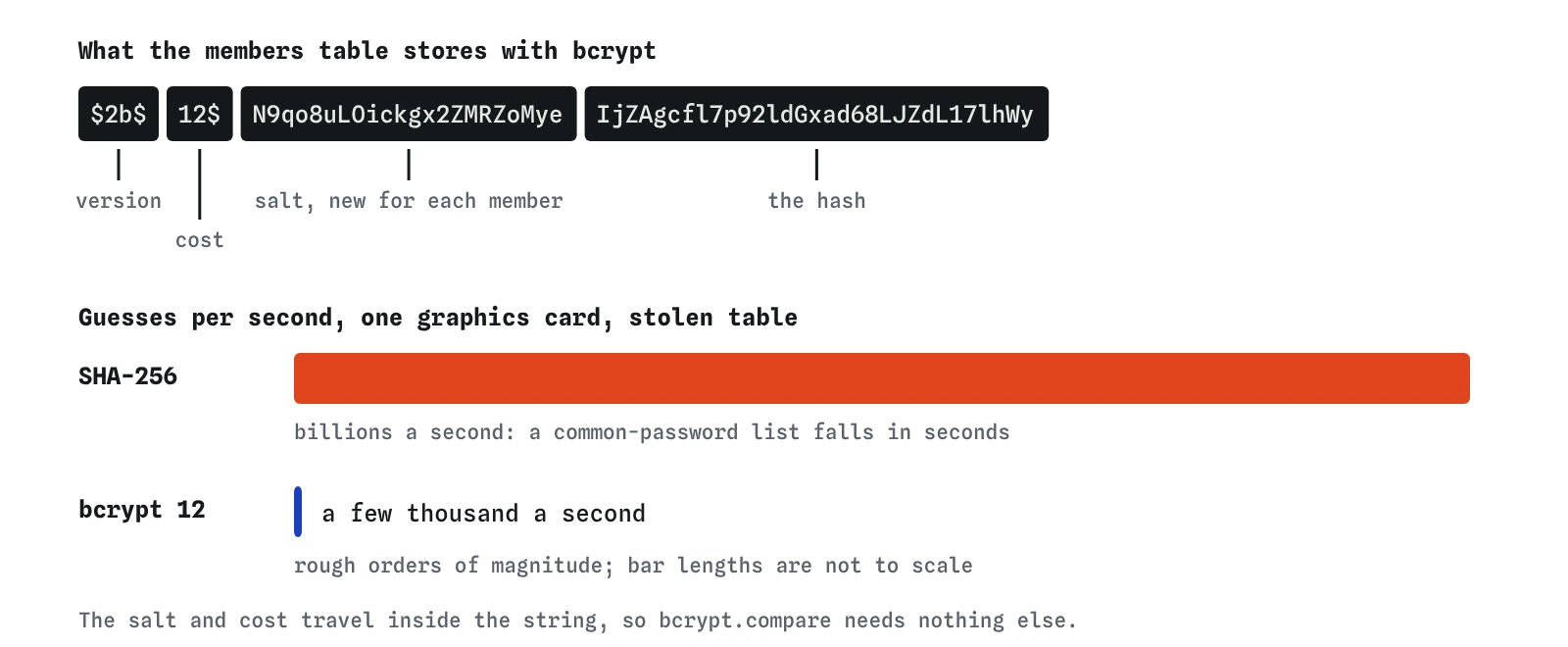
How do you change a site that already uses a fast hash?
You cannot convert old hashes into bcrypt hashes, because you do not have the original passwords. There are two common approaches. The first is to upgrade each member when they next sign in: check the typed password against the old SHA-256 hash, and if it matches, store a new bcrypt hash and clear the old one. Members who never come back keep the weak hash until you remove it.
The second is to wrap the old hashes straight away: store bcrypt(oldSha256Hash) for everyone, and at sign-in compute bcrypt.compare(sha256(typed), stored). That protects every account today, at the cost of a slightly more complicated check. Either way, add a column that records which method each row uses, so the code knows how to check it.
The lab skips this step and pretends the bird club has no members yet. On a real site with a real table, plan the change before you deploy it, or every existing member will be locked out.
What does the attacker still get after you switch?
Slow hashing buys time; it does not make a weak password strong. If a member chose password1, an attacker trying the thousand most common passwords will still find it, because a thousand bcrypt guesses take seconds. The lab says the same thing in its blocked message. That is why the strong passwords lesson had the club refuse common choices at sign-up.
Hashing also does nothing for the live sign-in form. The form already does the hashing for whoever submits it, so an attacker guessing there is limited only by how many attempts you allow. The rate limit in site.conf covers that. Hashing protects the copy; rate limits protect the door.
Finally, a stolen database contains more than passwords. Email addresses, names and sightings are still readable. Hashing protects one column well. Keeping the database from leaking at all is the job of the rest of this course.
What do AI tools get wrong about storing passwords?
Ask an assistant to add sign-up to an Express app and you will sometimes get crypto.createHash('sha256'), often with a comment saying the password is now hashed and secure. It is hashed. It is not secure against a stolen table. Some answers add a salt and call it done, which as you saw leaves the speed problem untouched.
Other common slips: comparing hashes with === on a hash the code built itself in place of using bcrypt.compare; choosing a bcrypt cost of 8 to make tests faster; writing passwords to a log line while debugging; and storing a reset token in plain text next to the hash. When you review code like this, search for createHash, md5 and sha near the word password, check the cost number, and search the logging calls for req.body.
Watch for one bcrypt quirk: it only uses the first 72 bytes of a password. That rarely matters for typed passwords, but code that joins extra data onto the password before hashing can lose part of it. argon2id has no such limit.
Field notes
- A site should store a hash of each password and never the password itself.
- Fast hashes like SHA-256 and MD5 let an attacker test billions of guesses a second.
- Password hashes like bcrypt and argon2id are slow on purpose and add a random salt to every password.
- You can move old hashes over by wrapping them in bcrypt until each member signs in again.
Easy to get wrong
SHA-256 is fast, so a stolen table can be guessed at billions of tries a second. bcrypt is slow and salted on purpose.
Each step down in cost halves the attacker's work, so cost 6 is 64 times cheaper to crack than cost 12. A low cost left in place after testing weakens every new member's hash.
A salt stops precomputed tables and cracking everyone at once. It does nothing about how fast each guess is.
A site that can email your password back is storing it in a readable form.
Questions people ask
Is encryption the same as hashing?
No. Encryption is meant to be reversed with a key, so anyone who steals the key reads every password. Passwords should be hashed with a slow password hash, which has no key and no way back.
Which should I pick, bcrypt or argon2id?
For a new project, argon2id if your platform supports it well. bcrypt at cost 12 is still a sound choice and is available almost everywhere. Both pass the lab.
How do I choose the cost?
Pick the highest setting that keeps one hash under about a quarter of a second on your real server. Check it again every few years as hardware gets faster.
Does the lab really crack anything?
No. It reads which hash your code uses and reports what would happen. The speeds it quotes are rough orders of magnitude for a single modern graphics card.