Who is actually attacking websites?
Picture the people behind attacks and you probably imagine someone in a dark room choosing a target. That person exists, and they are rare. The great majority of attacks on small sites are made by programs. Someone writes a script once, points it at a list of addresses, and leaves it running on rented servers. It visits sites all day, tries the same handful of tricks on each, and reports back whatever works.
Those programs are usually called bots. A bot has no idea that the Riverside Bird Club is a group of forty people who count herons on Sunday mornings. It sees a page with a sign-in form, so it tries passwords. It sees a public code repository, so it searches for keys. It sees a comments box, so it posts a scrap of HTML and checks whether it comes back unescaped.
Behind the bots there are a few kinds of people. Some sell access to whatever the bots find. Some run spam or scam operations and need a constant supply of real sites to host their links. A smaller group targets one organisation on purpose, perhaps an angry former member or a competitor. Very occasionally a well-funded group goes after a big company or a government. For a small site, planning for the bots covers almost all of the real risk.
What do bots want from a small site?
They want whatever can be turned into money or used for the next attack. A working email and password pair is valuable because people reuse passwords, so a bird club login might also open someone's email or shopping account. A sign-in cookie lets an attacker act as a member. A list of member emails can be sold to spammers. A site that runs the attacker's script can show fake sign-in forms to everyone who visits.
Even a site with nothing obviously valuable has something bots want: its good name. A trusted domain that hosts a spam page or redirects to a scam gets past filters that would block a brand new domain. A server that runs the attacker's code can send email, mine cryptocurrency or attack other sites. That is why a bakery or a bird club gets hit by the same traffic as a bank.
- Passwords that also work on other sites.
- Sign-in sessions, to act as a member.
- Personal details such as emails, names and addresses.
- Your domain's reputation, to host spam or scam pages.
- Your server's power and network, to attack someone else.
- Keys to paid services, such as email or payment accounts.
How does a password-guessing bot work?
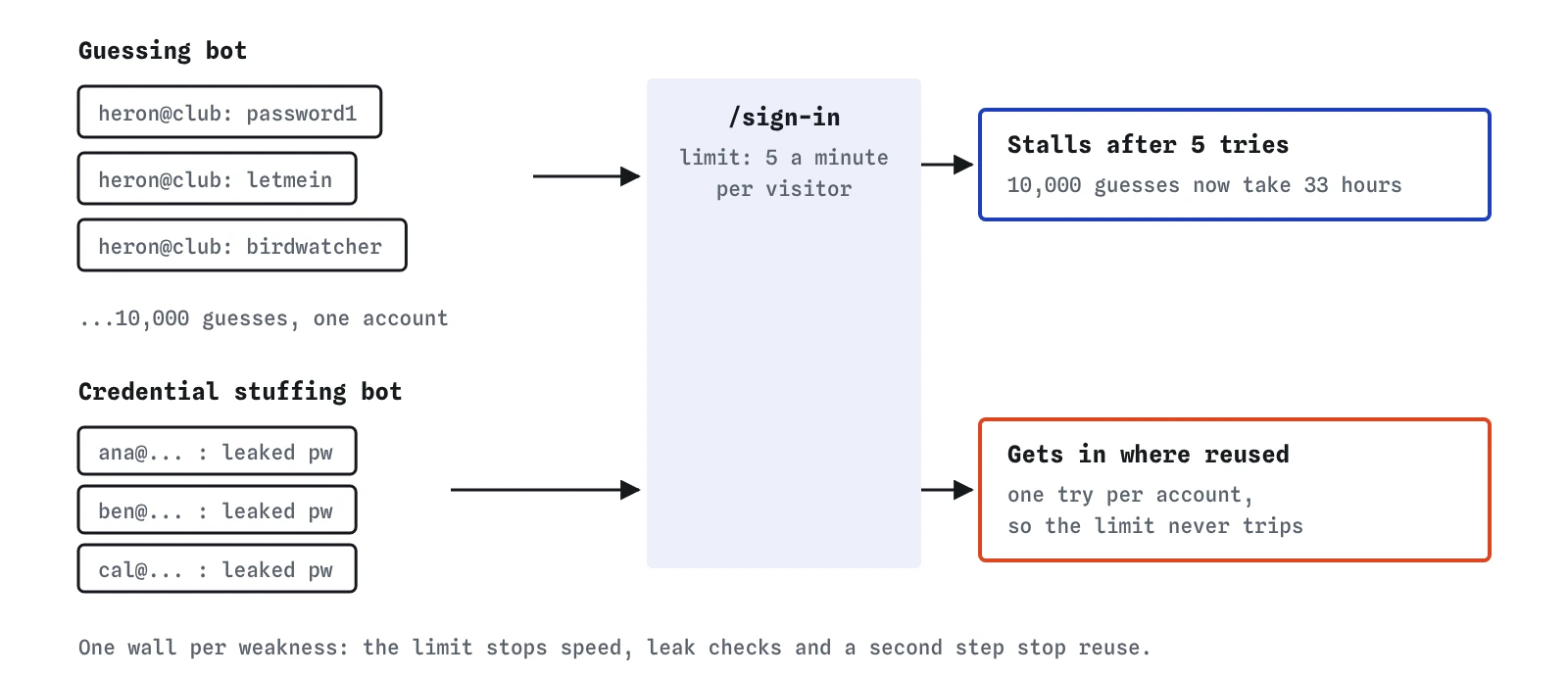
In the task you ran Guess common passwords. The bot chose a member's email, which is easy to find because many clubs show a contact address, and then worked down a list of passwords people choose most often: password1, letmein, birdwatcher, and thousands more. Each guess is an ordinary sign-in request, the same one a member makes when they press the button.
The bird club's code checks each password correctly with bcrypt.compare, so nothing in server.js is broken. The gap is that nothing counts how many times one visitor has tried. A program can send dozens of requests a second, so a list of ten thousand common passwords takes minutes. If the member chose a weak password, the bot gets in.
A sign-in rate limit closes that gap. It counts attempts and refuses extra ones for a while. At five tries a minute, a member who mistypes still gets in on the second or third go, while the bot needs well over a day for ten thousand guesses on that one account. Bots move on to easier targets long before then.
# site.conf
https = on
redirect_http = on
password_storage = bcrypt
bcrypt_cost = 12
login_attempts_per_minute = 5
Why did the leaked-password attack still work?
The second attack, Reuse leaked passwords, is called credential stuffing. Large sites get breached every year, and the email and password pairs from those breaches are collected into huge lists. An attacker feeds such a list to a bot, which tries each pair against your sign-in form. It makes one attempt per account and spreads them across thousands of accounts, so the rate limit never trips.
If a member used the same password at the club as on a breached shop, the pair is correct and the bot is in. Your code did nothing wrong, and the member typed nothing wrong. The weak point is reuse, which happens on a site you do not control.
That is why the lab still shows a cross next to this attack after your fix. Stopping it needs different defences: refusing passwords that appear in known leaks when members choose them, and a second step at sign-in such as a code from an app. The next lessons cover both. Different attacks need different walls, and a site usually needs several.
How do you tell bots from real visitors?
Often you cannot, and you do not need to. A bot's sign-in request looks almost exactly like a member's. It can claim any browser name it likes in the User-Agent header and can come from thousands of different addresses. Trying to spot bots one by one is a contest you lose.
Rate limits, slow password hashing and second steps work on everyone equally. A member barely notices five tries a minute; a bot that depends on speed is ruined by it. Good defences cost real visitors almost nothing and cost automated attacks a great deal.
You can still watch for bots, and it is useful to know what normal looks like. Your host's access logs will show bursts of POST /sign-in requests at three in the morning, requests for files you never had, such as /wp-login.php on a site that is not WordPress, and visits to /.env and /.git/config. Those requests are bots checking for well-known mistakes. Seeing them is normal. Being caught by them is what you are preventing.
203.0.113.7  POST /sign-in        401
203.0.113.7  POST /sign-in        401
198.51.100.4 GET  /.env            404
198.51.100.4 GET  /wp-login.php    404
What about attackers who choose you on purpose?
Targeted attackers exist, and they behave differently. They read your pages, learn who runs the site, try the password reset on the treasurer's account, and look for the one place your code does something unusual. They are patient and they adapt.
For a small site, the good news is that the same basics carry most of the weight. A targeted attacker still has to get past escaped output, parameterised queries, slow password hashing and a second sign-in step. What changes is that people become part of the attack surface: a convincing email asking a volunteer to sign in on a lookalike page, or a phone call asking the host to reset an account. Passkeys and a habit of checking the address bar help there more than any line of code.
If you run something that would attract a determined attacker, such as payments, health records or a political campaign, get a professional review. This course gives you the vocabulary to understand what they tell you.
How much does this lab simplify?
The lab treats any limit from 1 to 10 attempts a minute as enough to block guessing. Real rate limiting is more involved. You usually count attempts per account and per network address, because a bot can rotate addresses and a whole office can share one. You also need a plan for what happens when the limit is reached: a short delay that grows with each failure works better than locking the account, since a lockout lets anyone lock a member out on purpose by failing on their behalf.
In a real Node and Express app you would add a package such as express-rate-limit to the sign-in route, or use the limits your host or a service like Cloudflare offers. The site.conf line in the lab stands in for that setup, so you can see the effect without the configuration. The bot itself is also simplified: it tries one list against one account, where a real one varies its timing and spreads across many.
What do AI tools get wrong about attackers?
Ask an AI assistant to build a sign-in route and you usually get one that checks the password correctly and has no limit at all. Rate limiting does not show up in a demo, so it is often left out. When you ask for it, some assistants add a limit to the whole app with a high number like 100 requests a minute, which stops nothing on a sign-in form.
Assistants also tend to describe threats in dramatic terms and suggest heavy measures, such as blocking whole countries or adding a CAPTCHA to every page, while missing the plain fixes. Check any suggested sign-in code for three things: a limit on the sign-in route itself, a slow hash such as bcrypt or argon2, and a session that is replaced on sign-in. If one is missing, ask for it by name.
Field notes
- Most attacks on small sites come from bots that try the same tricks on millions of sites.
- Bots hunt for weak passwords, leaked
.envfiles and old admin pages. - A guessing bot tries common and leaked passwords, so a limit on attempts per minute stalls it.
- A small number of attackers pick your site on purpose, often for money or a grudge.
Easy to get wrong
Bots do not pick targets by importance. They try the same requests on every site they find, so a small club sees the same automated traffic as a large shop.
A limit only helps if it is low enough to hurt a bot. At 500 a minute, ten thousand guesses take about 20 minutes.
Permanent lockouts let anyone lock a member out on purpose by typing wrong passwords on their behalf. Growing delays stop bots without handing them that power.
Questions people ask
Should I worry about requests for /wp-login.php in my logs?
Not if your site is not WordPress. Bots request well-known paths on every site they visit. A 404 response is the right answer and means the check failed.
Does a CAPTCHA stop bots?
It slows some of them and annoys every real visitor. Many CAPTCHAs can be solved by paid services. Use one at most on sign-up or after several failed sign-ins, alongside a rate limit.
Can I block attackers by their IP address?
You can block an address that is clearly misbehaving, and some hosts do it for you. Bots rotate through thousands of addresses, though, so blocking is a small help and never the main defence.
Why does the rate limit not stop leaked passwords?
Credential stuffing makes one try per account. A per-minute limit on each visitor never trips. Checking passwords against known leaks and a second sign-in step deal with it instead.