What does fetch return?
fetch(url) sends a request and returns a promise for a Response object. The promise fulfils as soon as the server's headers arrive, before the body has finished downloading. The response tells you how it went: response.status is the HTTP status number, and response.ok is true for any status from 200 to 299.
The practice server in this editor has three addresses: /api/birds, /api/bakery/menu and /api/weather. They answer with JSON after a short delay, like a real server on a slow connection. Any other address under /api/ answers 404 Not Found.
A relative address such as /api/birds goes to the same site the page came from. A full address such as https://example.com/api/birds goes to another site, which brings in the CORS rules covered further down.
async function check() {
  const response = await fetch("/api/weather");
  console.log(response.status, response.ok);
}

check();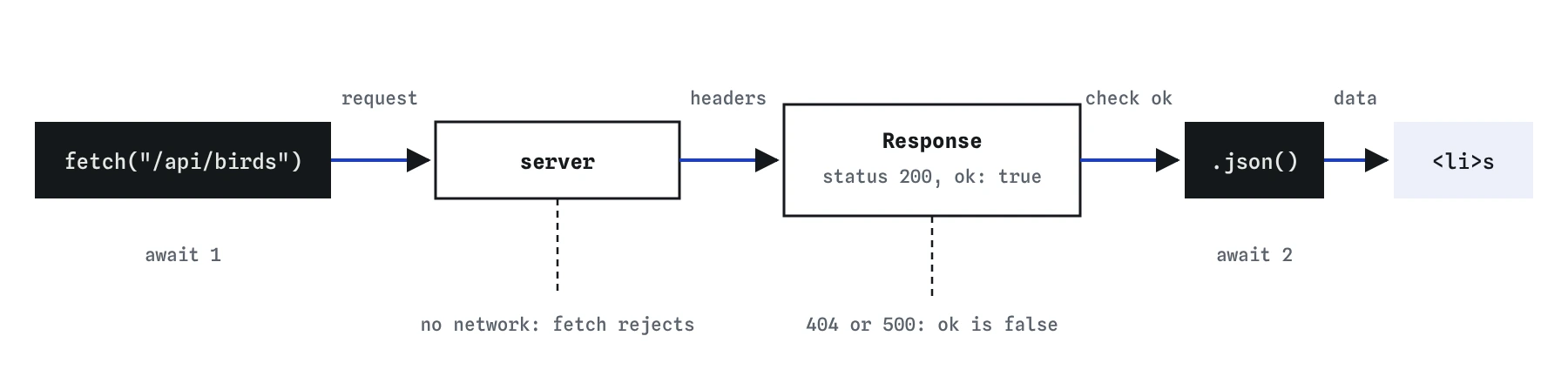

ok set to false.How do you read JSON from a response?
The body is read separately with response.json(), which also returns a promise, because the body may still be downloading. It parses the text as JSON and fulfils with ordinary JavaScript data: arrays, objects, strings and numbers. That is the second await.
Forgetting that second await is the most common fetch bug. The variable then holds a promise, so birds.forEach is not a function and data.city is undefined. When AI-generated code shows those symptoms, check this line first.
A body can be read only once. Calling response.json() and then response.text() on the same response fails. If the server might send something other than JSON, such as an HTML error page, read response.text() and parse it yourself inside a try. Log the parsed data once while you work so you know its shape: property names, nesting, and whether it is an array or an object.
async function showMenu() {
  const response = await fetch("/api/bakery/menu");
  const menu = await response.json();
  console.log(menu[0].item, menu[0].price);
}

showMenu();
Why are network errors and HTTP errors different?
Two different things can go wrong. A network error means no answer came back at all: the visitor is offline, the address does not exist, or the browser blocked the request. Then the fetch promise rejects, and await fetch(...) throws a TypeError.
An HTTP error means the server did answer, with a status such as 404 Not Found or 500 Server Error. To fetch, that is a successful conversation, so the promise fulfils as normal. Nothing throws. The only sign is response.ok being false. Code that skips the check goes on to read the error body as if it were data, and the page fills with undefined.
Handle both. Check response.ok right after the first await. Either show a message there, or throw your own error so a single catch covers both kinds: if (!response.ok) throw new Error(Server said ${response.status});.
async function loadMenu() {
  try {
    const response = await fetch("/api/bakery/specials");
    if (!response.ok) {
      throw new Error(`Server said ${response.status}`);
    }
    const data = await response.json();
    console.log(data);
  } catch (error) {
    console.log(`Could not load: ${error.message}`);
  }
}

loadMenu();
Which states does a data-driven page need?
Four, every time. Loading: something visible from the moment the request starts. Success: the data on the page. Empty: the request worked but there is nothing to show, such as no birds seen this week, which deserves its own friendly message instead of a blank list. Error: what went wrong and, where possible, a Retry button.
Set loading before the first await, and clear it in every path, ideally in finally. An empty array is truthy, so test birds.length === 0 for the empty state. Keep error messages in plain words for the visitor and log the technical detail to the Console for you.
Test each state on purpose. Change the address to a missing one to see the error state, and temporarily replace the data with [] to see the empty state. These states are what AI tools most often leave out.
How do you build the page from the data?
Loop over the array and create one element per item with createElement, set its text with textContent, and append it. Clear the container first with list.textContent = "" so that loading twice does not duplicate everything.
Data from a server is outside text, the same as something a visitor typed. Putting it into innerHTML with a template literal lets anyone who controls that data inject HTML and scripts into your page. Use textContent, or set attributes through properties such as img.alt.
For many items, build them into a DocumentFragment or an array and append once, which saves the browser some work. For the few dozen items in a typical list, appending one by one is fine.
function renderMenu(list, menu) {
  list.textContent = "";
  menu.forEach((entry) => {
    const li = document.createElement("li");
    li.textContent = `${entry.item}: $${entry.price.toFixed(2)}`;
    list.append(li);
  });
}

renderMenu(document.createElement("ul"), [{ item: "Rye", price: 4 }]);
How do you send JSON to a server?
Pass a second argument to fetch with the details. method: "POST" says you are sending something new. headers describes the request; "Content-Type": "application/json" tells the server the body is JSON. body holds the data, turned into a string with JSON.stringify, because a request body is text.
The server answers with a response like any other, so check response.ok and usually read response.json() to get the saved item back, often with a new id. Other methods follow the same shape: PUT or PATCH to change something, DELETE to remove it.
The practice API here is read-only: it answers every request to its three addresses with the same data and does not save anything. The example below shows the shape so you recognise it in real code.
async function addSighting(sighting) {
  const response = await fetch("/api/birds", {
    method: "POST",
    headers: { "Content-Type": "application/json" },
    body: JSON.stringify(sighting),
  });
  console.log(response.status);
}

addSighting({ name: "Kingfisher", count: 1 });
What is CORS?
Browsers protect visitors by stopping a page from one site freely reading responses from another site. Without that rule, any page you visited could read your webmail through your logged-in session without you knowing. CORS, Cross-Origin Resource Sharing, is how a server opts in: it sends headers saying which other sites may read its responses.
When a request to another site is blocked, the Console shows a CORS error and fetch rejects with a network error. The fix is on the server: it must send an Access-Control-Allow-Origin header that includes your site. Front-end code cannot override it, and the mode: "no-cors" option does not help, because it hides the response from your code entirely.
If the service has no CORS support, the request has to go through a server you control, which fetches the data and passes it on.
Why must API keys never be in front-end code?
Everything your page sends to the browser can be read by anyone: view the source, open the Network panel, or read the script file. A secret key in front-end JavaScript is a published key, however well you hide it in a variable or an environment file that a build tool inlines.
Someone who copies it can run up your bill or use your account. AI assistants often paste keys straight into fetch calls in example code, so search generated code for words like key, token and secret before publishing.
Keep secret keys on a server. Your page calls your own server, which adds the key and calls the paid API. Keys that services label as public or publishable, such as some map keys restricted to your domain, are designed to be visible and are fine in the browser.
Field notes
fetchreturns a promise for a response, and the body is read separately.response.json()also returns a promise, so it needs its ownawait.- Check
response.ok, since server errors like 404 do not reject the promise. - Plan for four states: loading, success, empty and error.
Easy to get wrong
json() returns a promise. Without await, data is the promise and every property reads as undefined.
A 404 or 500 does not make fetch reject, so without the check the error body is treated as real data.
Server data is outside text. innerHTML would turn any markup in it into real elements and possibly scripts.
A request body must be text. A plain object is sent as [object Object].
Questions people ask
Do I need a library like axios?
No. fetch is built into every current browser. Libraries add conveniences such as throwing on HTTP errors, which a small helper function of your own can do too.
How do I stop a slow request?
Pass a signal: fetch(url, { signal: AbortSignal.timeout(5000) }) rejects after five seconds. AbortController lets you cancel on demand, for example when a new search starts.
Why does fetch work on my server but not from my laptop file?
Pages opened as file:// have no real origin, and many requests are blocked. Run a local development server instead.
Can I fetch any website's data?
Only if its server allows your site through CORS, or the request goes through a server of your own.
Where do I see the request?
In the browser DevTools Network panel. It shows the address, status, headers and the response body for every fetch.