When is a table the right element?
Use a table when your content has two dimensions: rows of records and columns of attributes that apply to every record. A price list with sizes and prices, a bus timetable, a comparison of three broadband plans, the results of a bird club's monthly count. If you would naturally make it in a spreadsheet, a table is right.
Do not use a table to place things side by side on the page. Layout tables were common before CSS grid and flexbox, and they cause real problems: screen readers announce rows and columns that mean nothing, the content cannot reflow on a narrow screen, and the reading order follows the cells rather than the meaning. Use CSS grid for layout.
A one-dimensional list of items is a ul or ol. A list of term and description pairs, like a product spec sheet with labels on the left, is often better as a dl. Tables are for data where reading across a row and down a column both make sense.
What are the parts of a table?
A table is built from rows (tr) that contain cells. Header cells are th, data cells are td. Above the rows sits an optional caption, which gives the table its name.
The caption must be the first child of the table. Screen readers announce it when the user enters the table, and it is the accessible name. A heading placed above the table is not connected to it, so a user jumping between tables hears "table, 4 columns, 12 rows" with no idea what it is about. You can still style the caption to look like a heading, and position it with caption-side.
Every row should have the same number of columns once spans are counted. When rows differ, browsers fill the gaps with empty space and screen readers report wrong column positions.
<table>
  <caption>Bread prices, from 1 March 2026</caption>
  <thead>
    <tr>
      <th scope="col">Loaf</th>
      <th scope="col">Small</th>
      <th scope="col">Large</th>
    </tr>
  </thead>
  <tbody>
    <tr>
      <th scope="row">White</th>
      <td>£2.40</td>
      <td>£3.60</td>
    </tr>
    <tr>
      <th scope="row">Sourdough</th>
      <td>£3.20</td>
      <td>£4.80</td>
    </tr>
  </tbody>
</table>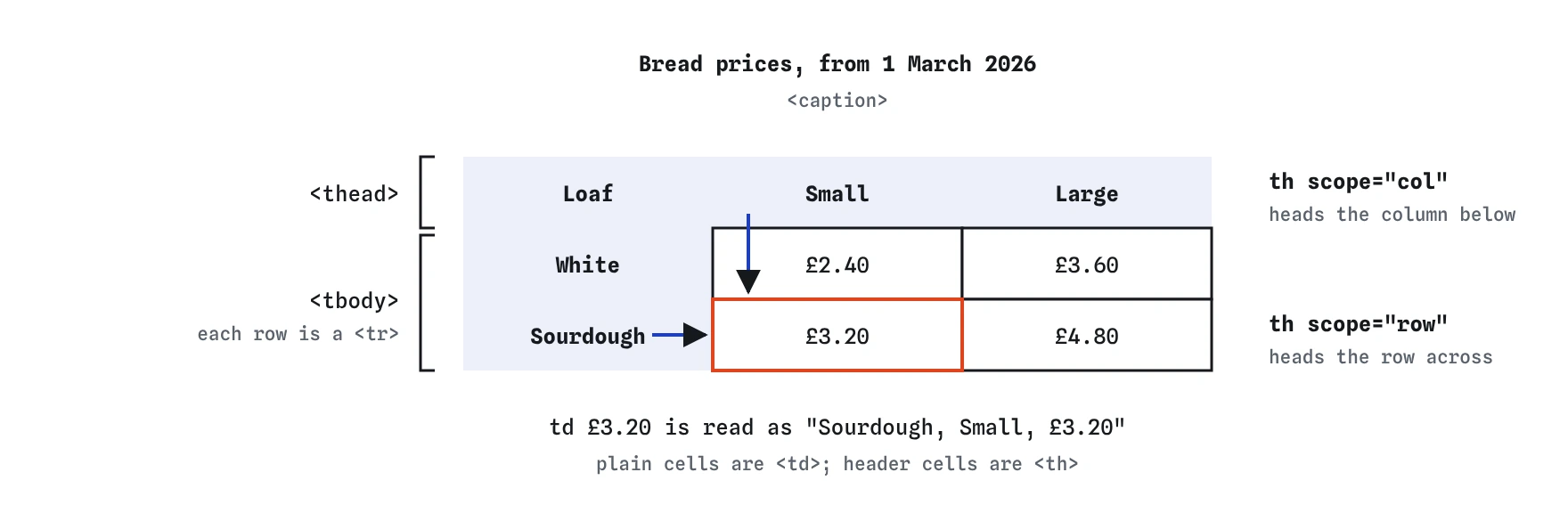

scope tells assistive tech which way each th points, so £3.20 is announced as Sourdough, Small.What do thead, tbody and tfoot do?
These three elements group rows. The thead holds the header rows, tbody the body, and tfoot the summary rows such as totals. They give you clean CSS hooks (tbody tr:nth-child(even) for zebra stripes) and let the browser repeat the header and footer rows on every printed page of a long table.
If you leave out tbody, the HTML parser inserts one for you. The DOM then contains a tbody your source does not show, which surprises people writing selectors like table > tr. That selector matches nothing in an HTML document. Write tbody yourself and the source matches the DOM.
The tfoot element may come after tbody; that is the order to use. Older specs allowed it before tbody too, but that position is no longer valid. A table can have several tbody elements, which is a tidy way to group rows, such as one body per month in a log of bird sightings.
How do th and scope tell screen readers what a cell means?
When a screen reader user moves into a data cell, the software reads the relevant headers first: "Large, Sourdough, £4.80". That only works if the headers are real th elements. Bold text in a td looks the same and announces nothing.
The scope attribute says which way a header points. Use scope="col" for headers across the top and scope="row" for headers at the start of each row. Browsers can guess scope in simple tables, but the guess fails in tables with headers in both directions or with empty corner cells. Writing it costs a few characters.
For headers that span several columns or rows, use scope="colgroup" or scope="rowgroup". For complex tables where a cell depends on headers that scope cannot express, give each th an id and list the relevant ids in the cell's headers attribute. If you find yourself needing headers everywhere, the table is probably too complex and would be clearer split into two.
<td headers="sat am">10:15</td>How do colspan and rowspan work?
The colspan attribute makes a cell stretch across several columns, and rowspan makes it stretch down several rows. A cell with colspan="2" counts as two cells in its row, so that row needs one fewer cell element.
With rowspan, the cell occupies a slot in the rows below as well. Those rows must leave that slot out. This is where hand-written tables usually break: someone adds a rowspan="2" and forgets to remove a cell from the next row, so every cell after it shifts one column to the right.
Merged cells make tables harder to read with a screen reader and harder to make responsive. Use them for genuine groupings, such as a header "Weekend" over Saturday and Sunday, and avoid them for visual effects.
<thead>
  <tr>
    <td></td>
    <th scope="colgroup" colspan="2">Weekend</th>
  </tr>
  <tr>
    <td></td>
    <th scope="col">Sat</th>
    <th scope="col">Sun</th>
  </tr>
</thead>
What can colgroup and col style?
The colgroup and col elements describe columns, which otherwise do not exist as elements. They sit right after the caption. You can give a col a span attribute and a class, then style it.
Only four CSS properties apply to columns: background, border, width and visibility: collapse. You cannot set text alignment or font on a col. For those, target the cells with a selector like td:nth-child(3).
Setting widths on col elements works well together with table-layout: fixed, which tells the browser to size columns from the first row and the column widths instead of measuring every cell. Large tables render faster and do not jump around while they load.
<colgroup>
  <col>
  <col span="2" class="prices">
</colgroup>
How do I make a table work on a phone?
The simplest approach that keeps the table intact is a scrolling wrapper. Put the table in a div with overflow-x: auto. Add tabindex="0", a role="region" and an aria-label to the wrapper so keyboard users can focus it and scroll with the arrow keys, and screen reader users hear what the region is.
Some sites restyle each row as a card on small screens by setting the table elements to display: block. This looks neat but can strip table semantics in some browser and screen reader combinations, so the row and column announcements vanish. If you do it, test with a screen reader, or add explicit ARIA table roles back.
Reducing columns usually beats any clever CSS. Ask which columns a phone user needs and move the rest to a details page.
Numeric columns read better right-aligned with font-variant-numeric: tabular-nums, so the digits line up.
<div class="table-scroll" role="region" aria-label="Bus timetable" tabindex="0">
  <table>…</table>
</div>
How do I check a table is built correctly?
Run the page through the W3C Nu validator. It reports rows that do not match the column count, cells that overlap because of a bad rowspan, and tfoot in the wrong place.
In Chrome DevTools, select a td and open the Accessibility pane. It shows the cell's role and, in recent versions, the header cells it is associated with. Firefox's Accessibility Inspector shows the same.
Do a screen reader pass on any table people will rely on. In VoiceOver, press VO+Cmd+arrow keys inside a table to move by cell; in NVDA use Ctrl+Alt+arrow keys. Listen for headers being read as you move. If you hear only values, your th or scope setup is wrong.
When an AI tool writes a table, look for these patterns:
- No
caption, with a heading above the table instead. - Header cells written as
tdwith bold or a class. - No
scopeon headers in a table with both row and column headers. - Obsolete attributes such as
border,cellpadding,cellspacing,alignandbgcolor. Replace with CSS. - A table used to lay out a form or a page.
- Rows with uneven cell counts after a
colspanorrowspanwas added.
Field notes
- Use a table only for data that has rows and columns.
- A
captionnames the table and should be the first thing inside it. - Header cells use
th, andscopesays whether they label a row or a column.
Easy to get wrong
A caption is tied to the table, so it is read as the table's name. A heading above it is not connected.
Bold text looks like a header but tells assistive tech nothing. th with scope does.
A cell that spans two columns uses up two slots. Remove a cell from that row so every row has the same width.
The border, cellpadding and cellspacing attributes are obsolete. CSS gives you the same result and more control.
The parser inserts a tbody around rows, so a tr is never a direct child of table in an HTML document.
Questions people ask
What is the difference between th and td?
th is a header cell that labels a row or column. td is an ordinary data cell. Use th with scope so screen readers can link data to its header.
Is tbody required?
You can omit it in the source, but the browser inserts it automatically. Writing it yourself keeps your HTML matching the DOM.
How do I make a table responsive?
Put it inside a div with overflow-x: auto so it scrolls sideways on small screens, and keep the number of columns modest.
Can I use tables for page layout?
No. Layout tables confuse screen readers and do not adapt to screen size. Use CSS grid or flexbox.
Should I sort and filter tables with HTML?
HTML has no built-in sorting. Add it with JavaScript, and mark the sorted column header with aria-sort="ascending" or "descending" so screen readers report the order.
Does a caption have to be visible?
Visible captions help everyone. If the design already shows a clear title, you can hide the caption visually with a screen-reader-only class, but keep it in the HTML.
Can a table cell contain a list or a form control?
Yes. A td accepts flow content, so lists, paragraphs, links and inputs are all allowed. Give inputs in table rows a label, often with aria-labelledby pointing at the row and column headers.