How does Tab decide where focus goes next?
Pressing Tab moves focus to the next focusable element in the DOM, and Shift+Tab moves back. The order is source order. CSS that rearranges things visually, such as order in flexbox, grid-template-areas, flex-direction: row-reverse or absolute positioning, has no effect on it. If your sidebar appears on the left but sits after <main> in the markup, keyboard users reach it last while their eyes expect it first.
The fix for a jumpy focus order is almost always to reorder the HTML so source order matches visual order. That also fixes the screen reader reading order, which follows the same tree. Reach for attributes only after the markup is right.
Safari on macOS is the odd one out. By default it skips links when you press Tab and only stops on form controls. Testers on a Mac either turn on "Press Tab to highlight each item on a webpage" in Safari settings or press Option+Tab. Keep that in mind before filing a bug that says links are unreachable.
<!-- Visual order: sidebar left, article right -->
<div class="layout">
  <nav class="sidebar">…</nav>   <!-- put it first in source too -->
  <main>…</main>
</div>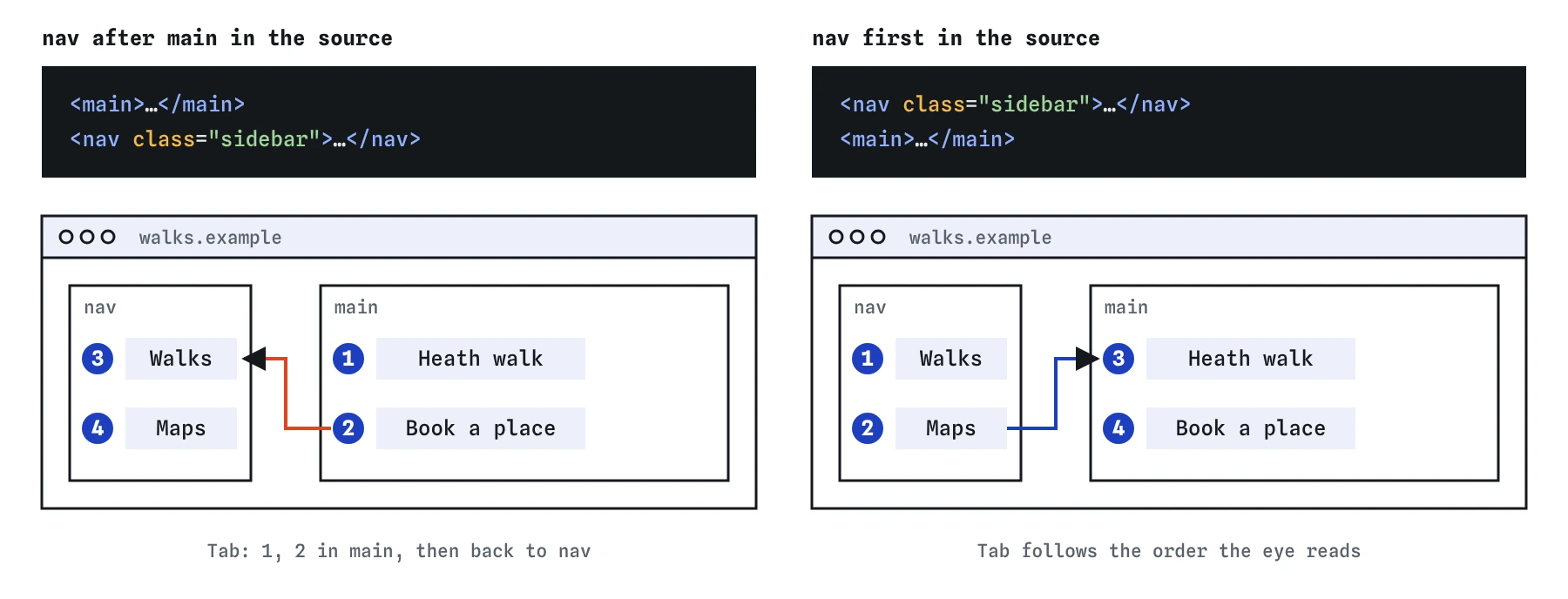
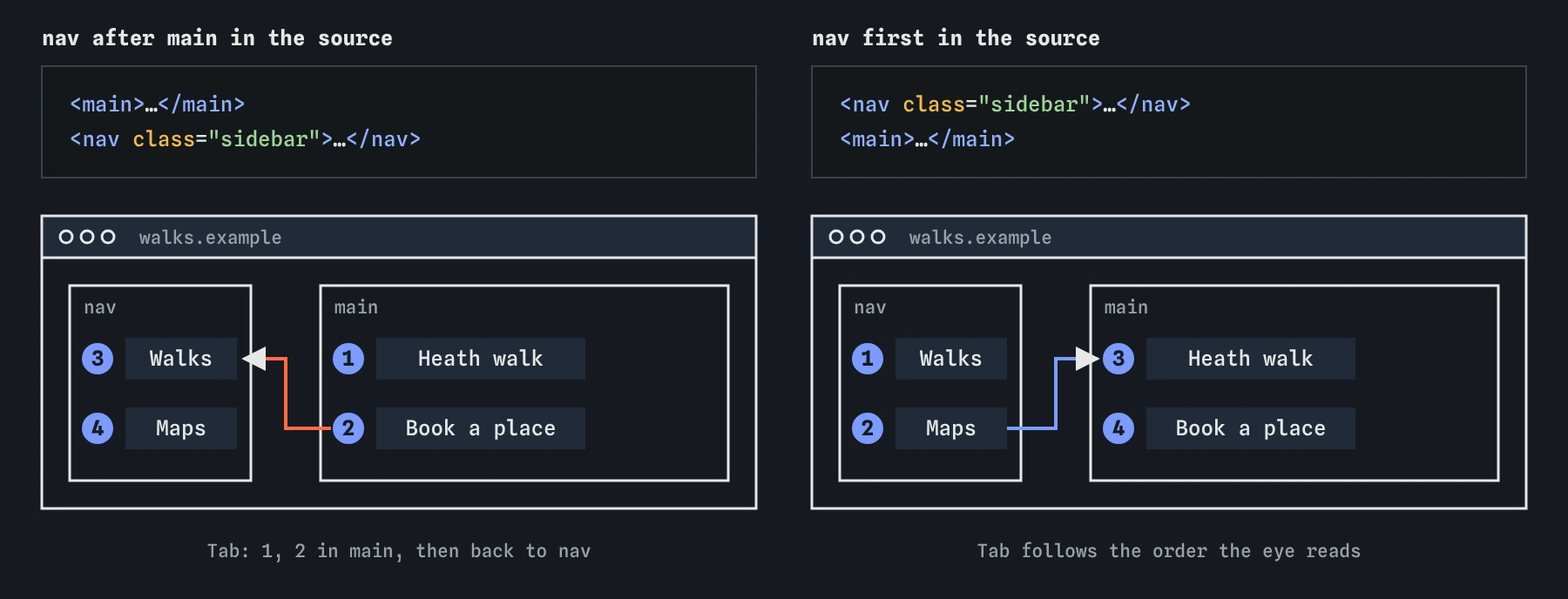
<nav> above <main> in the HTML makes the Tab order match what sighted users read.Which elements get focus without any extra code?
Interactive elements are focusable by default. Everything else is skipped, and that is correct. Keyboard and screen reader users read text with arrow keys and reading commands. Tab is for things you can operate, so a page where every paragraph is a Tab stop is slower to use.
<a>with anhref. An<a>with nohrefis a placeholder and is skipped.<button>,<input>,<select>and<textarea>, unless they carry thedisabledattribute.<summary>as the first child of<details>.<iframe>, and<audio>or<video>that have thecontrolsattribute.- Any element with
contenteditable. - Any element with a
tabindexattribute, which this page covers next. - Scrollable containers in recent Chrome and Firefox, so keyboard users can scroll them with arrow keys.
What do tabindex 0 and -1 actually do?
The value tabindex="0" adds an element to the Tab sequence at its natural source position. Use it on a custom widget you have made operable with script, or on a scrollable region that holds no focusable children. Adding it to a <div> gives focus and nothing else. You still owe keyboard handling, a role and a name.
The value tabindex="-1" makes an element focusable by element.focus() or by a fragment link, while keeping it out of the Tab sequence. It is the right choice for a results heading you move focus to after filtering, or for the container of an error summary.
Never use a positive value like tabindex="3". Positive values jump ahead of every element with 0 or no tabindex, in numeric order, across the whole page. One positive value forces you to number everything, and the next person who edits the page will break it. Accessibility checkers flag positive values for this reason.
<h2 id="results" tabindex="-1">12 walks found</h2>
<script>
  // after the filter updates the list
  document.querySelector('#results').focus();
</script>
Why must focus always be visible?
A sighted keyboard user needs to see where focus is, the same way a mouse user needs a cursor. Browsers draw a default focus ring. The most common keyboard failure on real sites is a stylesheet line like outline: none that removes it with nothing in its place.
Use :focus-visible to style focus. Browsers apply it when focus came from the keyboard, or always for text inputs, and skip it for most mouse clicks on buttons. That ends the old argument where designers removed outlines because they appeared on click.
WCAG 2.2 adds "Focus Not Obscured": a focused element must not be completely hidden behind a sticky header or cookie banner. If your header is fixed, set scroll-padding-top on the html element to the header height so focused elements and fragment targets land below it.
:focus-visible {
  outline: 3px solid #1a5fb4;
  outline-offset: 2px;
}
html { scroll-padding-top: 4rem; } /* height of the sticky header */
How do I add a skip link that works?
A skip link is the first focusable element on the page and points at the main content. Without one, a keyboard user tabs through the logo, the search box and every navigation link on every page before reaching the article. On a site with a 30-link menu that is 30 key presses per page.
Hide it off-screen until it receives focus, then show it at the top. Avoid display: none, which makes it unfocusable. The target needs a matching id. Modern browsers move both scroll position and the sequential focus starting point to the target, so the next Tab goes to the first link inside <main>.
Test it by loading the page, pressing Tab once, and checking that the link appears and reads clearly. Press Enter, then Tab again. Focus should land inside the main content.
<body>
  <a href="#main" class="skip">Skip to main content</a>
  <header>…</header>
  <main id="main">…</main>
</body>

.skip { position: absolute; left: -9999px; }
.skip:focus { left: 1rem; top: 1rem; }
Which keys should each control respond to?
Native elements bring their keyboard behaviour with them, which is one more reason to use them. When you build something custom, users expect it to follow the same conventions.
- Links: Enter follows the link. Space scrolls the page, so do not use links for actions.
- Buttons: Enter and Space both activate. A
<button>does this for free. A<div role="button">needs a keydown handler for both. - Checkboxes: Space toggles.
- Radio groups: one Tab stop for the whole group, then arrow keys move between options and select them.
- Select menus: arrow keys change the value, and typing a letter jumps to matching options.
<details>and<summary>: Enter or Space opens and closes.- Dialogs: Escape closes. A
<dialog>opened withshowModal()handles Escape itself. - Composite widgets like tabs and menus: one Tab stop, arrow keys inside. This roving focus pattern needs script.
How do dialogs and inert keep focus where it belongs?
When a modal is open, focus must stay inside it. If Tab escapes to the page behind, a keyboard user ends up operating controls they cannot see. A <dialog> opened with showModal() handles this for you. It moves focus into the dialog, makes everything else inert, closes on Escape, and returns focus to the button that opened it when it closes.
For other overlays, such as an off-canvas menu that is not a true modal, use the inert attribute. It makes an element and all its descendants unfocusable, unclickable and hidden from assistive technology. Put inert on the closed off-canvas menu so its links do not sit invisibly in the Tab order. It is supported in every current browser.
Use the autofocus attribute inside a dialog to choose the starting control. Pick the least destructive option, such as Cancel, so an accidental Enter does no damage.
<button type="button" id="open">Delete walk</button>
<dialog id="confirm">
  <p>Delete the Saturday heath walk?</p>
  <form method="dialog">
    <button autofocus>Cancel</button>
    <button value="delete">Delete</button>
  </form>
</dialog>
<script>
  open.onclick = () => confirm.showModal();
</script>
How do I test a page with only the keyboard?
Put the mouse out of reach and work through the page. This catches problems no automated tool can find, and it takes five minutes.
- Press Tab from the top. Is there a skip link first? Does every stop show a clear focus indicator?
- Does focus move in the same order your eyes read the page? A jump from header to footer and back means source order is wrong.
- Can you reach and use every link, button, field and menu? Can you open and close every disclosure and dialog?
- Does focus ever vanish, landing on something hidden? That usually means an off-screen menu without
inert. - After an action that changes the page, such as submitting a form, does focus land somewhere sensible?
- In Chrome DevTools, type
document.activeElementin the Console, or turn on the live expression for it, to see exactly what has focus.
What do AI tools get wrong about keyboard focus?
Assistants generate interactive markup quickly, and keyboard support is the part they drop most often. Scan their output for these.
outline: noneoroutline: 0in a CSS reset with no:focus-visiblereplacement.- Click handlers on
<div>,<li>or<img>with notabindexand no key handling. tabindex="0"sprinkled on headings and paragraphs to "make them accessible".- Positive
tabindexvalues used to force an order the source should have provided. - Hand-rolled modals built from a
<div>with no focus trap, when<dialog>would do the whole job. - Skip links pointing at an
idthat does not exist on the page.
Field notes
- Tab moves focus through focusable elements in the order they appear in the HTML.
- Links, buttons and form fields can take focus without any extra code.
- A skip link at the top lets keyboard users jump past the menu to the content.
Easy to get wrong
Positive tabindex forces the field ahead of everything else. Reorder the HTML instead.
Plain text should not be a Tab stop. It adds pointless stops for keyboard users.
The fragment needs a matching id, and the link text should say where it goes.
Questions people ask
What is the difference between tabindex 0 and -1?
0 adds the element to the Tab order in source position. -1 makes it focusable by script or link but leaves it out of Tab navigation.
Why should tabindex never be positive?
Positive values pull elements ahead of the natural order, which confuses users and breaks as the page changes.
What does the inert attribute do?
It makes an element and its contents non-interactive: no focus, no clicks, and hidden from screen readers.
How do I make a skip link?
Add <a href="#main">Skip to main content</a> as the first element in body and give your <main> id="main".