Should I use strong or b, em or i?
These four pairs look alike by default and mean different things. The strong element marks strong importance, seriousness or urgency, like a warning that the reader must not miss. The em element marks stress emphasis, the spoken stress that changes how a sentence is understood. "I <em>did</em> lock the door" answers an accusation. The plain sentence does not.
The b element draws attention without adding importance: product names in a review, the lead words of a news summary, keywords in a study guide. The i element marks text in an alternate voice or mood: foreign phrases, taxonomic names like <i>Turdus merula</i>, ship names, a character's thoughts, technical terms on first use.
Use em when you would stress the word aloud. Use strong when the content is more important than what surrounds it. Use b or i when the convention of print would bold or italicise it with no change in meaning. If none of those apply and you only want a look, use CSS on a span.
<p><strong>Do not</strong> unplug the oven during a firmware update.</p>
<p>The menu included <i lang="fr">pain au levain</i>.</p>
<p>I said the <em>small</em> loaf, please.</p>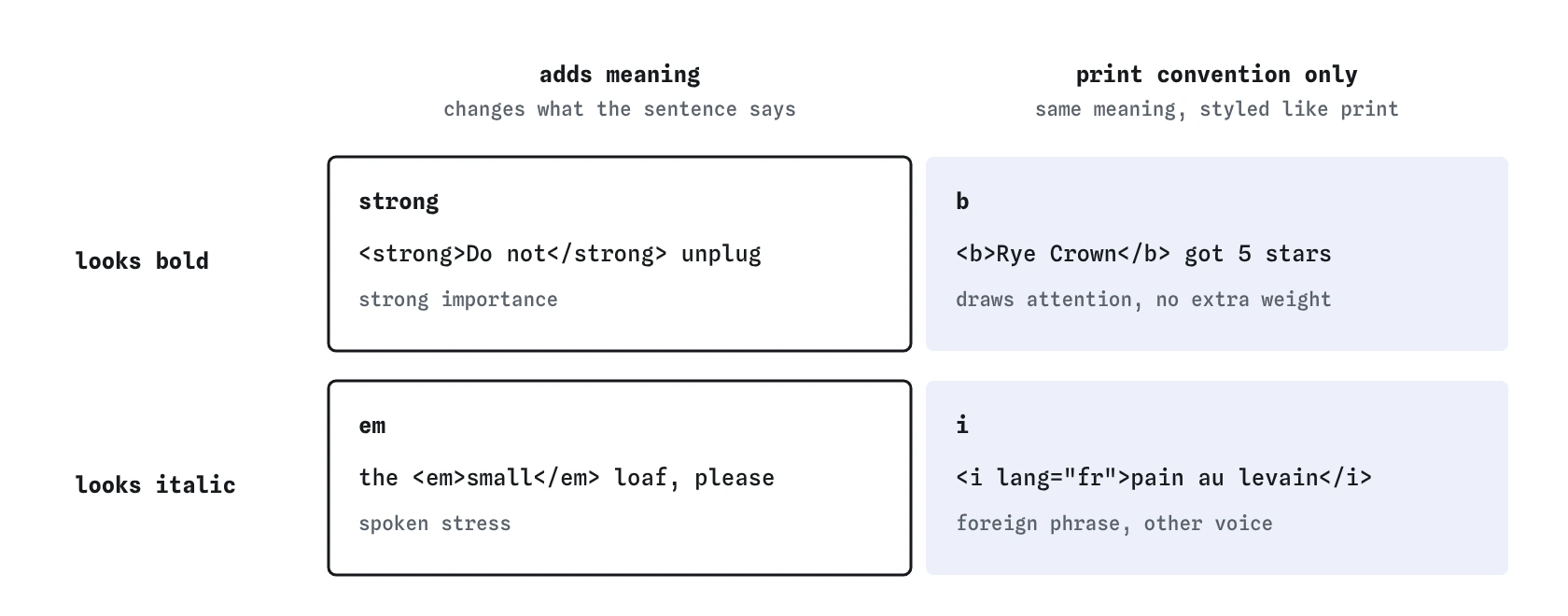

strong or em when the words carry more weight or stress, and b or i when print would style them without changing the meaning.Do screen readers actually announce strong and em?
Mostly no. JAWS, NVDA and VoiceOver ship with emphasis announcements turned off by default, and users who switch them on often turn them off again because they get noisy. Browsers do expose these elements in the accessibility tree with roles such as strong and emphasis, so the information is available to tools that want it.
That means the words must carry the meaning on their own. "Do not unplug the oven" is clear without bold. A sentence that relies on bold alone, such as a price list where the cheapest option is only shown in bold, loses its message for many listeners. Add a word like "cheapest" or a visible label. The same rule applies to mark, s, u and small below.
What are u, s, mark and small for?
Each of these older presentational tags was given a meaning in HTML5. Use them when that meaning fits, and reach for CSS when you only want the look.
- The
uelement marks an unarticulated annotation, such as a misspelt word in a spelling exercise or a proper name in Chinese text. Underlined text looks like a link, so restyle it with a wavy or dotted underline if you use it. - The
selement marks content that is no longer accurate or relevant, such as last week's price on a bakery menu. It is for outdated facts, not for tracked edits. - The
markelement highlights text for relevance in the current context: search terms in a results list, or a line in a quoted passage that you want the reader to notice. - The
smallelement holds side comments and fine print: legal notes, licence lines, "prices include VAT". It does not shrink importance, and it is not a tool for making any text smaller.
How do I show edits with del and ins?
The del element marks text removed from a document and ins marks text added. Both accept a cite attribute, a URL to a page that explains the change, and a datetime attribute holding a valid date or date-time string, such as 2026-03-01 or 2026-03-01T14:30Z.
They suit changelogs, edited policies, contract revisions and correction notices on news articles. Browsers strike through del and underline ins by default. Screen readers do not announce either by default, so if readers need to know about the change, say so in words too, for example with a short "Updated on 1 March" note.
Pick s when something is outdated but was never an edit, such as a crossed-out sale price. Pick del and ins when you are recording a change to the document itself.
<p>Club meeting at <del datetime="2026-03-01">2pm</del>
<ins datetime="2026-03-01">3pm</ins>.</p>
<p>Sourdough: <s>£4.50</s> £3.80 today.</p>When should I use sub and sup?
The sub and sup elements render subscript and superscript. Use them only where the position is part of the meaning: chemical formulas like H<sub>2</sub>O, exponents like x<sup>2</sup>, footnote markers, ordinal suffixes in French like 1<sup>er</sup>.
Do not use them to make text smaller or to nudge an icon up. They also change line height, which can make lines jump apart; set line-height: 0 on them in CSS if that bothers you. For heavy maths, MathML is now supported in every major browser and gives screen readers real structure for fractions and roots.
How do abbr, dfn, time and data work?
The abbr element marks an abbreviation or acronym. Its title attribute can hold the expansion, but title only shows on mouse hover and is not reliably read by screen readers or available on touch screens. Spell the term out in the text on first use, then use the short form.
The dfn element marks the term being defined, at the place where the sentence defines it. Wrap it around the term itself, and keep the definition in the same paragraph.
The time element gives a date, time or duration a machine-readable value in its datetime attribute while you show any human-friendly text. Calendar tools, search engines and browser extensions read the attribute. The data element does the same for other values, such as a product code behind a product name.
<p>The <abbr>RSPB</abbr> (Royal Society for the Protection of Birds) runs the count.</p>
<p>A <dfn>lek</dfn> is a gathering of males that display to attract females.</p>
<p>Next walk: <time datetime="2026-11-14T08:00">Saturday 14 November, 8am</time>.</p>
<p><data value="SKU-4471">Rye loaf</data></p>
What about span, bdi and ruby?
The span element has no meaning at all. Use it as a hook for CSS or JavaScript when no element above fits, such as styling a price in a brand colour.
The bdi element isolates text whose direction you cannot predict, typically user names that might be in Arabic or Hebrew inside an English sentence. Without it, a right-to-left name can scramble the punctuation and numbers around it. The bdo element forces a direction with dir, which you rarely need.
The ruby, rt and rp elements add small annotations above or beside base text, most often pronunciation guides for Japanese kanji or Chinese characters. Browsers support them well, and they are a good choice for language learning pages.
<li><bdi>إيمان</bdi>: 3 sightings</li>
<ruby>東<rt>とう</rt>京<rt>きょう</rt></ruby>
How do I check text-level semantics?
Open DevTools, inspect a word and look at the Accessibility pane. You will see roles such as strong, emphasis, insertion, deletion, mark and time where the browser exposes them. If a span or div carries the look, the role shows as generic, which tells you the meaning lives only in the styling.
Next, disable CSS. In Firefox use View, Page Style, No Style. Read the page in that state and ask whether the bold, italic and struck text still makes sense from the default styling and the words alone. Then run the page through the W3C Nu validator to catch a datetime value that is not a valid date, which breaks time and del without any visible error.
What do AI tools commonly get wrong here?
Generated code tends to swap b for strong everywhere because older style guides said b was deprecated. It never was. You will also see strong wrapped around every label in a card, which dilutes real importance until nothing stands out.
Other patterns to look for: i used as an icon container, as in <i class="icon-cart"></i>, which exposes an italic element with no text; time with a datetime like "Nov 14" that is not a valid format; abbr with a title and no visible expansion; and small used for every caption to make it look secondary. Fix each by asking what the text means and choosing from the elements above.
Field notes
- Use
strongfor importance andemfor stress emphasis. - Choose an element for its meaning, and use CSS when you only want a look.
- The
timeelement can hold a machine-readable date indatetime. - The
abbrelement marks an abbreviation or acronym.
Easy to get wrong
A warning is important, so strong carries the right meaning.
Underlined text looks like a link. Use u rarely and never to fake one.
Free text inside time needs a datetime attribute to be machine-readable.
sup is for typographic positions like exponents. Fine print is small.
Questions people ask
What is the difference between strong and b in HTML?
strong means the content is important. b only draws attention without adding importance. They look the same unless you style them.
Is the i tag deprecated?
No. i is valid and has a defined meaning: text in an alternate voice, such as foreign words or technical terms.
What format does the datetime attribute use?
Machine-readable forms like 2026-06-05, 14:30, 2026-06-05T14:30+01:00, or durations like PT1H30M.
How do I strike through text in HTML?
Use s for content that is no longer accurate, or del for a recorded removal from a document.