How do you add audio or video to a page?
The <audio> and <video> elements play media natively in every current browser, with no plugin. Point src at the file and add the controls attribute so people get play, pause, volume, seeking and, for video, fullscreen. Without controls, an audio element is invisible and a video shows only its first frame or poster with no way to start it.
Give video width and height attributes so the browser reserves the right space before the file loads, exactly as with images. Combine them with max-width: 100%; height: auto; in CSS so the player shrinks on phones.
Content between the opening and closing tags is shown only by browsers that do not support the element at all, which today means almost none. Use it for a download link anyway; it helps crawlers and some feed readers.
<video controls src="/media/nest-cam.mp4" width="1280" height="720">
  <a href="/media/nest-cam.mp4">Download the nest cam clip (MP4, 18 MB)</a>
</video>
Which file formats should you provide?
For video, MP4 with H.264 video and AAC audio plays everywhere. WebM with VP9 or AV1 is smaller at the same quality and plays in all current major browsers, and AV1 in MP4 is gaining ground. A practical setup today is one WebM or AV1 file and one H.264 MP4 fallback.
For audio, MP3 and AAC (in .m4a) play everywhere. Opus in WebM or Ogg gives better quality at low bitrates and is supported in all current major browsers. A podcast at 64 kbps mono Opus sounds fine and is half the size of the equivalent MP3.
Whatever you choose, the server must send the correct Content-Type and support HTTP range requests. Without range support, seeking breaks and Safari may refuse to play the file at all. Check the response in the Network panel: a successful seek shows status 206 Partial Content.
How do multiple source elements work?
Instead of src on the media element, list several <source> children. The browser plays the first one it can handle. Add type with the MIME type, and optionally a codecs parameter, so the browser can skip unsupported files without downloading them.
Put the most efficient format first, because the browser uses the first one it supports. If a source fails to load, the browser moves to the next one. Unlike <picture>, there is no media switching for most uses; use responsive layout and a single good encode, or adaptive streaming for long content.
<video controls width="1280" height="720" poster="/img/talk-poster.jpg">
  <source src="/media/talk.webm" type="video/webm">
  <source src="/media/talk.mp4" type="video/mp4">
  <a href="/media/talk.mp4">Download the talk (MP4)</a>
</video>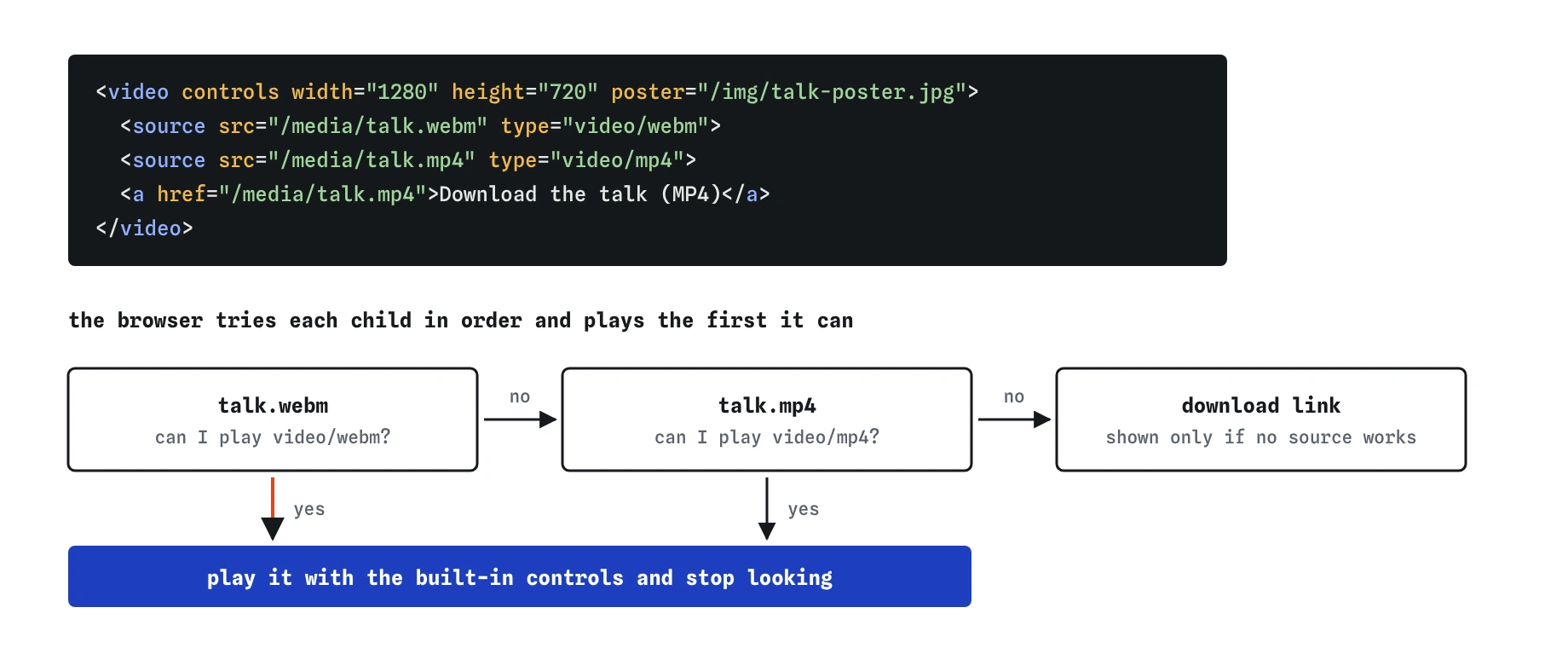
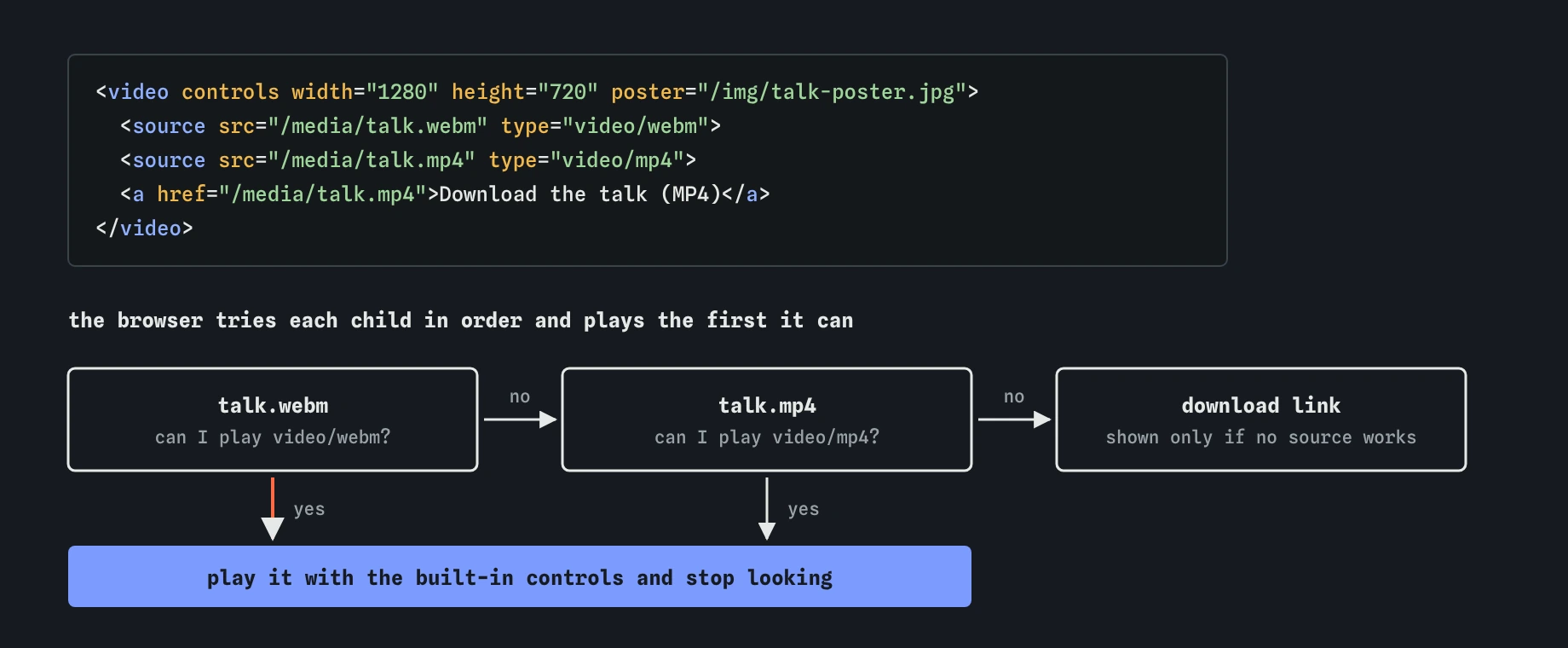
source elements with the most efficient format first. The type lets the browser skip a file it cannot play without downloading it, and the link at the end is for browsers that cannot play any of them.Why does autoplay need muted?
Browsers block autoplay with sound until the visitor has interacted with the site, and each browser applies its own rules on top. Muted autoplay is allowed almost everywhere. That means autoplay on its own usually fails without any error you can see, while autoplay muted works. On iPhones, add playsinline too, or the video may jump to fullscreen.
Calls to video.play() from JavaScript return a promise that rejects when autoplay is blocked. Catch it and show a play button rather than leaving a frozen frame.
Moving content that starts by itself distracts many people and can trigger symptoms for people with vestibular disorders. WCAG requires a way to pause any motion that lasts more than five seconds. Respect prefers-reduced-motion by not autoplaying background clips when it is set.
<video autoplay muted loop playsinline src="/media/waves.mp4" width="1280" height="720" aria-hidden="true"></video>What do loop, poster and preload do?
These attributes shape what happens before and after playback. Choose preload deliberately on pages with several players, because the default varies by browser and can waste a lot of mobile data.
<video controls preload="metadata" poster="/img/nest-poster.jpg" src="/media/nest.mp4" width="1280" height="720"></video>looprestarts the media from the beginning when it ends.poster(video only) sets an image shown before playback. Pick a frame that tells people what the video is about, and size it to match the video ratio.preload="none"fetches nothing until play is pressed. Use it on pages with many players.preload="metadata"fetches only duration, dimensions and the first frame. It is a sensible default for a single player.preload="auto"lets the browser download the whole file in advance. It is a hint, and mobile browsers often ignore it on cellular data.mutedstarts the media with sound off; people can still unmute it from the controls.
How do you add captions and subtitles?
The <track> element attaches a timed text file in WebVTT format to a video. Captions are required for accessibility: deaf and hard-of-hearing viewers rely on them, and many other people watch with the sound off. Set kind="captions" for same-language text that includes sound effects and speaker names, and kind="subtitles" for translations.
Each <track> needs srclang and a label, which appears in the player's captions menu. Add default to one track to switch it on automatically. The .vtt file must be served with Content-Type: text/vtt, and if it lives on another domain the video needs crossorigin and the server needs CORS headers, or the track will silently fail to load.
Auto-generated captions are a starting point. Review them by hand: they often mangle names, numbers and technical terms, which are exactly the words people need.
<video controls src="/media/talk.mp4" width="1280" height="720">
  <track kind="captions" src="/media/talk.en.vtt" srclang="en" label="English" default>
  <track kind="subtitles" src="/media/talk.es.vtt" srclang="es" label="Español">
</video>
When do you need a transcript or audio description?
Audio-only content such as a podcast needs a text transcript. Put it on the page below the player or link to it. A transcript also makes the episode searchable and quotable, and many people skim it before deciding to listen.
Video where important information is only visual needs audio description: narration of what is on screen during pauses. The kind="descriptions" track exists, but browser support for reading it aloud is poor, so the reliable approaches are a separate described version of the video or a text transcript that includes the visual details.
When should you use a video host or streaming instead?
A single MP4 file is fine for short clips under a few minutes. For long talks or popular videos, adaptive streaming with HLS or DASH sends lower-quality segments on slow connections and switches up when bandwidth allows. Safari plays HLS natively; other browsers need a small JavaScript library such as hls.js on top of Media Source Extensions.
Embedding from a video platform through an <iframe> handles encoding, streaming and captions for you, at the cost of third-party scripts, cookies and tracking. Give the iframe a title that describes the video, add loading="lazy" if it is below the fold, and consider a click-to-load facade so the heavy player only loads when someone wants it.
<iframe src="https://www.youtube-nocookie.com/embed/VIDEO_ID" title="Heron Point nesting season, 3 minutes"
        width="560" height="315" loading="lazy" allowfullscreen></iframe>
How do you check media and spot AI mistakes?
Tab to the player and make sure every control works from the keyboard. In the Network panel, confirm the right source downloaded, check the Content-Type, and seek to see 206 responses. In Chrome, the Media panel under More tools shows the chosen decoder, buffering and any playback errors.
In AI-generated media markup, look for autoplay without muted, video without width and height, missing controls, <source> elements without type, and no <track> for captions. Also watch for invented MIME types like video/mov and for .vtt files that the model referenced but nobody created.
Field notes
- The
<audio>and<video>elements play media without plugins. - Add
controlsso people can play, pause and change the volume. - Browsers usually only autoplay media when it is muted.
- Use
<track>to add captions so more people can follow a video.
Easy to get wrong
Autoplay with sound is blocked by browsers, so the video sits frozen. Muted autoplay is allowed, and playsinline stops iPhones going fullscreen.
Without controls nobody can play, pause or seek, and without dimensions the page shifts when the video loads.
Deaf and hard-of-hearing viewers cannot follow the content, and WCAG requires captions for prerecorded video with audio.
Seeking breaks and Safari may refuse to play the file at all.
Questions people ask
Can I style the built-in controls?
Only a little, and differently in each browser. For a fully custom player, remove controls, build your own with buttons, and keep keyboard support and labels on every control.
Is GIF better than video for short loops?
No. A muted looping MP4 or WebM is usually a tenth of the size of the same GIF and looks better. Use autoplay muted loop playsinline.
Do captions need to be WebVTT?
For the native <track> element, yes. Convert SRT files to VTT; the formats are close, mainly differing in the header and the decimal separator in timestamps.
How do I stop people downloading my video?
You cannot fully prevent it, because the browser has to download the file to play it. controlslist="nodownload" hides the button in Chromium, and DRM through Encrypted Media Extensions is the heavy option.
Does preload="none" affect the poster?
No. The poster image loads separately, so people still see a preview frame while no media data is fetched.