What does an iframe actually load?
The iframe element opens a second, complete browsing context inside your page. The framed document gets its own DOM, its own scripts, its own history entries and its own cookies. Your CSS does not reach inside it, and its CSS does not leak out. From the browser's point of view, you have put a small window into another page.
That separation is why iframes are the standard way to embed third-party content: a map from a mapping service, a video player, a booking widget for a bike repair shop, a payment form. The provider controls what runs inside the frame, and you control the box it sits in. You set the size with width and height attributes or CSS, and you point it at a URL with src.
You can also pass inline HTML with srcdoc instead of a URL. The browser renders that string as the frame's document. This is handy for previewing user-written HTML in a sandbox, such as a code playground or an email template preview.
Every iframe costs memory and network time. A page with six embedded video players loads six video player apps before your visitor scrolls. Keep embeds few, give them loading="lazy" when they sit below the fold, and consider a click-to-load placeholder for heavy players.
<iframe
  src="https://www.youtube-nocookie.com/embed/abc123"
  title="Video: repotting a fiddle-leaf fig"
  width="560" height="315"
  loading="lazy"
  allow="fullscreen; picture-in-picture"
  referrerpolicy="strict-origin-when-cross-origin">
</iframe>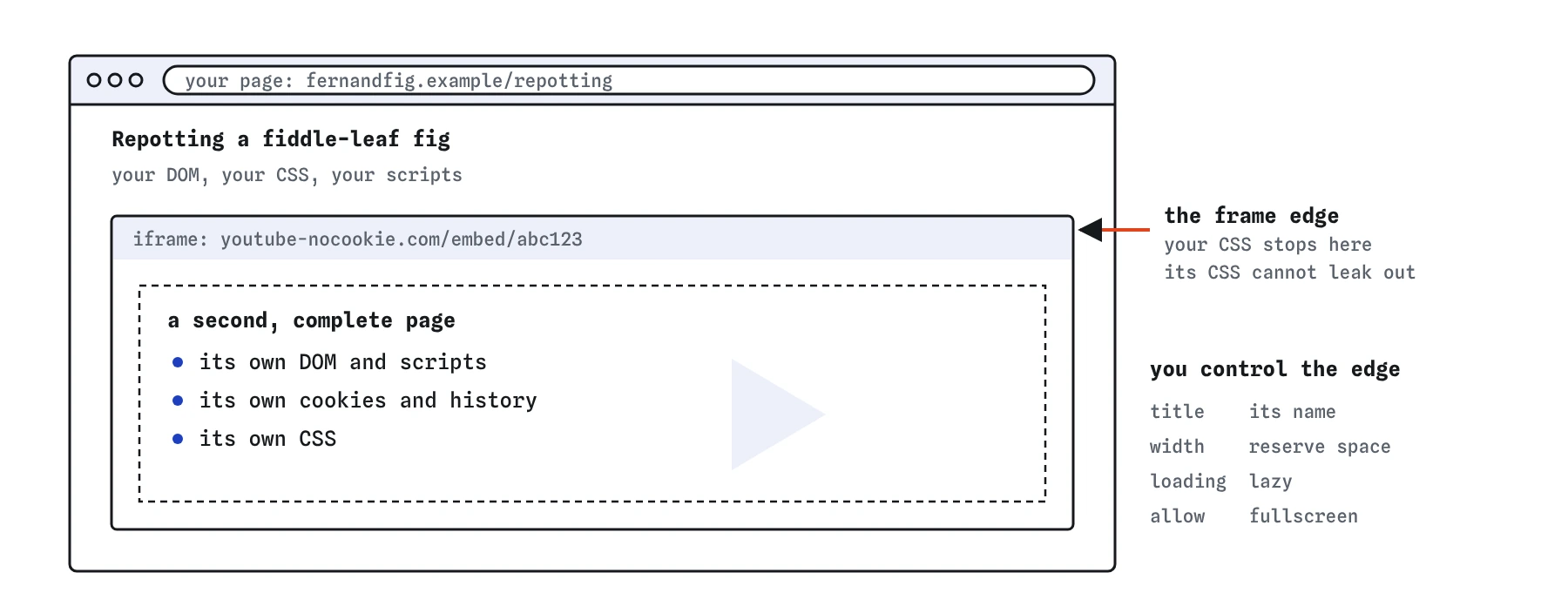

iframe puts a small window onto another page inside yours. The framed video has its own DOM, scripts and cookies, and styles do not cross the edge in either direction. You only set the frame itself: its title, size, loading and allow.Why does every iframe need a title?
Screen readers announce an iframe as a frame and read its accessible name. Without a title attribute, users hear something like "frame" or the raw URL, and they have to enter the frame to discover what it is. With title="Map showing our shop on Mill Street" they can decide to skip it.
Write the title as a short description of the content, the way you would describe it to someone on the phone. Avoid generic labels like "iframe" or "embed", and avoid repeating the provider's brand alone. "YouTube video" tells nobody which video it is.
The document inside the frame may have its own <title>, but browsers do not reliably use it as the frame's name. Set the attribute on the iframe yourself.
How does sandbox restrict an iframe?
Adding an empty sandbox attribute applies every restriction at once. The framed page cannot run scripts, submit forms, open popups, navigate your top-level page, or use plugins, and it is treated as coming from a unique opaque origin, so it cannot read cookies or storage for its real site.
You then add back only what the content needs, as space-separated tokens. The common ones are allow-scripts, allow-forms, allow-popups, allow-same-origin, allow-modals and allow-top-navigation-by-user-activation.
Never combine allow-scripts and allow-same-origin on a document from your own origin. The script inside can reach up to its parent, find the iframe element, and remove the sandbox attribute. Browsers warn about this pairing in the console. For third-party origins the pairing is less dangerous because the same-origin policy still separates you, though you have still granted the frame full script access to its own site.
A sandbox is the right default for anything you did not write: user-submitted HTML, ad code, preview panes. For a trusted provider like a mapping service, the provider's own documentation tells you which tokens their embed needs.
<!-- Preview of a member's HTML snippet, scripts allowed, nothing else -->
<iframe
  sandbox="allow-scripts"
  srcdoc="<p>Hello from Ana's profile</p>"
  title="Preview of your profile snippet">
</iframe>
What do allow, loading and referrerpolicy control?
The allow attribute sets a Permissions Policy for the frame. It decides which powerful features the embedded page may request, such as fullscreen, camera, microphone, geolocation, autoplay and clipboard-write. Anything you leave out is blocked by default for cross-origin frames, so a video player without allow="fullscreen" shows a fullscreen button that does nothing. The older allowfullscreen boolean still works but allow="fullscreen" is the current form.
The loading="lazy" attribute tells the browser to delay fetching the frame until it is near the viewport. This is the cheapest performance win for embeds. Leave it off for an iframe that sits at the top of the page, because lazy loading there only adds a delay.
The referrerpolicy attribute controls how much of your page URL is sent to the framed site in the Referer header. The browser default is strict-origin-when-cross-origin, which sends only your origin to other sites. Use no-referrer when the URL itself carries private details, such as an account page.
Some embeds need the referrer to work. Several video providers check it to decide whether embedding is allowed, so no-referrer can break them. Test after changing it.
- Use
allowfor camera, microphone, fullscreen and similar features. - Use
sandboxto restrict scripts, forms, popups and navigation. - Use
loading="lazy"for frames below the fold. - Use
referrerpolicyto limit what your URL reveals.
Why does an embed show a blank box or a refusal message?
Sites decide whether they may be framed. A server that sends X-Frame-Options: DENY or a Content Security Policy with frame-ancestors 'none' will refuse to render inside your iframe. The browser shows an empty frame or an error page, and DevTools logs a message in the console naming the header.
You cannot override this from your side. It protects users from clickjacking, where an attacker frames a real site and tricks people into clicking hidden buttons. Use the dedicated embed URL the provider offers, such as a /embed/ path for videos or maps. Those URLs are built to be framed.
Two other common causes: the src uses http: on an https: page, which the browser blocks as mixed content, and your own CSP has a frame-src or child-src directive that does not list the provider's domain. The console names the blocking rule in each case.
How do I draw with inline SVG?
SVG is a vector image format written in XML-like markup, and you can paste it straight into HTML. Inline SVG becomes part of your DOM. You can style its shapes with CSS, change fill on hover, animate it, and read or edit it with JavaScript. It stays sharp at any zoom level because it describes shapes, not pixels.
The viewBox attribute sets the internal coordinate system, for example 0 0 24 24. Shapes inside use those coordinates, and the browser scales the whole drawing to fit the width and height you give the svg element. Set fill="currentColor" on icons and they pick up the text colour around them, which makes them follow dark mode for free.
For accessibility you choose between two cases. A decorative icon next to a text label gets aria-hidden="true" so screen readers skip it. A meaningful graphic on its own gets role="img" and an accessible name, either through aria-label or a <title> as the first child of the svg.
Inline SVG is great for icons and small diagrams you want to style. For a large illustration that never changes, an <img src="chart.svg" alt="..."> is lighter, because the browser can cache the file and keep it out of your DOM.
<button type="button">
  <svg viewBox="0 0 24 24" width="20" height="20" aria-hidden="true">
    <path fill="currentColor" d="M12 21s-7-4.5-7-10a4 4 0 0 1 7-2.6A4 4 0 0 1 19 11c0 5.5-7 10-7 10z"/>
  </svg>
  Save to favourites
</button>
When is canvas the better choice?
The canvas element gives you a blank bitmap that JavaScript paints with the 2D context or WebGL and WebGPU. Once something is drawn, the browser forgets it was a circle or a word. It only keeps pixels. That makes canvas fast for thousands of moving objects, games, particle effects, image editing and real-time charts with many data points.
The cost is that everything else is your job. Canvas content has no DOM, so screen readers see nothing inside it, text in it cannot be selected or searched, and clicks have to be mapped to shapes by your own code. Put fallback content between the opening and closing tags, and provide the same information elsewhere on the page, for example a data table next to a chart.
Canvas also blurs on high-density screens unless you size its backing bitmap with devicePixelRatio. The width and height attributes set the bitmap size, while CSS sets the displayed size. When they differ, the browser stretches the pixels.
Pick SVG when you have a modest number of shapes that need to be crisp, styleable or accessible. Pick canvas when you redraw many pixels every frame.
<canvas id="flock" width="800" height="400">
  Bird counts by month: see the table below the chart.
</canvas>
Should I use object or embed?
The object and embed elements were built for browser plugins like Flash and Java, which no current browser supports. They remain valid HTML, and browsers still use them to display things they can render natively, mainly PDFs and images.
For a PDF, object with type="application/pdf" shows the browser's built-in viewer on most desktop browsers. Mobile browsers often show nothing or a download button instead, so always put a plain download link inside the object as fallback content. The embed element has no fallback content at all, which is why object is the better of the two when you need one.
For most other cases there is a more specific element: img for images, video and audio for media, iframe for other web pages. Reach for those first.
<object data="/menus/autumn.pdf" type="application/pdf" width="100%" height="600">
  <a href="/menus/autumn.pdf">Download the autumn menu (PDF, 240 KB)</a>
</object>
What should I check in AI-generated embed code?
AI tools usually copy embed snippets from old tutorials. Check the following before you ship one, and confirm each in DevTools: the Elements panel shows the frame's attributes, and the Console shows blocked features and refused frames.
- Every
iframehas a specifictitle, not "iframe" or the brand name alone. - No
frameborder,scrollingormarginwidthattributes. They are obsolete; use CSS borders and overflow. allowfullscreenplus a longallowlist copied from a video site. Remove features you do not need, such asaccelerometerorgyroscopeon a static map.sandboxcontaining bothallow-scriptsandallow-same-originon same-origin content.- Inline SVG icons with no
aria-hiddenand no label, which leaves screen readers to announce an unnamed image. - A
canvaschart with no text alternative anywhere on the page. embedused for a PDF with no download link for mobile users.
Field notes
- An
iframeloads a whole separate page inside yours. - Every iframe needs a
titleso screen readers can name it. - The
sandboxattribute limits what the framed page can do. - Inline SVG lets you draw shapes that become part of your page.
Easy to get wrong
Without a title, screen reader users cannot tell what the frame contains.
Same-origin content with both flags can remove its own sandbox.
A decorative icon next to text should be hidden from assistive technology.
PDF embedding is unreliable across devices. A link always works.
The frameborder attribute is obsolete, and the frame has no title. Remove borders with CSS and describe the video in the title attribute.
Questions people ask
Why is my iframe blank?
The embedded site probably forbids framing with X-Frame-Options or a frame-ancestors policy. Use the embed URL the site provides, if any.
How do I make an iframe responsive?
Give it width: 100% in CSS and an aspect-ratio, such as aspect-ratio: 16 / 9, with height: auto.
SVG or canvas: which should I use?
SVG for shapes you want sharp, styleable and accessible. Canvas for many pixels redrawn often, like games.
Is the embed tag deprecated?
It is still valid HTML, but its plugin purpose is gone and better elements exist for every common use.
Can I style the content inside an iframe?
Only when the framed page is on your own origin and you reach into it with script. For third-party frames you control the outer box only: size, border, radius and position. Any theme options must come from the provider's embed URL parameters.
Does Google index content inside iframes?
Search engines may index the framed page on its own URL, but they generally do not count it as content of your page. Put the important text, such as the shop address next to a map, in your own HTML.