What are you building in this project?
You are taking one page from rough to ready. The Crumb and Crust menu page exists, has useful content and prices, and still fails at almost every step between being written and being shown in a search result. Nothing links to it, its title says Home, it has no description, its headings start at the wrong level and the photo has no alt text.
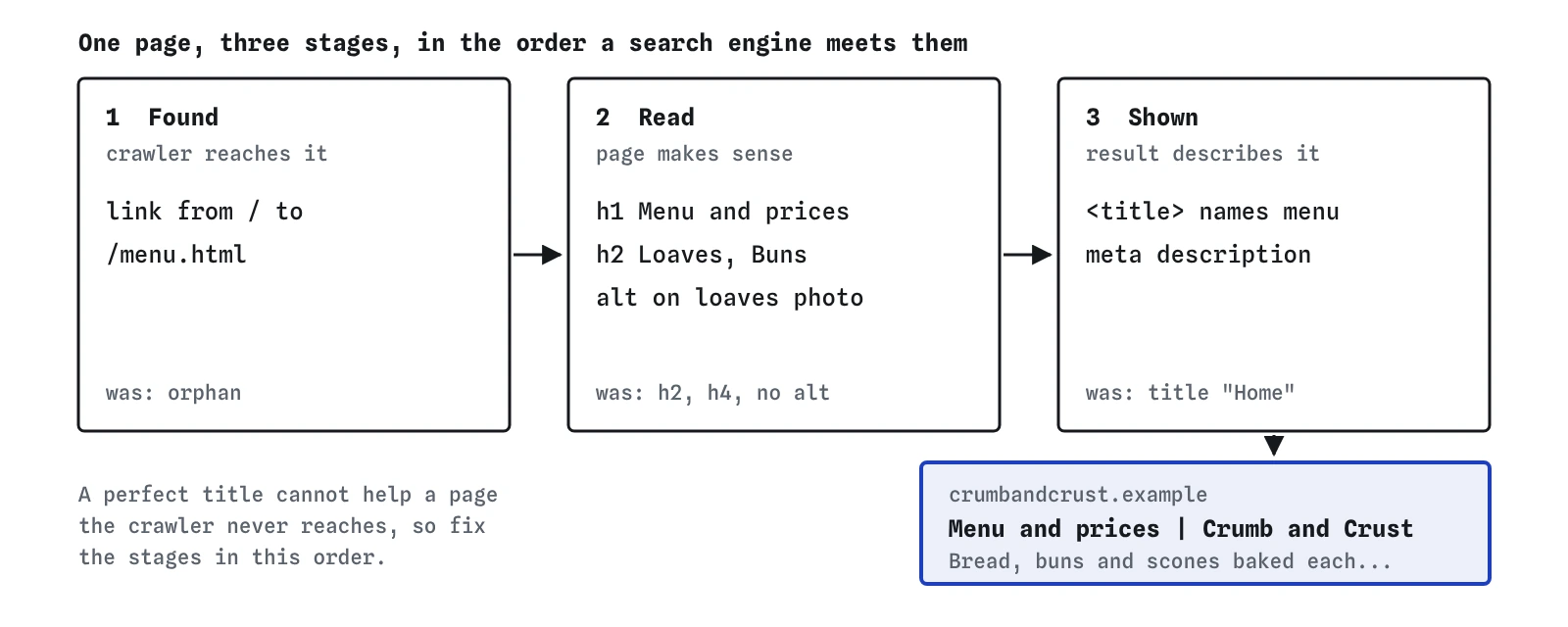
Each of those problems has its own earlier lesson. The point of a project is to meet them together, in the order a search engine meets them, and to see how one change affects the next. A perfect title does nothing for a page the crawler never reaches, and a page that is reached but called Home will probably be shown under a title the search engine made up.
Work through the page in that order: can it be found, can it be read, and does the result describe it well. The Result view shows the last part directly, so keep it open on /menu.html while you work.
Why start with the link from the home page?
Discovery comes first because everything else depends on it. The crawler starts at /, reads every link it finds and follows the ones that lead somewhere on the same site. The home page links to About and nowhere else, so the menu is an orphan: a page that exists on the server and that no crawler can find by following links.
A sitemap would also tell the crawler about the address, and later lessons add one. A plain link from the home page is still the better first fix for a small site. It helps people who arrive on the home page looking for prices, it tells the search engine the menu is one of the main pages, and it costs one line of HTML.
Write the link text as words that name the destination, such as Menu and prices. The words inside a link are one of the ways a search engine learns what the target page is about, and they are what a screen reader announces when someone moves through the links on a page.
<p><a href="/menu.html">Menu and prices</a> · <a href="/about.html">About the bakery</a></p>What should the title and description say?
The title should name the page first and the business second. Menu and prices | Crumb and Crust tells a searcher what they will get before they click, and the bakery's name confirms it is the place they meant. It is about 35 characters, comfortably inside the width desktop results show before cutting.
The description is your chance to give the detail a title has no room for. A good one for this page mentions what kinds of things are on the menu, one or two prices and the one fact people often need, such as the notice needed for cakes. Aim for roughly 120 to 150 characters so phones and desktops both show most of it. Those numbers are a guide from typical results; there is no official limit, and Google may show a different sentence from the page when it fits a search better.
Both elements go in <head>, and each page needs its own. When you copy a page to start a new one, the title and description are the first things to change, and the break-it exercise in this project shows what happens when someone forgets.
<title>Menu and prices | Crumb and Crust</title>
<meta name="description" content="Bread, buns and scones baked each morning on Mill Lane, with prices. Sourdough £4.20, cinnamon buns £2.80. Cakes need two days' notice.">
How should the headings be arranged?
The page should open with one h1 that says what the whole page is, then use h2 for each part. On this menu that means Menu and prices as the h1, with Loaves and Buns and scones as h2. The original page started at h2 and then jumped to h4, probably because someone picked the sizes that looked right.
Heading levels describe structure, and CSS decides how big they look. If an h2 looks too large, change the style rather than the level. Search engines use headings to understand how a page is organised, and screen reader users jump between them to find the part they want, so a skipped level leaves a gap in both.
Google has said that more than one h1 on a page is fine, and the lab does not complain about it either. One clear h1 is still the simplest pattern for a page with one topic, and it often ends up as the fallback title if the <title> is missing or vague.
What should the photo's alt text say?
The alt text should say what the picture shows, in the words you would use to describe it to a customer at the counter. Sourdough and rye loaves cooling on a wooden rack does that. It is short, specific and true, and it happens to contain the words someone looking for sourdough might type.
Avoid the two common failures. Leaving alt out means screen readers may read the file name instead, and image search has only the surrounding text to go on. Stuffing it with a list such as bakery bread sourdough Mill Lane best bakery reads badly aloud and can look like spam to a search engine.
If an image were purely decoration, such as a dotted divider, the right value would be an empty alt="". The lab counts an empty alt as present, because it is a deliberate choice that tells assistive technology to skip the image.
How do you check the result in the lab?
Press Crawl again after your edits and look at each view in turn. The Index view should list /menu.html as indexed and say it was found through a link from /. The Result view should show your title as the title link and your meta description underneath, with notes saying where each part came from and no warning about a rewrite.
The Checks view should no longer mention a generic title, a missing description, a missing h1, a skipped heading or a missing alt. If one of them is still there, its text names the page and the problem. Use Inspect in the Crawler view on /menu.html to see the full story for that address: how it was found, what the crawler read and why it was indexed.
- Index:
/menu.htmlindexed, found by a link from/. - Result: title link from your
<title>, description from your meta description, both whole. - Checks: no title, description, heading or alt warnings for the menu page.
- Crawler: the menu fetched after the home page, with a 200 answer.
How would you do the same on a real site?
On a real site the steps are the same and the checking tools are different. After publishing, open the page in a browser and use View Source to confirm the title, description, headings and alt text are in the HTML the server sends. Then open Google Search Console and use URL Inspection on the menu's address. It shows whether Google knows the page, whether it is indexed, and lets you request indexing once you have fixed it.
Expect to wait. Real crawlers revisit pages on their own schedule, so a fixed title can take days or a few weeks to show in results, and the Performance report in Search Console lags behind by a couple of days. The lab does everything in one crawl so you can see cause and effect; real search does the same work over time.
Being indexed does not guarantee any position. Whether the menu appears for sourdough near Mill Lane depends on the search, the person's location, the other pages that answer it and many signals no lab can copy. What you have done is remove the reasons it could not appear.
What do AI tools tend to suggest for a page like this?
Ask an AI tool to optimise this menu page and you will often get a title like Best Bakery Menu | Fresh Bread | Sourdough | Mill Lane Bakery. That is a list of keywords, it is too wide for one line, and search engines rewrite titles that look like that. A plain name for the page does better work.
The same tools often add a <meta name="keywords"> tag, which Google ignores, and suggest writing the word bakery a set number of times per hundred words. No keyword density target exists in Google's guidance. Some will tell you titles must be exactly 60 characters or descriptions exactly 155, stated as rules. They are rough display widths, and the real cut-off depends on the device and the letters used.
Check AI suggestions against what the page needs: a way in, an honest title, a useful description, an outline that makes sense and images described for people who cannot see them.
Field notes
- A page with no link from the rest of the site is hard for a crawler to find, so add one from the home page.
- A clear title and description that name the bakery and the menu help the right searchers recognise it.
- One h1 with ordered subheadings gives the menu an outline readers and crawlers can follow.
- The lab confirms the page is crawled and indexed, and a real site needs the same checks in Search Console.
Easy to get wrong
A list of keywords is hard to read, too wide for one line and likely to be rewritten. Name the page, then the business.
Pick heading levels for structure and change the size with CSS. Skipping from h2 to h4 leaves a hole in the outline.
Copied heads produce duplicate titles and descriptions, which make two different pages look the same in results.
Questions people ask
Which fix matters most if I only have time for one?
The link. A page nobody can reach is invisible however well it is written. After that, the title, because it is the largest part of the result.
Will these changes move the menu up in Google?
Nobody can promise that. They make the page findable and give it an accurate result. Its position for any search depends on many things outside the page.
Should the menu be an image or a PDF of the printed menu?
Keep the prices as HTML text. Search engines can read PDFs and some text in images, but HTML text is easier for them to read, works on every phone and can be updated in a minute.
Does the description need the bakery's name in it?
It can help, but it is optional. The site name already appears above the title link, so use the space for what is on the page.