What problem does a canonical tag solve?
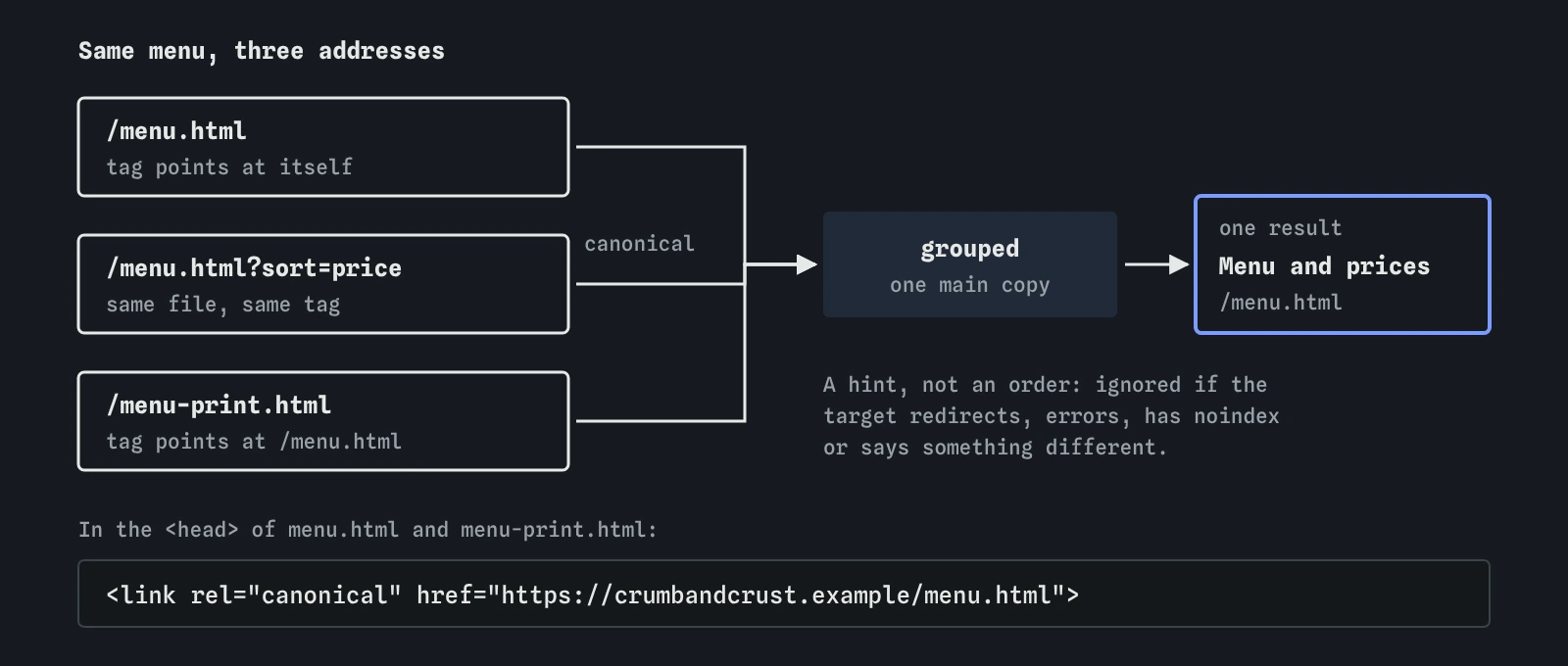
Sites often show the same content at more than one address. The bakery's menu is at /menu.html, the same list sorted by price is at /menu.html?sort=price, and a printer-friendly copy is at /menu-print.html. Other common causes are tracking parameters, http:// and https:// versions, addresses with and without www., and the same product reached through two categories.
Search engines do not want to show three results that say the same thing, so they group the copies and choose one to show. That chosen address is called the canonical URL. Left alone, a search engine picks it using its own signals. A canonical tag lets you tell it which address you prefer, which is useful when you care about which version people land on and which address collects the links.

What does the tag look like and where does it go?
A canonical tag is a <link> element with rel="canonical" and the preferred address in href. It goes in the <head> of the page that is a copy. Google reads it only in the head; a canonical tag in the body is ignored, which the break-it exercise on this page shows.
Use the full address, including https:// and the host. A relative path such as /menu.html works, and the lab accepts it with a note, but a full URL leaves no room for a mistake when the same template runs on a test server or an http:// version. Each page should carry at most one canonical tag; Google ignores them all when a page names two different addresses.
A page can point at itself. That is called a self-referencing canonical, and it is harmless and often useful: any variation of the address that serves the same file, such as one with a tracking parameter, then points back to the plain version automatically.
<head>
  <title>Printable menu | Crumb and Crust</title>
  <link rel="canonical" href="https://crumbandcrust.example/menu.html">
</head>
Is a canonical tag an instruction or a hint?
It is a hint. Google describes rel="canonical" as a strong signal, and it usually follows it, but it weighs the tag against everything else it knows. If the canonical points to a page with different content, a page that redirects, a page with noindex or an address that returns an error, the hint is likely to be ignored and Google chooses for itself.
Other signals point the same way when they agree. A 301 redirect is the strongest way to say one address replaces another. Listing only the preferred address in your sitemap is a weaker signal. Linking to the preferred address from your own pages helps too, as does serving the site on HTTPS. When all of them agree, the choice is easy; when they conflict, expect the search engine to pick the address the signals favour.
The lab copies this behaviour in a simple form. It follows a canonical only when the target answers 200, is indexable, does not redirect and shares at least half its text with the page. Real search engines judge similarity their own way, so treat that threshold as a model.
When should you use a canonical rather than a redirect or noindex?
Use a redirect when the old address should stop existing for visitors too, such as after renaming a page. Everyone who follows the old link lands on the new one, and search engines move to it quickly.
Use a canonical when both addresses need to keep working for people. The printable menu has a reason to exist, and the sorted list is a feature. Neither should be a separate search result. The canonical leaves them usable and points search engines at the main copy.
Avoid noindex for this job. A noindex tag removes a page from results entirely and tells search engines nothing about which page is the main copy, and putting both a noindex and a canonical on the same page sends mixed signals. Avoid robots.txt too: blocking the copy stops the crawler reading it, so it never sees the canonical tag at all.
- Page moved for good: 301 redirect.
- Same content at two working addresses: canonical tag on the copy.
- Page that should not appear in search at all:
noindex. - Never: robots.txt to hide a duplicate.
How do you see which canonical a search engine chose?
In Google Search Console, the URL Inspection tool shows two fields for any address: the user-declared canonical, which is what your tag says, and the Google-selected canonical, which is what Google decided. When they match, your hint was followed. When they differ, look for the reason: different content, conflicting signals or a target that is not indexable.
The Pages report groups addresses by why they are not indexed. Alternate page with proper canonical tag means a copy pointed at another page and Google agreed, which is the outcome you want for a printable menu. Duplicate, Google chose different canonical than user means Google disagreed with your tag. Duplicate without user-selected canonical means Google found copies with no tag and chose for itself.
In the lab, the Index view shows the main copy for each address, and Inspect explains whether a canonical was followed or ignored and why.
What happens to the pages you point away from?
They keep working. Visitors can still open, print and bookmark the printable menu. They are left out as separate results, and search engines consolidate signals such as links into the canonical address. If someone links to the printable menu from their blog, that link counts towards the main menu.
Search engines still crawl the alternates from time to time, to check the tag is still there and the content still matches. If you later change the printable page so that it says something different, the hint may be ignored and the page indexed on its own. Keep the content of alternates in step with the main copy, or remove the canonical when they stop being copies.
What do AI tools get wrong about canonical tags?
A very common suggestion is to add a canonical tag pointing at the home page to every page on the site, sometimes described as consolidating authority. That asks search engines to treat every page as a copy of the home page. Because the content differs, they will usually ignore the tags, and if they followed them your other pages would drop out of results. Each page with its own content should point at itself or carry no canonical at all.
AI tools also describe the canonical tag as a command that forces a search engine to index one address. It is a hint, and Search Console shows plainly when Google chose differently. Other generated code places the tag in the body through a component, uses a relative path that resolves wrongly on a subfolder, points it at an address that redirects, or adds two different canonical tags because a plugin and a template both insert one. View Source on the published page is the quickest way to see what is really there.
Field notes
- A canonical tag names the main address when several addresses show the same content.
- It goes in the head as a link element with rel set to canonical and a full absolute address.
- Search engines treat the canonical as a strong hint and may choose a different copy.
- Use a redirect when the old copy should go away, and a canonical when both copies must stay.
Easy to get wrong
A canonical says this page is a copy of another. Pointing every page at the home page asks search engines to drop them, and they will usually ignore it.
Search engines only read canonical tags in the head.
A blocked page cannot be read, so its canonical tag is never seen, and the bare address can still appear in results.
Questions people ask
Does every page need a canonical tag?
No. Pages with one address and no copies work without one. A self-referencing canonical is a harmless safeguard against tracking parameters and is common in templates.
Can a canonical point to another website?
Yes. Google accepts a canonical that points at another site, for example when the same article runs on two sites you own. If another publisher republishes your article, Google now suggests they use noindex on their copy, because a cross-site canonical on a reworked page is often ignored.
Is duplicate content a penalty?
No. Ordinary duplicates, such as a printable page or a sorted list, are normal. Search engines pick one copy to show. A canonical lets you influence which one.
Why does Google ignore my canonical tag?
Usually because the pages differ too much, the target redirects or has noindex, or other signals such as internal links and the sitemap point at a different address. URL Inspection shows the address Google chose.