What is a link preview card?
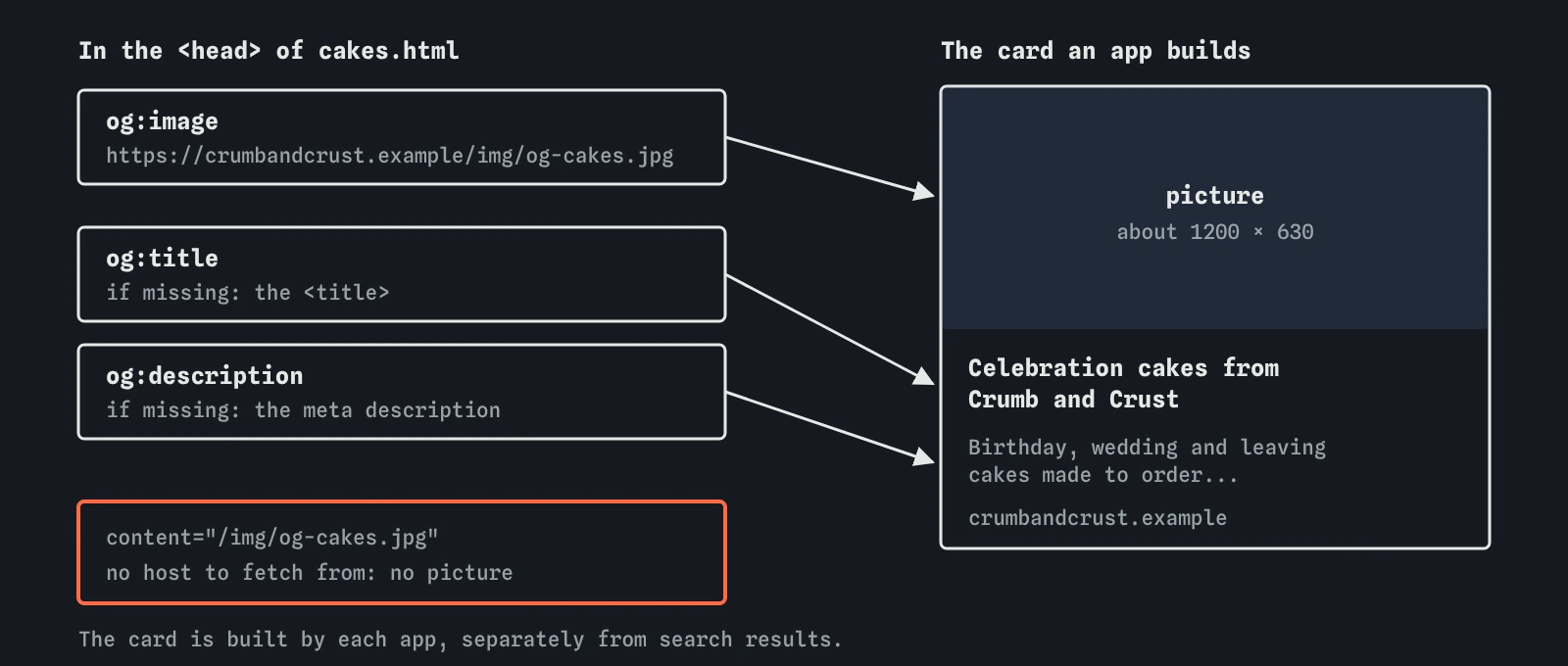
When you paste a link into a messaging app, a social network or a chat tool, the app usually fetches the page and builds a small card from it: a picture, a bold title, a line or two of description and the site's domain. People decide whether to tap a shared link mostly from that card, often without reading the message around it.
The card is built by the app, from the page's HTML, at the moment someone first shares the address. It has nothing to do with search results. A page that is not indexed anywhere can still produce a perfect card, and a page at the top of every search can produce a blank one. The two use different tags and different software.
Apps look for a set of <meta> tags called Open Graph, which Facebook published in 2010 and which almost every app now reads. If those tags are missing, the app guesses: it takes the <title>, a description and whatever image it can find, which for a bakery may be the logo, a tiny icon or nothing at all.
Which tags build the card?
Four Open Graph tags do most of the work. og:title is the card heading. og:description is the line under it. og:image is the picture. og:url is the address the card should point to, which helps when the same page can be reached through several addresses. og:type is usually website for ordinary pages and article for posts. og:site_name gives the name of the whole site, and Google lists it as one of the sources it may use for the site name above results.
Every tag goes in the <head>, uses the property attribute and keeps its value in content. The image address must be a full URL with https:// and the domain. Apps fetch the image from their own servers, so a path like /img/og-cakes.jpg has no host to attach to and the card comes out without a picture.
<meta property="og:type" content="website">
<meta property="og:title" content="Celebration cakes from Crumb and Crust">
<meta property="og:description" content="Birthday and wedding cakes made to order on Mill Lane, from £28.">
<meta property="og:image" content="https://crumbandcrust.example/img/og-cakes.jpg">
<meta property="og:image:alt" content="A three layer lemon cake with candied peel on top">
<meta property="og:url" content="https://crumbandcrust.example/cakes.html">
What about the twitter tags?
X, the service that used to be Twitter, has its own small set of tags that start with twitter:. The one most people need is twitter:card, which picks the layout: summary gives a small square picture beside the text, and summary_large_image gives a wide picture above it. When the other twitter: tags are missing, X falls back to the matching Open Graph tags, so you do not need to repeat the title, description and image.
These tags use name, while Open Graph tags use property, and the two are easy to mix up. A line such as <meta name="og:title"> is a typo that some apps forgive and others ignore. The lab warns about it, and the breakIt below has one.
<meta name="twitter:card" content="summary_large_image">What makes a good card image?
Use a picture made for sharing, about 1200 pixels wide and 630 tall. That shape, roughly 1.91 to 1, is what most apps show for a large card. Many apps ignore images smaller than 200 by 200 pixels, and some cut a square out of the middle for small layouts, so keep the important part of the picture near the centre and avoid text near the edges.
Keep the file small. A JPEG or WebP under about 300 KB loads quickly in a chat, and a few apps refuse very large files. Give the image dimensions with og:image:width and og:image:height when you know them, which lets some apps lay out the card before the image has finished downloading. Add og:image:alt to describe the picture for people using screen readers, in the same plain way you would write alt on the page.
A different image per page works better than one logo everywhere. A link to the cakes page that shows a cake tells people what they will find. The lab reads image sizes from assets.txt, because it has no real files to measure.
Why does a shared link still show the old card?
Apps keep a copy of each card for a while, often days and sometimes longer. If you change the image or the description after a link has been shared, people may keep seeing the old version. The page itself has changed; the app has not looked again.
Some platforms offer a tool that fetches a page again on demand and shows what they read. Meta has the Sharing Debugger for Facebook, and LinkedIn has the Post Inspector. Pasting your address there shows the tags they found, any errors, and refreshes their stored copy. Messaging apps such as WhatsApp and Signal build the card on the sender's phone, so a fresh share after the change usually picks up the new version.
Changing the image file name, for example from og-home.jpg to og-home-2027.jpg, also forces most apps to fetch the new picture, because the address is different. Use that when an old image keeps coming back.
Do Open Graph tags help a page rank?
No. Google does not use Open Graph tags as a ranking signal, and nothing in its documentation suggests otherwise. They change how a link looks when people share it, which may lead more people to tap it, and that is the whole of their job.
There are two small overlaps with search. Google may use og:site_name among other sources when it chooses the site name shown above a result. And Google Discover, the feed of articles in the Google app, favours large images, which you allow with <meta name="robots" content="max-image-preview:large"> rather than with an Open Graph tag. Neither changes where a page appears for a search.
How do you check a card before people share it?
Start with View Source in your browser and search for og:. Check that each tag sits in the <head>, uses property, and that the image address starts with https://. Paste the image address into a new tab: if the picture does not open there, no app will show it either.
Then use a platform's own tool, such as the Sharing Debugger or the Post Inspector, to see the card the way that platform builds it. For a chat app, send the link to yourself. Each app crops and styles cards differently, and the card in this lab is one neutral sketch of the common layout, not a copy of any particular app.
- Every important page has its own
og:title,og:descriptionandog:image. - The image address is a full URL that opens in a browser tab.
- The image is about 1200×630 and under a few hundred KB.
- The description is still true. Cards outlive the moment you wrote them.
What do AI tools get wrong about share cards?
The most common mistake in AI-written HTML is a relative image address, such as content="/images/share.jpg". It looks tidy and works for <img> tags on the page, so it is easy to miss. Card images need the full address every time.
AI tools also mix up the attributes, writing name="og:title" or property="twitter:card", and they often claim that Open Graph tags are an SEO ranking factor. Some generate one site-wide set of tags in a shared header, so every page shares the home page's title and picture. When you review generated code, check the attribute, the full image address, and whether each page has its own text.
Field notes
- Open Graph tags such as og:title, og:description and og:image build the card apps show for a shared link.
- Use a full https address for og:image, at around 1200 by 630 pixels.
- Apps keep old cards in a cache, so use each app's debugger or wait for it to refetch.
- Open Graph tags shape share cards and have no effect on search rankings.
Easy to get wrong
Apps fetch the image from their own servers and need the domain to find it. A path that works inside the page gives them nothing to fetch.
Open Graph tags use property. The name attribute belongs to twitter: tags and the meta description, and some apps skip Open Graph tags written with it.
Small images are ignored or shown as a tiny thumbnail, and the same logo everywhere tells people nothing about the page they are about to open.
Questions people ask
Do I need Open Graph tags on every page?
On every page people are likely to share, yes: the home page, products or menus, events and articles. Pages nobody shares, such as a basket, can go without. Without tags, apps make their own guess, which is often the wrong picture.
Is `og:title` the same as the `<title>`?
It can be, and apps use the <title> when og:title is missing. It is often better shorter and less formal, because a card stands alone in a chat. The search title still matters for search results, so keep both.
Can I use a PNG or SVG as the card image?
PNG and JPEG work everywhere, and WebP works in most apps. SVG is not supported by most platforms, so export a raster image for the card even when your logo is an SVG.
Why does the card look different in each app?
Each app decides its own layout, cropping and text length. Some show the description and some do not. Design the image with the important part in the middle and write a title that makes sense on its own.