What does robots.txt do?
A robots.txt file is a short plain text file at the root of your site, at an address like https://crumbandcrust.example/robots.txt. Before a well-behaved crawler fetches anything else on a site, it fetches this file and reads the rules in it. The rules say which addresses the crawler may fetch and which it should skip.
That is the whole job: it controls crawling. It does not control what appears in search results, it does not protect anything, and it does not change how your pages look to visitors. A page that robots.txt blocks can still be opened by anyone who has the address. The file is a polite request that major search engines honour, published where anyone can read it.
Most small sites need very little in this file. Many need nothing at all, because a missing robots.txt means every address may be crawled, and for a bakery with a handful of pages that is usually the right answer. The file earns its place when a site has areas that are useless in search, such as a basket, an internal search page or a folder of test files, or when you want to point crawlers at your sitemap.
How is the file written?
The file is made of groups. Each group starts with one or more User-agent lines naming the crawlers it applies to, followed by rules. The star, *, means every crawler. A Disallow line names the start of a path the crawler should skip, and an Allow line names one it may fetch even inside a blocked area. Lines starting with # are comments, which crawlers ignore.
Paths match from the start of the address and are case-sensitive. Disallow: /order/ blocks /order/, /order/basket and /order/thanks, and leaves /Order/ alone. A * inside a path matches any run of characters, and a $ at the end means the address must end there, so Disallow: /*.pdf$ blocks every address ending in .pdf. An empty Disallow: blocks nothing.
When two rules both match an address, Google uses the one with the longer path. If an Allow and a Disallow are the same length, the Allow wins. That lets you block a folder and open one page inside it. The Sitemap line sits outside the groups and gives the full address of your sitemap file.
# Crumb and Crust
User-agent: *
Disallow: /order/
Allow: /order/how-ordering-works.html

Sitemap: https://crumbandcrust.example/sitemap.xml
Which crawler follows which group?
A crawler looks for the group that names it most specifically and follows that group only. If the file has a User-agent: * group and a separate User-agent: Googlebot group, Googlebot reads the second one and ignores the first completely. The rules do not add together.
This catches people out. Someone writes a careful * group, then later adds a Googlebot group to block one extra folder, and every rule from the * group stops applying to Google. The fix is to repeat the shared rules in every named group, or, on a small site, to keep a single * group and not name crawlers at all.
The lab's crawler behaves the same way. A group naming Googlebot replaces the * group, and the Crawler view says which group it read. Bing documents the same idea for Bingbot, and most other large crawlers follow it too.
Why does blocking a page not keep it out of search?
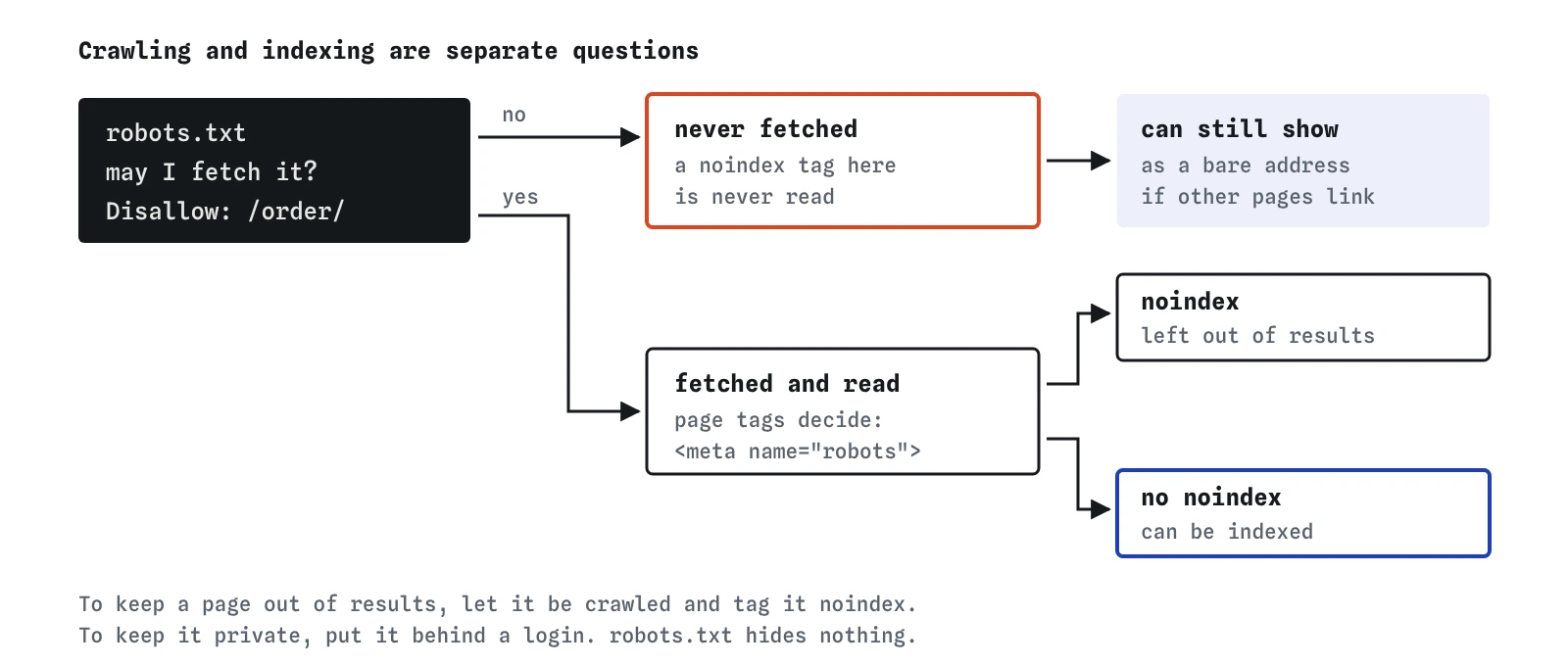
Blocking stops the crawler from reading a page. It does not stop the search engine from knowing the address exists. If another page links to /order/, the search engine has the address, and it can show it in results with no title from your page and a note that no information is available. Google documents exactly this case. It happens less with pages nobody links to, but it can happen.
To keep a page out of results, the search engine needs to read an instruction on the page itself: a <meta name="robots" content="noindex"> tag in the <head>, or the same instruction sent as an X-Robots-Tag header. For it to read that, the page must be crawlable. A page that is both blocked in robots.txt and tagged noindex is the worst of both: the crawler never fetches it, never sees the tag, and the bare address can stay in results.
Pick one tool for each job. Use robots.txt to save crawlers from wasting time on pages with no value in search, such as a basket that is different for every visitor. Use noindex for a page that crawlers may read but that should not appear, such as an old price list or a thank-you page. Use a password for anything private, because neither of the other two hides anything.

What should a small site block, and what should it leave open?
Block addresses that create endless or useless variations: an order basket, internal search results such as /search?q=bread, calendar pages that go on forever, or a folder of drafts that the public site links to by accident. On a site with a few dozen pages, none of this saves anything measurable, and leaving the file nearly empty is perfectly reasonable.
Leave open anything a page needs in order to display properly, including CSS, JavaScript and images. Google renders pages much as a browser does, and if the stylesheet or a script is blocked it sees a broken page. Some older advice, still repeated by AI tools, says to block /css/ or /js/ folders to save crawl effort. That advice is out of date and makes pages harder to understand.
Never leave Disallow: / in place on a live site. It blocks every address, and it is a common leftover when a site moves from a test server where keeping crawlers out made sense. Search Console's Pages report then fills with addresses marked Blocked by robots.txt, and the Checks view in the lab flags it too.
What do AI tools get wrong about robots.txt?
The most common mistake is suggesting a Noindex: line in robots.txt. Google never officially supported it and stopped honouring it completely in September 2019. The line does nothing, so the page is crawled and indexed as usual. The lab marks it as an error so you notice.
AI tools also recommend robots.txt as the way to hide a page from search, which leads straight to the bare-address problem above. Some suggest Crawl-delay to slow Google down; Google ignores that line, though some other crawlers read it. Others write rules in the wrong case, such as Disallow: /Members/ for a folder called members, or add a named Googlebot group without repeating the shared rules.
One more: a tool may tell you that robots.txt keeps private pages safe. The file is public, so listing a secret folder in it tells everyone where the folder is. Anything private needs a login.
How do you check robots.txt on a real site?
Open https://yoursite.example/robots.txt in a browser and read it. It should be short, plain and free of surprises. If it does not exist, the server should answer 404, which crawlers treat as permission to crawl everything.
In Google Search Console, the robots.txt report (under Settings) shows which robots.txt files Google found for your site, when it last fetched them and any lines it could not parse. The URL Inspection tool tells you whether a specific address is blocked. After you change the file, Google usually picks up the new version within a day, since it keeps a cached copy for up to about 24 hours. Search Console lets you ask for a fresh fetch when you need one sooner.
Remember that each host has its own file. https://crumbandcrust.example/robots.txt does not cover https://shop.crumbandcrust.example, and the file only works at the root, never in a subfolder.
Where does the lab simplify?
The lab reads robots.txt once, in a fixed order, and applies it straight away. Real crawlers cache the file, so a change can take a while to apply. The lab also never meets a server error while fetching the file. On a real site, if robots.txt answers with a server error, Google stops crawling the site for a while and, after about 30 days, falls back to the last copy it fetched, which is another reason to keep it simple and served as a static file.
The lab understands User-agent, Allow, Disallow and Sitemap, the * and $ patterns, and the most-specific-group rule. It does not model the 500 KiB size limit Google applies, or crawlers that ignore the file entirely. Badly behaved bots do exist and do not read robots.txt at all, which is one more reason never to treat it as security.
Field notes
- A robots.txt file sits at the site root and tells crawlers which addresses they may fetch.
- Each group starts with a User-agent line, and a crawler follows the most specific group that names it.
- A blocked page can still appear in results from links, so use noindex to keep a page out.
- Most small sites block very little and leave CSS, JavaScript and images open.
Easy to get wrong
Google stopped honouring Noindex: in robots.txt in 2019. Use Disallow to stop crawling, or a noindex meta tag on a crawlable page to keep it out of results.
Paths match from the start, so /menu also blocks /menu.html and /menus/. Write the exact address, or a folder that ends with a slash.
A blocked page is never fetched, so its noindex is never read and the bare address can still appear. The crawler has to see the tag for it to work.
Search engines render pages with their styles and scripts. Blocking those files makes your pages look broken to the crawler.
Questions people ask
Do I need a robots.txt file at all?
No. Without one, crawlers may fetch every address, which suits most small sites. Add one when you have areas with no value in search, or to list your sitemap's address.
Can robots.txt remove a page that is already in Google?
Not reliably. Blocking stops Google reading the page, so it cannot see a noindex tag. To remove a page, let it be crawled with noindex, return a 404 or 410 if it is gone, or use the Removals tool in Search Console for a fast temporary hide.
Does every crawler obey robots.txt?
Major search engines do. Some AI crawlers publish their own user-agent names so site owners can allow or block them separately. Badly behaved bots ignore the file, so it is never a way to protect private content.
Is the lab's robots.txt the same as Google's?
It follows the same published rules for groups, longest match, Allow winning ties, * and $. It does not model caching, server errors or the size limit.