What is alt text?
Alt text is the alt attribute on an <img> element: a short piece of text that stands in for the image when someone cannot see it. Screen readers read it aloud. Browsers show it when the image fails to load. Search engines read it to understand what the image shows.
The first job of alt text is accessibility. A blind visitor using the bakery's cakes page should come away knowing the same things a sighted visitor does: that there is a chocolate cake with ganache and a lemon sponge with curd. Search is a second reader that benefits from the same description.
The attribute lives inside the image element, next to src. It is plain text, with no HTML inside it.
<img src="/img/chocolate-birthday-cake.jpg"
     alt="Chocolate birthday cake with dark ganache and a name piped in white"
     width="800" height="600">
How do search engines use alt text?
Google's image documentation lists alt text as one of the main things it uses to understand an image, along with the page's title, the text near the image and the file name. Images with good descriptions can appear in Google Images and in image results within normal search, which can bring visitors to the page they sit on.
Search engines also analyse the pixels themselves, and they are good at it. They can often tell a cake from a bicycle without help. What they cannot see is the context only you know: that this is the bakery's own chocolate birthday cake, made on Mill Lane, available in three sizes. Alt text and the surrounding text supply that.
Alt text does not decide whether a page is indexed, and no description guarantees an image appears in any result. The lab checks that each image has an alt attribute and can test what it says. It does not run an image search.
How do you write good alt text?
Describe what the image shows that matters on this page, in a short sentence or phrase. Imagine reading the page aloud to someone over the phone and reaching the photo. What would you say about it?
Context changes the answer. On the cakes page, the photo of the chocolate cake is about the cake, its ganache and the piped name. The same photo on a page about a bakery's staff party might be described as the cake brought out for the team's tenth birthday.
- Say what the image shows, in plain words: Slice of lemon sponge showing the curd filling.
- Leave out image of and photo of; screen readers already announce it as an image.
- Keep it short, usually a sentence. Put longer explanations in the page text.
- Include text that appears in the image, such as a sign or a price board.
- Use the words a person would use. If they match what people search, that is a side effect.
When should alt text be empty?
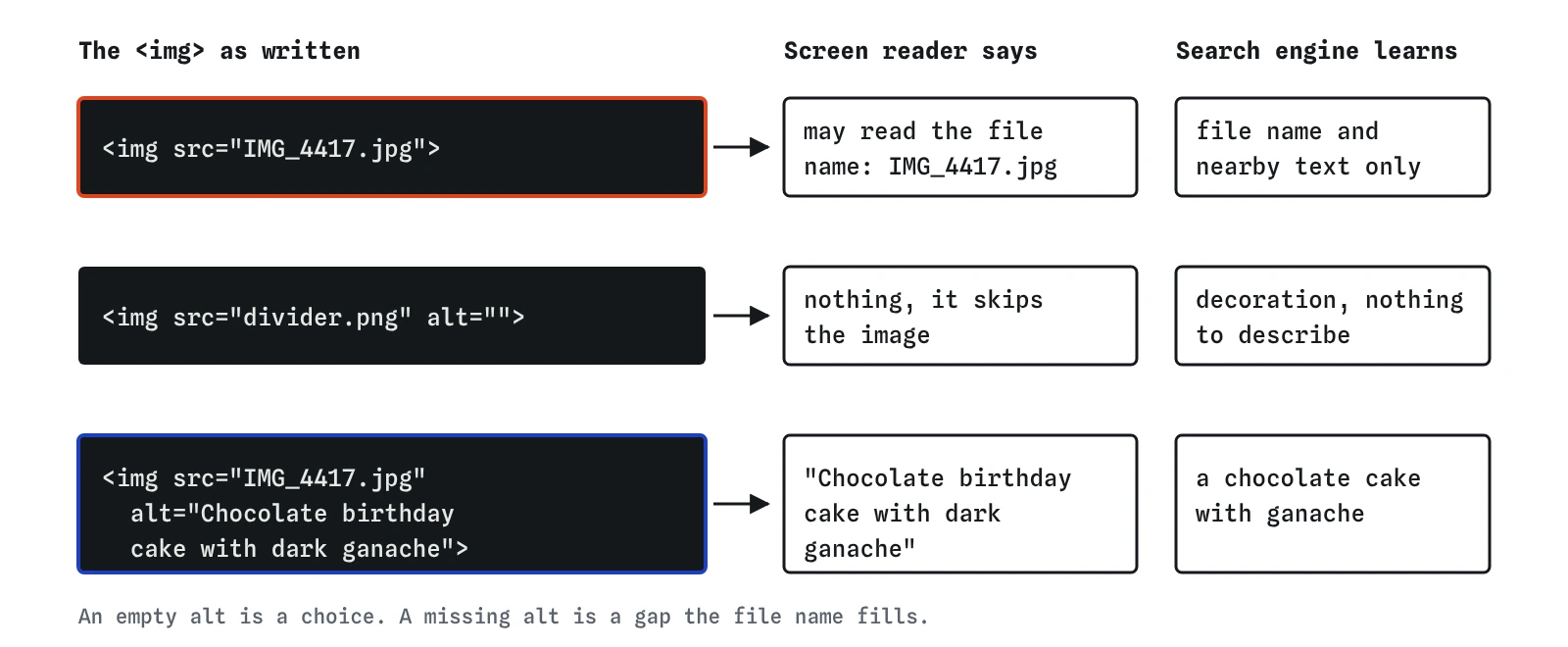
Some images carry no information: a decorative line between sections, a background flourish, an icon next to a text label that already says the same thing. Give these alt="", an empty value. Screen readers then skip them, and search engines know there is nothing to describe.
An empty alt is different from no alt at all. If the attribute is missing, a screen reader may read out the file name instead, and divider.png or IMG_4417.jpg is noise. The lab reports a missing attribute and accepts an empty one, which is the rule the HTML standard and accessibility guidelines use too.
Be careful with images that only look decorative. If a photo shows the shop front and the page says nothing else about where the shop is, the photo carries information and deserves a description.

What happens when an image is a link?
When a link contains only an image, the image's alt becomes the link's text. Search engines use it as the anchor text, the words that describe the page being linked to, and screen readers announce it as the name of the link. An image link with no alt is a link with no name.
In Sam's profile page in the break-it exercise, the email icon is the whole content of the link to the contact page. Its alt should say where the link goes, such as Contact me, and describing the icon as an envelope would miss the point.
A link that holds both an image and words already has its text. In that case, an empty alt on the image avoids the screen reader saying the same thing twice.
Do file names and image formats matter for search?
File names are a small signal. Google suggests short, descriptive names, so chocolate-birthday-cake.jpg tells it more than IMG_4417.jpg. Renaming files is optional, and if you do rename one on a live site, update every page that uses it so nothing breaks.
Search engines index images placed with an <img> element. Images set as a CSS background are not indexed as images, so a photo you want found should be an <img> in the HTML. Google supports the common formats, including JPEG, PNG, WebP, GIF, SVG and AVIF.
Size matters more for visitors. A five megabyte photo straight from a phone slows the page down, especially on mobile. Adding width and height lets the browser reserve the space so the text does not jump as the image loads. The lesson on speed and mobile goes further into this.
How do you check alt text on a real site?
Use View Source and search for <img to see every image and its alt. Most browsers' developer tools also have an accessibility panel that shows the name each image will be given. An automated checker such as Lighthouse, built into Chrome's developer tools, flags images without an alt attribute.
Automated tools can only tell you the attribute exists. They cannot tell whether alt="cake" is a good description. Read the descriptions back in order and check that they make sense without the pictures. Search Console's Performance report can be filtered to the Image search type to see which pages get visits from image results.
What do AI tools get wrong about alt text?
The most common mistake is stuffing alt with keywords, as in the profile page's screenshot described as web designer, freelance web designer, best web designer. That describes nothing, it annoys anyone using a screen reader, and Google's image guidance warns that filling alt with keywords can make a site look like spam.
AI tools also write alt text by guessing from the file name or by describing what an image model sees without the context of the page. The result is often vague, such as a cake on a table, or wrong, such as calling a lemon sponge a cheesecake. Check each one against the real image and the page it sits on.
Some tools put a description in the title attribute and leave out alt, or say every image must have a description, including decorative ones. The title attribute is a tooltip and is not a substitute. Decorative images should have an empty alt.
Field notes
- Alt text describes an image for people who cannot see it, and search engines read it to understand the image.
- Describe what the image shows and why it is there, in a short phrase without stuffed keywords.
- Decorative images get an empty alt, so screen readers skip them.
- When an image is the only thing inside a link, its alt text acts as the link text.
Easy to get wrong
Without alt, screen readers may read the file name and search engines rely only on nearby text. A short description fixes both.
Decorative images still need the attribute, set to empty, so screen readers skip them.
Lists of keywords are keyword stuffing. Describe the picture in a phrase a person would say.
In an image link, the alt is the link text. Say where the link goes.
Questions people ask
How long can alt text be?
There is no fixed limit, but most good descriptions are a sentence or less. If an image needs a paragraph of explanation, such as a chart, put the explanation in the page text and keep the alt short.
Should I put my business name in every alt?
Only where it describes the image, such as a photo of the shop sign. Adding it to every photo is a mild form of stuffing and makes screen readers repeat it.
Does alt text help the page rank for words in the alt?
It helps search engines understand the image, and the image can then appear in image results. Google treats it as one signal among many for the page, with no promise of a position for any word.
Do I need an image sitemap?
Usually not for a small site. If your images are <img> elements on pages that are crawled, search engines find them. Image sitemaps help most when images are loaded in ways crawlers miss. The lab does not read them.