What is on the lesson screen?
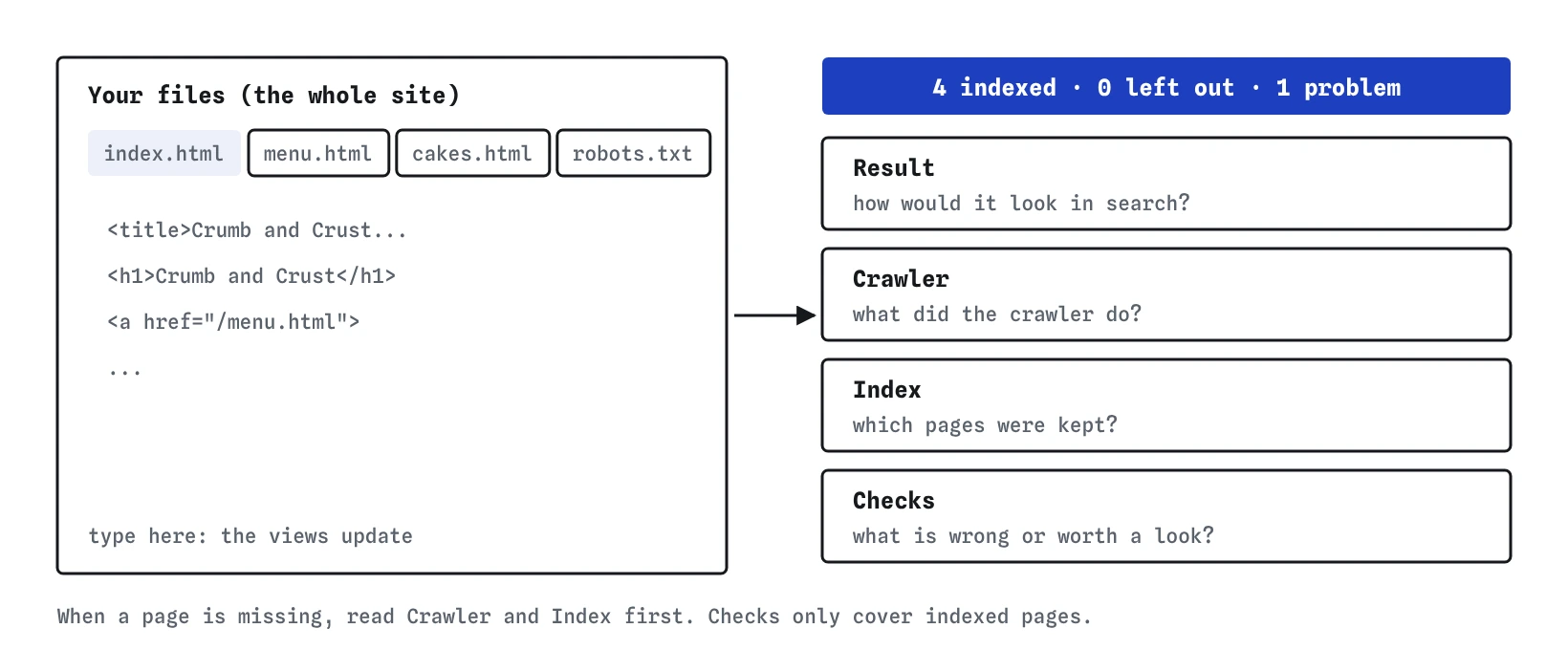
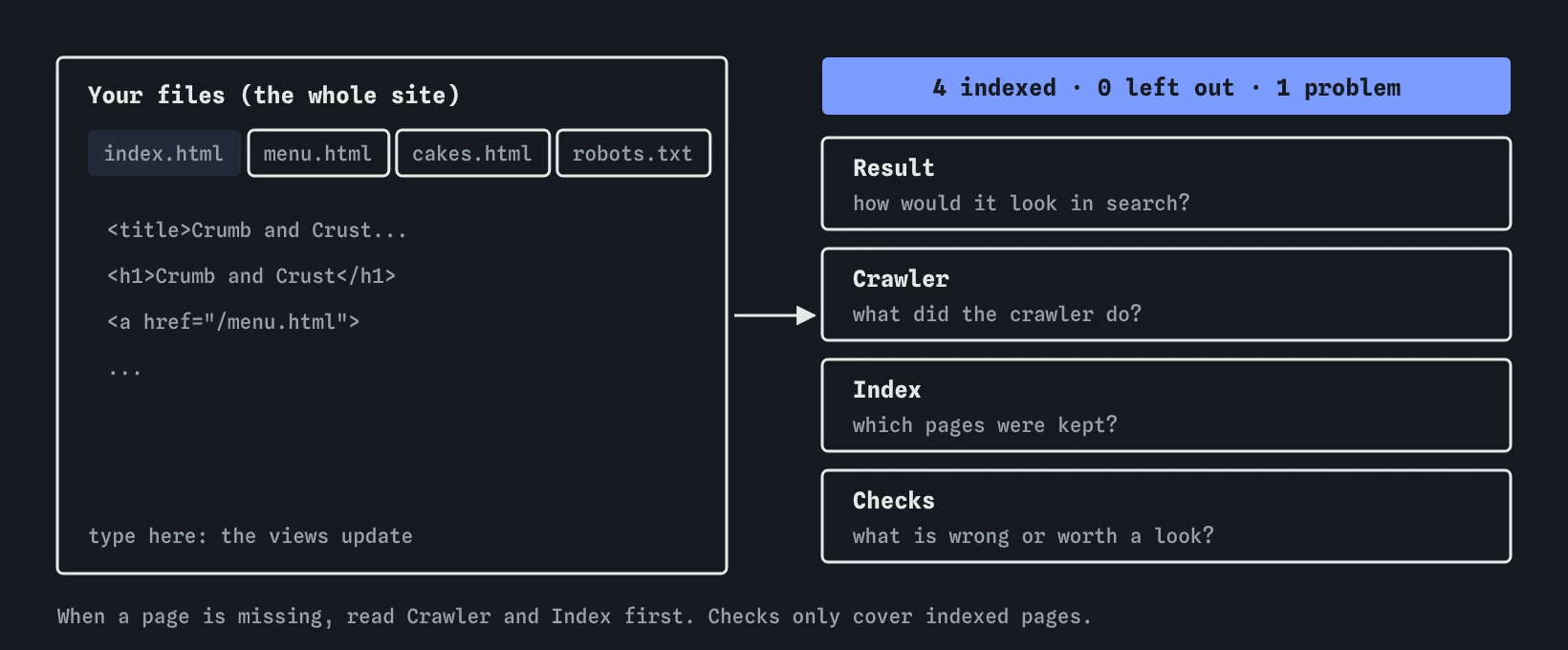
The left side holds the pretend website as a row of editor tabs, one per file. Most lessons have a few HTML pages and a robots.txt; later ones add sitemap.xml, redirects.txt, site.conf and assets.txt. Whatever you type in a tab is the site. There is no server and nothing leaves the page.
The right side has four views: Result, Crawler, Index and Checks. Each answers a different question. Result asks how a page would look in search. Crawler asks what the crawler did. Index asks which pages were kept. Checks asks what is wrong or worth a look. Above them, the scoreboard reads something like "4 indexed · 0 left out · 1 problem".
The views update as you type, so you can watch a change land. Pressing Crawl again records a crawl, which some tasks ask for, and gives you a fresh log to read from the top.
What does the Result view show?
The Result view is a sketch of one page as a search result. A page picker at the top chooses which page. Below it you get a desktop result, a phone result, and the link preview card a messaging or social app might show when someone shares the address.
Under each part, the view says where it came from: the title link from your <title>, or from the main heading if the title was missing or too vague; the description from your meta description, or from the first paragraph. When a part is cut off with an ellipsis, it says so.
A page that is not indexed appears faded under a "Not in search results" note, with the reason. That is your reminder that nothing about its look matters until it is in the index. The sketch is a likely version only. Google writes the final result for each search and may choose different words.
What does the Crawler view show?
The Crawler view is the log of one crawl, in the order things happened. It always starts with robots.txt, then reads sitemap.xml if there is one, then fetches / and follows links outward. Each row shows the address, what the server answered, such as 200 for a normal page, 301 for a permanent redirect or 404 for not found, and how the crawler found it.
Skips are listed too. If robots.txt blocks an address, the row says which rule did it. If a link points at a page that does not exist, you see the 404. This is the view to read when a page seems to be missing: if it is absent from the log, nothing led the crawler to it.
Each row has an Inspect button, and there is an Inspect box for typing any address.
robots.txt      200  read first
/               200  start page
/menu.html      200  linked from /
/cakes.html     200  linked from /
What does Inspect tell you?
Inspect takes one address and explains it in plain steps: how the crawler discovered it, whether robots.txt allowed it, what the server answered, what the lab read from the page, and the final decision with its reason. It is modelled on the URL Inspection tool in Google Search Console, which does the same job for a real address on your site.
Use it whenever the Index view gives a reason you do not understand. Reading the steps in order usually shows the exact line to change. The real URL Inspection tool can also run a live test of the current page and offers a Request indexing button; the lab has no need for either, because every crawl reads your latest files.
What does the Index view show?
The Index view starts with counts: how many addresses were indexed and how many were left out. Below that is every address the lab knows about, with its state, the reason when it was left out, the server status, how it was found, whether it is in the sitemap, and which address the lab picked as the main copy.
There are three states. Indexed means the page was kept and is eligible for results. Url-only means robots.txt blocked the page but links point to it, so the bare address could appear with no description. Excluded means it was left out, with a reason such as noindex, duplicate, redirect, 404 or thin.
Search Console's Pages report is the real equivalent. Its reasons use Google's own wording, such as "Alternate page with proper canonical tag" or "Page with redirect", and the lab's reasons map onto them closely.
What does the Checks view show?
The Checks view lists findings across the whole site, grouped as problems, warnings and notes. Problems are things that break something, such as a page with no viewport tag or invalid structured data. Warnings are likely to cost you, such as two pages with the same title or a link to a missing page. Notes are information, such as a sitemap line Google ignores.
Page-level findings are reported only for indexed pages, because the title of a page nobody can find is not the problem yet. Fix the index first, then read the checks again. Warnings are judgement calls. A title slightly over the width that gets cut on desktop may still be the right title.
Where does the lab simplify things?
The lab is built to behave like real crawlers on the points this course teaches, and to be honest where it cannot. These are the main differences to keep in mind.
- It crawls once, all at once, in a fixed order. Real crawlers come back on their own schedule, and changes can take days or weeks to show up.
- It never runs JavaScript. Google does render pages, sometimes later than the first fetch, so text in the plain HTML is the safest place for anything you want found.
- It always reads
/sitemap.xml, as if you had submitted it in Search Console. - It uses simple rules of thumb, such as 30 words for a thin page and 90 per cent text similarity for duplicates. Real engines have no word count and weigh many signals.
- It never ranks. Indexed means eligible, and the lab stops there.
How should you check AI-generated fixes in the lab?
The lab is a good place to test SEO advice from an AI assistant before you use it on a real site. Paste the suggested change into the right tab, then read the views. Advice to add a <meta name="keywords"> tag changes nothing in the index and shows up as a note in Checks. Advice to block a page in robots.txt to hide it turns the page url-only in the Index view, which is the opposite of hidden.
If a suggestion makes the scoreboard worse, undo it. If it changes nothing, it probably does nothing on a real site either, at least for crawling and indexing. The views cannot tell you whether a change will help ranking, and nor can anyone who promises it will.
Field notes
- The Result view shows how a page would look as a search result, built from your own tags.
- The Crawler view lists each fetch in order, with the status code and the link that led there.
- Inspect explains why one address was crawled, indexed or left out, like URL Inspection in Search Console.
- The lab simplifies real search, so check any AI-generated fix against the lab and current Google documentation.
Easy to get wrong
Without a viewport tag, phones draw the page at desktop width and shrink it. Google indexes the phone version, so every page needs one.
Checks for a page that is not indexed cannot help anyone yet. Fix the earliest stage that fails.
A link to an address that does not exist gives a 404, and the crawler cannot guess the real one. The Crawler view shows each broken fetch.
Questions people ask
Do I need to press Crawl again after every change?
The views update as you type. Crawl again records a crawl and gives a fresh log; some tasks check that you ran it.
Is the Result view what Google will show?
It is a likely sketch based on your files. Google builds each result for each search and may pick other words for the title link or the description.
What is the real version of Inspect?
The URL Inspection tool in Google Search Console. You paste an address from your own verified site and it reports whether the page is indexed, how it was found and any problems.
Why are some findings only notes?
Notes point out things that do no harm and do nothing, such as a <priority> value in a sitemap. They are there so you can remove clutter with confidence.