What is structured data for?
A search engine can read your recipe page and work out that it is about lemon cake. It has a much harder time knowing, for certain, that 45 minutes is the cooking time, that 4.6 is the average rating and that 8 is the number of servings. Structured data states those facts in a fixed, machine-readable format so nothing has to be guessed.
Google, Bing and other services use it to understand the page and, for some types, to show richer results: recipe cards with a photo and cooking time, event listings with dates, article details, and breadcrumb trails in place of a raw URL. Rich results are never guaranteed. The search engine decides whether to show them, and correct markup only makes the page eligible.
Structured data does not change what visitors see. It sits in the HTML as data, invisible on the page, and describes content that is already there.
How does a JSON-LD block work?
JSON-LD is the format search engines recommend. You write a JSON object inside a <script type="application/ld+json"> element. Because the type is not JavaScript, the browser does not run it. It stores the text and moves on, so the block has no effect on page speed beyond its few hundred bytes.
Every block starts with "@context": "https://schema.org", which says the property names come from the schema.org vocabulary, and an "@type" that names what is being described. The other keys are properties of that type, such as headline, name, startDate or image. Values can be text, numbers, URLs, dates in ISO format like 2026-03-14, or nested objects with their own @type.
The block can go in the <head> or the <body>. Both work. Many sites put it in the head so it sits with the other metadata, and some content systems output it just before the closing body tag. You can have several blocks on one page, or one block whose value is an array of objects.
<script type="application/ld+json">
{
  "@context": "https://schema.org",
  "@type": "Organization",
  "name": "Hilltop Bird Club",
  "url": "https://hilltopbirds.example",
  "logo": "https://hilltopbirds.example/logo.png"
}
</script>
Which schema.org types matter most?
Schema.org defines hundreds of types, but most sites only ever need a handful. Pick the most specific type that fits the page, and fill the properties the search engine documents for it, starting with the required ones.
Organization(or a subtype such asLocalBusinessorRestaurant) describes who runs the site: name, URL, logo, contact details andsameAslinks to official social profiles. It usually goes on the home page or about page.Article,NewsArticleandBlogPostingdescribe a written piece:headline,author,datePublished,dateModifiedandimage.Recipecoversname,image,recipeIngredient(an array of strings),recipeInstructions,prepTime,cookTime,recipeYieldand optionalnutrition.Eventneedsname,startDateandlocation, and can addendDate,eventStatus,eventAttendanceModeandoffersfor tickets.BreadcrumbListdescribes the trail from the home page down to the current page as an ordered list ofListItemobjects.Productwithoffersandreviewcovers shop pages, andFAQPagemarks up question and answer pages, though search engines now show FAQ results for very few sites.
What does a recipe or event block look like?
Durations use the ISO 8601 format, which looks odd at first: PT45M means 45 minutes and PT1H30M means an hour and a half. Dates with times use 2026-11-14T19:00 and can include a time zone offset such as +00:00. Getting these formats right is the most common fix the testing tools ask for.
Each ingredient is a separate string in an array, written the way it appears on the page. Instructions can be a list of HowToStep objects, each with a text property. An event location is a nested Place with its own name and address, and an online event uses VirtualLocation with a url instead.
<script type="application/ld+json">
{
  "@context": "https://schema.org",
  "@type": "Recipe",
  "name": "Lemon drizzle cake",
  "image": "https://bakery.example/img/lemon-cake.jpg",
  "prepTime": "PT20M",
  "cookTime": "PT45M",
  "recipeYield": "8 slices",
  "recipeIngredient": ["225 g butter", "225 g caster sugar", "4 eggs", "2 lemons"],
  "recipeInstructions": [
    {"@type": "HowToStep", "text": "Beat the butter and sugar until pale."},
    {"@type": "HowToStep", "text": "Bake at 180 C for 45 minutes."}
  ]
}
</script>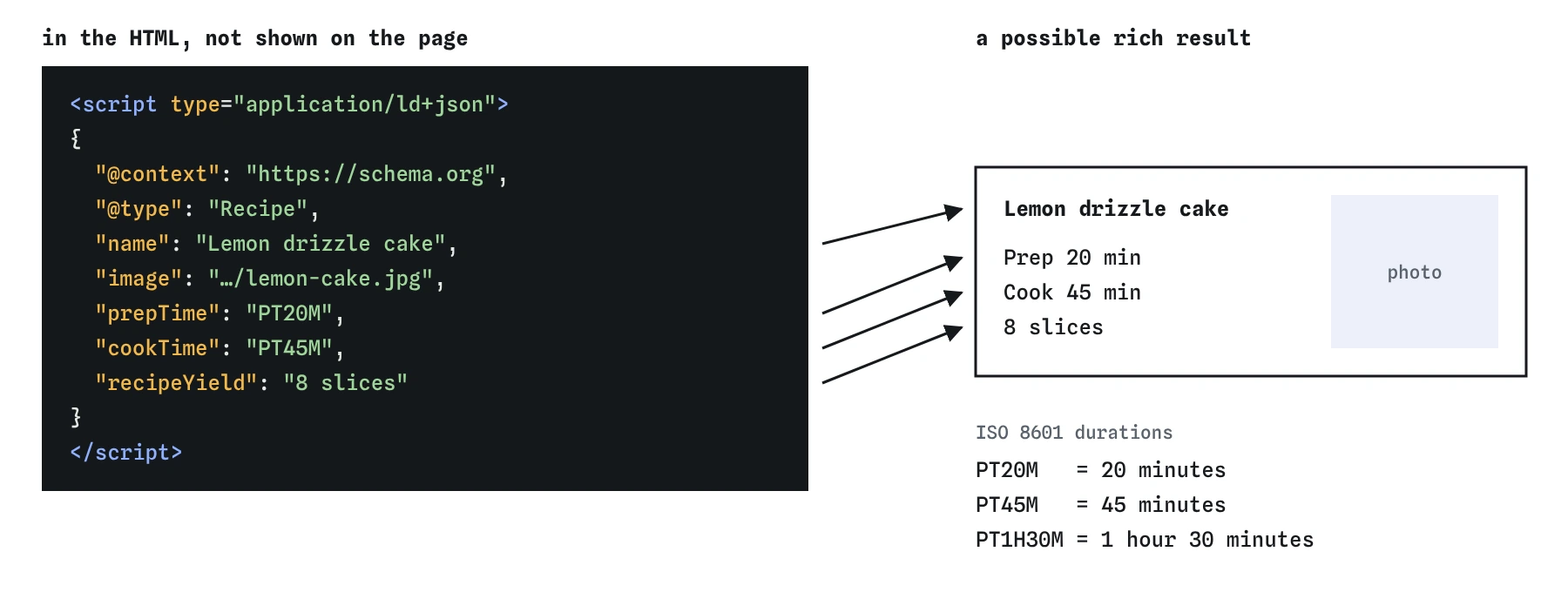
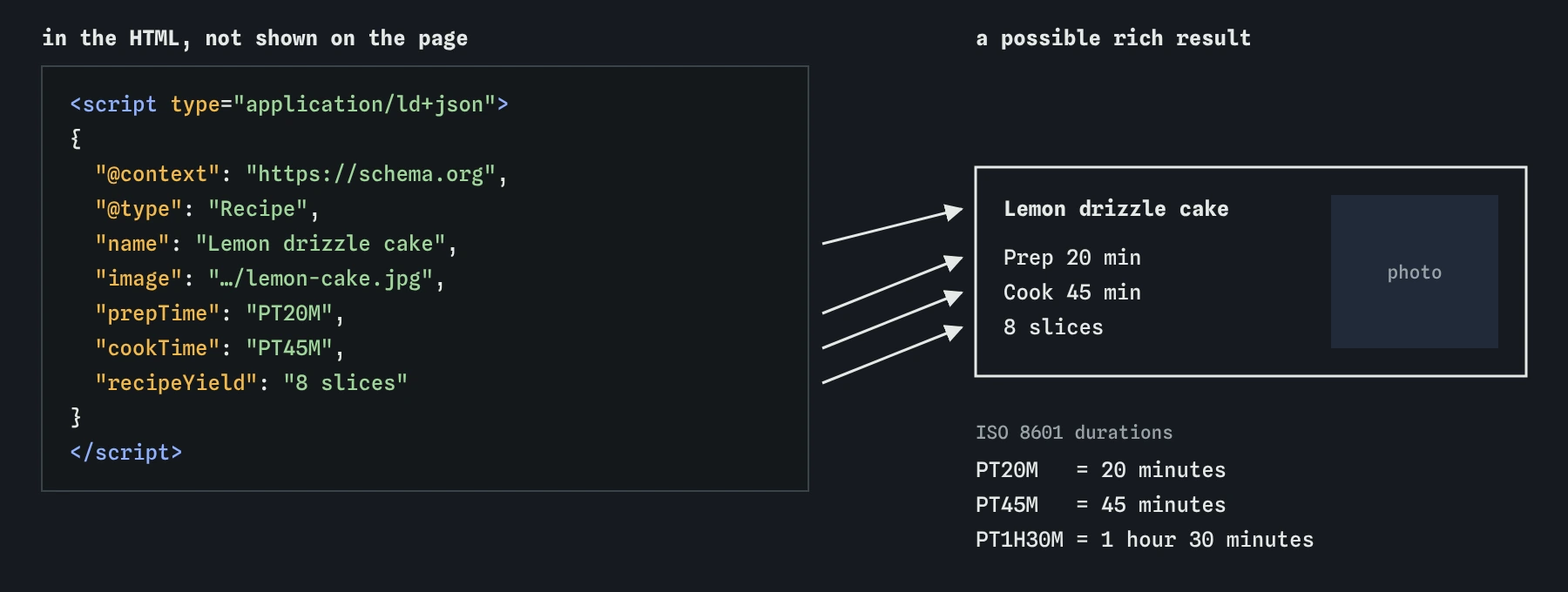
"cookTime": "PT45M". Visitors never see it, and correct markup only makes the rich result possible.How do breadcrumbs work in structured data?
A BreadcrumbList mirrors the breadcrumb links on the page. Each step is a ListItem with a position starting at 1, a name and an item URL. The last step is the current page, and its item can be left out. Search engines may then show "Hilltop Bird Club > Guides > Winter feeding" under the result in place of a long URL.
Only add breadcrumb data when the page shows a breadcrumb trail. The data describes visible navigation. It does not invent a new one.
<script type="application/ld+json">
{
  "@context": "https://schema.org",
  "@type": "BreadcrumbList",
  "itemListElement": [
    {"@type": "ListItem", "position": 1, "name": "Home", "item": "https://hilltopbirds.example/"},
    {"@type": "ListItem", "position": 2, "name": "Guides", "item": "https://hilltopbirds.example/guides/"},
    {"@type": "ListItem", "position": 3, "name": "Winter feeding"}
  ]
}
</script>
Why must structured data match the visible page?
Search engines treat structured data as a claim about the page, and they compare it with what people can see. A headline that differs from the h1, a five-star rating that appears nowhere on the page, an event date that has passed, or a price lower than the checkout price all count as misleading. Google can ignore the markup, drop rich results for the whole site or apply a manual action that the site owner has to fix and appeal.
Mismatches usually happen by accident. A template copies an old block onto every page, a content system fills dateModified with the build date, or someone edits the article title and forgets the script. Generate the data from the same source as the visible content wherever you can, so a change to one changes the other.
Keep reviews and ratings especially careful. Only mark up reviews that are shown on the page and that come from real customers. A business cannot mark up glowing reviews of itself on its own home page and expect star ratings in results.
How do you test structured data?
Google's Rich Results Test takes a URL or pasted code and shows which rich result types the page is eligible for, with errors for missing required fields and warnings for useful optional ones. The Schema Markup Validator at validator.schema.org checks the markup against the whole vocabulary, including types Google does not use for rich results. Run both after any template change.
Broken JSON is the first thing to check. A trailing comma after the last property, a straight quote inside a value that is not escaped as \", or curly quotes pasted from a word processor will stop the entire block from parsing, and the tools then report nothing found. Paste the JSON into any JSON checker or the browser console with JSON.parse to find the line.
After launch, Google Search Console shows reports for each detected type, with counts of valid items and errors across the whole site. That is where you notice a template bug that broke every recipe at once.
What should you look for when an AI writes structured data?
AI tools produce JSON-LD fluently and often confidently wrong. Check that @type names really exist on schema.org, because invented types like BlogArticle are silently ignored. Check that dates, prices, ratings and author names match the page, since tools fill in plausible placeholders. Look for aggregateRating blocks with made-up numbers, which are the fastest way to lose rich results.
Some older templates use microdata instead of JSON-LD. Microdata puts the same vocabulary into attributes on visible elements: itemscope starts an item, itemtype names its schema.org type and itemprop marks each property, such as <time itemprop="startDate" datetime="2026-05-02T05:00">. It is valid and still read by search engines, but the data is scattered through the markup, so it breaks more easily when someone redesigns the page. Do not mix both formats for the same thing.
Also check the script type. A block written as <script type="text/javascript"> or with no type will make the browser try to run the JSON as code and throw an error, and search engines will not read it as data. Finally, prefer one clear block per thing described. Pages stuffed with every type the tool could think of are harder to keep honest and gain nothing.
Field notes
- Structured data states facts about a page in a form search engines can read for certain.
- JSON-LD goes inside a
<script type="application/ld+json">element. - The data must match what visitors can see on the page.
Easy to get wrong
Without the ld+json type the browser runs the block as JavaScript and throws an error, and search engines do not read it as data.
Durations must use the ISO 8601 format. Plain English text fails validation and the cooking time is dropped.
The trailing comma makes the JSON invalid, so the whole block is ignored. Authors are also best described as a Person object.
Ratings that visitors cannot see are treated as misleading and can cost the whole site its rich results.
Questions people ask
Where should JSON-LD go, head or body?
Either works. Search engines read JSON-LD anywhere in the document, so choose whichever your templates make easiest to keep accurate.
Does structured data improve rankings?
It is not a ranking boost on its own. It helps search engines understand the page and can make it eligible for rich results, which may earn more clicks.
Is JSON-LD better than microdata?
Both are valid. JSON-LD keeps the data in one block separate from your markup, which makes it easier to write, generate and review, so search engines recommend it.
How do I test my schema markup?
Use Google's Rich Results Test for rich result eligibility and the Schema Markup Validator for general correctness, then watch the Search Console reports.
Can I have more than one JSON-LD block on a page?
Yes. A page can have separate blocks for the organisation, the article and the breadcrumbs, or a single block holding an array.