What is a callback, and why do these methods need one?
Every method here takes a function as its argument, called a callback. The array method calls your function once for each item, passing the item (and its index, if you ask for it). Your function decides what happens to that one item; the method handles the looping.
That split is the point. A for loop mixes the bookkeeping (start, check, step, a result array) with the actual idea. breads.filter((bread) => bread.vegan) says only the idea: keep the vegan ones.
The callback's return value is how you talk back to the method. map uses it as the new item, filter treats it as yes or no, find stops at the first yes. If your callback returns nothing, the method receives undefined, and that is the source of the most common bug on this page.

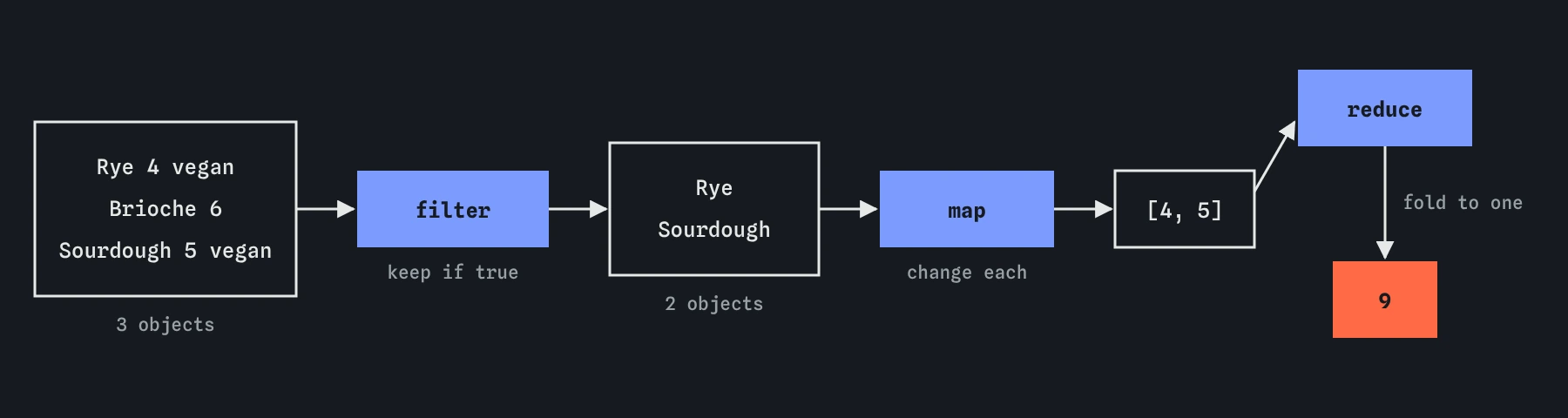
filter keeps some items, map turns each item into something else, and reduce folds the whole list into one value. Each step hands a new array to the next.Why does the arrow function with braces return nothing?
An arrow function has two forms. Without braces, (bread) => bread.vegan returns the expression after the arrow automatically. With braces, (bread) => { bread.vegan; } is a full function body, and a body returns nothing unless it says return.
So the braces version evaluates bread.vegan, throws the result away, and returns undefined. filter reads that as no for every item and gives back an empty array, with no error anywhere. The demo starts in exactly this state.
Fix it either way: drop the braces for a one-line callback, or keep them and write return. Keep braces when the callback needs several lines. One more trap: to return an object without braces, wrap it in brackets, (b) => ({ name: b.name }), or JavaScript reads the braces as a body.
const prices = [4, 6, 5];
const broken = prices.map((p) => { p * 2; });  // [undefined, undefined, undefined]
const fixed = prices.map((p) => p * 2);        // [8, 12, 10]
const alsoFixed = prices.map((p) => {
  return p * 2;
});
When should you use forEach?
forEach runs the callback for each item and returns undefined. Use it when you want an effect for every item, such as adding a list element to the page or logging, and you do not need a new array back.
Because it returns nothing, you cannot chain after it, and assigning its result to a variable is always a mistake. If you find yourself pushing into an outside array inside forEach, map or filter usually says the same thing more directly.
You cannot stop a forEach early: break is a SyntaxError inside the callback, and return only skips to the next item. When you need to stop, use for...of, or find and some, which stop on their own.
const list = document.querySelector("#birds");
["Robin", "Wren"].forEach((bird) => {
  const li = document.createElement("li");
  li.textContent = bird;
  list.append(li);
});
How do map and filter build new arrays?
map returns a new array of the same length, where each item is whatever your callback returned for the matching original. Turn bread objects into names, prices into price labels, or numbers into doubled numbers.
filter returns a new array with only the items whose callback returned something truthy. The kept items are the original items, unchanged. The length can be anything from zero to the original length.
Neither one changes the original array, which makes them safe to use on data that other parts of the page rely on. A quick test: if the new array should have the same number of items, you want map; if it might have fewer, you want filter.
const breads = [
  { name: "Rye", price: 4 },
  { name: "Brioche", price: 6 },
];
const labels = breads.map((b) => `${b.name}: $${b.price}`);
const cheap = breads.filter((b) => b.price < 5);
How do find, findIndex, some and every answer questions?
find returns the first item whose callback returns true, or undefined if none does. Use it to look up one record, such as the member with a given email. findIndex gives that item's position instead, or -1, which is what you need before calling splice.
some answers whether at least one item passes, and every whether all items pass. Both return true or false and stop as soon as the answer is known. Note that every on an empty array returns true, since no item failed.
Always handle the undefined that find can return. Writing members.find(...).name throws a TypeError when nobody matches; check the result first, or use optional chaining, found?.name.
const members = [
  { name: "Ada", paid: true },
  { name: "Ben", paid: false },
];
const ben = members.find((m) => m.name === "Ben");
console.log(members.some((m) => !m.paid));  // true
console.log(members.every((m) => m.paid));  // false
How does reduce build a running total, step by step?
reduce walks the array and carries one value along, often called the accumulator. You give it a callback with two parameters, the value so far and the current item, plus a starting value. Whatever the callback returns becomes the value so far for the next item. After the last item, that value is the result.
Take prices [4, 6, 5] and start value 0. Pass one: sum is 0, price is 4, return 4. Pass two: sum is 4, price is 6, return 10. Pass three: sum is 10, price is 5, return 15. The result is 15. Run it in the Step lens and watch sum change on each pass.
Always pass the starting value. Without it, reduce uses the first item as the start and begins at the second. With numbers that happens to work, but with objects the first sum is a whole object, and you get [object Object]6 like in Break It. On an empty array with no start value, reduce throws a TypeError.
const prices = [4, 6, 5];
const total = prices.reduce((sum, price) => sum + price, 0);
console.log(total); // 15
How do you chain methods into a pipeline?
Because map and filter return arrays, you can call another method straight on the result. Put each call on its own line, starting with the dot, and the code reads top to bottom like a recipe: keep the vegan ones, take their prices, add them up.
Each step creates a new array, which is fine for lists of hundreds or thousands of items on a web page. Order helps clarity and a little speed: filter first, so later steps do less work.
When a chain gets long or a step needs a comment to explain it, give the intermediate result a name with const. A named step is easier to inspect in the Console and easier to read.
const breads = [
  { name: "Rye", price: 4, vegan: true },
  { name: "Brioche", price: 6, vegan: false },
  { name: "Sourdough", price: 5, vegan: true },
];
const veganTotal = breads
  .filter((b) => b.vegan)
  .map((b) => b.price)
  .reduce((sum, price) => sum + price, 0);
console.log(veganTotal); // 9
When is a for...of loop clearer?
Array methods shine when each step is a small, pure transformation. A plain for...of loop is often clearer when you need to stop early, await something on each pass, update several totals at once, or run several statements with side effects per item.
A reduce that builds a complicated object with nested conditions is a common sign that a loop would read better. Readability wins: pick whichever version a teammate would understand fastest.
In AI-generated code, look for forEach with an async callback (it does not wait), map used only for its side effects with the result ignored, and reduce without a starting value. Each is a small change to fix and a common source of quiet bugs.
Field notes
- These methods call your callback once for each item in the array.
- An arrow function with braces needs
return, or it gives backundefined. mapchanges each item, andfilterkeeps only items that pass a test.findreturns the first matching item, orundefinedif none match.
Easy to get wrong
A callback body in braces needs return. Without it, every item becomes undefined.
Without a starting value the first object becomes the running total, and adding to an object makes a string.
forEach always returns undefined. Use map when you want a new array back.
find returns undefined when nothing matches, and reading a property of undefined is a TypeError.
Questions people ask
Do map and filter change the original array?
No. Both return a new array. The items inside are the same values, so if they are objects and your callback changes them, the originals change too.
Can I get the index inside map?
Yes. The callback receives the item, then the index, then the whole array: breads.map((bread, i) => ${i + 1}. ${bread.name}).
Is reduce faster than a loop?
Not in any way you will notice on a web page. Choose based on which version is easier to read.
What is the difference between find and filter?
find returns the first matching item itself, or undefined. filter returns an array of every matching item, possibly empty.