What are you building?
You are building a to-do list for a small bakery: a text box to add a job such as "Buy rye flour", a list of jobs, a checkbox to mark each one done, a Delete button on each, and a list that is still there after the page reloads. It is the most common practice app on the web for a reason. It touches forms, arrays, objects, events, element creation and storage in about forty lines.
Every part of it comes from an earlier lesson. The new skill is putting them together in a shape that stays manageable as the app grows. That shape is the one from the lesson on keeping the page in sync: one array holds the truth, one render function draws the page from it, and every event changes the array, saves it, then calls render.
The starter already has the elements, the storage key, a todos array read from localStorage, and a save function. You write render, the submit handler and one click listener for the list.
[
  { text: "Buy rye flour", done: false },
  { text: "Clean the oven", done: true }
]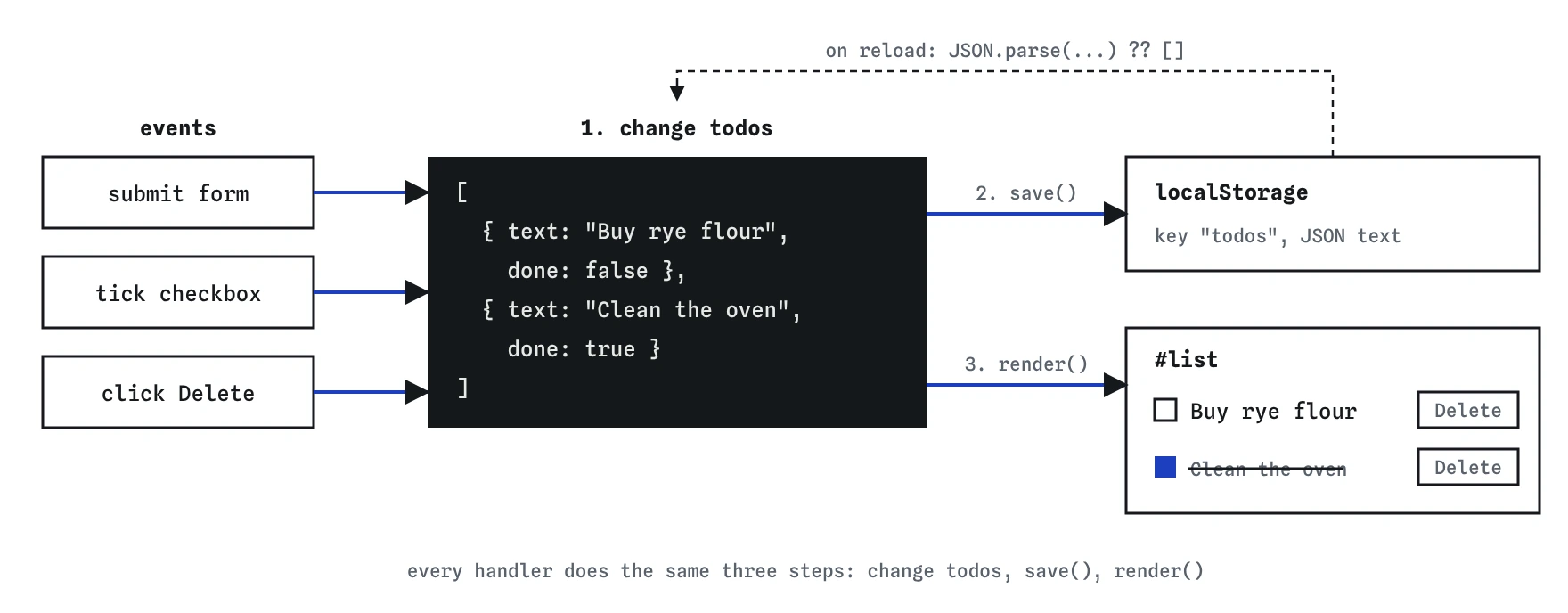
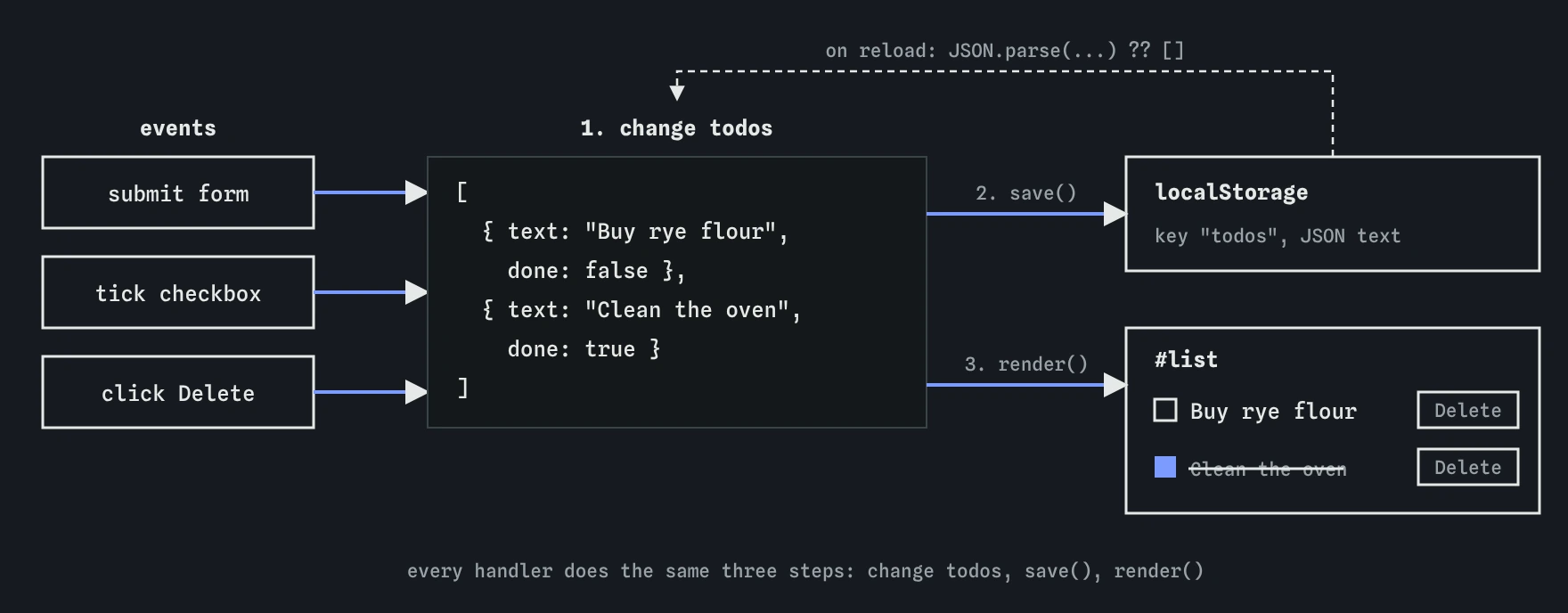
todos array is the single source of truth. Every handler changes it, calls save(), then calls render(), so the list on screen and the saved copy always match.How should you plan before typing?
Start from the data, never from the page. Write down what one job looks like as an object: some text and whether it is done. The whole app is an array of those. Ask of every feature: how does it change the array? Adding pushes an object. Ticking flips done on one object. Deleting removes one object. Reloading reads the array back from storage.
Next, decide the order of work inside every handler, and keep it identical everywhere: change todos, call save(), call render(). When every handler follows the same three steps, the page, the array and storage cannot drift apart, and a bug shows up in one obvious spot.
Build in this order and run the page after each step. First render, tested by typing todos.push({ text: "Test", done: false }); render(); in the Console. Then adding through the form. Then delete. Then the checkbox. Storage then works almost for free, because save is already called in every handler.
- Write
renderand test it from the Console. - Handle the form's submit event.
- Handle Delete with one listener on the list.
- Handle the checkbox in the same listener.
- Reload and confirm the jobs come back.
Which earlier lessons does each part use?
The form comes from the Forms lesson: listen for submit on the form, never click on the button, so pressing Enter also works, and call event.preventDefault() so the page does not reload. Read the text with input.value, trim it, and refuse empty strings so a stray Enter does not add a blank job.
The data is an array of objects from the Arrays and Objects lessons. push adds to the end; splice(index, 1) removes one item at a position. The drawing uses Creating elements: build an <li>, a checkbox <input>, a <span> for the text and a <button>, then append them. Putting the text in with textContent means a job called <b>flour</b> shows those characters instead of turning bold.
Clicks on Delete and on checkboxes use Event delegation: one listener on #list. Each item stores its position in data-index, so the listener can find it with closest("li") and Number(item.dataset.index). Storage uses localStorage.setItem with JSON.stringify and JSON.parse to read it back, from the Storage and JSON lessons. The ?? [] in the starter handles the first visit, when nothing is saved yet and getItem returns null.
How does render keep the page honest?
The render function throws away the current list and rebuilds it from todos. That sounds wasteful, and for a list of thousands of items it would be, but for a to-do list it is instant and it removes a whole class of bugs. There is no way for an item to show on the page after it has left the array, because the page is redrawn from the array every time.
Inside the loop, set everything from the object: the text, the checkbox's checked property and the done class on the <li>. Use classList.toggle("done", todo.done); the second argument forces the class on or off to match the value. Remember to empty the list first with list.replaceChildren(), or each render adds a second copy of every job.
function render() {
  list.replaceChildren();
  todos.forEach((todo, index) => {
    const item = document.createElement("li");
    item.dataset.index = index;
    item.classList.toggle("done", todo.done);
    // checkbox, span and delete button go here
    list.append(item);
  });
}
How do you check your own work?
The Console is your view of the truth. After each action, type todos and compare it with what the page shows. If the array is right and the page is wrong, the bug is in render. If the array is wrong, the bug is in a handler. Type localStorage.getItem("todos") to see exactly what was saved; it is a string, so it should look like JSON.
Use the Events lens while you click Delete or a checkbox. It shows the click, the element that received it and which function responded. If a click on the checkbox lists no handler, check that the listener is on #list and that the matches selector really matches the checkbox.
Step through the submit handler once. Watch text after trimming, then the length of todos after push, then the call to save. The Changes lens confirms what render did: after adding one job to a list of two, you should see three new items and the old ones removed. Then reload the page and confirm the list comes back, with done jobs still ticked.
What commonly goes wrong?
Saving at the wrong moment is the classic storage bug. If save() runs before push, storage always holds the previous version, and the newest job disappears on reload. Nothing errors, so it is easy to miss until you test a reload.
Indexes go stale if you store them anywhere except the freshly rendered items. Because render rewrites data-index every time, an index read from the clicked item always matches the array at that moment. Keeping a copy of an index in a variable across renders is where off-by-one deletions come from.
splice with one argument removes everything from that position to the end, so deleting the first of three jobs wipes all three. Always pass the count: splice(index, 1).
Listening for click on the Add button misses Enter in the text box, and forgetting preventDefault reloads the page on every add. Storing objects without JSON.stringify saves the useless string "[object Object]". Each of these shows up quickly if you test with the keyboard and with a reload, which is why the checks for this project include both.
How can you make the list friendlier for everyone?
Each checkbox needs a name a screen reader can announce. Wrap the checkbox and the text in a <label>, or give the checkbox an aria-label such as Done: Buy rye flour. Do the same for Delete buttons, since ten buttons all called "Delete" are hard to tell apart without the job name.
Because render rebuilds the list, keyboard focus is lost when the element that had it is replaced. After adding a job, put focus back in the text box with input.focus() so the next job can be typed straight away. A short live message, "Added Buy rye flour", in an element with aria-live="polite", tells screen reader users that something happened.
What could you add next?
When the required parts pass, extend the app. Each idea below reuses one earlier lesson and keeps the same state, save, render loop.
- Show "2 jobs left" under the list, worked out from
todos.filter((todo) => !todo.done).length. - Add a Clear done button that keeps only unfinished jobs.
- Add All, Active and Done filter buttons with a
filtervalue in state. - Give each job an
idfromcrypto.randomUUID()instead of relying on its index. - Let a double-click on the text edit it in place.
- Show a friendly message when the list is empty.
Field notes
- Start from the data: an array of objects with
textanddone. renderrebuilds the list from the array every time.- Change the array, save it, then call
render. - Save after the change, or storage keeps the previous version.
Easy to get wrong
Saving before the change stores the old array, so the newest job is lost on reload. Change the state, then save, then render.
Without the count, splice removes every item from that index to the end of the array.
Storage only holds strings. An array of objects turns into [object Object] text that cannot be read back.
The submit event fires for clicks and for Enter in the text box. A click listener on the button misses keyboard users.
Questions people ask
Is it slow to rebuild the whole list on every change?
For a few hundred items it is too quick to notice. Frameworks exist partly to make this pattern fast for very large pages, but the idea is the same.
Why use an index instead of an id?
An index is the simplest thing that works while render rewrites it each time. Once you add filtering or editing, an id per job is safer.
Where does localStorage keep the data?
In the visitor's browser, for that site only. Another browser or device will not see it, and clearing site data removes it.
Can an AI write this for me?
It can draft one in seconds. Check its save order, its splice call, whether it uses textContent, and whether it listens for submit. Then run the reload test.