What is an object for?
An object groups related values under names. A loaf of bread has a name, a price and whether it is vegan; a club member has a name, an email and a join date. Instead of three loose variables, you write one object with three properties, and you pass it around as a single thing.
You write an object literal with curly braces. Each property is a key, a colon and a value, separated by commas. Keys are usually plain words; values can be anything, including arrays, other objects and functions.
Arrays answer which position; objects answer which name. When you need a fixed order and every item is the same kind of thing, use an array. When you have one thing with several labelled facts, use an object. Real data is often both: an array of objects.
const loaf = {
  name: "Sourdough",
  price: 5,
  vegan: true,
  tags: ["slow", "crusty"],
};
When do you use dot access and when brackets?
Dot access, loaf.price, is the everyday form. Use it when you know the property name as you write the code. It is short and your editor can autocomplete it.
Bracket access, loaf["price"], takes a string. Use it when the name is stored in a variable, as in loaf[field], or when the key is not a valid identifier, such as "gluten-free" with a dash. Writing loaf.field looks for a property literally named field, which is the first bug in Break It.
Reading a property that does not exist gives undefined, never an error. Reading a property of undefined itself is a TypeError. That pair explains most object bugs you will meet.
const loaf = { name: "Rye", "gluten-free": false };
const field = "name";
console.log(loaf.name, loaf[field], loaf["gluten-free"]);
console.log(loaf.colour); // undefined
How do you add, change and delete properties?
Assign to a property that does not exist yet and it is added: loaf.baked = "6am". Assign to one that exists and it is changed. This works on objects declared with const, because const locks the variable, not the object's contents.
delete loaf.baked removes a property entirely, so "baked" in loaf becomes false. Setting it to undefined keeps the key with an empty value, which still shows up in Object.keys. Choose delete when the property should truly be gone.
Shorthand properties save typing when a variable has the same name as the key you want. { name, price } means { name: name, price: price }. You will see this constantly in modern code, including code from AI tools.
const name = "Spelt";
const price = 4.5;
const loaf = { name, price };
loaf.vegan = true;
loaf.price = 5;
delete loaf.vegan;
console.log(loaf); // { name: "Spelt", price: 5 }
What are methods, and what does this mean inside them?
A property whose value is a function is called a method. Write it with the short form label() { } inside the object. Call it with dot access and brackets: loaf.label().
Inside a method written that way, this refers to the object the method was called on, so this.price reads that loaf's price. That lets one method shape work for any loaf.
Arrow functions do not get their own this; they use the this of the surrounding code. An arrow function as a method therefore cannot see the object through this. Use the short method form for methods, and keep arrows for callbacks. The classes lesson returns to this in more depth.
const loaf = {
  name: "Rye",
  price: 4,
  label() {
    return `${this.name}: $${this.price}`;
  },
};
console.log(loaf.label());
How do you loop over an object's properties?
Object.keys(obj) returns an array of the property names, Object.values(obj) an array of the values, and Object.entries(obj) an array of [key, value] pairs. Once you have an array, every array method and for...of works.
entries pairs well with destructuring in a for...of loop, as below, and is the usual way to turn an object such as a stock count into rows on a page. The order follows the order properties were added, except that keys that look like whole numbers come first in numeric order.
Object.keys(obj).length tells you how many properties an object has, which is also the way to check whether an object is empty.
const stock = { rye: 3, spelt: 0, brioche: 5 };
for (const [bread, count] of Object.entries(stock)) {
  console.log(`${bread}: ${count}`);
}
console.log(Object.keys(stock).length); // 3
How does destructuring pull values out?
Destructuring creates variables from an object's properties in one line: const { name, price } = loaf; makes name and price. The variable names must match the keys. To use a different name, write { price: cost }; to supply a default for a missing property, write { vegan = false }.
It is common in function parameters. A function that takes ({ name, price }) can be called with a whole loaf object, and the body uses the short names directly. That keeps long objects readable without repeating loaf. on every line.
Destructuring a property from undefined throws a TypeError, the same as dot access would. If the object might be missing, give the parameter a default: ({ name } = {}).
const loaf = { name: "Rye", price: 4 };
const { name, price: cost, vegan = false } = loaf;
console.log(name, cost, vegan);

function label({ name, price }) {
  return `${name}: $${price}`;
}
How do you copy and merge objects with spread?
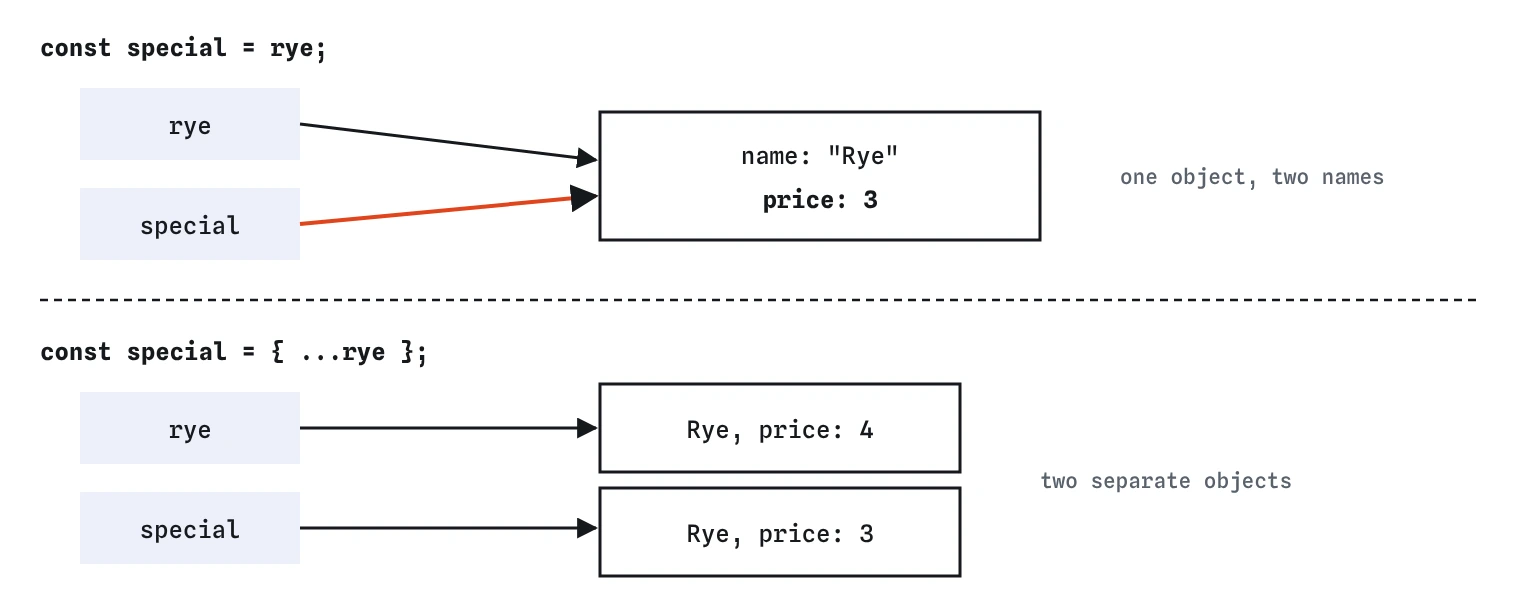
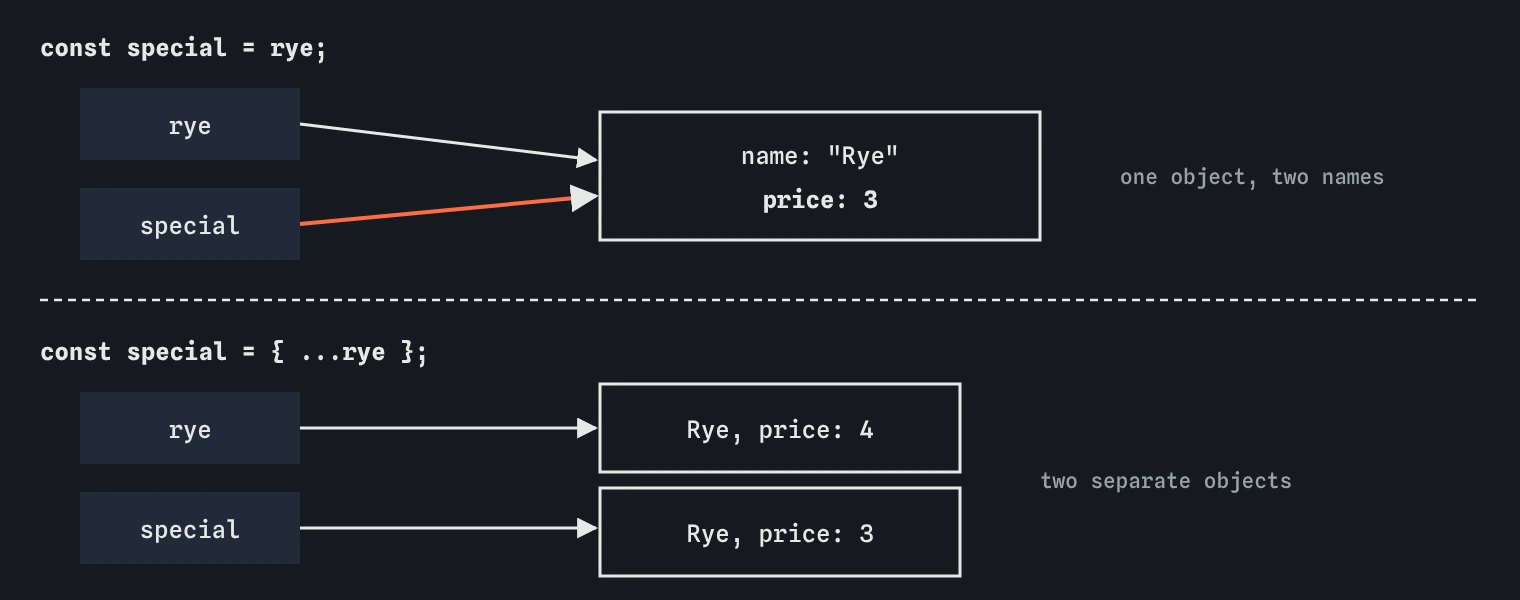
{ ...loaf } makes a new object with the same properties. Add properties after the spread to override them: { ...loaf, price: 3 } is a copy with a new price. Spread several objects to merge them; when keys clash, the later one wins.
Merging with defaults is a common pattern: { ...defaults, ...settings } starts with every default and replaces whatever the visitor chose. Put the defaults first or they overwrite the visitor's choices.
Spread is shallow. Nested objects and arrays are not copied; the new object points at the same nested ones. copy.tags.push("new") changes the original's tags too. For a full deep copy, structuredClone(loaf) copies every level and has been supported in all current browsers since 2022.
const defaults = { theme: "light", size: "medium" };
const chosen = { size: "large" };
const settings = { ...defaults, ...chosen };
console.log(settings); // { theme: "light", size: "large" }
How does optional chaining handle missing data?
Real data has holes: a member with no contact details, an API result missing a field. member.contact.email throws a TypeError when contact is missing. member.contact?.email checks first: if contact is null or undefined, the whole expression stops and gives undefined instead of throwing.
Pair it with ??, the nullish fallback, to show something sensible: member.contact?.email ?? "no email". ?? only replaces null and undefined, so a real value of 0 or an empty string is kept, unlike ||.
Use ?. where data is genuinely optional. Scattering it everywhere hides bugs where something should always exist; if a required field is missing, an error that points at it is more useful than a quiet undefined.
const ben = { name: "Ben" };
console.log(ben.contact?.email ?? "no email");
console.log(ben.greet?.()); // calls only if greet exists
Why do two variables sometimes share one object?
A variable does not hold an object itself; it holds a reference, a pointer to where the object lives. const special = rye; copies the pointer, so both names reach the same object. Change a property through either name and both see it. That is the demo's bug.
The same applies when you pass an object to a function: the function receives a reference, so changing a property inside the function changes the caller's object. Functions that should not change their input should copy it first with spread.
Comparison follows references too. { a: 1 } === { a: 1 } is false because they are two different objects, even though they look alike. rye === special is true only when both names point at the very same object. When AI-written code edits an object it received, check whether the caller expected that.
Field notes
- An object groups related values under names called properties.
- Use dot access when you know the name, and brackets when it is in a variable.
- A variable holds a reference, so assigning it to another name shares one object.
{ ...obj }makes a new object you can change without touching the first.
Easy to get wrong
Dot access uses the literal word after the dot. Brackets use the value of the variable.
Assignment copies the reference, so both names point at one object and the original price changes too.
If contact is missing, reading .email from undefined is a TypeError. Optional chaining stops safely.
Arrow functions do not get their own this, so this.price is not the loaf's price. Use the method shorthand.
Questions people ask
Can a const object be changed?
Its properties can. const only stops the variable from being reassigned to a different object. Use Object.freeze(obj) if you want to block property changes, which only freezes the top level.
How do I check if a property exists?
Use "price" in loaf or Object.hasOwn(loaf, "price"). Checking loaf.price !== undefined fails when the property exists with the value undefined.
What is the difference between an object and JSON?
An object is a live value in your program. JSON is text in a format that looks like an object literal, with double-quoted keys and no functions. The JSON lesson covers converting between them.
Should I use structuredClone or spread?
Spread for flat objects and when you are about to override a few properties. structuredClone when the object has nested objects or arrays you will change. It cannot copy functions or DOM elements.